








About Microgic 89
Level 1 of Microgic 89 is one room, two chips and a short gap in the wall, with 90 seconds on the clock. We still ran out of time at least three times. So here is the honest headline for this page: we played for ten minutes, made six tries, and never cleared First Steps. Everything past that level comes from the map screen or from the game's listing, and we say.
Those lost tries turned out to be useful, because they show what the game does not tell you. The chip counter runs backwards. The clock waits for you at the start and does not wait for you in the menu. Most of what follows comes from getting those wrong.
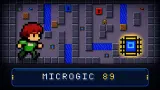
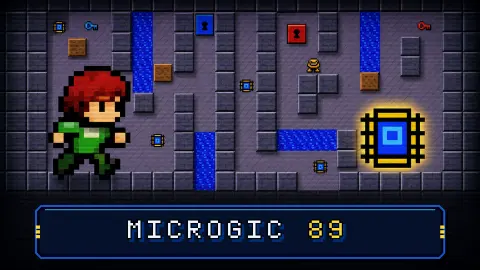
It looks like a program from an old desktop computer: grey panels, blue title bars, green digits, and a small pixel courier with red hair walking a floor of square tiles. You take every chip, which lights up a socket, and then, according to the listing, you step on that and reach the exit.
The game is credited to Hiroaki Ishibashi. The game went up on the portal in August and was last updated in October.
The first room is 13 squares long
The floor of First Steps is nine squares wide and three deep. You start in the top left corner. One chip sits two rows down and one across, and the other sits on the middle row, about two thirds of the way along.
The bottom wall has a single gap, one square wide. It leads down to the grey socket, and the blue square sits right next to the socket, with solid wall above it. There is no other way into that corner.
By our count, the shortest walk through both chips, the socket and the blue square is 13 squares. At the pace we measured, that is about three seconds of walking. We did not walk it, so treat it as a reading of the map and not a tested solution. What it does show is how generous the first clock is, and that the room seems to be there to teach you the controls.
Nothing in this room hurt us. We met no enemies, no water and no fire. The only way we failed was the MISS card, OOPS! OUT OF TIME!
A yellow question mark sits on the top row. We walked through its square several times and it neither stopped us nor vanished, but we never halted on it. The eight empty boxes at the top of the screen stayed empty all session. With keys and boots on the listing, we suspect that is where they go.
The clock waits at the start, and only there
The digits start at 90 on this level, and they do not move while the card is up. We saw the same thing at all four starts we could time: the clock sat at 90 until our next key press after the card had gone. The longest we watched it wait was six seconds, so we cannot promise it waits forever.
If you close the card with an arrow key, that press also walks you. We went two squares down that way with the clock still on 90.
After that the clock does not stop. We opened the side panel with 34 seconds left and it ran all the way to the MISS card behind the panel. The arrow keys still moved the character behind it too. The panel does have a PAUSE button, and the listing says P pauses, but we tried neither.
The digits are green at 19 and red at 13, which is your warning. Running out is cheap: the MISS card leads straight back to the level card, with 90 on the clock and both chips back where they started.
How we lost, so you do not have to
The chips were never the hard part. In two tries out of six we had the counter at 0, with 61 seconds left in one and 33 in the other.
What beat us was orientation. In the first of those, we spent the rest of the clock on the top row, pressing up into the wall or walking along it, and never went near the gap. In another, we stood directly under the last chip and pressed down into the wall for over 40 seconds, because a wall gives no sound or flash that we could spot. One upward drag took that chip at once.
Drag worked the one time we tried it, so it is a real alternative to the keys if you are playing away from a keyboard.
What the map promises after First Steps
The map screen appeared when we loaded the page afresh. It opens at 0/50 CLEARED, with a small figure by a yellow node marked 1 and padlocks on the stops above it. These are the zones as it lists them:
| Zone | Levels |
|---|---|
| BOOT FIELD | 1-5 |
| ICE LAB | 6-9 |
| HOT ZONE | 10-15 |
| BUG GARDEN | 16-21 |
| THE FACTORY | 22-26 |
| BLUE MUSEUM | 27 |
| OLD SCHOOL | 28-30 |
| LOGIC LABS | 31-40 |
| THE PLANT | 41-50 |
We saw none of them from the inside. The game's listing describes what they hold: ice that slides you, force floors, teleport pads, cloning machines, trap doors, bombs and patrolling bugs, plus water and fire that kill you unless you carry the matching boots. It also says each cleared level scores its number times 500, plus 10 for each second left, and that a global leaderboard keeps the totals.
The map also has DAILY CHALLENGE and WHOLE MAP buttons. The card for level 1 shows the password AKZA, and we did not find out where to type one: the part of the side panel we could read had no box for it.
The rest of the side panel
The button with three lines at the top right opens it. Under the label MICROGIC OFFICIAL there is a level list set to 1. FIRST STEPS, then WORLD MAP, RANKING, RESTART and PAUSE. Below those come LEVEL LIBRARY and LEVEL EDITOR, then SOUND, 3D MODE, a skin list set to CLASSIC 89 and a language list.
We opened none of them. The listing says the editor lets you draw maps and publish them for others, that the 3D view can be switched on at any time, and that there are eight languages.
What we did not reach
- A cleared level, so no win screen and no score.
- The socket and the blue square, or even the gap that leads to them.
- Level 2, and everything the zones above promise.
- The tools: editor, library, ranking, 3D view, skins, daily challenge.
- A phone. The game is marked as touch-ready and describes swiping and pinching, but we used a computer.
Who it is for, and more to play
It suits someone who likes thinking in squares and wants a first level that asks for very little. The opening has no danger beyond the clock, so it is a gentle place to learn the controls. If you want reflexes or a story, the first room offers neither. How hard the later zones get, we cannot say.
For a different kind of grid thinking, Neon Maze has you clearing bent arrows off a board in an order that works, and OrbaDrone - Robot Escape is a dark maze flown with the arrow keys.
More in our puzzle games.
Screenshots
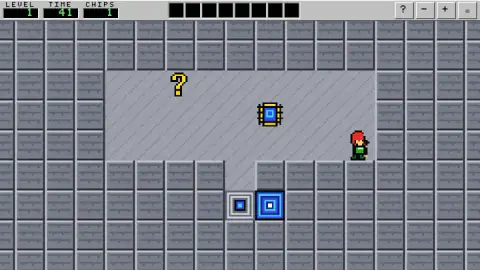
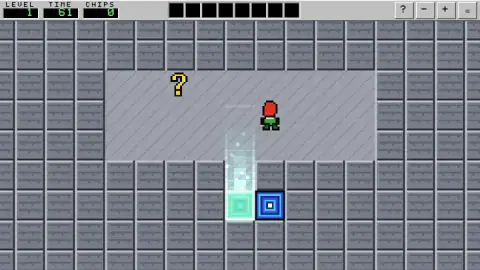
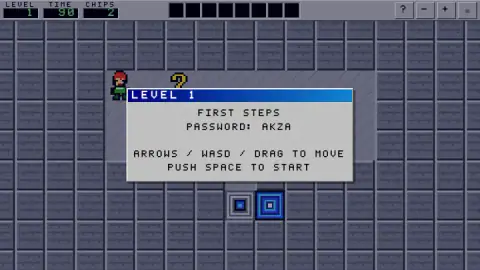
Taken by opening the game ourselves and letting it run — not supplied by the publisher, and not the same picture every other site shows.
How to play Microgic 89
- Close the card. Each try opens with a card giving the level name, a password and the controls. It says PUSH SPACE TO START; Enter and the arrow keys closed it for us too.
- Walk. The card lists arrows, WASD or dragging on the board.
- Step on every chip. Walking over one is enough, and you do not need to stop on it.
- Go to the socket. The grey square lights up once CHIPS reads 0. This is as far as we got.
- Reach the exit. The listing says to step on the socket and then get to the exit. On level 1 that looks like the blue square beside it, but we never stood on either.
Tips from our run:
- Read the board before you move. After the card closed, the clock stayed at 90 until our next key press.
- Read CHIPS as what is left. It counts down. A 2 at the start means two to find, not two in your pocket.
- Mind long presses. We held each key for about a second, and a one-second press carried us five squares. We did not try single taps.
- Check which side the chip is on. Walking into a wall does nothing at all, so the only sign that you are pressing the wrong way is the clock falling.
- Do not plan in the menu. The clock keeps running behind it.
Controls
| Arrow keys | Walk around the grid; holding one for a second carried us five squares |
|---|---|
| WASD | Listed on the level card as another way to walk; we stuck to the arrows |
| Drag on the board | Also walks; one upward drag moved us up a square and picked up a chip |
| Space | What the cards ask for to start or retry; Enter and the arrow keys closed them for us too |
| Button at the top right, three lines | Opens the side panel with the map, restart, pause, editor and settings; the clock keeps running behind it |
Features
- A world map of 50 levels split into nine named zones, with the later stops locked at the start
- A level card for each stage with its name, its password and the controls
- A countdown on every try: 90 seconds on level 1, and running out brings a MISS card
- A chip counter that falls to zero, at which point the grey socket square lights up
- A side panel with RANKING, LEVEL LIBRARY, LEVEL EDITOR and a 3D MODE button
- A DAILY CHALLENGE button on the map screen, which we did not open
Game details
- Developer
- Hiroaki Ishibashi
- Release date
- August 2026
- Last updated
- October 29, 2026
- Added here
- June 2026
- Technology
- HTML5
- Platforms
- Browser (desktop), Browser (mobile & tablet, touch)
- Saved progress
- Saving, when available, is managed by this game. Mava cannot confirm your level.
FAQ
How do you play Microgic 89?
You walk a character around a square grid and step on every chip until the CHIPS counter reads 0. That lights up a grey square called the socket. The listing's instructions say you step on it and then reach the exit before the time runs out. We got as far as lighting the socket on level 1 and did not finish the level.
How do you beat level 1 of Microgic 89?
We did not beat it, so this is our reading of the layout rather than a tested answer. Take the chip two rows below the start, take the other one on the middle row, and go down the only gap in the bottom wall. That gap leads to the grey socket, with the blue square right next to it. We count 13 squares for the whole walk, against 90 seconds on the clock.
What does the CHIPS number mean in Microgic 89?
It is how many chips are still on the board, not how many you hold. On level 1 it starts at 2 and falls by one with each chip you step on. When it reaches 0, the grey socket square lights up with a beam of light.
What is the question mark in Microgic 89?
We do not know yet. On level 1 a yellow question mark sits on the top row. We walked straight through its square several times without being stopped, and it stayed in place, but we never halted on it, so we cannot say whether it shows a message when you stand there.
Does the timer stop when you open the menu in Microgic 89?
No. We opened the side panel with 34 seconds left and watched the clock run down to a MISS card behind it. The panel has a PAUSE button, which we did not try, and the listing's instructions say P pauses as well.
How many levels does Microgic 89 have?
The map screen counts 50, split into nine zones from BOOT FIELD to THE PLANT, and it opens at 0/50 CLEARED. We only played the first level, First Steps, so we cannot describe the other 49 from our own play. Nodes further up the map show padlocks at the start.
Does Microgic 89 have a level editor and a 3D mode?
The side panel has a LEVEL EDITOR button, a LEVEL LIBRARY button and a 3D MODE button. We saw all three and opened none of them. The game's listing says you can draw your own maps, play ones other people published and switch the view at any time.
Who made Microgic 89?
The game is credited to Hiroaki Ishibashi. It published the game in August 2026 and updated the entry in October. In the game, the level set in the side panel carries the label MICROGIC OFFICIAL.