




About TetraDice–Merge & Blast Blocks
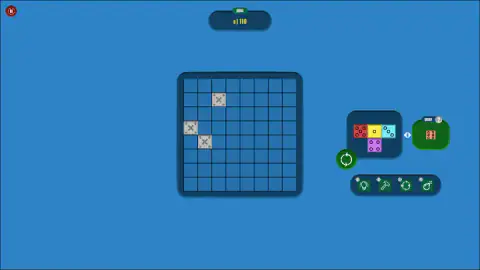
Open the first level of TetraDice–Merge & Blast Blocks, reload it, open it again, and you do not get the same board. Four grey riveted blocks marked with an X sit on the grid before you place anything, and the second time around all four were somewhere else. The number above the board did not change: 110, both times.
That is the shape of this puzzle. The grid is eight cells a side and the target is fixed, while the obstacles are dealt fresh. What you place on it is unusual too: every square of every piece is a die face, with its dots and its own colour, so a four-square shape is never just a shape.
Ten minutes with it, on a desktop with a mouse, got us one piece onto the board and the counter never moved off zero. What follows is everything we could confirm with our own eyes, and a clear line where our knowledge stops.
The game's listing credits the game to RDVIndieGames. It has been there since March 2025.
The one button that is not a drag
Beside the tray there is a round green button with two arrows chasing each other, and it is the most useful thing on the screen. Press it and the piece in the tray turns a quarter turn anticlockwise.
The dice do not change. A shape that was lying flat stands up, carrying exactly the same faces in the same order around the bend. We pressed it twice in the session and watched the same four dice go flat, upright, and flat the other way.
That matters more here than in an ordinary block puzzle. Turning a plain shape only changes which cells it fills. Turning this one also changes which die ends up touching which, and with a goal counter watching, that is presumably the point.
Twenty levels behind the title screen
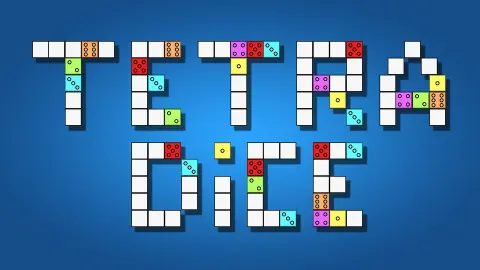
Reloading dropped us on the game's own front page, which the first run never showed us: a logo built out of block letters and two buttons, CLASSIC and ADVENTURE.
Adventure opens on a map that is itself a block puzzle. Twenty numbered tiles are fitted together into an uneven cluster, level one green and open at the bottom left, three of the twenty picked out in red, the rest grey. A yellow START button sits underneath.
We only ever played the first of the twenty, so we cannot tell you how the red ones differ or what Classic does with the same board. The listing talks about scoring as high as you can before the game ends, which would fit a mode without levels, but that is its claim and not ours.
Every number has its own colour
This is the detail that makes a crowded board readable. A one is always yellow. A two is green and a three is cyan.
A four is purple, a five is red and a six is orange. We checked it on every die that passed through the tray across both our sessions, and it held each time.
So you never need to count dots. Two yellow squares are two ones wherever they are, and you can see at a glance which numbers have ended up as neighbours.
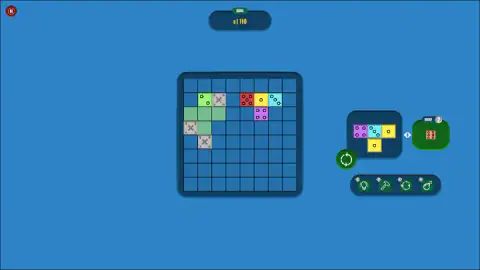
The word "merge" in the title suggests that matching dice do something when they meet. We cannot confirm it. The pieces we were dealt did carry repeats, two purple fours in one of them, but they sat corner to corner rather than edge to edge, and nothing merged, cleared or blasted while we played.
What the counter did, and what it did not do
The counter reads GOAL, and under it "0 | 110". The natural reading is a score of zero against a target, and the label supports it.
It read that when the level opened, when our four dice landed across the top two rows, and when we stopped. It read it again on the fresh level after the reload, before a single piece had gone down.
So one guess is ruled out: you are not paid for placing dice. What pays is something we did not reach. The listing mentions combinations, cleared lines and tasks; we completed no line, and we left the SWAP box alone along with the four tools under the tray, a light bulb, a hammer, a pair of turning arrows and a bomb, each carrying a small badge whose number we could not read.
Four squares joined by their sides
The "tetra" in the name is Greek for four. A shape made of four squares joined edge to edge is called a tetromino, a word modelled on "domino", which is the same idea with two squares. The American mathematician Solomon Golomb gave the whole family its name, polyominoes, in 1953.
There are only five such shapes if you may turn them and flip them over: a straight bar, a square, an L, an S and a T. Between our two sessions the game has dealt us four of the five, everything but the L.
What TetraDice adds is that the four squares are no longer alike. A plain square piece can go down in any slot that fits, and turning it changes nothing. A square made of a six, a five, a three and a four fits the same slots, but every turn of the green button hands its neighbours a different number.
Who it is for
Someone who likes slow placement puzzles and does not mind working the rules out by trying. Nothing on the screen hurried us, and we saw no clock.
If you want the rules laid out before the first move, look elsewhere. The level opened without a word of instruction, and ten minutes were not enough for us to find out how a point is scored.
More from the same studio, and more block puzzles
RDVIndieGames also made Lift Defender Zombie Carnage, which swaps the quiet grid for a lift door and an eight-round pistol. If it is the grid you want, Block Master Gem Puzzle uses a board of the same size and has a mode about clearing every block, Block Puzzle: Jewel Block is the endless kind where full rows and columns disappear, and Wood Block Journey crosses the idea with a sudoku grid. The rest are under puzzle games.
Screenshots
Taken by opening the game ourselves and letting it run — not supplied by the publisher, and not the same picture every other site shows.
How to play TetraDice–Merge & Blast Blocks
- Look at the board first. The grey X blocks are fixed obstacles, and every piece has to go around them.
- Hold the left mouse button on the piece in the tray, to the right of the board, and drag it across.
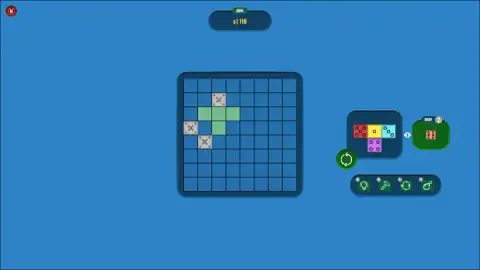
- Watch the pale green shadow. It marks the free cells your piece covers, and only those.
- Press the round green button if the piece is facing the wrong way. It turns a quarter turn each time.
- Let go. If the piece lands, its dice stay on the board and the tray deals the next one.
What we learned doing it:
- The shadow is a fit test. Hold a piece over a crowded corner and you will see one or two green cells instead of four. The missing ones are the squares already taken, by your own dice or by a grey block.
- The tray deals one piece at a time. There is no choosing between several. The other piece on offer sits in the SWAP box beside it.
- Putting dice down does not score. Four dice went on the board and the counter did not move.
- Many drops do not take. After the first piece, dozens of drags ended with the shape back in the tray, twice with the full shadow showing on empty cells. Expect to spend a while getting the feel of the release.
- A reload costs you the board. It drops you on the title screen, and starting the level again deals new obstacle positions.
Controls
| Hold the left mouse button on the piece in the tray and drag | Carries the piece over the board; a pale green shadow marks the free cells it is over |
|---|---|
| Release the button | Drops the piece; if it lands, its dice stay on the board and the tray deals the next piece |
| Round green button with two arrows, beside the tray | Turns the held piece a quarter turn anticlockwise; the dice keep their faces |
| SWAP box | Holds the other piece on offer and a counter that read 2; we never traded with it |
| Four tool buttons under the tray | Light bulb, hammer, turning arrows and bomb; we did not use any of them |
Features
- Pieces built from die faces, numbered one to six with the usual dot patterns
- One colour for each number, so yellow is always a one and red is always a five
- An 8 by 8 board with four grey riveted blocks marked with an X, in different squares each time the level opens
- A round green button that turns the piece a quarter turn without changing a single die
- A SWAP box that holds the other piece on offer, and a row of four tools
- A title screen with two modes, Classic and Adventure, and an Adventure map of twenty numbered levels
- A goal counter above the board that read "0 | 110" on both runs of the first level
Game details
- Developer
- RDVIndieGames
- Release date
- March 2025
- Added here
- May 2025
- Technology
- HTML5 (Unity WebGL)
- Platforms
- Browser (desktop)
- Saved progress
- Saving, when available, is managed by this game. Mava cannot confirm your level.
FAQ
What is TetraDice–Merge & Blast Blocks?
It is a block puzzle credited to RDVIndieGames in which every square of a piece is a die face. You drag the pieces from a tray onto a board of eight by eight cells, around four grey blocks marked with an X that are there before you start. A counter above the board shows the goal for the level.
How do you play TetraDice–Merge & Blast Blocks?
Hold the left mouse button on the piece in the tray, drag it over the board and let go. A pale green shadow shows which free cells the piece covers, so a shadow with fewer squares than your piece means part of it is over something. When the piece lands, its dice stay where you put them and the tray deals a new one.
How do you turn a piece in TetraDice–Merge & Blast Blocks?
With the round green button beside the tray, the one with two arrows chasing each other. Each press turns the held piece a quarter turn anticlockwise, and the dice keep their numbers, so the same faces simply end up facing different neighbours. We watched the same four-dice shape go from lying flat to standing up and back again.
Does TetraDice–Merge & Blast Blocks have levels?
Yes. The title screen offers two modes, Classic and Adventure, and Adventure opens on a map of twenty numbered levels drawn as a block cluster. Level one is green and open, three of the twenty are marked out in red, and the rest are grey.
How do you score points in TetraDice–Merge & Blast Blocks?
We can tell you what does not score. Four dice went onto the board in one piece and the goal counter stayed at "0 | 110" for the rest of the session. Placing dice is worth nothing on its own, and we never found out what does pay.
What are the grey blocks with an X in TetraDice?
They are fixed blocks that sit on the board before the level starts, four of them in ours, and pieces have to be placed around them. They are not in the same squares twice. We opened the first level, reloaded, opened it again, and the four had moved. We did not find a way to remove one.
What does the SWAP box do in TetraDice–Merge & Blast Blocks?
It sits to the right of the tray and holds a whole second piece, not a spare square, with a small counter that read 2 both times we looked. The arrow between the two boxes suggests you trade the piece you have for the one waiting. We never used it, so that reading is from the icons and not from play.
Can you play TetraDice–Merge & Blast Blocks on a phone?
It is listed for PC, Android and iOS and described as a portrait game. We played on a desktop with a mouse, so the phone version is the listing's word and not something we tested.