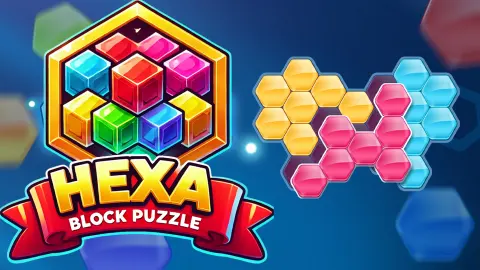



About Hexa Block Puzzle
Most block puzzles forgive you. Fill a row, it vanishes, and the space comes back. Hexa Block Puzzle never gives anything back. The level we played is one honeycomb shape and one tray of pieces, and the two match to the last hexagon.
We counted. The first board has 30 cells, and one is already taken by a grey metal hexagon that stays put. The tray holds nine pieces. Add up their hexagons and you get 29, the same as the empty cells. So nothing is spare, every piece has to go in, and each has exactly one job to do.
The game is credited to Drivix Games. It was published in October 2025.
We should say how little of it we saw. Our session ran for roughly four minutes on a desktop, played with the mouse, and never left level 1. We placed two pieces in the first minute, the blue and the yellow. After that our drops stopped landing, and we left with the level unfinished. We did not use a hint and did not see a second board. What follows is what that one board taught us, including the mistake we made on it.
Nine pieces, and what each one is
These are the nine pieces of level 1, as they lay in the tray.
| Piece | Hexagons | Shape |
|---|---|---|
| Blue | 4 | A zigzag across two columns |
| Yellow | 4 | A compact diamond |
| Bright green | 4 | A hook |
| Magenta | 4 | A wavy line |
| Red | 5 | A long hook, the biggest piece |
| White, orange, dark green | 2 each | Pairs that slant the same way |
| Pink | 2 | A pair standing upright |
The four pairs are the detail to notice. Three of them slant up to the right and are the same piece in different colours. The pink one stands upright. Since nothing turns, the pink pair can only go where two cells sit one above the other, and the three slanted pairs can never stand in for it.
The red piece deserves early attention for the opposite reason. Five hexagons in a bent line need a long open run, and the board narrows quickly toward its right-hand point. We left it for later and never found out where it belongs.
How two good-looking moves ended our level
Our blue piece went into the lower left of the board. The yellow diamond went in beside it. Both snapped in cleanly, and both looked like progress.
They were not. Between those two pieces and the bottom edge, we had sealed off a pocket of three cells. Nothing else touched it. And nothing left in the tray has three hexagons, or one. A pair would cover two of the cells and strand the third.
So after two moves the level could no longer be finished as it stood. The game did not say so. There was no warning and no sound. It let us keep trying, which is fair, but it means the puzzle expects you to spot a dead pocket yourself.
The way out is to lift a piece and try again. The game's instructions say a piece on the board can be rearranged. We did not test that. The pause panel also carries a button with a circular arrow, which reads like a restart, and we did not press that either.
The lesson holds for any board of this kind. Before you let go of a piece, look at the empty cells it walls in and ask whether something in the tray is that exact size.
Why hexagons make this harder than squares
Shapes made by joining hexagons edge to edge have a name in mathematics: polyhexes. Wikipedia's article on them gives the counts. Four hexagons can be joined in only 7 different ways, if you are allowed to turn a shape and flip it over.
Take that freedom away and the number changes sharply. Counted as fixed shapes, with every turn and flip treated as a different piece, the same article gives 44. That is the rule this game plays by.
It is also why the pairs matter. Two joined hexagons are a single shape in the free count and three in the fixed one, because a pair can lie along any of three directions. Level 1 uses two of the three. On a square grid a domino has only two directions to worry about, and most players learn to see both at once. On a honeycomb your eye has to learn a third.
What is on the screen, and what is not
The level screen is spare. The level name is at the top. A blue pause button sits to its left and a pink bulb to its right, with a small badge that read 5 all session. That bulb is the hint button; the game's instructions suggest using it when you are stuck. We did not, so we cannot say what a hint shows.
What is missing matters as much. There is no clock, no move counter and no score anywhere on the level. The game's own instructions say there are no time limits, and nothing we saw contradicts that.
One note on shape. The game's listing gives this as a portrait game. On our wide desktop window it still filled the screen, with the board above and the tray on a wooden shelf below. We did not try it on a phone.
Who it is for
It suits people who like a jigsaw with no picture: a fixed set of pieces, one correct fit, and all the time they want to find it. A level asks for looking more than for speed.
It suits less anyone who wants a score to chase. Nothing clears, nothing combos, and a level is either filled or it is not. If the first board is a guide, expect to take pieces back out as often as you put them in.
More games to try next
If you would rather have the rows vanish, Block Puzzle: Jewel Block is the endless, score-chasing kind, and Wood Block Journey plays it on a sudoku-style grid. Wood Blocks Jam is another level-by-level logic puzzle, about sliding blocks out through gates. For pieces that do make a picture, there is Cozy Jigsaw Puzzles. The rest are under puzzle games.
Screenshots
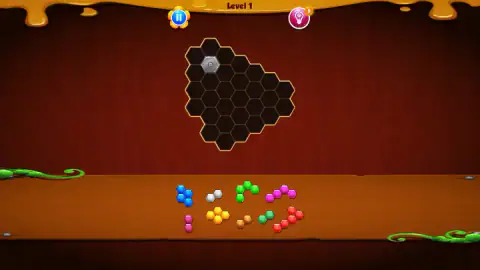
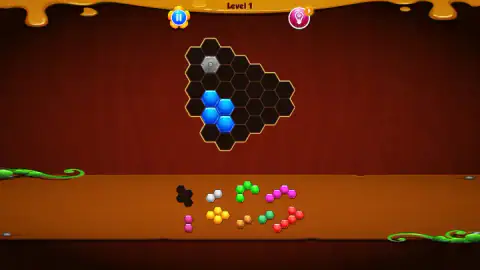
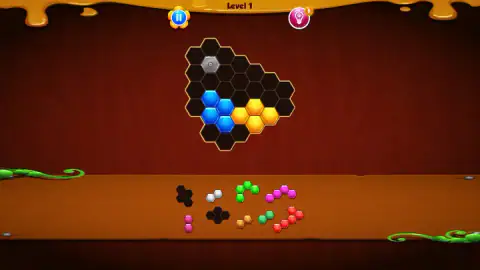
Taken by opening the game ourselves and letting it run — not supplied by the publisher, and not the same picture every other site shows.
How to play Hexa Block Puzzle
- Pick a level. We started on level 1; its name sits at the top of the screen for the whole level.
- Read the board first. Dark cells are empty. The grey metal hexagon is filled from the start, and you work around it.
- Drag a piece from the tray. Hold the left mouse button on a piece, carry it over the board and let go. It settles into the cells beneath it.
- Check the tray. A placed piece leaves a dark outline of itself where it used to lie, so you can always see what is gone and what is left.
- Fill every cell. There is no row to complete and nothing to clear. The level is the whole shape.
What one unfinished board taught us:
- Count before you drag. If the pieces add up to the empty cells, as they did here, any gap you cannot fill means an earlier piece is in the wrong place.
- Watch the small holes. The smallest pieces on level 1 are pairs. A single empty cell on its own can never be filled.
- Pieces keep their angle. Both of ours landed the same way up as they lay in the tray. The game's instructions say pieces cannot be rotated.
- A bad drop costs nothing. When a piece did not go in, the board simply stayed as it was. There is no counter to punish a miss.
- The pause button is not a way forward. It opens a panel with SOUND and MUSIC switches. The green tick closes it again.
Controls
| Drag and drop (hold the left mouse button, move, release) | Carries a piece from the tray onto the board; it settles into the cells under it, or the board stays as it was |
|---|---|
| Click the blue pause button (top left) | Opens the PAUSE panel with the SOUND and MUSIC switches |
| Click the green tick on the PAUSE panel | Closes the panel and returns to the level |
| Click the pink bulb (top right) | The hint button, with a small counter that read 5 throughout our session; we did not use it |
Features
- A honeycomb board to fill completely: 30 cells on level 1, one of them already taken by a grey metal hexagon
- Nine pieces of two, four and five hexagons that add up to exactly the 29 empty cells
- Pieces keep the angle they have in the tray; the game's instructions say they cannot be rotated
- Nothing clears and nothing scores: no rows to complete, no timer and no move counter on screen
- A hint button with a counter, and a pause panel with separate sound and music switches
- Made by Drivix Games
Game details
- Developer
- Drivix Games
- Release date
- October 2025
- Last updated
- August 10, 2026
- Added here
- August 2025
- Technology
- HTML5
- Platforms
- Browser (desktop, mouse), Browser (mobile & tablet, touch)
- Classification
- Puzzle
- Saved progress
- Saving, when available, is managed by this game. Mava cannot confirm your level.
FAQ
How do you play Hexa Block Puzzle?
Each level shows a board of hexagonal cells and a tray of coloured pieces made of hexagons. You drag the pieces onto the board until every empty cell is covered. Nothing disappears when you place a piece: the level is a single shape to fill, and on level 1 the pieces fit it exactly, with none left over.
Can you rotate the pieces in Hexa Block Puzzle?
The game's instructions say you cannot, and we found no control for it. The two pieces we placed sat on the board at the same angle they had in the tray. That makes the direction of each piece part of the puzzle: an upright pair of hexagons only fits where two cells stack one above the other.
Is there a time limit in Hexa Block Puzzle?
We saw none. The level screen shows only the level number, a pause button and a hint button: no clock, no move counter and no score. The game's own instructions also say there are no time limits.
How many hints do you get in Hexa Block Puzzle?
The hint button is a pink bulb in the top right corner, and it carried a small badge reading 5 for the whole of our session. We did not press it, so we cannot say what a hint shows or how the counter refills.
How many levels does Hexa Block Puzzle have?
We do not know. We played level 1 only and did not finish it, so we never saw the second board. The game's own description says the difficulty rises the further you go.
Can you move a piece after placing it in Hexa Block Puzzle?
The game's instructions say a piece on the board can be rearranged. We did not test that ourselves. It matters, because two early placements of ours left three cells cut off that no remaining piece could fill, and taking a piece back is the only way out of a position like that.
Who made Hexa Block Puzzle?
It is credited to Drivix Games. It was published in October 2025. It is listed for PC, Android and iOS as a portrait game; we played it on a desktop computer with the mouse.