




About Slide the Blocks: Build the Pictures!
A sliding picture puzzle normally means a photo chopped into small equal tiles with one tile missing. Slide the Blocks: Build the Pictures does it with far fewer pieces. Its first level has two. Its second has three. The trouble does not come from how many pieces there are but from how big they are.
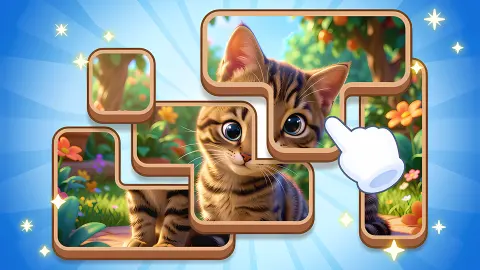
Each level is a square grid of pale cells with a picture lying on it in chunks. A chunk can be a square, a wide bar or an L that covers half the board. You drag one and it slides through the empty cells until it hits another chunk or the edge. There is no gap-shuffling as in a tile puzzle and no lifting as in a jigsaw. When the chunks sit together the right way, the picture is whole and the level is over.
The game is credited to a developer listed as seel1ch. It was published in late August 2026, so it is recent and has not been played by many people yet.
Here is the extent of our own play, so you can weigh the rest. One sitting of roughly four minutes, on a desktop computer with the mouse. We completed the first level and then pushed the three pieces of the second one around until we stopped, without solving it. What lies beyond level 2 we did not see, and where this page relies on the game's instructions, it says so.
Level 1 is one slide, level 2 is a swap
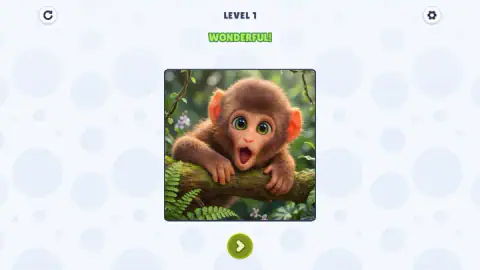
The first board is five cells by five. On it lies a baby monkey leaning on a mossy branch, cut in two. The larger piece is an L of twelve cells holding most of the animal. The smaller is a two-by-two square with the right side of its face, and it sits one cell too far to the right, leaving a strip of empty cells down the middle of the monkey's head. A line under the board reads "MOVE THE PIECES, TO COMPLETE THE PICTURE".
It is a tutorial, and we still made heavy weather of it: our first drags went in directions the square could not go, and nothing moved. Once it slid left, the grid vanished, the whole picture filled the middle of the screen with a green WONDERFUL label over it, and the arrow button appeared.
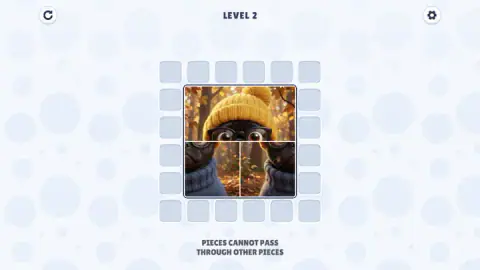
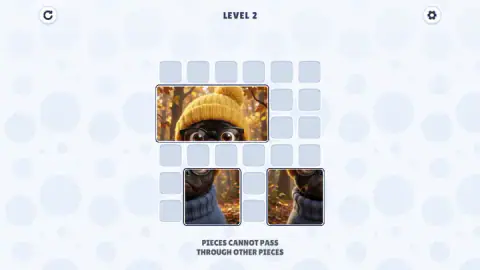
The second board is six by six, and the picture is a dog in a yellow knit hat, glasses and a blue jumper, standing in an autumn wood. It comes in three pieces: a wide bar with the hat and the eyes, and two squares with the lower half. They start in the centre of the board, already forming a square. The message under the board changes to "PIECES CANNOT PASS THROUGH OTHER PIECES".
That sentence is the real level. The two lower squares have to change sides, and they cannot go through each other. The ring of empty cells around the picture is one cell wide, and both squares are two cells wide. We slid the hat right, then left, dropped the two squares to the bottom edge, pulled them apart and pushed them back together. At the end of our session they were side by side again, in the same wrong order as at the start.
Looking at the board afterwards, the way through is to stop treating the hat as fixed. Parked against a corner, it leaves a block of free cells two deep beside and below it, and that is the room the squares need to pass one another. We offer that as a reading of the board, not as a solution we carried out. We also cannot tell you whether the finished picture has to sit in the centre or may be assembled anywhere on the grid.
An old kind of puzzle with a picture on top
Puzzles where pieces slide and may never be lifted form a family of their own. The best-known member is the fifteen puzzle, fifteen numbered tiles in a tray with one gap, which Wikipedia dates to 1880 and credits to Noyes Chapman. Picture versions of it are the tile puzzles most people think of.
This game belongs to a different branch, the one with blocks of unequal sizes. Its classic is Klotski, a name that Wikipedia traces to the Polish word for wooden blocks. Ten blocks of mixed sizes share a small upright board, and the aim is to bring the one large square to the exit. The shortest known solution to the standard layout takes 81 moves.
What makes Klotski hard is exactly what the second level here prints on the screen. A big block cannot turn, cannot hop and needs a gap as wide as itself, so most of the work is moving other blocks to make that gap. Slide the Blocks keeps that idea and changes the goal. No block has to leave the board. The blocks have to end up as neighbours, and the picture tells you at a glance whether they have.
That is also why it is gentler than its ancestor. With three or four pieces, you can hold the whole board in your head. It has no licence from or link with any Klotski product; it draws on the same old idea.
Who it is for
It suits anyone who likes a quiet logic puzzle and does not want to be timed. A child can do the first level, and the pictures, soft illustrated animals, are plainly meant to appeal to younger players. The second level already asks for a plan.
It is not a jigsaw and not a game about speed or score. In the part we played there was nothing to collect and nothing to unlock, only the next picture. The game's instructions say the levels go on without end; how large the boards get, and whether the pictures repeat, we cannot say.
More games to try next
Picture Shift is the nearest relative: sliding blocks that rebuild a picture, but against a clock and with coins to earn. Wood Blocks Jam uses the same no-passing rule to steer each block out through a gate of its own colour, with no timer. ExitBlocks: Color Match Puzzle is that idea again with a countdown. If you would rather lift the pieces than slide them, Jigsaw Puzzles is a plain photo jigsaw. The rest are under puzzle games.
Screenshots
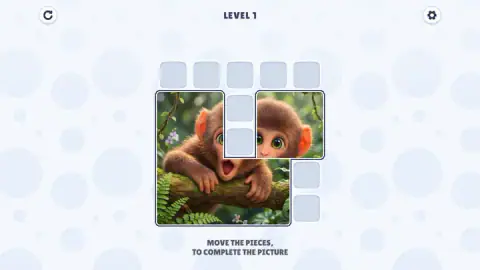
Taken by opening the game ourselves and letting it run — not supplied by the publisher, and not the same picture every other site shows.
How to play Slide the Blocks: Build the Pictures!
- Read the picture first. Work out which chunk is which part of the animal: who has the ears, who has the chin.
- Hold the mouse button on a piece and drag it along a row or a column.
- Watch where it stops. A piece travels only through empty cells. Another piece, or the edge of the grid, ends the move.
- Bring the pieces together in the right order. The joins between them disappear when the picture is complete.
- Press the round green arrow under the finished picture to go to the next level.
What two levels taught us:
- Level 1 is a single move. The picture is one column apart. Slide the small square one cell to the left and it is done.
- Do not trust a picture that looks finished. Level 2 opens with its three pieces packed into a neat square. Look at the bottom row: the two halves of the jumper are in each other's places.
- Measure the lanes. A piece two cells wide cannot enter a lane one cell wide. On level 2 that rules out the whole outer ring until something moves.
- The big piece is the door. Small pieces only get room when the largest one moves over, so move it first and move it far.
- Nothing hurries you. We saw no clock and no move count, and a wrong slide can simply be slid back.
Controls
| Hold the left mouse button on a piece and drag | Slides the piece across empty cells, sideways or up and down |
|---|---|
| Release | Leaves the piece where it is; another piece or the edge of the grid stops it |
| Round green arrow button (after a finished picture) | Goes on to the next level |
| Round button with a circular arrow (top left) | The usual restart symbol; we did not press it |
| Gear button (top right) | Settings; we did not open it |
Features
- Each level is one picture cut into a few large blocks, not into many equal tiles
- A 5×5 grid on level 1 and a 6×6 grid on level 2, with a 4×4 picture on both
- Two pieces on the first level and three on the second, the largest covering 12 cells
- One rule, printed on the screen in level 2, that pieces cannot pass through other pieces
- No clock, no move counter, no score and no coins on screen in the two levels we played
- Illustrated animal pictures such as a baby monkey on a branch and a dog in a yellow knit hat
- Made by seel1ch
Game details
- Developer
- seel1ch
- Release date
- August 2026
- Last updated
- August 26, 2026
- Added here
- July 2026
- Technology
- HTML5
- Platforms
- Browser (desktop, mouse), Browser (mobile & tablet, touch)
- Classification
- Puzzle
- Saved progress
- Saving, when available, is managed by this game. Mava cannot confirm your level.
FAQ
How do you play Slide the Blocks: Build the Pictures?
Each level shows a picture cut into a few blocks that sit on a grid in the wrong places. You drag a block to slide it through empty cells, and it stops when it meets another block or the edge. When the blocks line up and the picture is whole, the level ends and a green arrow takes you to the next one.
How many levels does Slide the Blocks: Build the Pictures have?
The game's instructions say the levels are endless. We cannot confirm that: we finished level 1 and spent the rest of our session on level 2 without solving it. Both levels carry a number at the top of the screen and no total.
Is there a timer or a move limit?
We saw neither in the first two levels. The screen shows the level number, a restart button, a settings button and the board, and nothing else. We moved the pieces of level 2 around for more than two minutes and the game never stopped us.
Why will a piece not move where I drag it?
Because something is in its way. Pieces slide along the grid and cannot jump over or pass through each other, which the game states on screen in level 2. On that level the free lane round the edge is one cell wide and every piece is at least two cells wide, so no piece fits in the lane unless another piece moves out first.
How do you solve level 2 of Slide the Blocks: Build the Pictures?
The two lower halves of the picture start in each other's places, so they have to change sides. We did not manage it in our session. Our reading of the board is that the wide hat piece has to be pushed into a corner first, to open a space two cells deep where the two small squares can go round each other.
Is Slide the Blocks: Build the Pictures a jigsaw puzzle?
No. In a jigsaw you lift a piece and put it anywhere. Here the pieces never leave the board: they slide, and they block one another. It is closer to the old sliding block puzzles such as Klotski, with a picture as the goal.
Who made Slide the Blocks: Build the Pictures?
It is credited to a developer listed as seel1ch. It was published on 25 August 2026. It is listed for PC, Android and iOS, in English and Russian; we played it on a desktop computer with the mouse.