






About Build the Bridge
The title promises a bridge you build. There are no planks, no budget and nothing to place. The bridge is already there, in a second landscape you can only see through one orange column, and your whole job is to decide how wide that column is while a small man in a yellow coat walks towards the drop.
He does not wait for you. He sets off by himself in every attempt, and no key we pressed steered him, stopped him or made him jump. That is the idea that makes this a puzzle: you never control the person in danger, only what exists under his feet.
Be warned that our account stops early. Over dozens of attempts on a computer we never got him onto the far bank. He stood on the hidden ground many times and fell every time, so everything below describes one crossing. We saw no finish flag, no second level and no win screen.
The game comes from Mohsin Atta, according to the game's listing, where it dates from August 2026.
The orange column is a window, not a wall
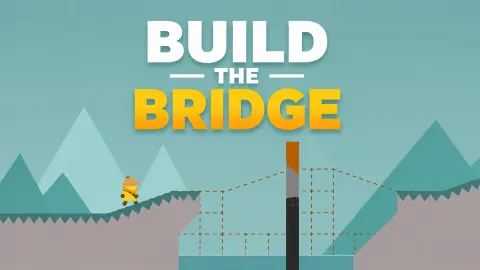
At first it reads as a pillar: a tall orange bar on a black base, with something strange happening where it covers the scenery. Open it wide and you see what that is. Inside, the sky turns orange, the teal mountains turn charcoal and grey, and the ground turns black with thin red cracks along the top.
The important part is that the two landscapes do not share their ground. Over the gap, the inside version has a solid hill exactly where the dashed red lines run. Over the banks, it has nothing. So when the window slides across the grey ground, that ground is gone for as long as it is covered, and you see only a dark pit with a dashed outline.
Those lines work in both directions. Outside the window, red dashes show the black ground you cannot see yet. Inside it, faint dashes show the outline of the grey bank it has hidden.
Three ways we fell, and what each one teaches
A failed attempt lasted about five seconds, and the falls we looked at came in three kinds.
Short of the window. The commonest. He walks off the lip of the near bank and drops into the gap, with the column still some way ahead. It happened with the column at its narrowest, and also when we had opened only the right side very wide. The left edge has to reach the lip before he does.
Out of the right side. With the left edge far enough, he stepped onto the black ground and climbed the hill inside the window. Then he came to the right edge, walked out onto a dashed line and fell. This is where a window that is merely wide on the left stops being enough.
Off the end of the black ground. Our best attempts opened both sides a long way. He walked the full length of the black hill, past the crest and down the other side, which was the furthest we saw him go. But the window also covered the start of the far bank, so that bank did not exist for him. The black ground ended in a cliff and he dropped down it, inside the window.
That last fall holds the part we think matters most. The two grounds overlap by a strip about as wide as the explorer, at each end of the gap. Comparing our captures, the black ground runs on only that little way past the point where the far bank begins. So the right edge seems to need to stop inside that strip, or arrive there as he does, with the same job on the left at the near bank.
Measured from the sliver, the left and right edges each have to travel a similar distance. We never hit both, so treat this as our reading of the screen and not a method we can vouch for. It does explain why the listing's retract keys exist: an edge that has gone too far has to come back. We pressed K twice with the column already at its narrowest and nothing changed, which proves little. We saw the window narrow sharply in one attempt, but we cannot say for certain which key did that.
The big numbers are not your level
They look like a level counter, and at first we read them that way. A teal 3 or a red 2 pulses in the middle of the screen, sometimes large and sometimes tiny, and nothing else is labelled.
The evidence goes against it. The numbers kept returning on the same landscape, attempt after attempt, in no order that fits progress. In one attempt a 3 gave way to a small 2 in under a second, with the explorer standing in the same spot. They appear only while he waits at the start. That makes them a short countdown, although we only ever caught the 3 and the 2.
There is no score, timer or level label on screen either, so all you have to go on is how far he got last time.
How far the course goes, as far as we could see
The far bank is not the end. It is less than half a screen long, and past it another set of dashed red lines begins, with a grid beneath it. So a second gap seems to follow on the same course, and getting across the first one would probably not end the level.
The listing describes a finish flag, a key for continuing after a cleared level and levels that get harder. We did not reach any of that, so we cannot say how many levels there are or what they add.
It is not the kind of bridge game the name suggests
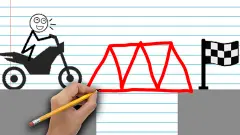
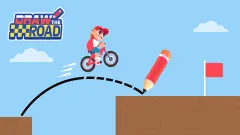
Many bridge games are about drawing or engineering. In Draw Bridge - Brain Game, one line becomes the road and a red car drives over it. Draw Bridge: Puzzle Challenge sends a stickman on a dirt bike at the gap, and Draw One Line Bridge Puzzle also comes down to a single stroke. All three let you plan, then watch the result.
Here, nothing falls over or bends, and the planning happens against the clock. Nothing we saw behaved like physics: the ground is either there or it is not, depending on which side of an edge it sits. If you came for stress and girders, this is a different game. The grid under the dashed lines looks like scaffolding, but it holds nothing up.
Who it is for
It suits players who like one strange rule and enough patience to work it out alone. There is nothing to read and very little to explain, and attempts come back so fast that failing costs little.
It is a harder sell for younger children or anyone who wants quick progress. Nothing on screen explains the column, and we went through dozens of attempts without clearing the crossing. It needs a keyboard too: it is listed for PC only.
More in our puzzle games.
Screenshots
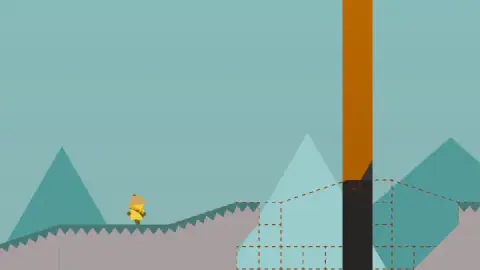
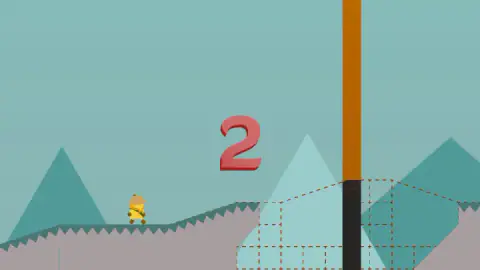
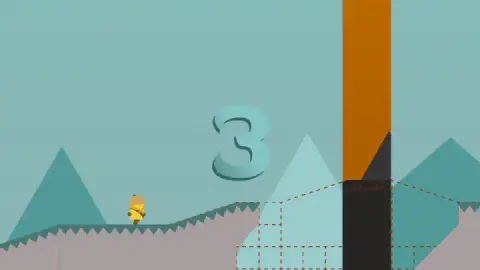
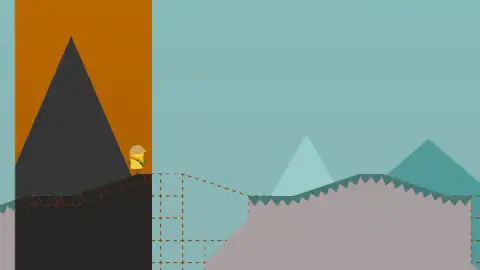
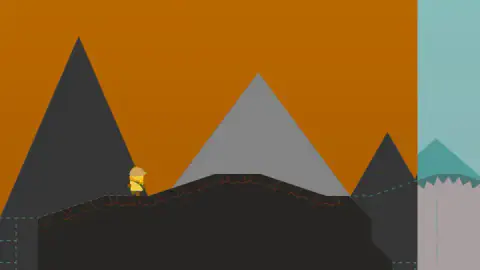
Taken by opening the game ourselves and letting it run — not supplied by the publisher, and not the same picture every other site shows.
How to play Build the Bridge
- Start with Enter, as the listing instructs. The explorer appears at the left, on grey ground. A big number pulses in the middle while he waits.
- Read the dashed red lines. They run across the gap and show where the hidden ground lies. The thin orange column stands in the middle of them, with black ground at its foot.
- Open the column. A pushes its left edge out and L pushes its right edge out. It keeps its width when you let go. The listing gives S and K for pulling the edges back.
- Keep him on something solid. Grey ground holds him outside the column and black ground holds him inside it. A dashed line holds nothing.
- Try again. After a fall the game restarts at once, and the column is back to a sliver.
Tips from our run:
- Open it before he moves. The keys already work while the number is on screen, so you can set the width with him standing still.
- Use both hands. With L alone he falls before he even arrives, however wide the right side gets, because the gap starts well to the left of the column.
- Forget the space bar and the mouse. We tried both at length. There is no jump, and clicking built nothing that we could see.
- Do not chase the column. It looks as if it slides across the screen, but it stays put. The camera follows the explorer, so everything else appears to move.
Controls
| A | Pushes the left edge of the orange column outward. Hold it longer to open further |
|---|---|
| L | Pushes the right edge of the column outward. Hold it longer to open further |
| S | Pulls the left edge back, according to the game's listing |
| K | Pulls the right edge back, according to the game's listing. It changed nothing with the column at its narrowest |
| Enter, Space and M | Start, continue after a cleared level and mute, according to the listing. Space did nothing during an attempt |
Features
- The explorer walks on his own from the first moment, and no key steers him or makes him jump
- A single orange column works as a window onto a second landscape with its own ground
- Dashed red lines show where the hidden ground runs before you open the window
- Four keys in two mirrored pairs: the outer finger of each hand opens, the inner one closes, as listed
- The window keeps its width while you let go, and shrinks back to a sliver after every fall
- A failed attempt restarts within moments, with no menu and no game over screen in our captures
- A big 3 and 2 pulse at the start, and you can already open the window while they show
Game details
- Developer
- Mohsin Atta
- Release date
- August 2026
- Last updated
- October 1, 2026
- Added here
- July 2026
- Technology
- HTML5 (2D)
- Platforms
- Browser (desktop, keyboard)
- Saved progress
- Saving, when available, is managed by this game. Mava cannot confirm your level.
FAQ
How do you play Build the Bridge?
The explorer walks to the right by himself, towards a gap he cannot cross. You change the width of an orange column with the keyboard: A and L push its left and right edges out, and the listing gives S and K for pulling them back. Inside the column there is dark ground over the gap, and he can walk on it.
How do you make the explorer walk or jump in Build the Bridge?
You do not. He sets off on his own every time, whatever you press. The space bar gave no jump and clicking did not change anything in our attempts. All you control is the column.
What does the orange column do in Build the Bridge?
It is a window onto another version of the landscape, with an orange sky, dark mountains and black ground. The ground inside only exists inside it, and the grey ground outside disappears wherever the window covers it. The dashed red lines show where the black ground will be.
Why does the explorer keep falling in Build the Bridge?
We saw three causes. The left edge had not reached the near bank, so he walked off it before getting to the window. Or he walked out through the right edge onto a dashed line, which holds nothing. Or the window also covered the far bank, so he reached the end of the black ground with nothing beyond it.
Are the big numbers in Build the Bridge the level?
They do not appear to be. A 3 and a 2 kept coming back on the same landscape, and we caught a 2 less than a second after a 3 at the same spot. They show while he waits at the start, so they look like a short countdown. We never caught a 1 on screen.
How many levels does Build the Bridge have?
We cannot tell you. The listing speaks of levels and a finish flag, but we never got across our crossing, so we saw neither a flag nor a next level. No level number appears on screen. Past the far bank more dashed ground begins, so that bank does not look like the end of the course.
Can you play Build the Bridge on a phone?
It is listed for PC only, in landscape. We played with a keyboard and saw no on-screen buttons, and the controls are all keys, so plan on a computer.
Who made Build the Bridge?
The game is credited to Mohsin Atta and dates it August 2026, with a last update in October 2026. The listing shows English as its only language, and there is almost nothing to read in play.