




About Bridge Dash
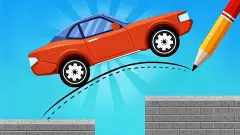
Most car games give you a pedal and a wheel and let you sort out the road as you go. Bridge Dash takes both away. The small red car drives itself. Your only job is to draw the road it drives on, in one stroke, before it sets off.
That sounds like a drawing game, and for the first two levels it is close to one. Then the line starts to matter as a thing, not a picture. It has to sit at the right height, touch the right edges and hold the car up, and a stroke that looks fine on screen can leave the car short of the flag.
We played Bridge Dash on a computer with a mouse in October 2026. We cleared the first two levels, then got stuck on the third and did not get past it. This page covers what those levels taught us, what we got wrong, and what we did not get far enough to see.
The game is credited to ColorGames, its only title there. It was published at the end of August 2026.
Three levels, three different problems
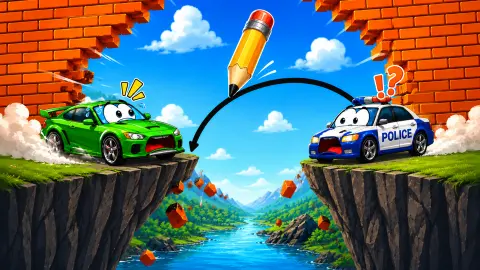
Level 1 is the lesson. A gap splits the brick wall, and a dotted arc above it shows you the shape of the bridge. Trace it and the car rolls over, past the flag, and stops by the roadblock.
Level 2 surprised us. There is no gap at all. The wall is one solid block, and between the car and the flag sits a small stepped bump of bricks. The challenge is to get the car over it rather than across anything. It took us a couple of strokes to clear.
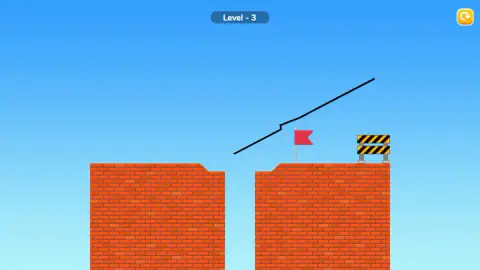
Level 3 is where the guide disappears. Two brick towers stand apart, the inner corner of each one cut away at an angle, so the edges of the gap sit lower than the road. There is no dotted line to follow.
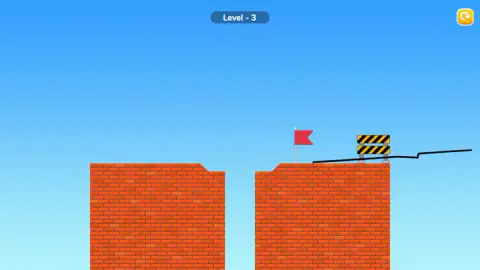
We tried a flat line across the gap first. Then we tried longer lines, some far above the towers. None of them got the car to the flag. In our later screenshots the car was no longer on screen, and one long, kinked line we had drawn showed up in three different places: high over the gap, then higher and flatter, then lying flat on top of the far tower, across the roadblock. A line in Bridge Dash is not ink on a page. It is an object in the level, and it can move once it is there.
What the banknotes are for
Each level we finished paid 13 banknotes, shown on a purple banner with a CLAIM button. Next to it, a blue button with a film icon offers 65, five times as much, for watching a video. The counter at the top right went up by the same amount after our first claim.
We do not know what the banknotes buy. The obvious candidate is the purple button with a car on it at the top right of every level, which looks like a garage, but we never opened it.
The two other buttons at the bottom of the level cost something too. The Skip button carries a small video badge, so skipping a level means a video. The magnifier showed the number 2 on every level we saw, which reads like a stock of two hints. We did not press either.
Drawing the solution: where this idea comes from
Turning a line you draw into a solid object goes back further than phone puzzles. The best-known early example is Crayon Physics Deluxe by Kloonigames, a game where everything you sketch in crayon falls, rolls and pushes like a real object. It won the Seumas McNally Grand Prize at the Independent Games Festival in 2008.
Bridge Dash takes a narrow slice of that idea. You do not draw boxes, ramps and levers in any order you like. You draw one road for one car. That makes it quicker to read than its ancestors, and the whole puzzle is visible at once: where the car starts, where the flag stands, and what is in between.
It also means the same rule applies on every level we saw. Your line is a physical part of the level. It has to meet the brick, carry the car and stay in place, and a line that floats in the air is no use to a car that cannot jump.
What we did not see
We stopped on level 3, so we do not know how many levels there are or how the later ones change. We never saw a fail screen or heard a crash. On level 3 the car was simply gone from the screen in our later captures, and we cannot tell you how the game handles that.
We did not open the settings, the purple car button or the hint, and we did not watch a video for a reward or a skip. We also did not play on a phone. The game is listed for touch screens in landscape and portrait, and the game's own instructions say to use touch on mobile.
Who it is for
Bridge Dash suits younger players and anyone who likes short puzzles with no clock. There is no timer, nothing violent, and very little to read: a level number, a banner and a few button labels.
The catch is the jump in difficulty. Level 1 hands you the answer and level 3 hands you nothing, and a younger child may need help to see why a line that looks right leaves the car short. If you like thinking about how a shape will behave before you draw it, that is the part worth playing for.
More drawing and driving puzzles
Draw Bridge - Brain Game uses the same idea, a car and a road you sketch yourself. Draw The Car Path moves the pen to a car park, where you draw each car's route to its space. For physics without the pen, Eggy Car gives you the pedals back and an egg that must not fall out of the car. Browse the rest of the driving games.
Screenshots

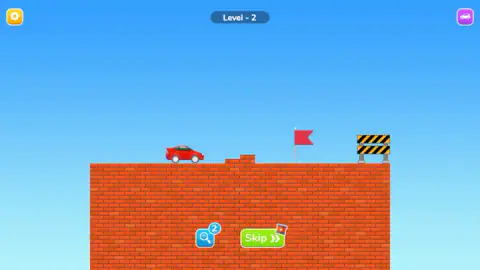
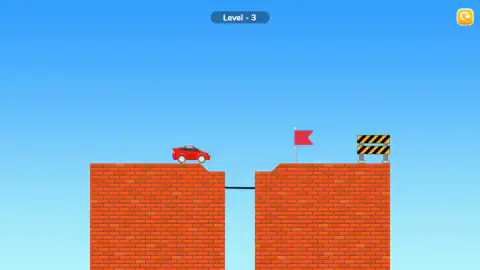
Taken by opening the game ourselves and letting it run — not supplied by the publisher, and not the same picture every other site shows.
How to play Bridge Dash
- Look at the level before you touch anything. The red car sits on the left, a red flag stands further along, and a black-and-yellow roadblock marks the end.
- Find the problem between the car and the flag. On level 1 it is a gap with a dotted arc over it that shows where the bridge goes.
- Hold the mouse button down and drag along the line you want. A plain click draws nothing.
- Let go. The line becomes part of the level and the car starts to move on its own.
- If the car gets past the flag, the flag turns green and the LEVEL COMPLETE banner appears. If it does not, press the yellow round arrow at the top right and draw again.
Tips from our session
- Drag, never click. Our first session went nowhere for four minutes, mostly because we kept clicking. Nothing on screen reacts to a click on the level, and the arrow keys and space bar did nothing either.
- Trace the dotted guide when there is one. On level 1 we drew along the dotted arc in a single drag, and the car crossed first time.
- Join the road at road height. On level 3 the tops of the two towers are bevelled down at the gap. Our first bridge there was a short flat line across the gap, but it sat below the road on both sides, and the car did not make it to the flag.
- Draw before you think about buttons. The hint and Skip buttons vanish the moment you start a line and a restart button takes their place, so decide first whether you want them.
- Take CLAIM if you do not want videos. The bigger reward on the blue button costs you a video every time.
Controls
| Hold the left mouse button and drag (or drag a finger) | Draws a line; when you let go it becomes part of the level and the car sets off |
|---|---|
| Yellow round arrow, top right | Restarts the level after you have drawn something |
| Magnifier with a number | Hint button; it showed 2 on every level we saw, and we did not press it |
| Green Skip button with a video badge | Skips the level in exchange for watching a video |
| Gear (top left) and purple car button (top right) | Settings, and a car button we did not open |
Features
- One input for the whole game, a line you draw yourself, with no throttle, brake or steering
- A small red car that drives by itself toward a red flag and a striped roadblock
- Brick levels that change shape, from a gap with a dotted guide to a bump on flat ground to two towers with no guide
- A reward of 13 banknotes for each level, or five times that if you choose to watch a video
- A restart button that replaces the hint and Skip buttons as soon as you start drawing
- No timer and no lives counter on screen
Game details
- Developer
- ColorGames
- Release date
- August 2026
- Last updated
- September 1, 2026
- Added here
- August 2026
- Technology
- HTML5 (2D physics)
- Platforms
- Browser (desktop), Browser (mobile & tablet, touch)
- Saved progress
- Saving, when available, is managed by this game. Mava cannot confirm your level.
FAQ
How do you play Bridge Dash?
Each level puts a small red car on a brick wall, with a red flag and a striped roadblock further along. You hold the mouse button, or your finger on a touch screen, and draw one line for the car to drive on. When you let go, the car moves by itself. If it gets past the flag, the level is complete.
How do you win a level in Bridge Dash?
Get the car past the red flag. The flag turns green, the car rolls to a stop by the roadblock, and a LEVEL COMPLETE banner gives you 13 banknotes. You do not steer or brake at any point, so the whole level depends on the line you draw.
Does clicking work in Bridge Dash?
No. A click does not draw anything, and the arrow keys and the space bar did nothing for us either. The only thing the game listens to is a drag: press, move, release.
What do the CLAIM and video buttons do after a level?
CLAIM takes the 13 banknotes you earned and moves on. The blue button with a film icon offers 65 instead, five times as much, in exchange for watching a video. We always took CLAIM, and the counter at the top right went from 0 to 13 after the first level.
Is Bridge Dash hard?
The first two levels are gentle: the first even shows a dotted arc where the bridge should go. The third level has no guide, a gap between two brick towers and lower edges on both sides, and we did not manage to clear it in about three minutes of drawing.
Who made Bridge Dash and when did it come out?
Bridge Dash is credited to ColorGames. It was published on 31 August 2026.
Can you play Bridge Dash on a phone?
It is listed for touch screens in both landscape and portrait, and the game's own instructions say to use touch on mobile. We played it only on a computer with a mouse, so we have not tested drawing with a finger ourselves.