



About Car Stunts Driving
Most stunt driving games sell you on speed: a needle in the red, a car in the air, a loop the size of a house. Car Stunts Driving starts the other way round. Your red sports car sits still on a grey slab of concrete with nothing but sky around it, the speed readout says zero, and the first thing you learn is that this car does not want to go fast unless you insist.
That is the whole skill of the first level. The finish is an arch with chequered posts at the top of a ramp, and a ramp is only climbable with momentum. Everything between the start and that arch is a test of whether you have built enough of it.
We played Level 1 on a desktop for about four minutes and did not clear it. We crept along the deck, followed the kerbed lane up to the arch and stopped at the foot of its ramp with the progress bar nearly full. This page tells you what that run showed, and says plainly where it stops.
The game is credited to Andrey Melnikov. It was published in August 2026.
A track with nothing around it
The level is a strip of grey concrete laid out in open sky. There are no buildings, trees or crowds, only clouds at the horizon and the edge of the deck where the concrete stops. At the start, a banked curve with a red and white kerb rises off to the left, and far ahead a dark block marks where the course climbs.
Further on, the deck narrows into a lane with kerbs painted in red and white stripes on both sides. They are the only railing between you and the drop. The listing warns that falling into the abyss is the main way to fail.
Along the lane we passed a glowing yellow panel with a large upward chevron on it, set right in front of a climb. It looks like a boost pad or a jump marker. We never hit it fast enough to find out which, so treat it as a sign that something is about to go up.
The screen tells you three things
While we drove, the screen carried very little. In the top centre, the words LEVEL 1 and a thin blue progress bar. In the top left, a round pause button. In the top right, a circular restart arrow, and under it your speed in kilometres per hour.
In the part we played there was no timer, no score and no coin counter. The only measure of how well you are doing is the bar. Ours went from a sliver at the start to about a third on the open deck, half by the kerbed lane and roughly nine tenths in front of the arch.
The pause button opens a small card headed Settings. It has two green buttons, Sound and Music, so you can mute one and keep the other, and a small red Restart Level button underneath. A red X in the top corner of the screen closes it.
Why the finish is chequered
The arch at the end of Level 1 has posts painted in black and white squares. That pattern means "finish" almost everywhere in motor sport, and the reason is older than motor racing itself.
The chequered flag comes from road rallies, not circuits. At the Glidden Tours in 1906, a long-distance reliability run for early cars, the officials who checked drivers through each time point were called checkers and carried chequered flags so they could be spotted. The earliest known photo of one ending a race is from the Vanderbilt Cup on Long Island the same year. The popular story that it was borrowed from horse racing has no evidence behind it.
That fits this game better than most. Car Stunts Driving is not a race. There are no rival cars on the track and no clock against you. Like those first rallies, it is a run from point to point where the only question is whether you and the car make it to the checkpoint in one piece.
The car
You drive a red two-seat sports coupé, low and wide, seen from a camera just behind and above it. It casts a hard shadow on the concrete, and when it pulls away it leaves dark tyre marks behind. The level started straight away with this car, and we saw no garage or shop to choose another.
In our hands the car felt heavy. At low speed it crept, and it did not leap forward the moment we pressed the key. That weight is what makes the ramps a puzzle rather than a formality: you have to plan the run-up, because the car will not give you speed on the climb itself.
Who it is for, and what we did not see
Car Stunts Driving suits players who like steady, careful driving more than racing: there is nobody to beat, nothing chasing you, and as long as you stay on the deck you can take each section at your own pace. The controls are the four keys most computer games use for moving, plus Space.
Anyone looking for rivals, laps or a fast car from the first second will find none of those in Level 1.
Our run was short. We did not finish Level 1, so we have not seen what happens at the arch, what a fall looks like, or what Level 2 brings. We did not test S, A, D or Space beyond what the game's own list says, did not hit the yellow chevron panel at speed and did not play on a phone or tablet.
More cars, ramps and tracks in the sky
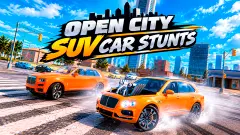
Open City SUV Car Stunts has a stunt track in the sky too, driven in an SUV, plus an open city. GT Cars Mega Ramps floats its half-pipes in the air and adds a clock and a second player on the same keyboard. MR RACER Stunt Mania shrinks the stunt track down to toy size and fills it with rivals, and Car Parkour turns the same point-to-point idea into a 2D course of oil drums and tyres. The rest are under driving games.
Screenshots
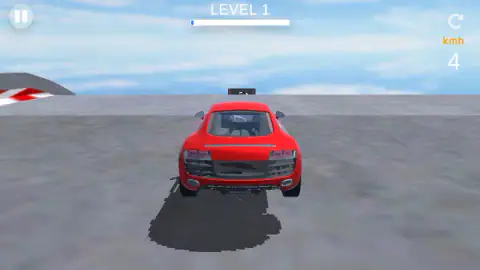
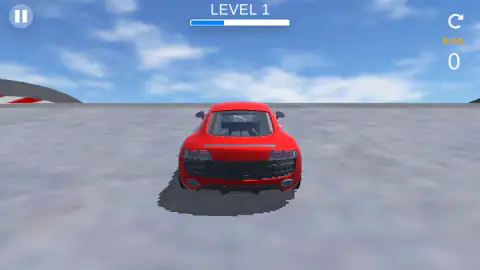
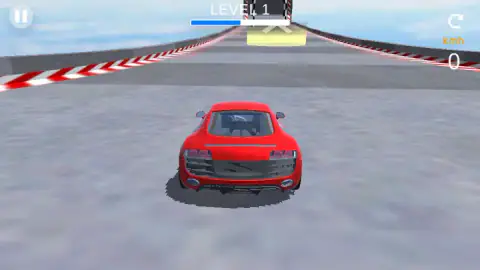
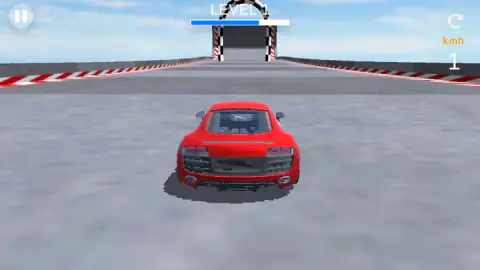
Taken by opening the game ourselves and letting it run — not supplied by the publisher, and not the same picture every other site shows.
How to play Car Stunts Driving
- Click into the game. Level 1 starts straight away, with the car parked on the track.
- Hold W to accelerate. The number under kmh on the right shows your speed.
- Steer with A and D to stay between the red and white kerbs. S goes back and Space stops, according to the game's own control list.
- Watch the progress bar under the level number. It fills as you get closer to the end.
- Drive through the chequered arch to finish the level. If you fall or get stuck, the circular arrow in the top right restarts.
What our run taught us:
- Hold, do not tap. We pressed W for a second or so at a time, and the readout never read more than 12 km/h. At that pace the car rolls rather than drives.
- Build speed on the flat. The last ramp before the arch is steep. Our car arrived at its foot at 10 km/h and went no further. The run-up is where the climb is won.
- Be patient with the Settings card. When it came up in our run, it took several clicks on the red X before we were driving again.
- Use the bar, not your eyes. The track looks much the same all the way. The bar tells you whether you are a third of the way or nearly there.
Controls
| W | Accelerate forward (hold it; short taps barely move the car) |
|---|---|
| S | Back, according to the game's own control list |
| A and D | Steer left and right, according to the game's own control list |
| Space | Stop, according to the game's own control list |
| Pause button, top left | Opens the Settings card with Sound, Music and Restart Level |
| Circular arrow, top right | Restart button on the driving screen |
Features
- One red two-seat sports car, seen from a chase camera just behind it
- Concrete tracks laid out in open sky, with red and white kerbs along the edges
- A progress bar under the level number that fills as you get closer to the finish
- A finish arch with chequered black and white posts at the top of a ramp
- Glowing yellow panels with an upward chevron painted on the track before the climbs
- A speed readout in kilometres per hour on the right of the screen
- A Settings card with separate Sound and Music switches and a Restart Level button
Game details
- Developer
- Andrey Melnikov
- Release date
- August 2026
- Last updated
- August 12, 2026
- Added here
- June 2026
- Technology
- HTML5 (WebGL, 3D)
- Platforms
- Browser (desktop)
- Saved progress
- Saving, when available, is managed by this game. Mava cannot confirm your level.
FAQ
How do you play Car Stunts Driving?
You drive a red sports car along a track built in the sky and try to reach the chequered arch at the end of the level without falling off. Hold W to accelerate and steer with A and D. A bar at the top of the screen shows how close you are to the finish.
What are the controls for Car Stunts Driving?
On a computer, W drives forward, S goes back, A and D steer and Space stops the car, according to the game's own control list. On phones and tablets the listing says you use buttons on the screen. The pause button in the top left opens sound, music and a restart option.
Why is my car so slow in Car Stunts Driving?
Because short presses do not build speed. In our run we pressed W for about a second at a time and the readout never went above 12 km/h, which was not enough to carry the car up the final ramp. Hold the key down for longer on the flat sections before a climb.
How do you finish a level in Car Stunts Driving?
Drive through the arch with chequered posts at the end of the track. In Level 1 it sits at the top of a ramp, so you need speed to get there. We reached the foot of that ramp with the progress bar about nine tenths full but did not get through.
How many levels does Car Stunts Driving have?
The game's listing talks about many different levels and tracks. We only played Level 1, so we cannot give a number or say how the later tracks differ.
How do you restart a level in Car Stunts Driving?
Use the circular arrow in the top right corner of the driving screen, or open the pause menu in the top left and press Restart Level. The same card has separate switches for sound and music.
Who made Car Stunts Driving?
The game is credited to Andrey Melnikov. It was published on 6 August 2026 and last updated a week later.