








About Build Your Dream Car
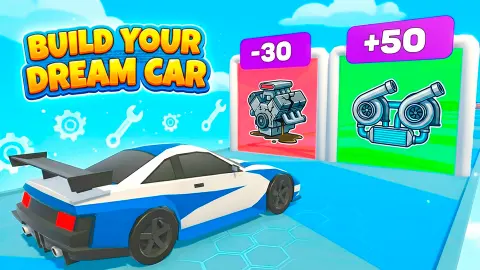
The title promises a garage. What you get first is a road in the sky and a car with nothing on it. Build Your Dream Car puts the building on the track: the parts hang inside gates, and the car is assembled by driving through them.
Then the road crosses a chequered line and the game changes. One rival pulls up, a dial appears, and the car you put together a few seconds ago has to win a short race in a straight line. Timing takes the place of steering.
The game is credited to Welwise Studio. It was published in June 2026.
We played about four minutes on a desktop with a mouse. We ran Level 1 several times, lost every race, bought one upgrade and looked at the car shop without the money to use it. Everything below comes from those races, and we flag the parts we never reached.
Each pair of gates is a choice between a part and something else
The gates are where the title happens. They come two at a time, joined in the middle, so you cannot take both.
Some pairs offer a part against a part. We saw "+ Glass" beside "+ Exhaust", and "+ Engine" beside "+ Color", the second with a spray gun drawn on it. Others set a part against money: one pair was "300$", with a wad of banknotes, beside "+ Spoiler", with a black rear wing.
A third kind has nothing to do with looks. Twice the left gate read "+25 POWER". Once its neighbour read "+Power", and once it was the red "-Control" gate. So a pair can be a good option beside a bad one, and the game does not slow down while you read.
What we cannot give you is the arithmetic. We did not measure what a spoiler or 25 points of power does to the race that follows, and we lost that race with every combination we tried.
The pairs were not the same from one run to the next, either. The first two gates on the start screen changed between runs, so there was no route to memorise.
The race is a dial, and we never beat it
After the chequered line the road gains a pink stripe down the middle and a black car appears alongside. What the game asks of you is no longer steering. It is one job: stop a moving needle inside the green part of a dial.
That was the whole race as we met it. Green is what accelerates the car, in the game's own words. We lost each time, and at least once we had clicked when the dial appeared and not when the needle arrived.
Every race we ran ended on a screen headed "Lose". It is a soft landing. The screen still pays, and it offers three buttons, one to double the payout by watching a video, one for the car shop and Next. We pressed Next each time. The level number never moved off 1, so we cannot tell you what a win pays or what Level 2 looks like.
Losing still pays, and here is what the money buys
Each lost race paid 50. We began with 150, and three losses later we had enough to try the cheapest upgrade on the start screen.
| Upgrade | Value we saw | Price of the next step |
|---|---|---|
| Top Speed | 140, after one purchase | 800 |
| Handling | 20 | 200 |
| Acceleration | 10 | 500 |
The first step of Top Speed cost 150. The second was priced at 800. That is the number to know before you spend: the first upgrade is cheap on purpose, and the one after it is sixteen lost races away.
We did not buy Handling or Acceleration, so their second prices are unknown to us. Each card also carries a small blue badge with a number on it. We did not work out what it counts.
The car shop is a long way off
The SHOP button on the left edge opens a row of cars on cards, with a scroll bar underneath. We could read three complete cards. A black pickup with yellow and orange paint down its sides costs 7,500. A pickup in camouflage with roof lights, labelled "War Pickup", costs 14,000. A black coupé with a rear wing, labelled "Tokyo Car", costs 18,000.
There is an oddity in the labels. The cheapest of the three carries the tag RARE, and the two dearer ones carry STANDART, spelled that way. If the tags are meant as a ranking, the prices do not follow it.
Set those prices against what a lost race pays. At 50 a time, the 7,500 pickup is 150 lost races away. The money gates on the track shorten that, and so would the video button. What a win pays we do not know. Nothing we saw makes a second car a first-session purchase. More cards ran off both edges of the screen and we did not scroll to them.
What you bolt on does not seem to last
Here is the part the title does not warn you about. In our first run the convertible reached the chequered line wearing a red and black striped wrap. On the next run it was plain green again, facing a fresh pair of gates.
So in what we saw, the parts belong to the run and not to the car. What carries over is the cash and the three upgrades. The dream car is rebuilt every time, a little differently.
Who it is for
Players who want very short rounds and a number that goes up. A run is a handful of gate choices and one timing test, and it pays even when it goes badly.
It is not a tuning garage. There is no screen where you pick a part from a shelf and fit it, at least none that we reached. And it is not a driving game in the usual sense: you slide between two lanes, then click a dial.
More car games with a garage or a start line
Drag Racing Club is the fuller version of the second half: a side-view drag racer where the launch, the gear changes and the nitrous are all timed by you. Street Race Master gives the steering back, on 3D circuits with a career mode. Car Smash Simulator: Crash & Tune is a sandbox for people who would rather take a car apart than assemble one. Shape Transform Race keeps the idea of choosing quickly while the road keeps coming. The rest are in the driving games category.
Screenshots
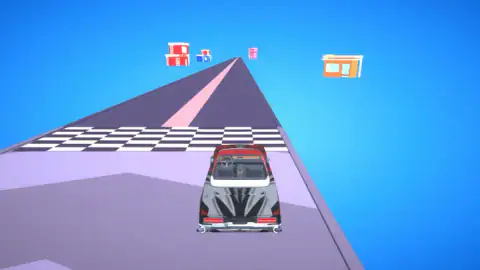
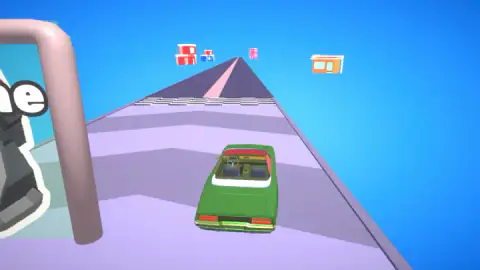
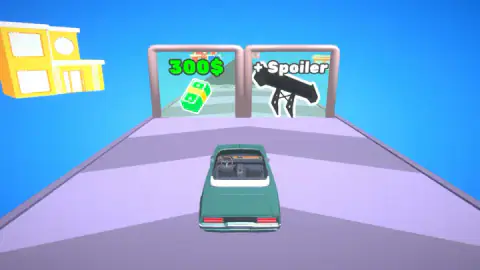
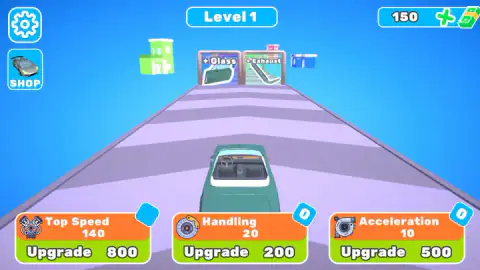
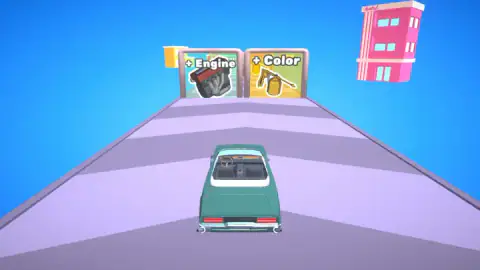
Taken by opening the game ourselves and letting it run — not supplied by the publisher, and not the same picture every other site shows.
How to play Build Your Dream Car
- On the start screen the car sits on the track with Level 1 above it and three upgrade cards below. Hold the mouse button down on the track, above the cards, and slide sideways. The car sets off.
- Two gates stand side by side ahead. Each one has a label and a picture. Slide the car towards the one you want and drive through it.
- Do the same at each pair that follows, until the road crosses a chequered line.
- Past the line a rival joins you and a round dial comes up with the words "Hit the green zone to accelerate". Click while the needle is over the green.
- The result screen pays out and offers Next. Press it and you are back on the start screen with your cash at the top right.
Tips from our session:
- The Upgrade buttons do not start anything. The start screen has no Play button, and the three green buttons are the only obvious things to press. They only spend money. The run begins when you drag on the track itself.
- Read the sign, not the colour of the picture. One gate we met was marked "-Control", with a minus. It stood right beside "+25 POWER" and had the same shape. Only its red panel and that one character set it apart.
- Wait for the needle. Clicking as soon as the dial appears is the natural reflex and it is the wrong one. The needle keeps moving, and more than once it was over the red when the dial came up.
- An Upgrade button that does nothing is a price you cannot pay. We clicked one several times before noticing the number beside it was larger than the number at the top right.
Controls
| Hold the mouse on the track and slide left or right | Sets the car moving from the start screen and steers it towards one of the two gates |
|---|---|
| Click during the race | Stops the needle on the round dial; landing in the green zone is what accelerates the car |
| Upgrade (three green buttons) | Spends cash on Top Speed, Handling or Acceleration from the start screen |
| SHOP (left edge) | Opens the row of cars for sale; Back returns to the track |
| Arrow keys | Pressed several times; we could not tell that they did anything |
Features
- Runs in two halves, a stretch of gates where the car is assembled and a race against a single rival
- Gates in pairs, with a part on one side and either cash or a second part on the other
- Parts we saw on gates include a spoiler, glass, an exhaust, an engine and a colour
- A red gate marked "-Control" that takes something away, next to one marked "+25 POWER"
- Three upgrades bought with cash, Top Speed, Handling and Acceleration
- A car shop where the three prices we could read ran from 7,500 to 18,000
Game details
- Developer
- Welwise Studio
- Release date
- June 2026
- Last updated
- June 15, 2026
- Added here
- April 2026
- Technology
- HTML5 (3D)
- Platforms
- Browser (desktop, mouse), Browser (mobile & tablet)
- Classification
- Driving
- Saved progress
- Saving, when available, is managed by this game. Mava cannot confirm your level.
FAQ
How do you play Build Your Dream Car?
Each run has two halves. First the car rolls down a track towards pairs of gates, and you slide it left or right to choose one; a gate adds a part such as a spoiler or an engine, or pays cash. After a chequered line the run turns into a race against one rival, where you click as a needle crosses the green zone of a dial to accelerate.
What are the controls in Build Your Dream Car?
On a desktop we held the mouse button down on the track and slid sideways to start and steer the car. In the race a single click stops the needle on the dial. The Upgrade and SHOP buttons are clicked like any menu. We pressed the arrow keys too and could not tell that they did anything.
How do you win the race in Build Your Dream Car?
We did not win one, so we can only tell you what the game asks for. A dial comes up with the words "Hit the green zone to accelerate", and the click has to land while the needle is in the green. Every race we ran ended on a screen that says "Lose", and the level stayed at Level 1.
What do you get for losing in Build Your Dream Car?
Cash anyway. Each lost race paid us 50, and the screen offers a Next button to go again. Three losses took us from 150 to 300, which was enough for one Top Speed upgrade.
How much do the cars cost in Build Your Dream Car?
The three prices we could read in the shop were 7,500 for a pickup, 14,000 for an armoured-looking pickup and 18,000 for a black coupé the game calls "Tokyo Car". Other cards ran off both edges of the screen. We started with 150, so we did not buy any of them.
Do the parts stay on the car in Build Your Dream Car?
Not in what we saw. In our first run the car reached the chequered line with a red and black striped wrap. In the runs after that it was back to the same plain green convertible, facing new gates.
Can you play Build Your Dream Car on a phone?
It is listed for PC, Android and iOS, in landscape or portrait. We played in a landscape window on a desktop with a mouse and did not try it on a phone ourselves.
Who made Build Your Dream Car?
The game is credited to Welwise Studio. It was published in June 2026.