




About Slide To Ride
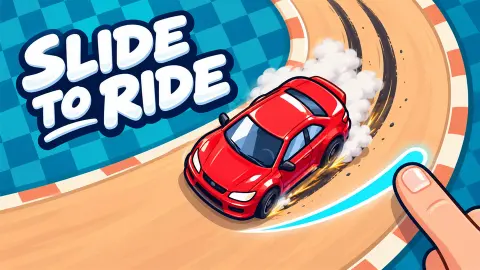
Most driving games give you a throttle and a wheel. Slide To Ride gives you neither. The car is already moving, and the only thing you control is where the mouse pointer sits: the car turns toward it and drives. Put the pointer on the chequered flag and the car goes to the flag. Put it somewhere silly and the car goes there too, as we found out.
That makes it a time trial in the strictest sense. Each track is a flat, salmon-coloured road seen from above, with a start, a finish and a clock. The clock runs from a short countdown until you touch the flag, and the results card then compares your time with three targets printed right there on the screen. One star clears the track. Three stars is a "Perfect!" and the game tells you so.
Slide To Ride comes from One More Game and was published on 2 November 2026. We played it four days later, on a computer, with the mouse and the keyboard, for about ten minutes. We cleared the first track with three stars and started the second, a hairpin, without finishing it. We also spent two earlier sessions getting almost nowhere on the arrow keys, and that story is worth telling, because the game's own help bar invites you to make the same mistake.
The star times are printed on screen, and they are the whole game
Most racing games hide what counts as a good time. Slide To Ride prints it. On the results card of the first track three little badges read 1.70, 2.21 and 3.23: the times for three, two and one star.
On the second track you do not even have to finish to see them: the badges sit next to the car on the start line, reading 4.93, 5.78 and 7.70.
So you are never racing your own best. You are racing 3.23 seconds, and then 1.70. On the first track, which is a straight of a few car lengths, that means a run with no wasted motion at all. Our starless runs were a long way off, because every one of them had the car wandering before it found the flag, and the card said the same thing each time: "Try a faster run" and "Earn at least one star to clear this track."
The star is also the key to the door. With zero stars the button on the right of the card is a yellow Next with ad. The moment we earned stars it became a plain blue Next, no ad. Retry is always free. In other words, the game does not sell you the next track; it sells you a way to skip the one you have not beaten yet.
The arrow keys are listed, but the mouse is the way
The help bar along the bottom of the first track shows four arrow keys with the word Steer next to them. We leaned on it for most of two earlier sessions, and in both the car spent long stretches scraping along the bottom wall, leaving skid marks. The first session did close the track, at 6:05 and then 1:09, without a star either time; the second had the clock at 8:32 without ever reaching the flag.
Then we did what the publisher's one line of instructions says: move the cursor. During the countdown, with the clock still at zero, we clicked once on the chequered flag at the right end of the track. The pointer moved there, the car followed, and the run ended at 1.69 seconds with three stars and a New best badge. Two sessions of keys against one click.
The lesson for a computer is simple: no accelerator key is listed, the car is already heading somewhere, and your job is to pick the somewhere. The publisher's instructions give the mouse button, or Space, as the handbrake; we did not test it properly, and holding it on the straight is not what you want.
The drift bonus, the hairpin, and what the yellow bar means
The results card lists two numbers: Race time and Drift bonus. The bonus is a negative figure in blue, and it comes off your time. On the straight first track ours never got past -0.01, which tells you where it is not earned. The second track tells you where it is: a message pops up over the road reading "Swing the cursor hard into a corner to slide."
That second track is a hairpin. You start on a straight heading right, turn 180 degrees at the far end and come back along a parallel straight to the flag at the top left. The corner keeps your skid marks, so after a few attempts the asphalt shows exactly where you went wide. We reached 1:06 on the clock without crossing the line, and we did not finish it. The star targets of under eight seconds suggest the drift is not optional there.
The thin yellow bar under the level name is the other thing worth reading right. It is not a timer. It was almost empty with the car still near the start line nearly four minutes into a run, full when the car sat on the flag, and on the hairpin it was half full at the far corner. It measures how much road is left. There is no time limit at all: a run of 3:58 still produced a results card, just one with no stars on it.
Ads, the Lambini, and what we did not see
Besides Next with ad, the results card showed a second car, a yellow Lambini, with three small bars under icons of a speedometer, a lightning bolt and a steering wheel, and an Unlock with ad button. We did not press it, and we saw no coins on the two tracks we drove. The publisher says there are 40 tracks, coins along them and cars to unlock with those coins; that is their description, not something we reached. The card also has a grid button and a trophy button that we did not open.
A small grey tag, Click to keep playing, appeared over the road once, at the start of the second track. Click the game and carry on.
Slide To Ride suits anyone who likes a target they can see. The rules fit in one sentence, a run on the early tracks lasts seconds, and the game tells you to the hundredth how far off you are. Younger players will understand the pointer at once; the hard part is the restraint of leaving it still. We played on a computer only, so we cannot say how dragging a finger compares on a phone, and we did not open the settings, the level grid or the main menu.
More driving games
If the slide is the part you like, Drifting Car Master is built around holding one, in 3D and for score rather than time. Parking Boom also rates every attempt out of three stars, with a fling instead of a pointer. Bouncy Motors has the same chequered flag at the end of each level and a car that is far less obedient on the way there. For a race against the clock with gears to shift, there is Drag Racing Club. More are in our driving games.
Screenshots
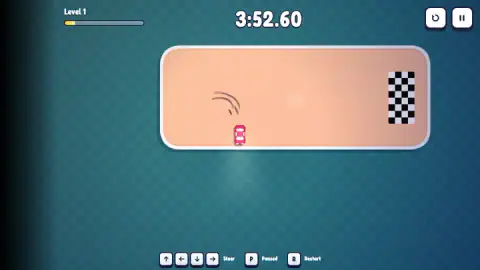
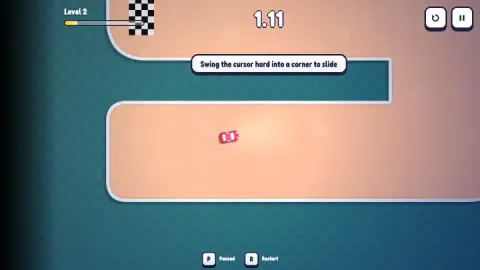
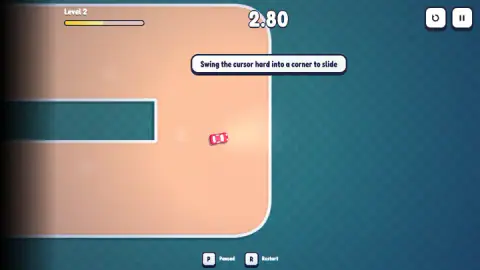
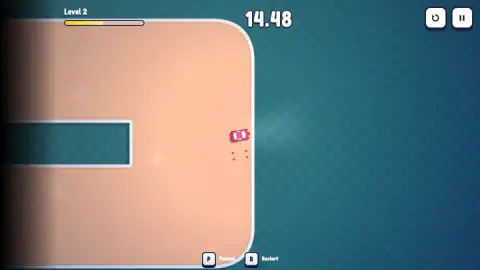
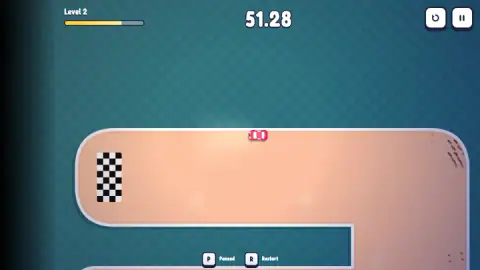
Taken by opening the game ourselves and letting it run — not supplied by the publisher, and not the same picture every other site shows.
How to play Slide To Ride
- The track appears with the car at the start and a large "1" counting down. On the second track you click once to start, then the count runs.
- Move the mouse. The car drives itself toward the pointer, so steering is deciding where the pointer sits.
- Follow the faint arrows printed on the road. They show the way round, which matters once the road bends.
- Touch the chequered flag. The clock stops, confetti falls, and the results card compares your time with the three star targets.
- Press Retry on the card, or R at any time, to run it again. P opens the pause menu.
Tips from our runs
- On the first track, put the pointer on the flag before the countdown ends and leave it there. That one move gave us 1.69 seconds and three stars.
- On a bend, keep the pointer a little ahead of the car along the road, not on the flag. On the hairpin the flag sits on the other straight, across the gap, so the straight line to it leaves the road.
- Read the star targets before you move. The second track shows them beside the car on the start line.
- Do not touch the yellow Next with ad button after a starless run. Press Retry, get a star, and the free Next appears.
Controls
| Mouse (move the cursor) | Steers the car; it drives itself toward wherever the pointer is, with no accelerator key |
|---|---|
| Hold the mouse button, or Space | Handbrake, for sliding through corners (the publisher's instruction; we did not test it properly) |
| Arrow keys | Listed under "Steer" in the help bar, but two earlier sessions spent mostly on the keys produced only starless finishes of over a minute, and one run that never ended |
| P, or the pause button at the top right | Pause menu with Resume, Restart, Levels, Settings and Main menu |
| R | Restart the current track at once |
| Arrow keys / Enter / Esc | Move between buttons, confirm and go back on the results and pause cards |
Features
- Top-down time trials: one car, one track, a clock that starts on the countdown and stops on the chequered flag
- Star times printed on screen for each track: 1.70, 2.21 and 3.23 seconds on the first straight, and under eight seconds on the second
- A results card with race time, a drift bonus that comes off your time, your best, and a Next button that is free only once you own a star
- A yellow bar under the level name that shows how much track is left, not how much time
- Tracks that keep your skid marks, with faint arrows on the road showing the way round
- A pause menu on P, a restart on R, and keyboard navigation of the results and pause cards
Game details
- Developer
- One More Game
- Release date
- November 2026
- Added here
- November 2026
- Technology
- HTML5 (2D)
- Platforms
- Browser (desktop), Browser (mobile & tablet, touch)
- Saved progress
- Saving, when available, is managed by this game. Mava cannot confirm your level.
FAQ
How do you play Slide To Ride?
On a computer you steer with the mouse: the car drives itself toward wherever the pointer is, and no accelerator key is listed. Put the cursor where you want the car to go and it goes. The clock starts after a short countdown and stops when you touch the chequered flag. The publisher lists the mouse button or Space as a handbrake for corners; we did not test it.
What times do you need for three stars in Slide To Ride?
The game prints them on screen. On the first track you need 3.23 seconds for one star, 2.21 for two and 1.70 for three. On the second track the targets sit beside the car on the start line, and the three-star time there is under five seconds. The first track is a short straight, so a clean run from the start line clears it with three stars.
Why does Slide To Ride only let me go to the next level with an ad?
Because you finished without a star. The results card says you must earn at least one star to clear a track, and until you do the Next button is a yellow Next with ad. Beat the one-star time and it turns into a plain blue Next with no ad. Until then, Retry is the free way forward.
Do the arrow keys work in Slide To Ride?
The help bar lists them under Steer, but we would not rely on them. In two earlier sessions spent mostly on the keys, the first finish took over six minutes and earned no star, and the next session never finished at all, with the car scraping along the bottom wall. One short click of the mouse on the flag finished the same track in 1.69 seconds.
What is the drift bonus in Slide To Ride?
A negative number on the results card that comes off your race time. It is earned by sliding through corners, which the game explains on the second track with the message Swing the cursor hard into a corner to slide. On the first track, which is a straight, ours never got past -0.01 seconds.
What does the yellow bar at the top left of Slide To Ride mean?
How much of the track you have covered. It sits under the level name, is nearly empty at the start and fills as you drive, reaching the end as you touch the flag. It is not a timer: there is no time limit, and a run of almost four minutes still finished, just without a star.
How many tracks does Slide To Ride have?
The publisher says 40, with coins to collect and cars to unlock. We played two: a straight and a hairpin. We did not see any coins on either, and the only other car we saw was a Lambini on the results card, offered behind an ad.
Who made Slide To Ride?
The game is credited to One More Game. It was published on 2 November 2026. We found no other page about the game.