





About Scale the wheels
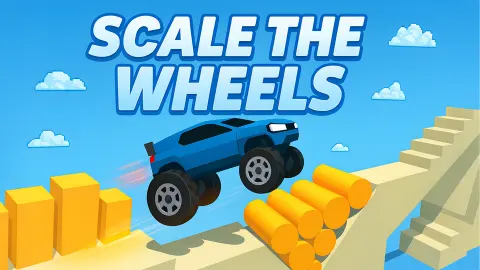
Driving games usually hand you the pedals and keep the car as it is. Scale the wheels does it the other way round. The car drives itself, and what you get to change is the car: one slider, and all four wheels grow or shrink as you drag it.
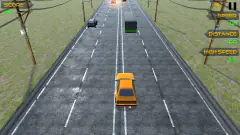
That single slider is the whole game. A step in the track is too tall for small wheels. A slab hanging over the track is too low for large ones. The orange sports car keeps rolling towards both, and it will not wait while you decide.
The game is credited to Eva Games. It was published in November 2025.
We played about four minutes on a desktop with a mouse. We finished level 1, started level 2 and ended the session stuck under a beam. This page covers what we saw in that time and says where it stops.
The signs are painted on the track
The game does not explain itself with text. It paints the answer on the scenery.
Just after the start of level 1 the track rises in a step. On the wall below it there is a small wheel, a yellow arrow and a large wheel. Grow them. The car on large wheels stands tall, like a monster truck, and rolls over the step.
A little further on, a long rounded slab hangs over the track, with not much air beneath it. The sign there is the same drawing reversed: a large wheel, an arrow, a small wheel. Shrink them, and the car goes under with its roof clear.
Those were the two kinds of obstacle in what we played, something to climb and something to duck. The interest is in how close together they come. You cannot pick a size and leave it.
What getting stuck looks like
Nothing breaks and nothing ends. We arrived at the first slab on large wheels, and the car simply stopped with its nose against it. No sign came up, no life was lost, no timer appeared. It sat there.
We sat there with it for close to a minute, moving the slider a little each way. Then we dragged it to the far left. The wheels shrank to almost nothing and the car drove under the slab and away.
So the cost of a wrong size, as far as we saw, is time and nothing else. There is a round restart arrow at the top right during a level for the cases where time does not fix it. We did not press it.
Under the slider sit two small dials, a red one at the left end and a green one at the right end. We did not work out what they measure, and we would rather say so than guess.
Tyres are the money, and the Boost is where they go
Before each level there is a short stop: the level number, a card marked Boost and the Play button. At the top right a counter sits next to a tyre.
Before level 1 the counter read 0 and the Boost card said Free. After we finished level 1 it read 15. On the level 2 screen the Boost was at level 1 and its price was 10 tyres, so one finished level had more than paid for it.
We pressed Play without buying it. What the Boost does to the car, and how its price moves after the first purchase, are things we did not see. The same goes for the yellow button with a car on it under the counter, and for the gear at the top left.
Level 2, and where we stopped
Level 2 opens on a downhill stretch. A long beam slopes down over the track until there is very little room between the two.
We had the slider fully right. The car, on its largest wheels, drove under the beam until its roof met it and stayed there. Our session ended at that point, about half a minute later, with the car still wedged.
Going by level 1, small wheels are the answer. We did not get to prove it. We also cannot tell you how many levels there are, whether later ones add anything beyond steps and beams, or what happens if the car leaves the track.
Who it is for
Players who like one idea used cleanly. There is nothing to learn after the slider, and a level is short: the whole of level 1, including our minute against the slab, took under a minute and a half.
It is not a racing game. There are no rivals, no steering and no clock in what we saw. If you want to hold the throttle yourself, this will feel like watching.
More driving games where the car has to fit the road
Shape Transform Race works on the same thought with two buttons instead of a slider: you switch between a runner and a car to suit the road or the stairs ahead. Hill Climber gives you the pedals back, with a red off-roader, farm hills and a fuel tank that empties. Shape Transform adds a third form, so the choice is between runner, bike and SUV. For ramps at speed there is GT Cars Mega Ramps. The rest are in the driving games category.
Screenshots
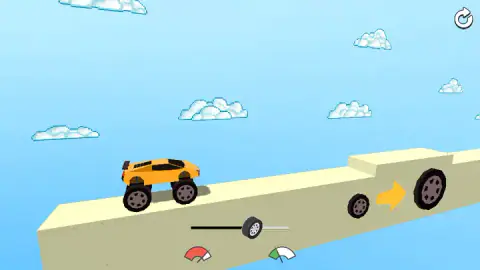
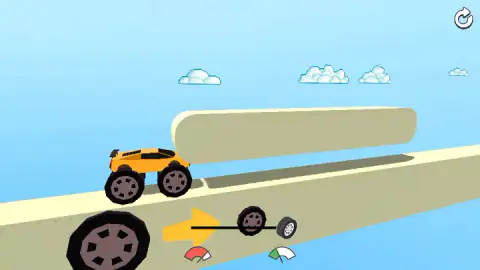
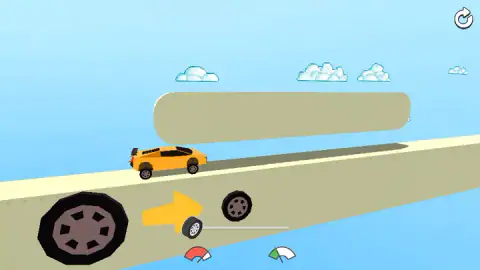
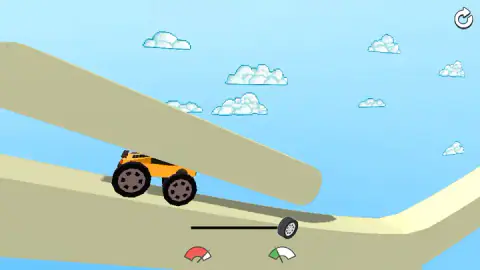
Taken by opening the game ourselves and letting it run — not supplied by the publisher, and not the same picture every other site shows.
How to play Scale the wheels
- Press the green Play button on the screen that shows the level number.
- Find the slider at the bottom of the screen. Its handle is a small tyre. A hand points at it the first time.
- Drag the handle right to grow the wheels and left to shrink them. The car changes at once, while it drives.
- Read the wheels painted on the side of the track ahead, and set the size they show before the car arrives.
- Keep doing that until the track ends. The next level's screen comes up with your tyre count at the top right.
Tips from our session:
- The far left is lower than you think. With the slider fully left the wheels almost vanish under the body, and that was what it took to clear the first slab. Halfway was not enough.
- If the car has stopped, the wheels are wrong. We lost close to a minute against one obstacle because we kept nudging the slider instead of sending it to the other end.
- Look at the sign, not the car. Each painted pair of wheels sits right beside the obstacle it is about. By the time the car is touching the obstacle you are late.
- Large wheels are not a safe default. We went into level 2 on the largest setting and jammed under the first thing that hung over the road.
Controls
| Drag the slider left | Shrinks the wheels; at the far left the car sits low enough to pass under a hanging slab |
|---|---|
| Drag the slider right | Grows the wheels until the car stands on them like a monster truck |
| Round arrow (top right) | Shown during a level as the restart button; not pressed in our session |
| Play (green button) | Starts the level from the screen that shows its number |
| Arrow keys | Pressed once each; we could not tell that they did anything |
Features
- One control for the whole game, a slider that sets the size of all four wheels at once
- A car that drives forward on its own, with no accelerator and no steering
- Signs painted on the track that show which wheel size the next obstacle wants
- Obstacles of two kinds in what we played, steps to climb and beams to duck under
- A tyre counter that went from 0 to 15 when we finished level 1
- A Boost upgrade offered before each level, free the first time and 10 tyres on level 2
Game details
- Developer
- Eva Games
- Release date
- November 2025
- Last updated
- August 10, 2026
- Added here
- September 2025
- Technology
- HTML5 (3D)
- Platforms
- Browser (desktop, mouse), Browser (mobile & tablet)
- Saved progress
- Saving, when available, is managed by this game. Mava cannot confirm your level.
FAQ
How do you play Scale the wheels?
The car drives forward by itself along a track in the sky. You drag one slider at the bottom of the screen, left for small wheels and right for large ones, so the car fits whatever comes next. Large wheels lift it over a step and small wheels drop it low enough to pass under a beam. Reach the end of the track and the next level opens.
What are the controls in Scale the wheels?
One slider, dragged with the mouse. Its handle is a small tyre, and all four wheels of the car change size as you move it. There is no accelerator, no brake and no steering in what we played. A round arrow at the top right is there to restart the level.
What do the wheels painted on the track mean?
They are the hint for the obstacle next to them. A small wheel, an arrow and a large wheel means grow the wheels, and we saw it beside a raised step. A large wheel, an arrow and a small wheel means shrink them, and we saw it beside a slab hanging low over the track.
What do you do when the car gets stuck in Scale the wheels?
Move the slider the other way, and move it all the way. On level 1 we sat against a low slab for close to a minute on large wheels, and the car went under as soon as we dragged the slider to the far left. There is also a restart arrow at the top right, which we did not use.
What is the Boost in Scale the wheels?
It is an upgrade offered on the screen before each level, above the Play button. On level 1 it was marked Free, and on level 2 it was at level 1 with a price of 10 tyres. Finishing level 1 had paid us 15. We did not buy it, so we cannot say what it changes in the car.
How many levels does Scale the wheels have?
We cannot say. We finished level 1 and were stopped under a sloping beam on level 2 when our session ended. No screen we saw gave a total.
Can you play Scale the wheels on a phone?
It is listed for PC, Android and iOS, in landscape or portrait. We played in a landscape window on a desktop with a mouse. The only control is a slider on the screen, but we did not try it on a phone ourselves.
Who made Scale the wheels?
The game is credited to Eva Games. It was published in November 2025 and last updated in August 2026.