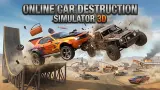




About Online Car Destruction Simulator 3D
Most driving games teach you one key for going and one for stopping, and leave it there. Online Car Destruction Simulator 3D prints its key list on the menu before you have chosen a map, and three of the eight lines we could read have nothing to do with driving. One slows time down. One restores the car. One hands you the next car. The game is telling you how the drive is going to end.
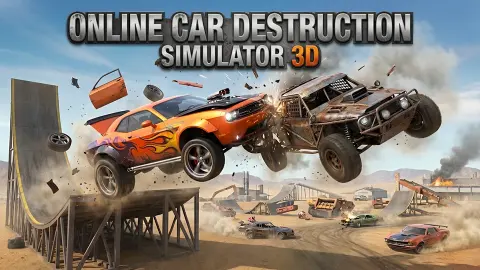
It is a crash sandbox: a 3D map, a car, and no instruction beyond the keys. Nobody sets a lap time and nothing counts your points. You drive at something, see what it does to the car, put the car right and try something else.
We have to be straight about how far we got. We spent about four minutes with the game and a little over a minute and a half of that on the map itself. In that time we did not get far from the starting point and we did not crash at speed. So this page tells you what the menu offers, what the screen shows while you drive, and what the starting point looks like. It does not tell you what a wreck looks like, because we did not make one.
The game's listing credits Streff. The game has been there since December 2025.
There are two games with this exact name, and this is the one with the oasis
Two studios have published a browser game called Online Car Destruction Simulator 3D, and both are on this site. They are different games, and you can tell them apart in five seconds on the map menu.
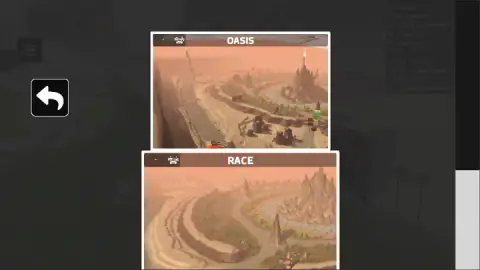
This one, by Streff, shows desert maps: OASIS, a sandy basin with rock spires and a river bend, and RACE, a desert track. Its screen has a counter beside a question mark in the top right corner.
The other Online Car Destruction Simulator 3D is by KreizLand. Its maps are WINTER, NATURE and FOREST, and its pause menu has a gravity slider. If you came looking for the gravity slider, that is the page you want.
The two games do share an idea, and most of a key list. Both let you slow time, change car and repair the car. That is the grammar of this whole kind of game: the crash is the event, and everything else is a tool for setting it up or looking at it afterwards.
What the screen shows while you drive
Every capture of our drive is from inside the cab. A thick pillar frames the left side of the windscreen. Below it there is a steering wheel and a dashboard with four dials, and their red needles move. Past the glass you see a white bonnet and two wipers.
Over that, the game draws its own readouts. Top left, a pause button marked TAB and a second round button with a double arrow pointing down, which we did not press. Top right, a larger dial: a number in a circle, which we take for the gear, and the speed under it in km/h.
Under that dial a small box appeared once we were moving. It showed a number, a white square and 1.0X. The game has a key for slowing time, so 1.0X may well be the speed of time, but we did not see it change and will not swear to it.
On the right edge there is a small F over a double arrow pointing up. It stayed on screen throughout. The key list has no line for F and we did not find out what it does.
The counter with a question mark loses one every second
The most visible number on the screen is the one the game explains least. In the top right corner, next to a white question mark, a counter was already running when our drive began.
It read 149 in our first capture and 49 in our last, taken a hundred seconds later. The captures in between sit on the same line: 142, 125, 99, 74. That is one unit a second, and it kept the same pace when the car was parked with the speed at zero.
So it is a clock and not a score, and nothing you do behind the wheel changes it. What it is counting down to, we cannot tell you. We stopped with 49 still showing.
The first thing on the map is a recycling poster
The spot where we started is a flat piece of grey ground under a tall rock wall, with banks of sand to the left. To the right stands a red-brick house with a green roof and bars on the windows. Between the two, two metal poles are held up by stays.
And straight ahead there is a billboard. It carries a drawing, in the style of a school poster: a road, an orange bin with the recycling symbol on it, and a blue and a yellow figure with faces. Across the top, in red hand lettering, it says «ДОВЕЗИ ДО КОНТЕЙНЕРА». That is Russian for "take it to the container".
It is an odd welcome for a game about wrecking cars. It is also the nearest solid thing to the start, and we spent most of our drive nosing up to it and backing away again.
What we did not see
A crash. We never hit anything at speed, so we saw no damage and no part come off the car. The game's description promises both, along with ramps and presses, and we cannot vouch for any of it.
We did not open RACE. We met no other car and no other player. We did not find a screen for painting or tuning the car. We did not see slow motion, a second car or a repair, though the key list names all three. And we did not try a phone.
Who it is for
Players who like to be handed a car and left alone. If you want a race with a podium, or a level to clear, the part of this game we played has neither.
It also asks for some patience at the start. The cab view is narrow and the map gives no hint of where the interesting things are, so the first minutes go on finding your way.
More cars to wreck
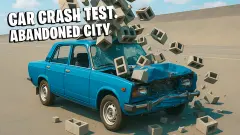
Car Crash Test: Abandoned City carries the same Streff name and swaps the desert for an empty city of concrete blocks. Car Smash Simulator: Crash & Tune is a crash sandbox with stars to find on its map, and Break The Car Completely turns the same idea into runs with a payout at the end. The rest are under driving games.
Screenshots
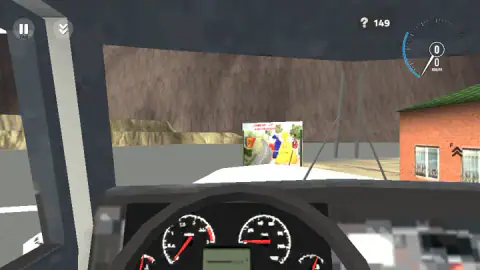
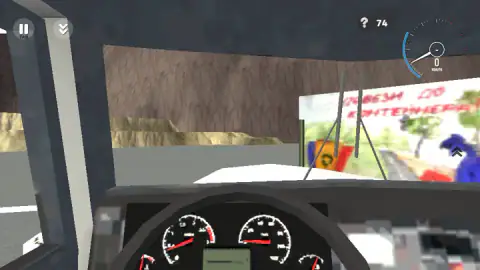
Taken by opening the game ourselves and letting it run — not supplied by the publisher, and not the same picture every other site shows.
How to play Online Car Destruction Simulator 3D
- On the map menu, pick a card. We saw OASIS and RACE; clicking OASIS brought up a second card called SANDBOX, and clicking that put us on the map.
- Hold W to pull away and S to back up. A and D steer.
- Find something solid and drive at it. The game's key list gives you Shift for nitro and Space for the handbrake.
- When the car is finished, K restores it and N gives you the next one, according to the same list.
What our short drive taught us:
- Read the key list before you start. It sits in the top right corner of the menu, and we did not see it again once the drive began.
- Short taps get you nowhere. We held W for a second and a half at a time and the best figure we saw was 28 km/h. A car needs a long run before it hits anything hard enough to matter.
- Watch the circle in the dial. It showed −1 when we backed up at 8 km/h and 0 or 1 the rest of the time, so we take it for the gear. If you are pressing W and the circle still shows −1, you are still rolling backwards.
- A wall right in front of you fills the screen. One of our captures is nothing but grey blocks from edge to edge. Back away further than you think you need to before you turn.
- The menu scrolls. RACE is cut off by the bottom of the window and there is a grey scroll bar on the right. We did not scroll it, so there may be more maps below.
Controls
| W / S | Drive forwards and backwards; we reached 28 km/h forwards and saw -1 in the dial while reversing |
|---|---|
| A / D | Steer, according to the "Move - WASD" line of the key list on the menu |
| Space / Shift | Handbrake and nitro, as the game's key list names them |
| C | Change camera, per the key list; every capture of our drive is from inside the cab |
| B | Time slowdown, per the key list |
| N / K | Next car and restore car, per the key list |
| Tab | Pause; the pause button in the top left corner is labelled TAB as well |
Features
- A 3D crash sandbox with a map menu that shows OASIS and RACE, and a SANDBOX card behind OASIS
- A view from inside the cab with a steering wheel, four dials with moving needles, a bonnet and two wipers
- A key list on the menu with eight lines, three of them for what happens around a crash
- A dial with the speed in km/h and a circle that read -1 while we reversed
- A counter beside a question mark that drops by one every second while you drive
- A hand-drawn recycling poster in Russian on a billboard near the start
- No timer to beat, no score and no finish line in the part we played
Game details
- Developer
- Streff
- Release date
- December 2025
- Added here
- October 2025
- Technology
- HTML5
- Platforms
- Browser (desktop)
- Classification
- 3D , Driving , Multiplayer , Simulation
- Saved progress
- Saving, when available, is managed by this game. Mava cannot confirm your level.
FAQ
What is Online Car Destruction Simulator 3D?
It is a free 3D driving sandbox by Streff, listed since December 2025. You pick a map, drive a car around it and crash it on purpose. In the part we played there was no race, no score and no finish line, only the car, the map and a list of keys.
How do you play Online Car Destruction Simulator 3D?
Choose a map from the menu, then drive with W, A, S and D. The game's own key list adds Space for the handbrake, Shift for nitro, C to change camera, B to slow time down, N for the next car and K to restore the car. Tab pauses.
Why are there two games called Online Car Destruction Simulator 3D?
Two different studios used the same name. This page is about the one by Streff, with the OASIS and RACE maps and a counter beside a question mark. The other is by KreizLand, has WINTER, NATURE and FOREST maps and a gravity slider in its pause menu, and has its own page on this site.
What is the number next to the question mark?
It is a countdown. In our drive it fell by one each second, from 149 to 49 across a hundred seconds, whether the car was moving or parked. We stopped before it reached zero, so we cannot say what happens there.
Can you repair the car in Online Car Destruction Simulator 3D?
The key list on the menu has a line for it, "K - restore car", next to "N - next car". We never damaged the car, so we did not see the repair happen. Both keys are there because the game expects the car to end up wrecked.
Is Online Car Destruction Simulator 3D multiplayer?
The name says online, and each map card carries a small car icon with a dash beside it. We saw no other car and no other player in our drive, so we cannot confirm how the online part works or whether it was active.
Can you play Online Car Destruction Simulator 3D on a phone?
It is listed for PC, Android and iOS. We played on a desktop with a keyboard only, and every control we can describe is a key. The phone is the listing's word and not ours.
Who made Online Car Destruction Simulator 3D?
The game's listing credits Streff, the name that is also on Car Crash Test Abandoned City. It was published in December 2025.