
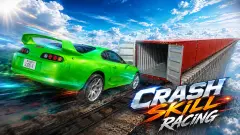


About Realistic Car Crash King
A crash laboratory gets one run per car. Engineers spend weeks preparing it, the car hits the barrier once, and it is scrap. Realistic Car Crash King removes that cost with a single key. The legend in the corner of the screen reads F - FIX CAR, and it means exactly that.
That key is what makes this a toy and not a test. You choose a map, point a red coupe at something large, and see what is left of it afterwards. Then you undo the damage and choose something larger. Nothing we saw keeps score, sets a time or marks a finish line.
The game is by MK-Play. This one was published in May 2026.
We should be plain about how much of it we saw. We played for about four minutes, on one map, in one car, and spent nearly all of it on the accelerator. We did not reach most of what was standing on the horizon. What follows describes that short drive and marks what we only read on screen or in the game's own instructions.
What is on screen while you drive
The view is clean. Bottom centre is the dial. Bottom left is a short legend with four entries: fix car, next car, pause and jump. Top right is the pause button, which is also on Tab.
Top left are two buttons the legend does not explain. One shows a small drone. The other shows an hourglass, is marked B and has a 1 beneath it. We did not press either, so we will not guess at them here.
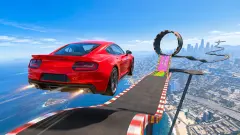
The map we drove begins on a wide pad with a blue-grey chequered floor and orange kerbs. A white car with blue markings was parked a long way ahead of us. We never reached it. Past the pad the ground turns to grass, and the big pieces start: an orange loop, a dark block built like a staircase, striped black-and-yellow posts, and two dark tracks that arch overhead and come down into orange quarter-pipes. Rows of yellow objects stood further off. We cannot tell you what they do.
A real crash test happens at 64 km/h, and only once
The game's name borrows from a real trade, and the comparison is worth a minute.
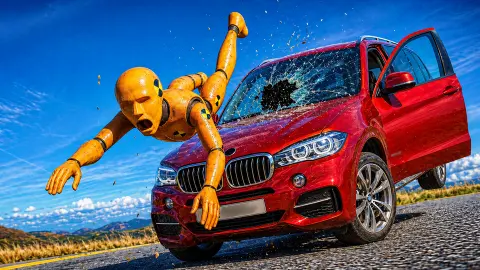
One of the best-known real tests is the moderate overlap frontal test, which the Insurance Institute for Highway Safety in the United States has run since 1995. The car is driven at 40 mph, which is 64 km/h, into a barrier that gives way on impact. Only 40 per cent of the car's front meets it, because most head-on crashes are not square.
The barrier is soft for a reason. Its face is an aluminium honeycomb that crumples the way another car's nose would. Latin NCAP, which runs the same test, describes it as standing in for two cars of similar weight that meet at about 55 km/h each.
Now set that beside the game. Our dial read 157 on the ramp. The game does not label the unit, but if it is kilometres per hour, that is roughly two and a half times the laboratory speed. Crash energy grows with the square of speed, so it is about six times the energy that a real test is built to measure.
That gap tells you what kind of game this is. A laboratory wants to know whether the people inside would walk away, so it picks a speed at which that is still an open question. This game wants to know how a car comes apart, so it hands you ramps and lets you choose your own number. And where the laboratory writes off the car, you press F.
Ad breaks come often
This is the part to know before you start. In about four minutes we were stopped by an ad break four times. Each one froze the drive until we clicked to carry on. In a game about building up speed, that is a real cost. Short runs suit it better than long ones.
What we cannot vouch for
We did not enter the second map or scroll the map list, so we do not know how many there are. We drove one car and never pressed N for the next. We did not try the jump on T, the hourglass on B, the handbrake, the reset or the camera change. We did not drive a loop or either of the arched tracks, and we never reached the parked car.
We also have no picture of an impact itself. The smoke, the open bonnet and the pale lights are what we saw afterwards. We did not test a phone.
Who it suits
Players who want a car, a field of ramps and no instructions. There is nothing to read and nothing to unlock in what we saw, which makes it easy to hand to a child and easy to drop after ten minutes. If you want races, opponents or a campaign, this is not that game.
More crash sandboxes to try
From the same studio, Crash Test Simulator 3d is another take on driving cars until parts come off. Online Car Destruction Simulator 3D adds a gravity slider in its pause menu, and Beam Drive Car Crash Test Simulator gives you a full dashboard with a clutch. Car Crash Test: Abandoned City swaps the ramps for an empty city of concrete blocks, and Car Smash Simulator: Crash & Tune hides stars around its map for you to find. The rest are under driving games.
Screenshots
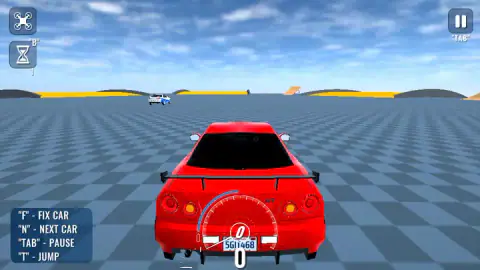
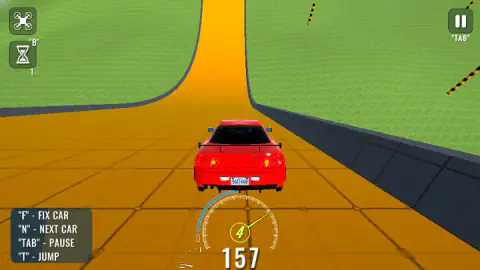
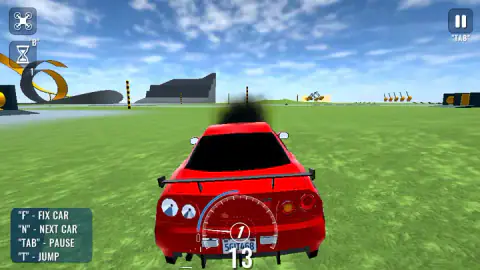
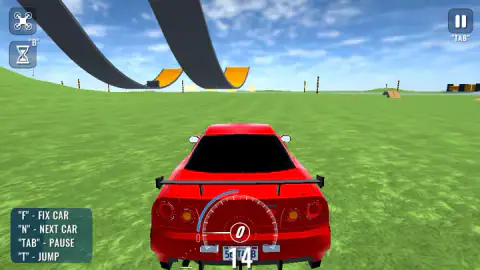
Taken by opening the game ourselves and letting it run — not supplied by the publisher, and not the same picture every other site shows.
How to play Realistic Car Crash King
- Start the game from the opening screen. It leads to a screen titled SELECT A MAP, with a picture and a Play button for each map.
- Pick a map. The car appears at rest, seen from behind, with a dial at the bottom of the screen.
- Hold W to accelerate. The game's instructions give A and D to steer and S to brake.
- Aim at a ramp, a loop or anything solid. The dial shows your gear in its centre and your speed underneath.
- When the car is too broken to be fun, press F to fix it and go again.
What our four minutes taught us:
- The orange ramp is the quick way to real speed. The car starts from rest on a flat pad. On the banked orange track beyond it, the speedometer read 157 in fourth gear.
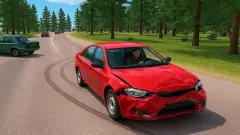
- Damage shows before the car stops. Black smoke came off ours while it was still rolling at 13, in first gear. Smoke is the cue to look for somewhere to stop and repair.
- Look at the tail lights. Once the car was damaged, the left pair had gone from red to pale grey, and the bonnet was standing straight up in front of the windscreen. Both are visible from the default camera.
- Fix in place. After we pressed F the bonnet was shut and the lights were red again, and the car had not moved from its patch of grass.
- Keep the game in focus. At one point a small label reading "Click to keep playing" appeared at the top of the screen. If the keys seem dead, look for it.
Controls
| W | Accelerate; the only driving key we used at length |
|---|---|
| A / S / D | Steer and brake or reverse, according to the game's instructions; we did not test them one by one |
| F | FIX CAR, as the on-screen legend says; after we pressed it the bonnet was shut and the lights were whole again |
| N | NEXT CAR, per the on-screen legend; not tried |
| T | JUMP, per the on-screen legend; not tried |
| Tab, or the button in the top right corner | Pause |
| B, or the hourglass button | Marked on screen with a 1 beneath it; we did not press it |
| Space / R / C | Handbrake, reset car and change camera, according to the game's instructions; not tried |
Features
- A map menu before every session; two map cards were on screen for us and the second ran off the right edge
- A start pad with a chequered floor that opens onto grass, an orange banked ramp, loops and arched tracks
- A dial that shows the gear in its centre and the speed below it; ours read 157 in fourth gear on the ramp
- Damage you can see from the driver's view, with black smoke, a bonnet that flips open and tail lights that go pale
- A repair key that puts the car back together without leaving the map
- No score, timer or finish line in anything we saw
- Made by MK-Play
Game details
- Developer
- MK-Play
- Release date
- May 2026
- Last updated
- August 10, 2026
- Added here
- March 2026
- Technology
- HTML5 (WebGL, 3D)
- Platforms
- Browser (desktop, keyboard), Browser (mobile & tablet)
- Classification
- Driving
- Saved progress
- Saving, when available, is managed by this game. Mava cannot confirm your level.
FAQ
How do you play Realistic Car Crash King?
Start the game, choose a map on the SELECT A MAP screen and drive. W accelerates, and the game's instructions give A, S and D for steering and braking. There is no score or finish line in what we saw: you pick a ramp, a loop or an obstacle, hit it, and press F to fix the car when it stops being drivable.
What are the controls in Realistic Car Crash King?
The legend on screen lists F to fix the car, N for the next car, Tab to pause and T to jump, and an hourglass button is marked B. The game's instructions add WASD to drive, Space for the handbrake, R to reset the car and C to change the camera. We drove with W and used F and pause; the rest we did not test.
Who made Realistic Car Crash King?
It is by MK-Play. The game's listing gives its release as May 2026 and its last update as August 2026.
How do you repair the car in Realistic Car Crash King?
Press F. In our run the car had black smoke coming off it, the bonnet was standing open and the left tail lights had gone pale. After we pressed F the bonnet was shut and every light was red again, and the car stayed where it was on the map.
How many maps and cars does Realistic Car Crash King have?
We cannot give totals. The map screen showed two cards for us, with the second cut off by the edge of the screen, and we did not scroll to see whether more follow. We drove one red coupe the whole time and never pressed N, the key the game labels NEXT CAR.
Is Realistic Car Crash King free, and does it have ads?
It is free in the browser with no download and no account. Ad breaks are frequent: we counted four in about four minutes, each one stopping the car until we clicked to continue.
Can you play Realistic Car Crash King on a phone?
It is listed for PC, Android and iOS in landscape, and the game's instructions say phones use on-screen buttons. We played on a computer with a keyboard and did not test a phone ourselves.