



About A Deadly Car Crash
The game is called A Deadly Car Crash. The thing that very nearly ended our run was a rock face, taken at walking pace, with the speedometer reading zero for the next half minute.
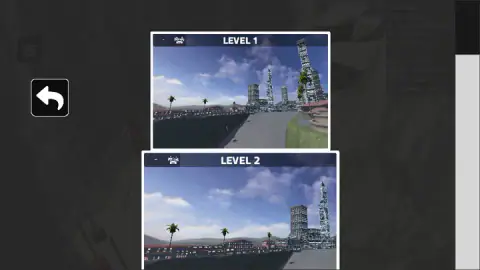
What loads is not what the name suggests either. There is a black PLAY button, and behind it a printed list of eight controls. Then a level select with exactly two cards, LEVEL 1 and LEVEL 2, both showing the same seaside city of glass towers and palm trees under a flat blue sky. Seven of those eight control lines are about what you do when driving stops going well: a handbrake, nitro, a camera change, a key that swaps your car, a key that restores it and a key that slows time down.
Pick a level and the camera is already inside the car. You get a steering wheel, a dashboard and the left wing mirror, a countdown reading 3 out in the world, and a framed button that says START THE RACE. A stopwatch starts in the top-left corner and runs in hundredths. Next to it, a chequered flag reads 1/2: two laps. The city drops away behind you and the road turns into a pass cut between rock faces, with water on one side and green slopes on the other.
The game is credited to Streff. It has been available since February 2026. We drove for about four minutes, never finished the first lap of two, and spent a good chunk of that time stationary.
A descent is a braking problem, and this one hands you the right tools
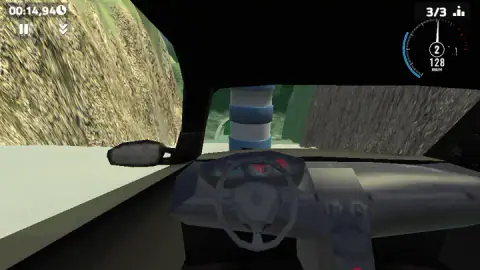
Look at what the menu offers before you have turned a wheel: a handbrake, a key that slows time down, and a dial that tells you which gear you are in. Browser racers almost never bother with the last one. Here it reads 1 while you are pulling up towards 100 km/h, 2 at 128, and a dash while you are crawling.
That set of tools belongs to a particular kind of road, and the real version of it is worth knowing. On a long descent, the thing that gets drivers into trouble is not the accelerator. Brakes work by turning speed into heat, and heat is the enemy of the friction they depend on: get them hot enough and the drums or discs expand away from the pads, the bite fades, and pressing harder gives you less. That is brake fade, and it is why lorry drivers are taught to choose a low gear at the top of a grade and let the engine hold them back on the way down, rather than riding the brakes all the way to the bottom.
When that fails, there is a last resort built into the mountain itself. A runaway truck ramp is a bed of loose gravel climbing away from the carriageway, designed to swallow a vehicle that has nothing left to stop it, and it is placed low on the grade — the point where a driver has run out of hope and is ready to take it. The busiest one in the United States sits beside westbound Interstate 70 in Colorado, at Lower Straight Creek.
There is no gravel bed in this game, and that is the consequence worth taking into the first corner. When a descent gives you no escape, speed stops being the interesting number and heat stops being the problem; the only thing that matters is arriving at each bend slow enough to turn. Brake early on the straight, let the car run free between the signs, and keep the dial honest. The rock wall does not bounce you back into the race. It keeps you.
The HUD tells you four things, and we could only read three
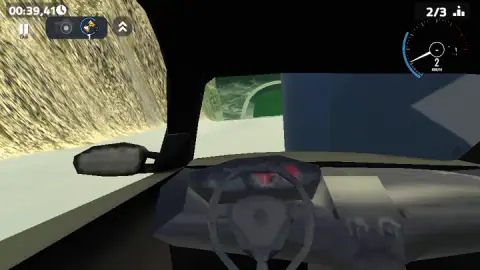
Top left: the stopwatch, in minutes, seconds and hundredths, with a small clock beside it. Under it, the touch controls that the phone layout leaves on screen even on a desktop — a pause button with TAB written underneath, a camera button, and a snail that shows how slow time currently runs, reading 1.0X at normal speed.
Top right: the dial, with the gear in a circle and the speed in large figures under it, and above that a counter next to an ascending-bars icon. At the start of the run, before the countdown, that counter read 5/10 and the lap flag read 1/2.
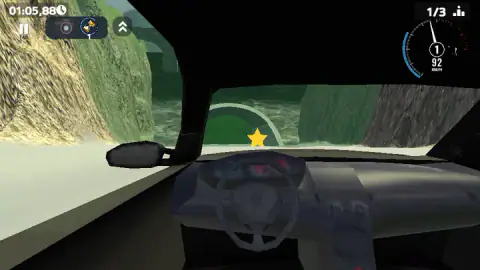
Then the counter changed scale. Fifteen seconds into the race it read 3/3. By thirty-nine seconds it was 2/3, and by a minute and six it was 1/3, where it stayed for the rest of our run. It never once went back up. Both times it dropped, we had just hit something — a striped column standing in the middle of the pass, and then the rock face. In a game named after a crash, that is a suggestive pattern, and it is as far as we are willing to take it, because nothing on screen says what the number is counting.
Sold as an open world, played as a timed lap
The game's own listing describes something broader than what we drove: an open world, crash-test areas, traffic to race against, and a car you can restyle by colour, parts and wheel placement. What we were given was a menu with two levels on it and a stopwatch.
Those two things can coexist — the spot where our run began was a city street with a START THE RACE sign planted in it, which is how a free-roam map usually launches a timed event. We cannot tell you whether the city opens up if you drive away from the sign instead of towards it, because we did not try.
What we can report is the collision we did have. A striped column, taken at 126 km/h, and the car simply lost its speed and carried on. Nothing detached, nothing rolled, no door went past the window. If this game has spectacular destruction in it, four minutes on the first level is not where it lives, and the honest headline from our session is quieter than the title: the damage model that mattered was the one that pinned us to a wall and would not let go.
More driving and more crashing
Car Smash Simulator: Crash & Tune is the sandbox this one is sold as being — a map, a car and no clock. BMG: Ragdoll Car Race takes the physics in the other direction and lets the driver fly. If what you liked here was the cockpit and the road, Driver Club: Highway Racing puts the traffic back in, and Stock Car Hero swaps the cliff for an oval and gives you upgrades to spend coins on. The rest are in driving games.
Screenshots
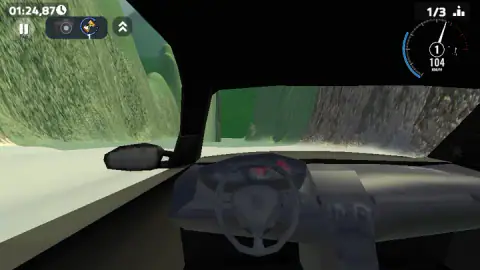
Taken by opening the game ourselves and letting it run — not supplied by the publisher, and not the same picture every other site shows.
How to play A Deadly Car Crash
- Press PLAY, then pick a card. The select screen holds two, LEVEL 1 and LEVEL 2. The arrow in the top-left corner takes you back.
- Click once more if a dark notice reads "Click to keep playing". The game pauses itself whenever the page loses focus and waits there until you click back in.
- Press START THE RACE while the countdown runs. The button sits in the middle of the windscreen and the race begins when the count reaches one.
- Drive with WASD or the arrow keys and watch the dial in the top-right corner, which carries your gear in a small circle above the speed.
- Brake before the yellow signs, not in them. A yellow plate with curved arrows is the only warning the road gives you that a bend is coming.
What four minutes on the first level taught us:
- The arrow keys work, and the menu never says so. The printed list names WASD and stops there. The up arrow took us from a standstill to 128 km/h without complaint.
- The space bar is a real brake. One press scrubbed us from 136 km/h down to 61 in about a second, which is more bite than the word handbrake usually promises.
- The rock wall on the left is the hazard, not the drop on the right. We hit it carrying speed, stopped dead, and neither forward nor reverse freed us for roughly half a minute. The clock did not pause while we sat there.
- Press C before the first bend, not during it. The cockpit view is handsome and it blinds you: the windscreen pillar and the mirror together cover a wide slice of the left-hand side, which is exactly where the rock is.
- The stars and the arches sit on the racing line. Yellow stars float at windscreen height and green arches cross the road, both placed where you would be driving anyway.
Controls
| W A S D | Drive and steer. This is the only movement control the game prints on its own menu |
|---|---|
| Arrow keys | The same job, and they work. The menu does not mention them; the up arrow is what took us from a standstill to 128 km/h |
| Space | Handbrake, and it bites. One press took us from 136 to 61 km/h in about a second |
| Shift | Nitro, according to the menu. We never had a clear enough stretch of road to see what it adds |
| C | Changes the camera. You start inside the car, where the windscreen pillar and the mirror hide a wide slice of the left side |
| N | Next car, according to the menu. We pressed it and could not tell that anything changed |
| K | Restore the car. This is the key for the moment you are wedged against a rock face, and we could not confirm it freed us |
| B | Slows time down. A snail icon in the top-left corner shows the current rate, reading 1.0X at normal speed |
| TAB | Pause. There is a matching on-screen button with TAB written under it |
Features
- A level select with exactly two cards, LEVEL 1 and LEVEL 2, both previewing the same seaside city of glass towers and palm trees
- A cockpit camera as the default view, steering wheel and wing mirror included, rather than the usual chase camera
- A stopwatch running in hundredths of a second that keeps counting while you are stopped against a wall
- A dial that carries the gear as well as the speed - a 1 at around 100 km/h, a 2 at 128, a dash while we crawled backwards
- A cliff road above the water with yellow stars floating at windscreen height and green arches crossing the track
- A handbrake rather than a brake pedal, a nitro key and a key that slows time down, all listed on the menu before you start
- It has been available since February 2026
Game details
- Developer
- Streff
- Release date
- February 2026
- Last updated
- October 17, 2026
- Added here
- December 2025
- Technology
- HTML5 (WebGL, 3D)
- Platforms
- Browser (desktop), Browser (mobile & tablet, touch)
- Saved progress
- Saving, when available, is managed by this game. Mava cannot confirm your level.
FAQ
How do you play A Deadly Car Crash?
You press PLAY, choose LEVEL 1 or LEVEL 2 from a two-card menu, then press START THE RACE when the countdown appears across the windscreen. From there you drive with WASD or the arrow keys, brake with the space bar, and follow a cliff road that runs down from a seaside city to the water. A stopwatch runs in the top-left corner from the moment the countdown ends.
How many levels does A Deadly Car Crash have?
The select screen offers two, LEVEL 1 and LEVEL 2, and both cards show a preview of the same seaside city. We only played the first one and did not finish it, so we cannot tell you how the second differs or whether more unlock behind them.
What are the controls in A Deadly Car Crash?
The menu prints eight lines - WASD to move, space for the handbrake, shift for nitro, C to change camera, N for the next car, K to restore the car, B to slow time down and TAB to pause. It does not mention the arrow keys, but they drive the car as well, which is worth knowing if your hand is already over them.
Is A Deadly Car Crash an open world game?
Not in the four minutes we played. The game's listing describes an open world with crash-test areas and traffic to race against, but what loaded for us was a level select and a single timed run with a lap counter. We cannot rule out a free-roam mode further in; we can only tell you what the game put in front of us.
Who made A Deadly Car Crash?
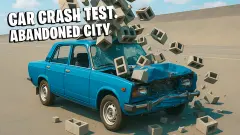
The game is credited to a developer called Streff and links to a page listing three games, all of them about car damage - Car Crash Test Abandoned City, this one, and Online Car Destruction Simulator 3D. No studio name appears anywhere on screen while you play, and we found no studio website to confirm it against.
Why does my car get stuck against the wall in A Deadly Car Crash?
Because the scenery does not shrug you off. We arrived at the left-hand rock face carrying speed and the car simply stopped, dial reading zero, and stayed there for about half a minute of our run while the clock kept going. Reversing did not free us quickly. The menu offers K to restore the car, which is the key to reach for before you waste the time we wasted.
Does A Deadly Car Crash have ads?
We were not shown one in about four minutes of play. We also never reached an end-of-run screen, which is where browser games of this kind usually place theirs, so take that as an honest gap rather than a guarantee. The screen does dim and show a notice reading "Click to keep playing" when the page loses focus, which is a pause rather than an advert.
Can you play A Deadly Car Crash on a phone?
It is listed for PC, Android and iOS in landscape, and the on-screen buttons for pause, camera and slow motion sit in the corners even on a desktop, which is a sign the layout was drawn for a touchscreen first. We played with a keyboard, so we can describe the controls but not how the car answers to a thumb.