






About Destructive Car Crash Simulator
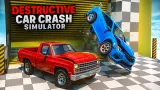
Most car crash games hand you a target and a stopwatch. Destructive Car Crash Simulator hands you a pickup truck, a field and nothing else. No clock starts, no score appears, and nobody tells you where to go. Across the grass sit checkered ramps, a yellow striped drum and a wall of warning-painted blocks, and the only question the game asks is which one you want to drive into first.
That freedom is the whole design, and it cuts both ways. If you like poking at a physics toy, you have a playground with no rules. If you need a reason to keep going, you will have to bring your own.
We played it on a desktop with a keyboard for four minutes, in one blue pickup on one map. We should be plain about what that covered. We drove, steered, got stuck and got free, but our hits were slow, and we never saw the dents and broken panels the game is built around. What we did not reach is listed near the end.
The game is credited to KreizLand. It was listed in October 2025, last updated in September 2026.
One field, three kinds of obstacle
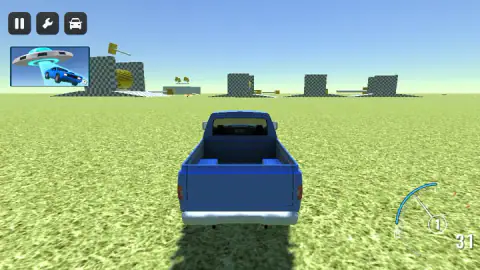
The map we played is a flat green field with the obstacles pushed out toward the edges. From behind the truck at the start, the horizon is a row of grey checkered blocks and ramps, with gaps between them wide enough to drive through.
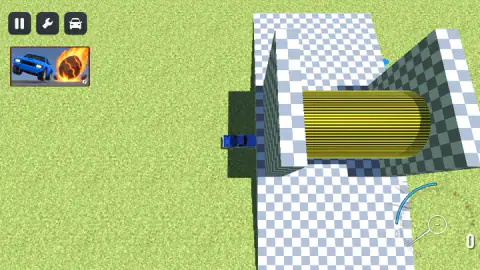
The first thing we reached was a checkered structure with a long yellow drum lying inside it, striped with thin black bands. From above it looks like a tunnel or a roller. We hit the wall next to it rather than the drum itself, which is how we ended up stuck.
Later we drove along a different edge of the field: a wall of yellow-and-black hazard blocks, each with grey rods sticking out of it. The listing mentions presses among the props, and this wall looks like the kind of thing that would push. We never saw it move.
Out on the horizon at the start there was also what looked like a giant yellow mallet on a pole. We did not get close enough to say more.
The warning stripes are the real thing
The yellow-and-black pattern on that wall is not just decoration. In real factories and warehouses it is a signal with rules behind it. In the United States, the workplace safety rules set yellow as the colour for caution and for marking physical hazards, and the list of hazards includes being "caught in between" (OSHA, 29 CFR 1910.144). That is the exact danger of a press.
Why add black? The American standard for safety colours recommends solid yellow, yellow and black stripes, or yellow and black checkers, chosen for the strongest contrast with whatever is behind them. Yellow is a very light colour, so a dark band next to it makes the edge jump out even from far away or in poor light.
The game borrows that language and gets it right. On a field where everything else is green grass and grey checks, the striped wall and the striped drum are the two things your eye goes to first. That is exactly what the colours are for in real life: telling you where not to go. Here they tell you where to aim.
What sits around the screen
The top-left corner has three buttons: pause, a wrench and a car. The listing gives keys for restoring and switching cars, and on phones it says you use the buttons on screen instead. We did not press the wrench or the car, so we cannot tell you what they open.
Under those buttons sits a small picture that changed during our session. At first it showed a flying saucer lifting a blue car. Later it showed a blue car next to a flaming boulder. We did not click it, and nothing on screen said what it was.
The dial in the bottom-right corner shows speed as a plain number, with no unit, and the gear in a small circle. It read 1 for most of our run.
Once during our session the screen dimmed and a notice said an ad had been skipped this time, with a Continue playing button. One click and we were back on the field.
What we did not see
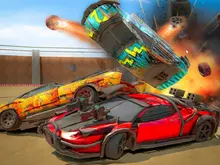
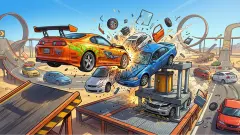
The game is sold on its damage. The listing promises cars that dent, break and come apart, a police car that hunts you if you hit it, crash tests, several maps and cars, and props such as cannons, catapults and presses. We saw none of that in action. In our run the truck looked whole in every picture we took, and at the speeds we reached that is not surprising.
We also did not try the handbrake, the nitro or the reset keys, and we only played on a computer, not on the Android or iOS versions the game's listing gives. If you want the wreckage, our advice is simple: use the open grass to build up speed, and aim at the checkered ramps or the striped wall.
Who it is for
This suits players who enjoy driving around and testing things without being graded. There is no failing, no timer and no pressure, so it works for younger players who just want to steer a truck into a wall and see what happens.
It is less suited to anyone who wants a goal. We found nothing to collect, no level to finish and no score to beat. The fun has to come from you picking a target.
More crash sandboxes from KreizLand
Car Crash Sandbox gives the same idea a to-do list, with ten metal objects to destroy on a country road. Drive & Crash Sandbox starts you in a yard of shipping containers with one to ram. Online Car Destruction Simulator 3D adds a mountain road and a gravity slider, and Buggy Simulator Sandbox 3D trades the crashing for off-road driving on another open field. For more, browse the driving games.
Screenshots
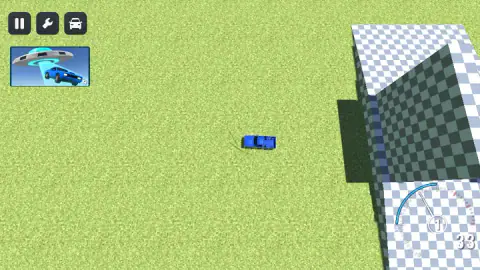
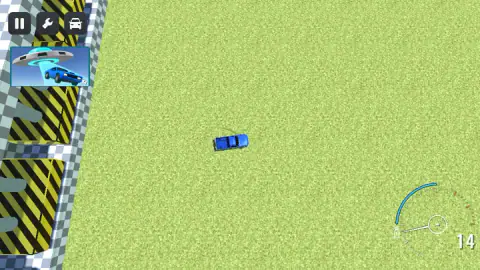
Taken by opening the game ourselves and letting it run — not supplied by the publisher, and not the same picture every other site shows.
How to play Destructive Car Crash Simulator
- Get through the opening screens. It took us several clicks and key presses before the truck appeared on the grass.
- Hold W to drive forward and use A and D to steer. The dial in the bottom-right corner shows your speed and the gear you are in.
- Pick an obstacle on the horizon and drive at it. Nothing is locked and there is no order.
- If you hit a wall and stop, use S to reverse, turn, and try again.
What four minutes taught us:
- Speed takes a run-up. The highest number we saw on the dial was 33, and that was after a stretch of open grass. Short hops between obstacles kept us well under that.
- Do not push into a wall. For about half a minute our truck sat nose-first against a checkered wall beside the striped drum while we held W, and the dial crept from 0 to 1. Only reversing and turning got us out.
- The view can change under you. We started behind the truck and later found ourselves looking straight down at it from above. The listing says C switches the camera, so that is the key to try if the view is not the one you want.
- Learn the listing's keys before you need them. It names R to reset the car, K to restore it and N to switch to another one. We did not try them, but on a wrecked car they are the difference between restarting and carrying on.
Controls
| W A S D | Drive forward, steer and reverse (we used W to drive and S to back out of a wall) |
|---|---|
| Space | Handbrake, according to the game's listing |
| Shift | Nitro, according to the listing (we did not try it) |
| C | Change the camera, according to the listing |
| R / K / N | Reset the car, restore it, switch to another car (listing; not tried) |
| TAB or Escape | Pause menu, according to the listing |
Features
- One open grass field with checkered blocks and ramps spread across it, reachable in any order
- A striped yellow drum set inside a checkered structure, and a long wall of yellow-and-black hazard blocks
- A dial in the bottom-right corner with your speed and current gear
- Two camera views seen in one session, behind the truck and straight down from above
- No clock, no score and no finish line in what we played
- Pause, wrench and car buttons on screen, and a key list in the listing for repair, reset and switching cars
Game details
- Developer
- KreizLand
- Release date
- October 2025
- Last updated
- September 28, 2026
- Added here
- September 2025
- Technology
- HTML5 (WebGL, 3D)
- Platforms
- Browser (desktop)
- Classification
- Driving , Simulation
- Saved progress
- Saving, when available, is managed by this game. Mava cannot confirm your level.
FAQ
How do you play Destructive Car Crash Simulator?
You drive a vehicle around an open map with W, A, S and D and steer it into whatever you like. The map we played was a grass field with checkered ramps and blocks, a striped yellow drum and a wall of yellow-and-black blocks. There is no timer or score, so you choose what to hit and how fast.
What are the controls in Destructive Car Crash Simulator?
WASD drives and steers. The game's listing adds Space for the handbrake, Shift for nitro, C to change the camera, R to reset the car, K to restore it, N to switch car, and TAB or Escape for the pause menu. On phones and tablets the listing says you use the buttons on screen.
Is there a goal in Destructive Car Crash Simulator?
Not one we could find. In four minutes on the first map nothing on screen gave us a target, a time limit or points. It plays as a sandbox, where the fun is choosing an obstacle and seeing what happens.
What do you do if your car gets stuck in Destructive Car Crash Simulator?
Stop holding forward. Our pickup sat against a checkered wall for about half a minute while we pushed W, and it only came free when we reversed with S and turned. The listing also says R resets the car.
Does the car get damaged in Destructive Car Crash Simulator?
The listing says every car can be dented and broken. We did not see it happen in our run, because we never went faster than 33 on the dial and our hits were slow. Higher speed into the ramps or the hazard wall is the way to test it.
Who made Destructive Car Crash Simulator?
The game is credited to KreizLand. It was published in October 2025.
Is Destructive Car Crash Simulator free?
Yes. It runs in the browser with nothing to install. During our session one the notice appeared saying an ad had been skipped, with a button to continue playing.