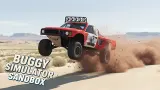







About Buggy Simulator Sandbox 3D
Buggy Simulator Sandbox 3D has nothing to win, and it does not pretend otherwise. The screen shows a rev counter, your speed, the gear you are in and one gauge. No score, no clock, no coins, no arrow pointing at a finish line. You sit behind a buggy in a field of grass and the rest is up to you.
What it offers in place of a goal is a second car, and a third. One key moves you out of the vehicle you are driving and into another one, without a garage screen in between.
The game is by KreizLand. It was published in September 2025. Our session was short and we want that understood before you read on: about four minutes, one field, three vehicles, and close to a minute of it parked against a tree. This page covers that and nothing more.
Three vehicles, and they are parked in the same field
We started behind a dark blue buggy with a rounded body, a single aerial and its engine exposed at the back. A little way ahead, beside three logs lying in the grass, a second vehicle sat with its rear lights glowing red.
The first press of the next-car button put us in a blue pickup on tall tyres, with a roll bar and two whip aerials. The parked vehicle by the logs was still there, off to our left. The next press put us in a green tube-frame buggy with a spare wheel bolted to the back, and when the view cleared we were sitting right in front of those logs.
Our reading is that the vehicles are standing in the field all the time and the button moves you from one driver's seat to the next, so the buggy we finished in was the one we had been looking at from the start. We saw three. The game's description says "several", and we cannot give you a count.
One practical consequence, if that reading holds: a car you leave stays where you left it.
All three ride on knobbly tyres and sit high. In the minute or so each one got, we could not tell you how they differ to drive. We reached 35 km/h in the round buggy, 26 in the pickup and 34 in the green one, always in first gear.
The minute we spent against a tree
The pickup ended up with its bonnet against a tree trunk, and there it stayed. The readout said 0 km/h and the gear circle said N for the best part of a minute while we kept pressing W.
We cannot tell you which of two things happened. Either the tree held the truck, or the game had stopped listening to the keyboard and needed a click. The N in the gear circle, where a moving car showed 1, makes us suspect the second. We did not try reverse, and we did not try R, which the instructions give as the key that resets the car. Those are the first two things to do in that spot.
Changing vehicle got us out of it.
When the ad notices appear
For us they came with the change of car. After we pressed the next-car button, a dark bar reading AD IN crossed the screen with a short countdown. Nothing inside the game offered a reward for watching a video.
What we did not see
Most of the game, going by its own description, which promises a city with a bridge and a test zone with pyramids to knock down. We stayed in the field and never opened the menu, so we cannot confirm any of it or tell you how you get there.
We did not use the nitro, and the cyan gauge under the dials stayed full from the first minute to the last. Nor did we change the camera, pull the handbrake at speed, damage anything or drive on a phone.
Who it is for
Someone who wants to drive without being asked for anything: no levels to unlock in what we saw, no failing, no currency. It suits a child who likes big wheels and an open space, and anyone curious about how a suspension copes with a hill.
It is not for you if you need a reason to keep going. Four minutes in, the game had given us a field, three cars and no task, and that is the whole proposal.
More driving with nothing, or little, to win
KreizLand has two more in our catalogue, and both give you a job where this one does not: Drive & Crash Sandbox starts in a yard walled with shipping containers and tells you to ram one, and Car Crash Sandbox opens on a country road and asks you to destroy ten metal objects. Stunt Simulator is another sandbox without a finish line, with a score that pays for flips and drifts. If you want the off-road part with a structure, Offroad Mania is rock crawling over set courses with no clock. The rest are in the driving games category.
Screenshots
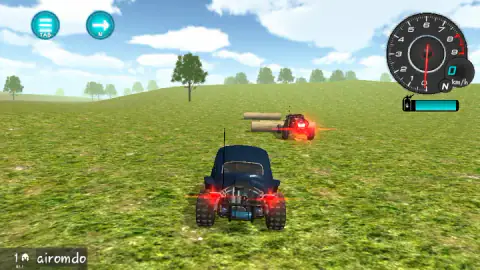
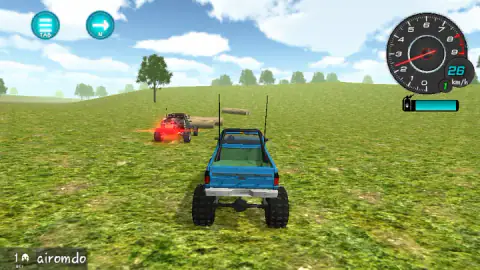
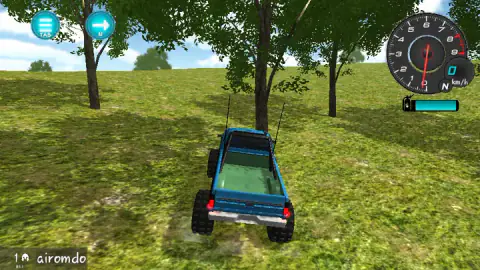
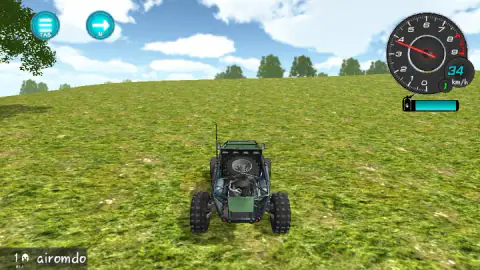
Taken by opening the game ourselves and letting it run — not supplied by the publisher, and not the same picture every other site shows.
How to play Buggy Simulator Sandbox 3D
- Hold W to accelerate. The digital readout inside the dial gives your speed in km/h, and the small circle next to it shows the gear: N when you stand still, 1 once you roll.
- Press N, or click the round arrow button at the top left, to move into the next vehicle.
- The other round button, marked TAB, is the menu. We did not open it.
- That is all we used. The game's instructions also list A, S and D, Space for the handbrake, Shift for nitro, C for the camera and R to reset the car.
Tips from our session:
- Do not expect speed from first gear on grass. The highest figure we have on screen is 35 km/h, with the needle near 4 on a rev counter that turns red at 8. We never saw second gear.
- Mind the trees. They stand in small groves, and we parked a truck nose-first against one. See below.
- If the car stops answering, click on the game. After a pause the keyboard does nothing until you click back in.
Controls
| W | Accelerates. The only driving key we held in our session |
|---|---|
| N, or the round arrow button at the top left | Moves you into the next vehicle. We used the on-screen button |
| Tab, or the round button with three bars | Opens the menu, according to the game's instructions. We did not open it |
| A, S and D | Steering and reverse, according to the game's instructions. Not used in our session |
| Space, Shift, C and R | Handbrake, nitro, camera and reset car, according to the game's instructions. Not tested by us |
Features
- No score, coins, timer or objective on screen at any point of our session
- Three vehicles driven, a round-bodied buggy, a pickup on tall tyres and a tube-frame buggy
- A next-car button that moves you between vehicles without leaving the field
- A rev counter numbered 0 to 9, a digital speed readout in km/h and a gear indicator
- A cyan gauge under the dials that stayed full the whole time we drove
Game details
- Developer
- KreizLand
- Release date
- September 2025
- Last updated
- August 26, 2026
- Added here
- July 2025
- Technology
- HTML5 (Unity WebGL)
- Platforms
- Browser (desktop, keyboard & mouse), Browser (mobile & tablet)
- Classification
- 3D , Driving , Simulation
- Saved progress
- Saving, when available, is managed by this game. Mava cannot confirm your level.
FAQ
What is the goal of Buggy Simulator Sandbox 3D?
There is none on screen. In our session the display showed a rev counter, the speed, the gear and one gauge, and never a score, a timer, coins or a task. You drive around a field and change vehicle when you feel like it.
How do you change car in Buggy Simulator Sandbox 3D?
Press N, or click the round button with an arrow at the top left of the screen. We used the button three times and drove three different vehicles, a round-bodied buggy, a blue pickup on tall tyres and a green tube-frame buggy.
What are the controls of Buggy Simulator Sandbox 3D?
W accelerates, and that is the key we drove with. The game's instructions also list A, S and D for steering and reverse, Space for the handbrake, Shift for nitro, C for the camera, R to reset the car, N for the next car and Tab for the menu. We did not test those ourselves, apart from changing car with the on-screen button.
Does Buggy Simulator Sandbox 3D have ads?
In our session the ad notices came when we changed vehicle. A dark bar reading AD IN with a short countdown crossed the screen after we pressed the next-car button. Nothing in the game asked us to watch a video for a reward.
How many maps does Buggy Simulator Sandbox 3D have?
We only drove one, an open grass field with low hills, scattered trees and a few logs. The game's description also promises a city with a bridge and a test zone. We did not open the menu, so we did not see them.
Can you play Buggy Simulator Sandbox 3D on a phone?
It is listed for PC, Android and iOS, and the screen has round buttons for the menu and the next car. We played on a desktop with a keyboard and mouse and did not try it on a phone.
Who made Buggy Simulator Sandbox 3D?
The game is credited to KreizLand. It was published in September 2025 and last updated in August 2026.