



About I am Crazy Bird
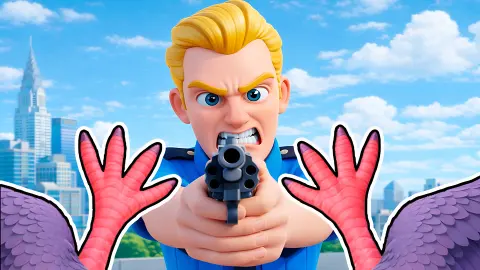
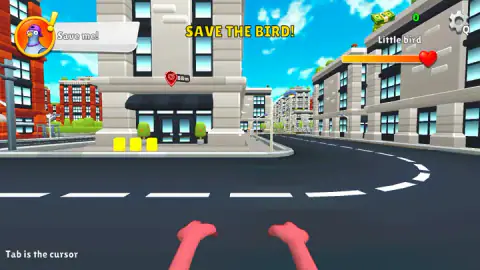
The bird in I am Crazy Bird is you, and you never see it. The game is played from inside its head. What you get of yourself is a pair of pink feet hanging at the bottom of the screen, and beyond them a cartoon city seen from pigeon height, which is to say from the middle of the road.
That choice changes what kind of game this is. The developer describes an open city for flying, stealing food and causing trouble. What the first minutes actually hand you is smaller and clearer: a mission, a marker and a distance. A grey pigeon in a purple cap appears in the top left corner and says «Save me!». A yellow banner reads «SAVE THE BIRD!». A red pin hangs over a doorway down the street with a number of metres next to it.
The game is credited to Devord Studio. It was published in March 2026.
We never left the ground, and this page is limited by that. We played for about four minutes on a desktop computer. We walked towards the first mission, looked around a great deal, and did not take off or finish the mission. Flying, items and everything after the first marker are the developer's word, not ours.
The whole screen is a mission card
Most of what the game tells you sits on the edges of the picture, and it is worth knowing what each piece is before you move.
The pigeon's portrait is round, on an orange disc, with a yellow exclamation mark beside it. That mark and the speech strip stayed on screen for our whole session, because the mission stayed open. The banner in the top centre names the mission.
The right side is about you. A stack of banknotes with a green number is your money; ours read 0 from start to finish. Below it, the name «Little bird» sits over an orange bar that ends in a red heart. It was full every time we looked, and nothing in the street hurt us. We cannot say what empties it.
The gear has a small Q beside it. Since the mouse is busy turning the view, the hint about Tab matters here: it is the game telling you how to get a pointer back.
Eighty-eight metres to a doorway
The pin sits over the entrance of a grey stone building with a dark awning and glass doors. Two potted bushes stand by the doors and three bright yellow blocks sit on the pavement to the left. They are the only things on the street in that colour, so they stand out from far off.
We walked at it in a straight line across the road. The pin read 88 metres, then 87, then 82, and by then the doorway filled the middle of the screen. That is as close as we got. We did not find out what the yellow blocks are for or what saving the bird asks of you once you arrive.
The city around it is tidy and empty in what we saw: grey blocks and red brick blocks with green roofs, traffic lights, street lamps, a curving junction. No cars or people crossed our view.
Pink feet are the right feet
The portrait in the corner is plainly a pigeon, and the feet at the bottom of the screen match. City pigeons do have reddish-pink feet. They descend from the rock dove, a bird that nests on cliff faces, which is why window ledges and rooftops suit them so well: to a pigeon, a block of flats is a cliff with better food at the bottom.
That is the city this game builds. Seen from the road it is a canyon of ledges, and looking straight up between two blocks is the view that makes you want the Space bar to work.
A sandbox that opens with one clear job
I am Crazy Bird suits players who like to be dropped into a place and left to poke at it, and who enjoy seeing a familiar city from an odd height. The first mission gives you a direction without a clock, and nothing punished us for wandering or for standing still.
Anyone who wants to be taught will have a harder start. Apart from one hint about Tab, the game showed us no instructions, and the keys that matter most are not on screen. Read the control list above before you start. And we cannot judge the flying, which is the main promise of the game: we did not get that far.
Where to go after the pigeon's errand
For another game played through the character's own eyes, Summer Punch Party is a first-person brawler on sunny islands. Rooftop Run covers the top of a city on foot, and Horizon: Flight Into the Light is about gliding between towers. Animal Evolution Simulator is another game where you play as the animal. The rest are under adventure games.
Screenshots
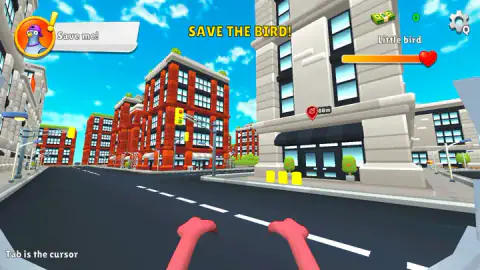
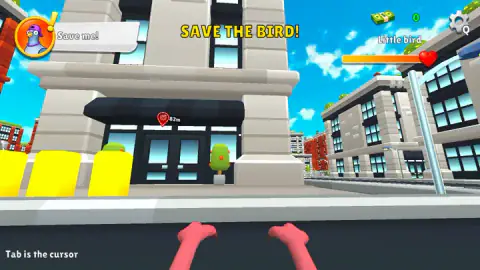
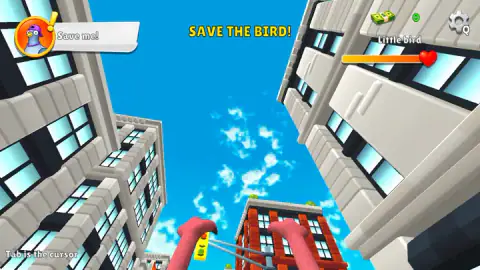
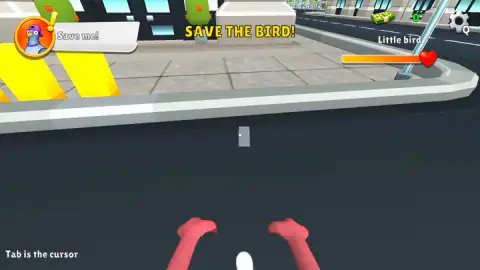
Taken by opening the game ourselves and letting it run — not supplied by the publisher, and not the same picture every other site shows.
How to play I am Crazy Bird
- Read the three corners. Top left is the pigeon and its request. Top right is your money, a settings gear and a health bar labelled «Little bird». Bottom left is a hint: «Tab is the cursor».
- Find the red pin. It floats in the world over the mission spot, with a target icon and the distance in metres.
- Walk with W, A, S and D. Hold the key down. A short tap barely moves you.
- Turn with the mouse. The view follows it in every direction, up and down included.
- Take off with Space, by the developer's list. Shift is given as a boost in the air, the left mouse button as hit and interact, and E as pick up and drop.
What four minutes on the road taught us:
- Watch the number, not the street. The buildings look alike, and the pin is the only honest measure of progress. Ours started at 88 metres and read 82 after three holds of W.
- The view goes further than you expect. Push the mouse to the top of the window and you are staring at the sky between two blocks; pull it down and all you see is tarmac. If the city disappears, bring the mouse back to the middle.
- A small white dot marks the centre of the view. It is easy to miss against the sky. That dot is where you are looking.
- Clicking the corners does nothing. We clicked the pigeon's portrait several times. It is a notice, not a button.
- Short taps of Space did not lift us. We tapped it many times and stayed on the road. Try holding it.
Controls
| W, A, S, D | Move. Holding W walked us forward along the street |
|---|---|
| Mouse | Turns the view, including straight up and straight down |
| Tab | Frees the mouse cursor, according to the hint in the bottom left corner |
| Space | Take off (developer's list; we did not get off the ground) |
| Shift | Boost while flying (developer's list; not tried) |
| Left mouse button | Hit and interact (developer's list) |
| E | Pick up or drop an item (developer's list) |
Features
- A first-person view from inside the bird: the only part of yourself you see is a pair of pink feet
- A first mission, «SAVE THE BIRD!», given by a grey pigeon in a purple cap
- A red pin over the mission spot that shows how many metres are left
- A cartoon city of grey stone and red brick blocks, with traffic lights, street lamps and green roofs
- A health bar named «Little bird» and a money counter that starts at 0
- Made by Devord Studio
Game details
- Developer
- Devord Studio
- Release date
- March 2026
- Last updated
- August 10, 2026
- Added here
- January 2026
- Technology
- HTML5 (3D)
- Platforms
- Browser (desktop, keyboard and mouse), Browser (mobile & tablet)
- Classification
- Adventure , Simulation
- Saved progress
- Saving, when available, is managed by this game. Mava cannot confirm your level.
FAQ
How do you play I am Crazy Bird?
You see a city through the eyes of a bird, with your own pink feet at the bottom of the screen. A pigeon in the top left corner gives you a mission, and a red pin in the world shows where it is and how many metres away. You walk with W, A, S and D and turn the view with the mouse; the developer's list adds Space to take off.
What are the controls in I am Crazy Bird on a computer?
The developer lists W, A, S and D to move, Space to take off, Shift to boost in the air, the left mouse button to hit and interact, and E to pick up or drop an item. An on-screen hint adds that Tab is the cursor. In our session W walked the bird forward and the mouse turned the view; we did not manage to take off.
What does «Tab is the cursor» mean in I am Crazy Bird?
It is a hint that stays in the bottom left corner of the screen. The mouse normally turns the bird's view, so there is no pointer to click the settings gear with. The hint says Tab gives you the pointer back. We did not press it in our session, so we are passing on what the game says.
What is the first mission in I am Crazy Bird?
It is called «SAVE THE BIRD!». A grey pigeon in a purple cap says «Save me!» and a red pin appears over the door of a grey building with a dark awning. The pin read 88 metres when we started. We walked it down to 82 metres and did not finish the mission.
How do you fly in I am Crazy Bird?
The developer's control list says Space takes off and Shift boosts once you are in the air. We tapped Space several times, briefly, and stayed on the road. We cannot tell you whether it needs to be held, so try a long press before anything else.
Is I am Crazy Bird first person or third person?
First person, in everything we saw. You never see the bird you are playing. What you see is the city in front of you and two pink feet below, and the view follows the mouse far enough to look straight up between the buildings or straight down at the road.
Who made I am Crazy Bird?
It is credited to Devord Studio. It was published in March 2026. It is listed for PC, Android and iOS as a landscape game in English and Russian; we played it on a desktop computer.