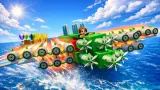
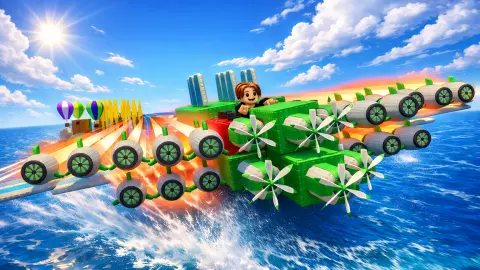



About Build and Fly Obby
The name makes three promises: building, flying and an obstacle course. Build and Fly Obby lets you skip straight to the second. Press the green START button with nothing built, and the game puts your character on a single yellow block, throws the block down a sand runway and out over the sea. Half a kilometre later the energy is gone, smoke is rising from the seat, and you have earned 8 coins.
That first flight is the whole design in small. Distance is the score, distance is the wage, and the wage buys parts. A guide called Engineer Tom appears in the corner of the plot with one piece of advice, to buy a fuel block. Everything you bolt on afterwards answers one question: how many more metres does this give me?
The game is credited to a developer listed as Cappella. It was published in February 2026.
Now the honest part. We played for about four minutes on a desktop computer, almost entirely with the mouse. In that time we made seven flights, all on the starting block, and our coins went from 5 to 60. We did not buy a part and we did not build. This page describes the loop and the first rung of the ladder, not the machines further up it.
What the four readings tell you
The flight screen is plain, and every item on it is worth a glance.
The ENERGY bar at the bottom is your fuel. It was green and nearly full on the runway. At 497 metres it was empty and dark, and grey smoke was rising from the machine.
The speedometer in the corner read about 25 km/h as we rolled off the pad and about 101 km/h in the air. It was at that same top figure each time we looked in the air, which suggests the bare block has one speed and nothing we did changed it.
The vertical gauge on the right does two jobs. Its figures give the metres flown and, in green, the coins that distance has earned so far. Its shape is a track: a chequered flag at the top and a small plane climbing towards it from the bottom. After 497 metres our plane marker read 1%. Whatever stands under that flag, the first block covers about a hundredth of the way.
Where the coins go
After each flight a panel shows the distance and two buttons. One pays the coins you earned. The other pays three times as much and carries an advert icon. We took the plain payout each time, which is why seven flights left us with 60 coins and not more.
Back on the plot, the spending side is laid out in plain view. A market stall marked SHOP stands on the left, and white arrows on the grass lead to it from where your character stands. Along the bottom there is a backpack and a bar of seven slots, all empty in our session. On the right, two hammer buttons read DELETE and DELETE ALL, for taking a part off or clearing the pad.
The developer's instructions describe the step we did not take: pick a part in the inventory, then tap the plane to attach it.
There is a second counter next to the coins, a pink gem, which stayed at zero for us. A box in the top left corner shows a crossed-out advert icon and a pair of wings with a price of 19 USD. We did not open it, so we will not describe what it sells beyond what the icons suggest.
We also cannot tell you what a fuel block costs. We left before visiting the stall, with 60 coins in hand.
Why a flying game calls itself an obby
Obby is short for obstacle course. Wiktionary lists it as informal slang that grew up among players of Roblox, where obstacle courses are one of the common kinds of game, and the word now turns up on browser games with block-built figures like the three on this plot.
An obstacle course, in Wikipedia's definition, is a series of physical obstacles to get through, usually against the clock. Armies use them to train recruits, and the idea has been adapted for television and for video games.
Measured against that definition, this game keeps the word and changes the test. There is no clock anywhere on the screen. What is measured is how far you get. Obstacles may well lie further out: from the runway we could see hot-air balloons, an orange ring hanging in the air and an island of cloud with a rocky peak. The stretch of sea we crossed on the starting block had nothing in the way.
So read the title in order. First build, then fly, and the course is what the metres reveal once your machine can reach it.
Who it is for
It suits players who like a short loop with a number to beat: fly, collect, improve, fly again. A flight on the first block is over in well under half a minute, so a bad design costs you little.
If you want a course of jumps to clear on foot, this is not that kind of obby. And if you dislike games that offer an advert after every round, know that the triple payout is offered after each flight, though the plain one is always there beside it.
More games to try next
Bobr turbo: craft cars is another game about assembling a machine from blocks, with wheels in place of wings. Paper Flight 2 shares the loop of flying for distance and upgrading between throws. Horizon: Flight Into the Light is a glider run with the obstacles this one keeps in the distance. Break a Tower: Obby takes the obby label somewhere else again, to knocking a tower down floor by floor. The rest are under arcade games.
Screenshots
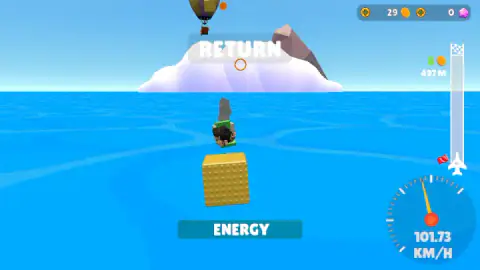
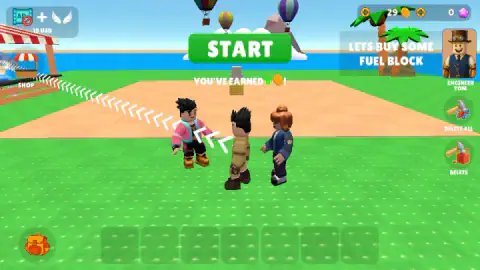
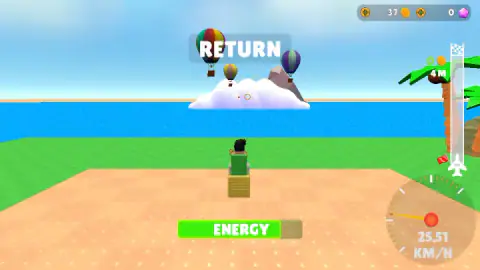
Taken by opening the game ourselves and letting it run — not supplied by the publisher, and not the same picture every other site shows.
How to play Build and Fly Obby
- Look at the plot. START is at the top, the shop stall on the left, the inventory bar along the bottom.
- Press START. The view moves behind your machine on the sand pad and the flight begins.
- Watch the energy bar. It drains as you go. When it is empty the machine has nothing left to give.
- Press RETURN. It sits where START was, and it ends the flight.
- Collect the coins and spend them. The yellow button pays out; the shop turns coins into parts.
What our session taught us:
- You can fly before you build. We never placed a block, and START worked every time. If the building tools look like a lot to learn, fly first and let the coins pile up.
- We touched nothing in the air. The block flew straight out over the water by itself. The developer's instructions list keys for walking and jumping, so steering may come with what you build; on the bare block there was nothing to steer.
- START and RETURN share one spot. A second click in the same place ends the flight you have just launched. Take your hand off the mouse once you are moving.
- The starting block has a ceiling. Six of our seven flights paid 8 coins and one, cut short at about 450 metres, paid 7. Repeating the same flight does not improve it. Only a different machine will.
Controls
| START (green button, top centre) | Launches the flight with whatever machine is on the pad |
|---|---|
| RETURN (same place, during a flight) | Ends the flight and takes you to the payout |
| Yellow button on the results panel | Collects the coins the flight earned; the green one beside it offers three times as much for an advert |
| Inventory bar, backpack and SHOP stall | Where parts are bought and picked; the developer's instructions say you select a part and then tap the plane to attach it. We did not buy or attach any |
| WASD or arrow keys, Space, right mouse button | Walk, jump and turn the camera, according to the developer's instructions; we did not use them in play |
Features
- Two places, one loop: a grass plot where you build, and a flight over open sea that pays for the next build
- A flight screen with four readings, an energy bar, a speedometer, the metres flown and the coins earned so far
- Flights short enough to repeat; ours ran close to 500 metres each on the starting block
- Pay by distance; a flight of 497 metres gave us 8 coins
- A shop stall, a seven-slot inventory bar and two delete tools on the building plot
- A guide character, Engineer Tom, whose first advice is to buy a fuel block
- Made by Cappella
Game details
- Developer
- Cappella
- Release date
- February 2026
- Last updated
- August 10, 2026
- Added here
- November 2025
- Technology
- HTML5 (3D)
- Platforms
- Browser (desktop, keyboard & mouse), Browser (mobile & tablet)
- Saved progress
- Saving, when available, is managed by this game. Mava cannot confirm your level.
FAQ
How do you play Build and Fly Obby?
You start on a grass plot with a launch pad. Pressing the green START button sends your machine into the air, and the flight pays coins according to the metres it covers. Back on the plot, the coins buy parts in the shop, and the parts make the next machine.
Do you have to build a plane before you can fly?
No. We pressed START without building anything and flew every time, seated on a single yellow block. Each of those flights covered close to 500 metres and paid 7 or 8 coins, so the game hands you a first income before it asks you to build.
How do you earn coins in Build and Fly Obby?
By distance. A counter beside the distance gauge shows the coins the current flight has earned, and it read 8 at 497 metres. After the flight a panel offers that amount, or three times as much if you watch an advert. We took the plain amount each time.
What is the ENERGY bar for?
It is the fuel of the flight. The bar was almost full when we left the pad and empty at 497 metres, with grey smoke rising from the machine. The guide character's first advice is to buy a fuel block, which points the same way: more energy, more metres.
What does obby mean?
Obby is a shortening of obstacle course. Wiktionary records it as informal slang that comes from players of Roblox, where obstacle-course games are common. In this game the word works as a genre label; the measure of a run is distance, not a course cleared against a clock.
Is there an end to reach in Build and Fly Obby?
The gauge on the right of the flight screen has a chequered flag at the top and a small plane that climbs towards it. After 497 metres our plane marker read 1%, so the flag is a long way beyond anything the starting block can reach. We did not get near it and cannot say what waits there.
Who made Build and Fly Obby?
It is credited to a developer listed as Cappella. It was published on 2 February 2026. It is listed for PC, Android and iOS; we played it on a desktop computer.