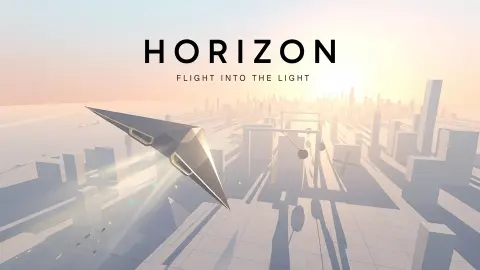










About Horizon: Flight Into the Light
Most endless flying games count down your lives, or simply wait for you to hit something. Horizon: Flight Into the Light counts down the daylight. A bar marked SUN sits at the top of the screen, the sun ahead of you is sinking, and when the light is gone, the flight is over, however clean your flying has been.
That turns a dodging game into a game about time. You are not only steering a black glider between white towers. You are deciding which crystal is worth the risk of reaching it, and which patch of shade is costing you light you will want later.
The game is by GI GAMES and was published on 23 September 2026. The title screen still shows version 0.1.0, so this is an early version of the idea: white blocks, an orange sky and a black glider. We flew it at least five times in one sitting. Here is what we saw.
The sun bar is the clock
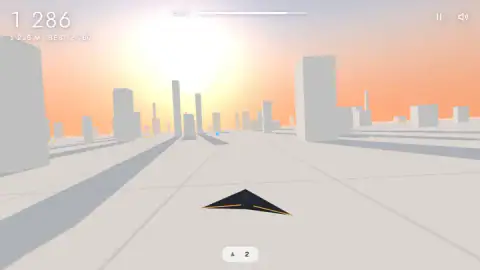
The bar is full at take-off and drains as you go. In one flight it was at about four-fifths when we passed 1,125 metres; in another, about the same at 1,236. Two things move it faster or slower, and both are confirmed by the game itself, not just by its description.
The first is blue crystals. The instructions say they lift the sun back up, and one hangar upgrade is called Bright crystals: "Blue crystals raise the sun 15% more." In one flight we saw a small blue shape low on the ground ahead, between the towers, most likely one of them.
The second is shade. Flying through the shadow of a building makes the sun set faster, and another upgrade, Shade guard, exists only to slow that drain. You will spend a lot of time in shade, for a reason that has nothing to do with game design.
Why the shadows reach for you
You always fly toward the sun, and it is always low. That combination fills the course with shadow.
A shadow's length depends on how high the sun is in the sky. With the sun halfway up the sky, a building casts a shadow as long as it is tall. With the sun 10 degrees above the horizon, the shadow is about 5.7 times the height, and lower still it passes ten times. It is the same geometry that makes late-afternoon shadows stretch across a whole street.
Now add the direction. When you face the sun, every shadow falls toward you. In our flights, the towers threw long grey bands diagonally across the floor, and in one capture the glider sat right inside the shade of the tower beside it.
So the setting is the rule. Shadows are not scenery you can ignore; they lie across the line you are flying, and every second in them costs light. Weaving into the bright gaps between the bands is part of steering, not an extra.
What the hangar sells
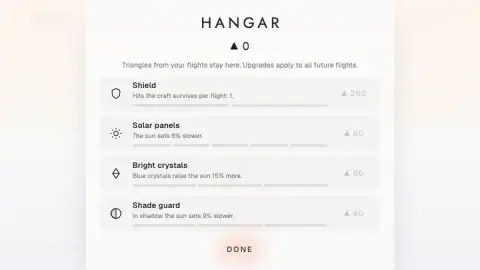
The hangar opens with one line: "Triangles from your flights stay here. Upgrades apply to all future flights." There are four upgrades, each shown with its first price and a bar of levels.
| Upgrade | What it does | First price | Levels |
|---|---|---|---|
| Shield | Hits the glider survives per flight | 250 | 2 |
| Solar panels | The sun sets 6% slower | 50 | 5 |
| Bright crystals | Blue crystals raise the sun 15% more | 60 | 3 |
| Shade guard | The sun sets 9% slower in shadow | 80 | 3 |
Solar panels are the cheapest and have the most levels, so they are the natural first buy. Shield is five times the price, and it is the only upgrade that does anything about crashing.
Before we had bought anything, the Shield card already read "Hits the craft survives per flight: 1." We could not tell whether that one hit is yours from the start or is what the first level adds. We never collected enough triangles to find out, and we did not see prices beyond the first level.
How far we got
Our best flight was 2,760 metres, and none of the others came close to it. That leaves our record 240 metres short of the third kilometre, where the game's description says a new world begins, with ramps, rolling balls, gates, windmills, pendulums and presses. We saw none of those. Our whole course was white towers, a white floor and the sun.
The title screen also labels the course "WORLD OF THE DAY · 2 OCTOBER". That suggests the opening world is tied to the date, but we only played on one day, so we cannot say what changes from one day to the next.
Two more things we did not see: a flight ending because the light ran out, and what a jump clears. Every one of our flights ended against a tower.
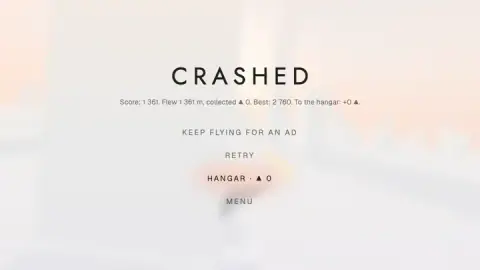
A crash screen also offers "KEEP FLYING FOR AN AD", a continue paid for by watching an ad. RETRY, HANGAR and MENU sit under it, and RETRY is the quickest way back into the air.
More games about distance
If you like the throw-it-and-upgrade rhythm, Paper Flight 2 is the same loop with a paper plane: fly, collect, improve, fly further. For steering between city blocks at speed, Slope City 2 swaps the glider for a ball on a road with no walls. More are in our arcade games.
Screenshots
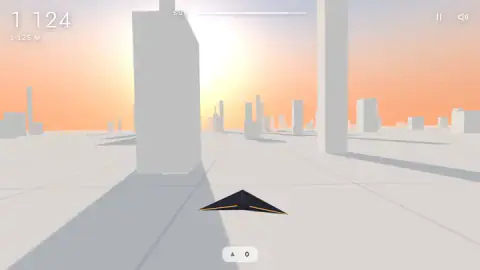
Taken by opening the game ourselves and letting it run — not supplied by the publisher, and not the same picture every other site shows.
How to play Horizon: Flight Into the Light
- Press PLAY. The title screen has three options: PLAY, HANGAR and SOUND. You start low over an empty white plain, with the city still far off on the horizon.
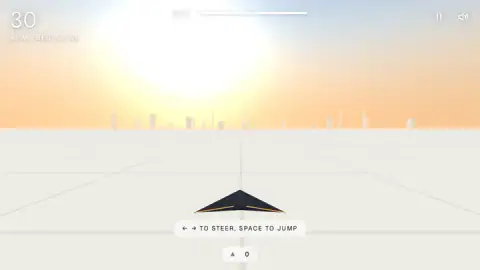
- Steer with the arrows. A hint at take-off reads "← → TO STEER, SPACE TO JUMP". The instructions add A and D for steering, and Up or W for jumping.
- Fly toward the sun. By the time you pass the first kilometre, the towers have closed in. Hitting one ends the flight with a CRASHED screen.
- Watch the SUN bar. It shrinks as you fly. The game's instructions say blue crystals push it back up.
- Spend in the hangar. Triangles you pick up go to the hangar after every flight, where they buy permanent upgrades.
Tips from our flights:
- The start is empty. At 31 metres there was nothing in front of us but grid lines and a distant skyline. Use that stretch to settle your hands.
- Score and distance are the same number. Our first crash screen read 1,361 points for 1,361 metres, and the others matched within a point. Your best flight is shown in metres in the corner, so you always know what you are chasing.
- The light lasts longer than you think. After more than a kilometre, the SUN bar had lost only about a fifth. In our flights the towers ended things long before the dark did, so early on, flying clean matters more than chasing crystals.
- Collect triangles on purpose. Every crash screen we saw ended with "To the hangar: +0". Without triangles, the hangar stays shut.
Controls
| Left / Right arrows (A / D, according to the instructions) | Steer the glider between the towers |
|---|---|
| Space (Up arrow or W, according to the instructions) | Jump |
| Hold the left or right half of the screen / swipe up | Steer and jump on a phone, according to the instructions (not tested by us) |
| Pause and speaker buttons (top right) | Pause the flight or mute the sound |
| RETRY / HANGAR / MENU | Fly again at once, spend triangles, or go back to the title screen after a crash |
Features
- Your score is the distance flown, one point per metre, and the screen keeps your best flight next to the current one
- A SUN bar at the top is the real clock; when the light runs out, so does the flight
- Building shadows drain the light faster, and you are always flying straight into a low sun, so the shadows fall across your path
- Four permanent upgrades in the hangar: Shield (250 triangles), Solar panels (50), Bright crystals (60) and Shade guard (80)
- Triangles you collect are kept between flights, even when you crash
- The title screen dates the course as the "World of the day"
- RETRY puts you back in the air straight from the crash screen, with your best distance shown in the corner
Game details
- Developer
- GI GAMES
- Release date
- September 2026
- Last updated
- September 24, 2026
- Added here
- September 2026
- Technology
- HTML5 (3D)
- Platforms
- Browser (desktop, keyboard), Browser (mobile & tablet, touch)
- Saved progress
- Saving, when available, is managed by this game. Mava cannot confirm your level.
FAQ
How do you play Horizon Flight Into the Light?
You steer a black glider left and right with the arrow keys and jump with Space, flying toward a setting sun between white towers. The score counts the metres you fly. The flight ends when you hit something or when the SUN bar at the top runs out of light.
How do you keep the sun from setting in Horizon?
The game's instructions say blue crystals lift the sun back up, while flying through building shadows makes it set faster. Two hangar upgrades back this up, one making blue crystals worth more and one slowing the sunset while you are in shadow. So the light lasts longer if you chase blue crystals and stay out of the dark patches.
What are triangles for in Horizon Flight Into the Light?
Triangles are the hangar currency. Whatever you collect on a flight is banked when the flight ends, crash or not. You spend them on four permanent upgrades, the cheapest being Solar panels at 50 triangles.
What upgrades are in the Horizon hangar?
There are four. Shield sets how many hits the glider survives per flight, Solar panels make the sun set 6% slower, Bright crystals make blue crystals raise the sun 15% more, and Shade guard makes the sun set 9% slower while you are in shadow. They cost 250, 50, 60 and 80 triangles for the first level.
Is there an end to Horizon Flight Into the Light?
No, it is an endless flight scored on distance. The game's description says a new world with new obstacles begins every 3 kilometres. Our best flight was 2,760 metres, so we never reached the second one.
Who made Horizon Flight Into the Light?
It is by GI GAMES and was published on 23 September 2026. The title screen shows version 0.1.0, which points to an early release.
Can you play Horizon Flight Into the Light on a phone?
It is listed for phones and tablets, and the game's instructions say you hold the left or right half of the screen to steer and swipe up to jump. We played it on a computer with a keyboard and did not test it on a touch screen.