


About Rolling Cube 3D
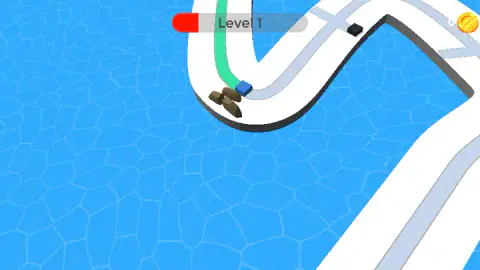
The cube in Rolling Cube 3D does not turn, and that takes a while to believe, because the track is nothing but turns. It is a white causeway laid across open water, doubling back on itself in hairpins and long S-bends with nothing underneath it. We dragged the mouse left, dragged it right, dragged it in circles. The blue cube followed the lane anyway, and the coloured line it left behind never once stepped outside it.
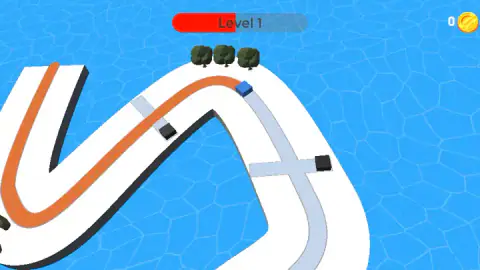
What it does instead of turning is move, or not move. Down the middle of that white road runs a narrow pale-grey lane, and the cube colours the lane in as it passes — green in one of our runs, orange in another, the same blue cube both times. Hold the mouse button down and it travels. Let go and it stops where it is. There is no third thing to do.
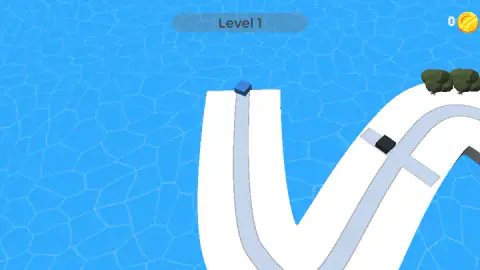
The reason you would ever want to stop is parked up ahead. At intervals the road is cut by a short grey rail, and on each rail sits a black cube sliding from one end to the other and back, straight through the lane you need to paint. You cannot go round it, because you cannot steer. You can only arrive after it has gone.
Foxi Games made it. This one went up in June 2026. We played it on a desktop, failed level 1 once, finished it on the next attempt and got as far as the opening of level 2.
You do not steer, and that is the whole design
Most games that put a block on a winding track give you a left and a right, and then spend their level design punishing you for using them badly. This one removes the steering wheel and keeps the track.
It sounds like a smaller game. In practice it is a different one. Once direction is off the table, every corner becomes free movement — the cube takes the hairpin perfectly whether you are watching or not. What is left to go wrong is entirely a question of when, and that is harder to get right than where. You cannot shade a timing decision. You either arrived before the black cube or you did not.
The painted line is the proof. The stripe trailing round the hairpin in our run sits dead centre in the lane the whole way, through curves we certainly did not drive. The lane is the steering. Your hand is the throttle, and the throttle has two positions.
Failing tells you a number, not a verdict
When our first run ended, the screen did not say we had lost. It said 34% Completed, in green, with "Tap to restart" underneath.
That is the same figure as the red bar that fills across the top of the screen while you play, and it changes what a failed attempt feels like. A verdict closes a subject. A percentage opens one, because the only sensible response to 34 is to go and get a bigger number. There are no lives, no score to protect and no penalty for restarting — the lane goes blank and you start again.
It also tells you something about the level. Thirty-four per cent is not a vague feeling of having done quite well; it is a position on the track you can go and look at. The second attempt is not a fresh roll of the dice but a known route with one crossing you now understand.
A chequered flag has never meant that you won
The finish line here is not a line. It is two patches of black-and-white chequer painted on the white road, one on each side of the lane, standing like gateposts. The cube passes between them and the level is over.
That is exactly the right use of the symbol, which is not how most people read it. In motor racing the chequered flag does not mean victory. It means the race has ended, and the starter waves it at every car that crosses, not just the first. The winner's flag and the last-place flag are the same piece of cloth.
Where the pattern came from is one of the few genuinely unsettled questions in motorsport. The earliest photographic record usually cited is the 1906 Vanderbilt Cup on Long Island, where the starter Fred Wagner brought one down to end the race. Research by the historian Fred Egloff points in a different direction for the origin: to Sidney Waldon, a Packard employee who in the same year used chequered flags on the Glidden Tour to mark the checking stations where crews had their cards stamped — a neat explanation for a word that otherwise has nothing to do with chess. Claims of earlier use at French bicycle and horse races float around too, without photographs behind them. What everyone agrees on is the practical bit: a hard black-and-white grid stayed readable through the dust of a dirt track and against a crowd.
Which is why it belongs on this road and not on a podium. Rolling Cube 3D has no opponent, no clock and no ranking. Reaching the chequer means the same thing it means to a driver three laps down: that is the end, here is what you did. The number on the failure screen is the game's real scoreboard, and the flag is just the full stop.
What a level pays
Nothing on the road is worth money. The coin counter in the top-right corner sat on zero for every second of level 1, through two attempts, and there is nothing on the track to run into for points.
The payment comes at the end, all at once. The panel that opens when you cross the chequer shows an open chest and the number 100, with a green CLAIM button and, beside it, a second button carrying a video icon and marked x5. We took the plain one, and the counter read 100 when the header changed to Level 2. That is the whole of our evidence about the economy: one level, one hundred coins, and no shop we ever found to spend them in.
There is a similar fork after a failed run, where a small panel offers to continue, video icon attached. Neither is in your way: the green button and the restart tap both work on their own.
More games by Foxi Games
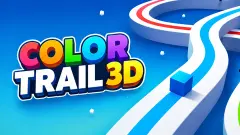
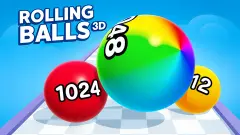
Rolling Balls 3D is the studio's other rolling game in our catalogue, and it goes the opposite way: you steer constantly and the maze keeps adding clones of your own ball. Cut It 3D and Cut It All 3D swap the timing for a single well-aimed slice. Outside the studio, ColorTrail 3D is the closest relative we have found anywhere on the site — a yellow cube, a track over the sea, the same hold-to-move painting, with spinning propellers in place of the sliding black cubes. And Rolling Balancer Ball keeps the narrow path over water but hands the steering back to you, which after an hour of this one feels like being given too much to do. The rest are in 3D games.
Screenshots
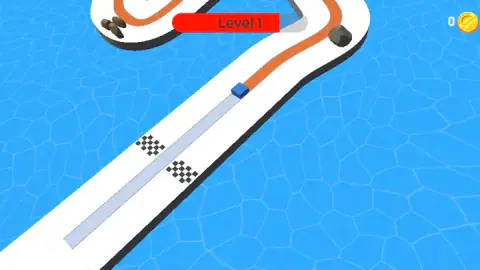
How to play Rolling Cube 3D
- Click through the opening screen. Ours took a couple of clicks before the track appeared, with a short sound on the way in.
- Hold the left mouse button down. The cube sets off along the lane and paints it behind it. A finger held on a touchscreen does the same job.
- Let go to stop dead. You will want to do this before every crossing where a black cube is sliding across your lane.
- Hold again once the crossing is clear, and keep alternating. The bar across the top of the screen, the red one with the level number written over it, fills as you cover ground.
- Paint your way between the two chequered patches at the far end and the level is done. A panel opens with a chest; the green CLAIM button banks the coins and moves you on.
What we learned the slow way:
- Hold, do not click. Our first attempts were short taps and the cube barely twitched. Everything we actually achieved came from pressing the button and keeping it pressed for a second or more. If the cube seems broken, you are tapping.
- Stop short of the rail, not on it. The safe place to wait is a cube's length back from the crossing, where you can watch the black cube's full sweep. Creeping up to the edge gives you a better view and no time to use it.
- Let the first sweep go past. Each black cube repeats the same trip at the same speed. Watching one full there-and-back costs a second and tells you exactly how long the gap is.
- The camera is not a fixed height. It pulls in close on some stretches and sits well back on others, so the same gap can look very different from one crossing to the next. Trust the timing you counted, not how wide the lane looks.
- The roadside clutter is a mystery we did not solve. Brown logs, a grey boulder and a few small trees sit at the edge of the road rather than on the lane. We never touched one, so we cannot tell you whether they bite.
Controls
| Hold the left mouse button (or hold a finger on the screen) | The cube travels forward along the lane and paints it behind it. Short clicks barely move it |
|---|---|
| Release | The cube stops where it is. This is how you wait for a black cube to clear the lane |
| The mouse direction | Nothing we could detect. Dragging left, right, up and down never pulled the cube off the lane |
| Arrow keys and the space bar | Nothing we could detect. Every bit of progress we made, we made by holding the button down |
| Tap anywhere on the "Tap to restart" screen | Starts the level again from the beginning, with the lane blank |
| CLAIM | On the level-complete panel, banks the coins and moves you on. The button beside it carries a video icon |
Features
- One input for the whole game: hold to move, let go to stop, and nothing else
- A blue cube that turns the pale lane of the track a solid colour as it passes, green in one of our runs and orange in another
- A track floating on open water, made of hairpins and S-bends the cube follows without any steering from you
- Black cubes that slide back and forth along short rails cutting across your lane, so every crossing is a wait rather than a dodge
- Failure is scored, not punished: the screen tells you the percentage of the level you painted and invites you to restart
- A finish marked by two chequered patches painted on the road, and a chest that paid 100 coins for level 1
- Listed for desktop, mobile and tablet, with the same hold working as a mouse button or a finger
Game details
- Developer
- Foxi Games
- Release date
- June 2026
- Last updated
- October 23, 2026
- Added here
- April 2026
- Technology
- HTML5 (3D)
- Platforms
- Browser (desktop), Browser (mobile & tablet, touch)
- Saved progress
- Saving, when available, is managed by this game. Mava cannot confirm your level.
FAQ
How do you play Rolling Cube 3D?
You hold the left mouse button, or hold a finger on the screen, and a blue cube travels forward along a lane marked down the middle of a track, colouring the lane in behind it. Let go and the cube stops. The track handles the corners for you, so the whole game is deciding when to move and when to sit still.
How do you steer in Rolling Cube 3D?
You do not. We dragged the mouse left, right, up and down and tried the arrow keys, and the cube followed the lane regardless — the painted line it leaves behind never once stepped outside the lane, even through a hairpin. The only thing your hand controls is whether the cube is moving.
What are the black cubes in Rolling Cube 3D?
They are the obstacles. Short rails cross the track at intervals, and a black cube slides back and forth along each one, passing straight through the lane you need to paint. We caught the same crossing twice with the black cube at opposite ends of its rail, which is how we know they move rather than sit. One of them ended our first run.
What does the percentage mean when you fail in Rolling Cube 3D?
When the run ends, the screen shows how much of the level you painted before it did, in green, above the words "Tap to restart". Ours read 34 per cent. It is the same figure as the red bar across the top of the screen during play, which fills from left to right as the cube covers ground.
Do you collect coins on the track in Rolling Cube 3D?
There is nothing to pick up on the road. Our coin counter sat on zero for the whole of level 1 and only moved when we finished it, at which point a panel with an open chest paid out 100 and the counter read 100 on level 2. A second button on that panel carries a video icon and is marked x5.
Who made Rolling Cube 3D?
This one was published in June 2026.
Is Rolling Cube 3D free to play in a browser?
Yes. It runs on this page with nothing to install and nothing to buy, and it is listed for desktop, mobile and tablet alike. We played it with a mouse on a desktop; the hold that drives it is the same gesture as a finger held on a screen, which is plainly what it was designed around.
How many levels does Rolling Cube 3D have?
We do not know. We finished level 1 and saw the header change to Level 2, and that is as far as our session went. The game's own description promises many levels without naming a number, so we cannot tell you where it ends or whether it does.