

About Cube Smash
Cube Smash is filed under shooting games, and you will never fire a shot in it. The white cube at the bottom of the lane shoots by itself, a steady line of lime-green balls going straight up, from the first second of a run to the last. What it asks of you is harder to see, and we will be honest about how much of it we worked out in ten minutes.
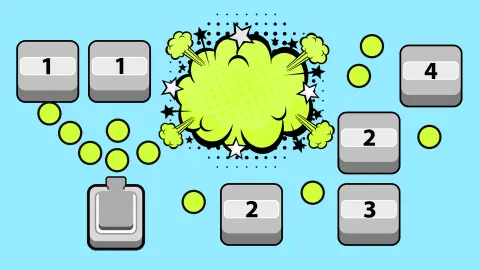
The lane is four blocks wide and phone-shaped: on a computer it sits as a tall strip in the middle of the window with grey either side. Rows of rounded blocks appear at the top, each printed with a number, and sink toward the cube. Every ball that lands takes one off the number; at zero the block bursts and the big black counter under the dollar figure goes up by one. When a block reaches the cube, the run is over.
That is the whole loop, and it is quick. What makes it more than a screensaver is a handful of things the game never explains: what the two colours of the blocks mean, why some blocks can slide right past you, what the money is for and what the small blue chip does. Those are below.
The game is credited to TAP TO PLAY. It went up in January 2025 and was last updated this October.
The cube shoots by itself, so the game is about where it stands
Most block breakers give you a paddle or a trigger. Cube Smash gives you neither. The balls are already in the air when the first row appears, and no press of ours ever started or stopped them. The store page talks of aiming and shooting, which is generous: the aiming is a matter of where the cube stands, and the shooting is not yours.
So what did we control? Less than we would like to report. The cube sat dead centre in most of our frames, between the two middle columns, and the stream went up that seam. Where it had moved, it had shifted a finger's width toward the side we had pressed, never further, and never into an outer column. Our presses were short, and we read the game as moving the cube only while you hold, which would explain why a tap did almost nothing. To shift the stream under a particular block, press and keep pressing.
That makes Cube Smash a game of reading rather than reflexes. Every number is visible from the moment a row appears, and so is the column the stream is in. The question each row asks is whether the balls will burn through its middle blocks before it reaches the cube. The outer blocks are not your problem.
Grey blocks take six hits or fewer; green ones take seven or more
The game never explains its colours, but it is consistent about them. Across every frame of our session, the grey blocks all read 6 or less and the green ones 7 or more. One row made the border plain, with a green block at one end and a grey one at the other, exactly one hit apart. The biggest block we saw read 13, and it was green.
The colour reads faster than the digit. A green block in a middle column is the row's real threat: at least seven balls before it bursts, and the row does not wait. A grey one in the same spot is a formality. We also noticed that the money comes in per hit rather than per block: between two frames our wallet rose by $14 while the block counter rose by two, and a run that ended on 15 blocks left $56 behind. Bigger blocks pay better, but they are also the ones that end runs.
Rows arrive with gaps. Some had four blocks across, some two, some a single block in an outer column that slid past untouched. The losing frames tell the rest: one run ended under a full row whose smallest block was a 6, another under a full row topped by an 11, and a third under a thin row whose only middle block was a 2. The number did not matter at that point; the position did.
Nine runs, a best of 32 and $863 we never spent
We played for ten minutes on a computer and lost nine times; most runs ended in the mid-teens or low twenties. One run reached 32 before a row caught the cube. The title screen remembers that figure as Best result, with a crown under it.
Money is the other thing that survives a loss. Our wallet went from nothing to $863 over the session and kept every cent through the YOU LOSE cards: the run that ended with $421 on the counter was followed by one that started with $421.
For scale, the top score on the distributor's daily leaderboard was 210 when we looked: six or seven of our best runs stacked end to end.
One more interruption: if the window loses focus, a grey pill reading Click to keep playing appears at the top of the lane and the game pauses until you click it. It caught us twice.
What we did not open
- The shop and the upgrades. The green cart and the red up-arrow on the title screen stayed shut. The store page speaks of other kinds of ammo bought with the money you earn; we saw one kind of ball all session, so we cannot tell you prices or what changes.
- The language flag and the sound button. Both sit at the top of the title screen; we touched neither.
- A phone. The game is built in portrait and the game's listing gives Android and iOS, but our session was on a computer.
Who it is for, and more block breakers in the catalogue
Cube Smash suits someone who wants a minute at a time: a run is short, the rules fit in a sentence, and the only reading required is a number on a block. There are no levels and no story; in our session the rows simply kept coming. Anyone hoping for the ammo and upgrades the store page promises should know we did not reach them in ten minutes.
If you like numbered blocks creeping toward you but want to aim, Balls: Ricochet! is the turn-based version, one shot per row; BreakBlock adds a volley of balls and dots to collect, and Bricks Buster does it in fixed levels. For money per hit with a proper shop behind it, Block Shooter: Shoot the Blocks! pays a dollar a shot and saves toward a missile launcher, and Smash Master points a cannon at stacks of crates.
More in our shooting games.
Screenshots
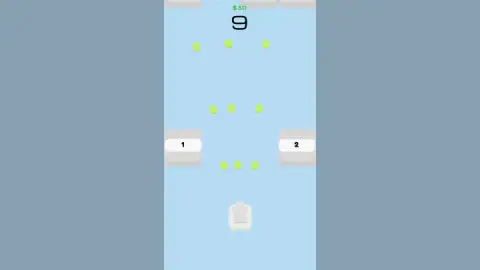
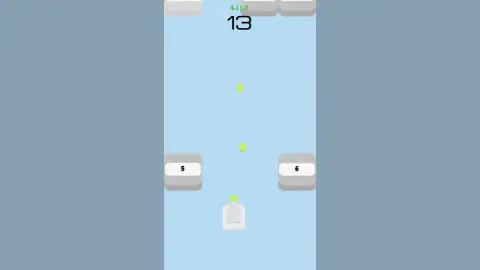
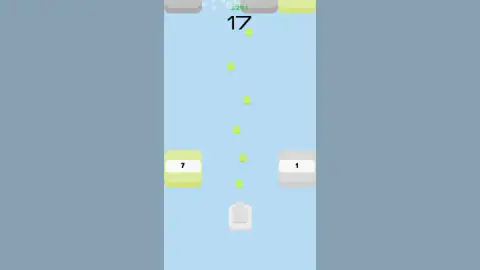
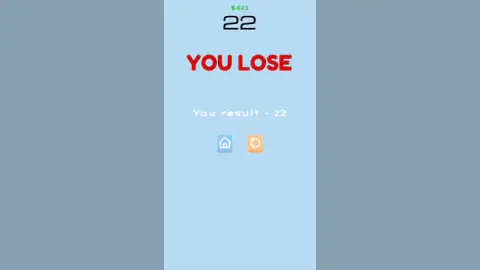
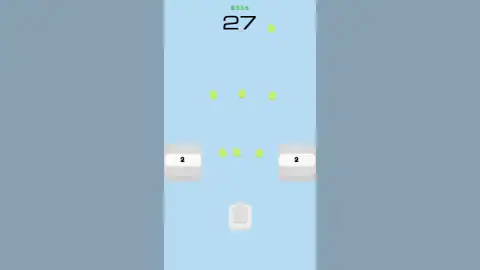
Taken by opening the game ourselves and letting it run — not supplied by the publisher, and not the same picture every other site shows.
How to play Cube Smash
- Tap to start. The title screen shows your best result under the name and four small buttons along the top: a flag, a speaker, a shopping cart and a red upward arrow.
- Let the cube shoot. There is no fire button and no reload. The balls leave the cube one after another and travel straight up the middle of the lane.
- Read the numbers. Each block shows how many hits it has left. Grey blocks are the cheap ones; a green tint means a bigger number, and in every frame we kept the line between the two sat at seven.
- Keep the middle clear. Blocks in the two outer columns slide past the cube and off the bottom. A block in the two middle columns ends the run the moment it reaches you.
- Read the result. The red YOU LOSE card shows You result and your block count, with a blue house to go back to the title screen and an orange arrow to go again.
Tips from our runs:
- The zero looks like a block. The counter is drawn in a rounded font whose 0 is a hollow square. At the start of every run there seems to be an empty block waiting at the top of the lane; it is the score reading zero.
- Grab the blue chip. A light-blue square with three white dots drifted down the lane in our first run, and shortly after the cube was firing three balls abreast instead of one. We take it to be the triple-shot pickup.
- Hold rather than tap. In our frames the cube only drifted off centre when we pressed to one side, and only a little. We read it as following your finger or pointer while you hold, so a quick tap barely moves it.
- Expect an ad after a loss. Every YOU LOSE card in our session was covered by a layer offering an ad break before we could press retry. It let us through each time; on a phone, count on the ad playing.
Controls
| Tap or click | Starts a run from the title screen and takes the house or retry button after a loss |
|---|---|
| Hold and move sideways (finger or mouse) | Nudges the cube left or right while you hold; a short tap barely moves it, as far as we could tell |
| Nothing to fire | The cube shoots a steady stream of balls straight up on its own |
| Cart and red up-arrow on the title screen | Shop and upgrades; we did not open either |
| Flag and speaker on the title screen | Language and sound; not tried |
Features
- The cube fires a constant stream of lime-green balls straight up the lane; there is no fire button
- Every block shows how many hits it has left: grey blocks read 6 or less, green ones 7 or more, in every frame we kept
- Rows up to four blocks wide sink down a phone-shaped lane; a block in the middle two columns ends the run when it reaches the cube
- Blocks in the two outer columns slide past the cube and off the bottom without harm
- A light-blue chip with three white dots turned our single stream into three balls abreast
- Money carries over between runs and grew from $0 to $863 in ten minutes; the block count resets each run
- Our best run smashed 32 blocks; the top daily score on the site's leaderboard was 210 when we checked
Game details
- Developer
- TAP TO PLAY
- Release date
- January 2025
- Last updated
- October 1, 2026
- Added here
- April 2025
- Technology
- HTML5 (2D, Construct)
- Platforms
- Browser (desktop), Browser (mobile & tablet, touch)
- Classification
- Shooting
- Saved progress
- Saving, when available, is managed by this game. Mava cannot confirm your level.
FAQ
How do you play Cube Smash?
You tap to start and the white cube at the bottom begins firing green balls straight up on its own. Rows of numbered blocks appear at the top and sink toward you; each hit takes one off a block's number and at zero it bursts, adding one to the big counter. The run ends when a block in the middle of the lane reaches the cube. The only thing you steer is the cube's sideways position, and only a little.
How do you lose in Cube Smash?
A block reaches the cube. In our runs that was always either a full row of four or a block in one of the two middle columns; blocks in the outer columns slid level with the cube and off the bottom without ending anything. A red YOU LOSE card then shows You result and your block count, with a blue house button for the title screen and an orange arrow to go again.
What do the numbers on the blocks mean in Cube Smash?
How many hits the block still takes before it bursts, as far as we could tell. A block marked 1 goes with the next ball; one marked 13 needs thirteen. The green dollar figure at the top rose with every hit, not only when a block burst, so bigger numbers are worth more money but take longer to clear from your path.
Why are some blocks green and others grey in Cube Smash?
The colour tells you the size of the number before you can read it. In every frame we kept, blocks with 6 hits or fewer were grey and blocks with 7 or more were lime green; the biggest we saw read 13. A green block in a middle column is the one most likely to end your run, because the row does not wait for the balls to wear it down.
What does the money do in Cube Smash?
It carries over between runs: we lost with $421 on the counter and started the next run with $421 still there, and our wallet reached $863 after ten minutes. The title screen has a shopping cart and a red upgrade arrow where it is presumably spent, and the listing's page talks of upgrades and other kinds of ammo. We never opened the shop, so we cannot tell you prices or what the ammo does.
What is the blue chip with three dots in Cube Smash?
A pickup that drifts down the lane like a block. One appeared in our first run, and shortly afterwards the cube was firing three balls abreast instead of one, which carried that run past its earlier best. We take it to be a triple-shot power-up. It did not appear in every run, and we did not see how long it lasts.
Can you play Cube Smash on a phone?
It is listed for PC, Android and iOS and the game is built in portrait: on a computer it sits as a tall strip in the middle of the window with grey either side, and a tap is the only input it needs. We played it on a computer, so we did not try a touchscreen ourselves. Expect an ad break after each loss on any device.
Who made Cube Smash?
The game is credited to TAP TO PLAY. It went up in January 2025 and was last updated in October of the following year. When we checked, in English, with an E age label on its page.