


About Cubby Soccer League
Most small soccer games pick one thing: a penalty shootout or a kickabout. Cubby Soccer League cuts between the two every few seconds. You run up the pitch, the pitch goes dark, a card slides over it and asks one question: is this shot going in or not.
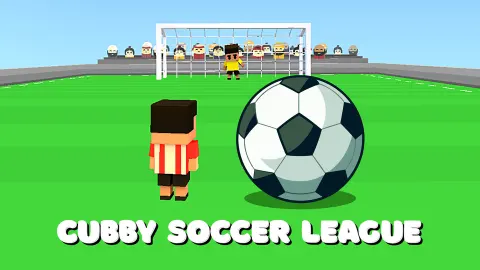
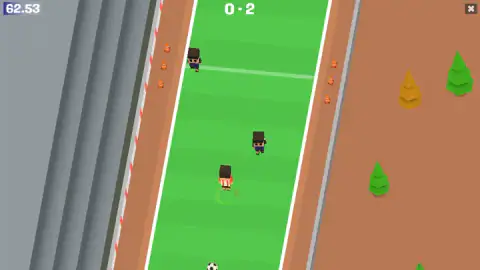
The players are cubes with square heads and striped shirts. Yours wears red and white and has a green ring at his feet. The pitch is one lane wide and you see it from behind him, so the goal you attack is at the top of the screen and the defenders come down at you.
We played for about four minutes on a desktop, across parts of two matches. We lost both and did not score. What follows is what those four minutes showed, including why we think we lost.
The game is credited to Peynir Games. It has been available since October 2024.
The shot card tells you three things at once
The card is the whole interface, so it is worth reading slowly once.
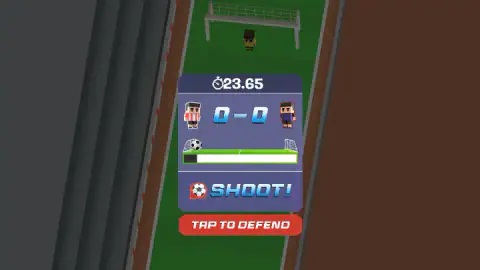
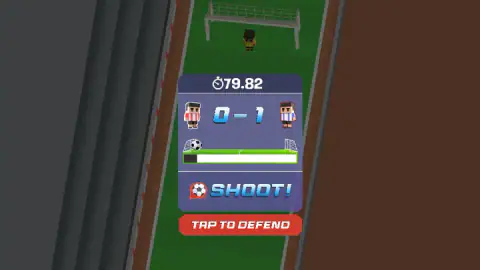
At the top is the clock. Under it are the two players' portraits with the score between them, yours on the left. Under that is the position bar: a goal icon at each end, a tick at the halfway point and a ball that slides along it. At the bottom is a label, SHOOT! or OUT!.
Behind the card the pitch is dimmed, and you can see a goal with a keeper in yellow standing in it.
We saw the ball marker at the left goal on every SHOOT! card. Once, as a card slid away, the marker was at the right goal and the bar was almost full. So the bar does travel the whole way, and we read the left end as our own goal. That reading is ours; the game never spells it out.
Our saves held, and we still lost 0-2
The first match was already going badly when we got our bearings: 0-1 down against a rival in sky-blue and white stripes, with the clock near 80. We did not see how it ended. The next thing on screen was the ladder again.
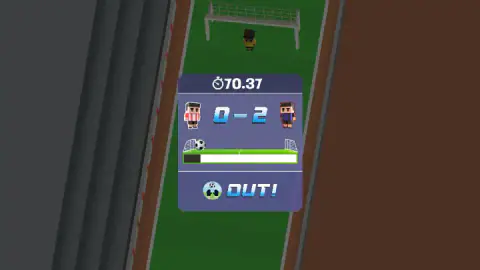
The second match was against the rival in dark blue. At 23.65 on the clock it was 0-0. By 53.77 it was 0-2, and it was still 0-2 at 70.37 when we stopped.
Here is the odd part. Every time we pressed TAP TO DEFEND, the answer was OUT! with a pair of gloves, and the score on that card did not change. Yet two goals went in. We never saw either one cross the line.
Our best explanation is that we wasted presses. Between saves we clicked the SHOOT! label and the bar itself, thinking it was our turn to strike. Each of those clicks did nothing, and both goals came in those stretches. We cannot prove that a missed press is what lets a shot in. It is what the timeline suggests.
We also never took a shot of our own that we could recognise. Whether attacking uses the same card with a different button is something we cannot tell you.
The clock stops for every shot, which real football never does
One thing we can state exactly. The clock read 53.77 when one shot card came up and 54.23 some twenty seconds later. While a card is open, time does not run.
Real football works the other way round. Under Law 7 of the Laws of the Game, a match is two halves of 45 minutes and the clock keeps going through everything. The referee adds time at the end of each half for what was lost to substitutions, injuries, time-wasting and goal celebrations. There is one exception that looks like this game: if a penalty has to be taken, the half is extended until the kick is completed.
Cubby Soccer League treats every shot like that penalty. For you it means there is no reason to rush a card. The seconds you spend reading the bar are free, and the clock only costs you when you are running.
It also means the number in the corner is not a stopwatch. The highest we saw was 79.82, in a match that had taken a good deal longer than 80 seconds of our time. We did not see where it ends.
A ladder of three rivals in striped shirts
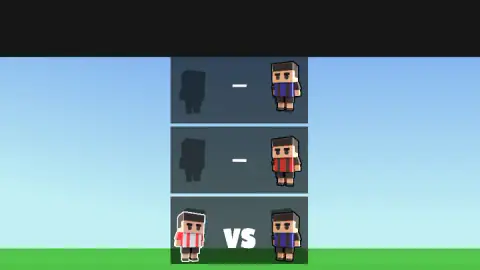
The screen before kick-off stacks three panels. The bottom one is lit: your player, VS, and the first rival. The two above show your place as a grey silhouette with a dash where the result will go, and the rivals waiting there, one in red and black stripes and one in dark blue.
So a run is three matches, climbing. We never got off the bottom rung.
The shirts are the only identity the teams have. No club name, badge or league appears on any screen we saw, and the game does not present its sides as real ones. Stripes in familiar colours are as far as it goes.
Who it is for, and what we did not see
It suits someone who wants soccer in two-minute pieces and does not mind a game that explains nothing. The look is friendly: bright grass, orange cones, toy-like players. The difficulty is in working out what the card wants, more than in the football.
Be clear about how little we saw. We did not score, win or finish a ladder. The game's listing says the arrow keys move you left and right and steer the keeper, that Space runs forward and shoots, and that there is stamina to manage. We saw no stamina meter and could not match a key to a result. We did not play on a phone.
More soccer games
For the card without the running, Penalty Shooter alternates taker and keeper in a plain shootout. Soccer Dash is the running without the card: you thread a ball past defenders with drags. Power ball soccer is a top-down match against rivals that get stronger, and Freekick Hero is all set pieces. The rest are under soccer games.
Screenshots
Taken by opening the game ourselves and letting it run — not supplied by the publisher, and not the same picture every other site shows.
How to play Cubby Soccer League
- Start the game. Before kick-off a ladder of three rivals appears, with your player and the word VS on the bottom rung.
- In open play, run your player up the lane. The clock is top left and the score top centre.
- When a shot is on, the pitch darkens and the shot card covers the middle of the screen.
- If a red TAP TO DEFEND button sits under the card, press it. The card answers with OUT! and play goes on.
What four minutes taught us:
- SHOOT! is not a button. It has a ball icon and looks pressable. We clicked it four times and the card did not change.
- The red button is the one that works. Five presses, five OUT! cards, no goal on any of them.
- Read the small bar first. It runs between two tiny goals with a ball marker on it. The marker sat at the left goal, the one beside our own portrait, every time the red button was showing.
- The danger is between cards. Both goals in our second match arrived while we were not looking at a card with a button we understood. Stay on the red button until the pitch lights up again.
Controls
| Left click on TAP TO DEFEND | Answers a shot card; each time we pressed it the card changed to OUT! and the score stayed as it was |
|---|---|
| Left click on the SHOOT! label | Did nothing we could see; it is a notice, not a button |
| Arrow keys and Space | Listed for steering, running forward and shooting; we could not tie a clear result to them in our session |
| X in the top right corner | On screen during open play; we did not press it |
Features
- A pitch one lane wide, seen from behind your player, with cones and trees along the touchlines
- Cube-headed players in striped kits, yours marked by a green ring at his feet
- A shot card that covers the pitch, with the clock, the score and a bar showing where the ball is between the two goals
- A red TAP TO DEFEND button under the card when the ball is at your end
- A clock that counts up in hundredths of a second and stops while a shot card is open
- A ladder of three rivals shown before kick-off, with the next two waiting above the first
Game details
- Developer
- Peynir Games
- Release date
- October 2024
- Last updated
- June 10, 2026
- Added here
- March 2025
- Technology
- HTML5 (Construct)
- Platforms
- Browser (desktop)
- Saved progress
- Saving, when available, is managed by this game. Mava cannot confirm your level.
FAQ
How do you play Cubby Soccer League?
You control one cube-headed player on a narrow pitch, running upfield towards the far goal while rivals come the other way. When a shot is on, a card covers the screen with the score, the clock and a bar showing where the ball is. If the red TAP TO DEFEND button is under it, press it to keep the shot out.
What does TAP TO DEFEND do in Cubby Soccer League?
It is the save. In our session we pressed the red button five times and each time the card changed to OUT! with a pair of keeper's gloves, and the score did not move. The SHOOT! label above it is only a notice; clicking it did nothing we could see.
How long is a match in Cubby Soccer League?
We cannot give the full length, because we never reached a final whistle. The clock counts up from zero in hundredths of a second and the highest reading we saw was 79.82. It also stops while a shot card is on screen, so a match lasts longer in real time than the clock says.
How many teams are there in Cubby Soccer League?
The screen before kick-off shows a ladder of three rivals, one above another, and you start at the bottom. We met two different rivals in our session, one in sky-blue and white stripes and one in dark blue, and lost to both, so we did not see the second or third rung played.
Are the teams in Cubby Soccer League real clubs?
No club, league or player name appears anywhere we looked. The teams are told apart only by their striped shirts, such as red and white, dark blue, or red and black. Nothing in the game presents them as licensed sides.
Is Cubby Soccer League a penalty shootout game?
Not only. There is open play, where you run up a one-lane pitch past defenders, and there are shot cards that interrupt it. In our session most of the time went on the cards, defending shots at our own goal.
Who made Cubby Soccer League?
The game's listing credits Peynir Games. It was published on 20 October 2024 and last updated in June 2026.