





About Soccer Jump
Most one-on-one football games hand you a stick to run with and a button to shoot. Soccer Jump gives you neither. Your player cannot walk. Hold the Space bar or the mouse button and they start to lean; let go and they leap, legs first, in whatever direction they were leaning when you released. That is the whole control scheme, and the game is about learning when to let go.
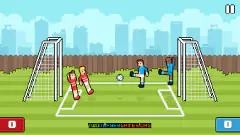
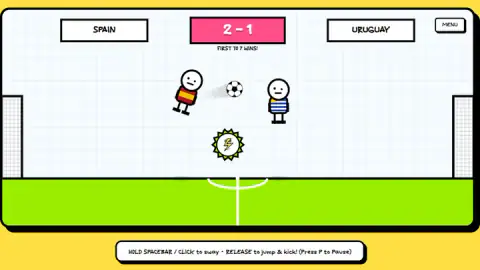
The pitch is seen from the side, like a table-top game: one goal on the left, one on the right, a ball and two stick-figure players with round heads. Matches are first to seven goals. After a goal the ball drops back in from above the centre circle, so each point restarts as a small race to the same falling ball.
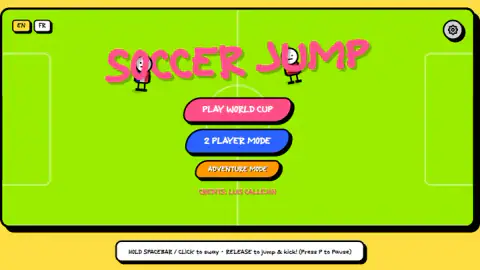
Soccer Jump is credited on its own menu to Luis Callejon, who is also listed as its author. It came out in late August 2026. We played about four minutes of it on a computer with a mouse: most of the first Adventure match and the start of a World Cup game.
Goliath gets the bigger goal
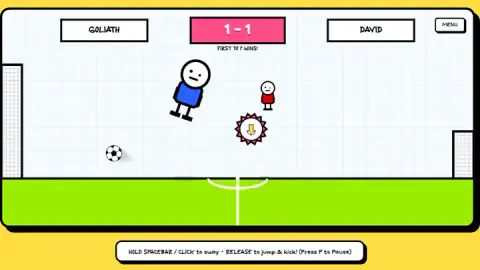
The first Adventure match is called, on the scoreboard, GOLIATH against DAVID. The left-hand player, in the blue shirt we had kept on the character screen, stands about twice as tall as the small red player opposite. It looked like we were the giant.
What the scoreboard does not tell you is that the goals are different sizes too. Goliath defends a goal more than twice as tall as David's. In the World Cup match the two goals were the same height, so this is a rule of that first stop, not of the game.
The reference is the oldest underdog story in football writing. In the Book of Samuel, the young shepherd David faces the Philistine champion Goliath and brings him down with a sling and a stone. Football borrowed the idea long ago: when a small club knocks a big one out of a cup, English commentators call it giant-killing.
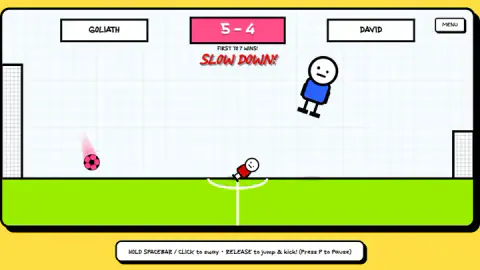
Soccer Jump turns the story into balance. Goliath covers more of the pitch with each jump and reaches high balls David cannot. David has a smaller target to protect, so his shots need less power and his saves less reach. When we played it, the match stayed tight: the score was tied at one and at two, and the last screenshot we kept showed Goliath only one goal ahead at 5-4.
The Adventure map and the World Cup
Adventure Mode is a map of ten stops along a winding path, with a gold cup above the last one. Only the first stop is open at the start; the rest show padlocks. The map has a MY CHARACTER button for dressing your player, and a BACK button to the main menu. We did not see the second stop played.
Play World Cup opens a Pick a Nation screen with more than twenty countries, from Argentina and Brazil to Japan, Morocco and Sweden. The list is alphabetical except for its first three entries: Canada, Mexico and the USA. Those are the three countries that co-hosted the 2026 men's World Cup, the first played with 48 teams. The game uses only country names and simple shirt colours; we saw no official crest, badge or tournament logo.
After you pick a nation, a bracket screen appears with a START MATCH button. We chose Spain, were drawn against Uruguay, and were leading 2-1 when our session ended. The game's listing says the final is a harder match than the others. We did not get that far, so we cannot tell you what changes.
What changes during a match
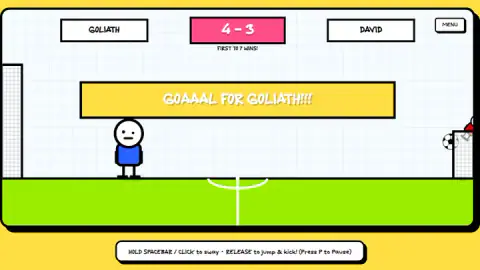
Soccer Jump does not keep the pitch the same for long. In one of our screenshots from the Adventure match, the ball has turned pink and trails a pink streak, and the words SLOW DOWN appear in red under the score. After a goal, a wide yellow banner across the pitch announces who scored.
We cannot tell you exactly which badge caused which effect, because we did not see each one picked up and then followed through. What we can say is that the game expects you to change plans mid-point: the ball and the conditions do not always behave as they did on the last restart.
Who it is for
Soccer Jump suits anyone who likes short, silly duels where the skill is timing rather than reflexes. A single input makes it easy to hand to a younger player, and the drawings are friendly and bright. Since every player shares the same one-button control, an adult has no head start from years of gamepads.
It is less suited to anyone who wants to run a team, pass the ball or plan a formation. There is one player per side, and every goal comes from a jump.
What we did not see
We did not finish a match, see a result screen or play the second Adventure stop. We did not try 2 Player Mode, open the settings or play the World Cup final. We played only on a computer; Android and iOS is listed as well. Between matches the game showed an ad-break screen, which on our run was skipped with a short notice and a Continue playing button.
More one-on-one football
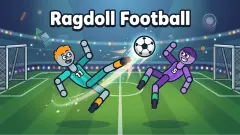
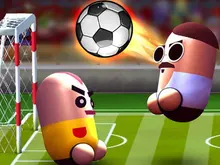
Ragdoll Football is another one-on-one physics match, with floppy players and short rounds. Dummies Football 2026 also has you pick a national team and play a tournament. To play a friend, Pill Soccer has a 2 Player mode. More matches are in the soccer category.
Screenshots
Taken by opening the game ourselves and letting it run — not supplied by the publisher, and not the same picture every other site shows.
How to play Soccer Jump
- From the main menu, pick Play World Cup, 2 Player Mode or Adventure Mode.
- Hold Space or the mouse button. Your player starts to sway, tilting back and forth where they stand.
- Release to jump and kick. The jump follows the lean, so the moment you let go decides where you land and where the ball goes.
- Score seven before your opponent does. P pauses the match, and the MENU button in the top-right corner takes you out.
Tips from our matches
- A bad jump is costly. Players can end up flat on the grass, and in one of our screenshots the opponent lies there while the ball is on the other side of the pitch.
- Watch the restart. In both of our restart screenshots the ball was dropping in above the centre circle, so the first jump after a goal decides a lot.
- The badges that appear mid-pitch are worth a detour. We saw one marked with a lightning bolt and one with a down arrow; the listing talks about kids imagining superpowers, and these badges look like where they come from.
- The scoreline moves fast. In our Adventure match the lead swung back and forth, and no lead felt safe at first to seven.
Controls
| Hold Space or hold the mouse button | Your player starts to sway on the spot |
|---|---|
| Release | Your player jumps and kicks in the direction of the lean |
| P | Pauses the match |
| MENU button, top right | Leaves the match for the menu |
Features
- One input for everything, hold to sway and release to jump and kick, on desktop with Space or the mouse
- Matches are first to seven goals, against a single opponent on a side-on pitch
- Three ways in from the main menu: Play World Cup, 2 Player Mode and Adventure Mode
- A World Cup with more than twenty nations to pick from, and a knockout bracket before each match
- An Adventure map of ten stops with a gold cup at the end, opened one stop at a time
- Mid-pitch badges that change the match, including a lightning bolt and a down arrow
- English and French menus
Game details
- Developer
- Luis Callejon
- Release date
- August 2026
- Last updated
- August 25, 2026
- Added here
- July 2026
- Technology
- HTML5
- Platforms
- Browser (desktop)
- Classification
- Soccer
- Saved progress
- Saving, when available, is managed by this game. Mava cannot confirm your level.
FAQ
How do you play Soccer Jump?
Hold the Space bar or the mouse button and your player starts to sway; let go and they jump and kick in the direction they were leaning. There is no run button and no separate kick key. Whoever reaches seven goals first wins the match.
How do you win a match in Soccer Jump?
Matches are first to seven goals, shown as FIRST TO 7 WINS under the score. In our matches the ball dropped in again above the centre circle after a goal, so each point started with both players racing for the same falling ball.
Who made Soccer Jump and when did it come out?
The main menu credits Luis Callejon, and the game's listing gives him as the author. The game was published on 24 August 2026.
Does Soccer Jump have a 2 player mode?
Yes, 2 Player Mode is one of the three buttons on the main menu, alongside Play World Cup and Adventure Mode. We did not try it, so we cannot say how two people share the controls.
Who are Goliath and David in Soccer Jump?
They are the two players in the first Adventure match. Goliath is a large player in blue and David a small one in red, but Goliath defends a goal more than twice as tall as David's. The size gap and the goal gap pull in opposite directions.
Which teams can you pick in the Soccer Jump World Cup?
The Pick a Nation screen lists more than twenty countries, including Argentina, Brazil, England, France, Germany, Japan, Morocco, Spain and Uruguay. Canada, Mexico and the USA come first, ahead of the alphabetical list. The teams are simple shirt colours with no official crests.
Can I play Soccer Jump on a phone?
The game's listing gives PC, Android and iOS for Soccer Jump, and the game is played in landscape. We only played it on a computer with a mouse, so we cannot describe how the hold-and-release control feels on a touch screen.