





About Music Note
Most platform games give you a way to walk and a way to jump, and the difficulty comes from doing both at once. The Music Note game takes the walking away from you. The note slides along its shelf by itself, turns around when it meets a wall, and keeps going. All you decide is when it jumps.
That sounds like less of a game, and on the first level it is. The level is a ladder of shelves, each one with a wall at both ends, and a jump from anywhere lifts the note onto the shelf above. The second level is where the idea shows its teeth: some of the shelves lose a wall, and a note that slides to an open end falls off.
Everything is drawn in black on pale grey. The hero is a single black note, the scenery is a trumpet, a guitar, treble clefs and ribbons of written music, and the goal is a piano keyboard on the top shelf. The only colour is the one you make, a short trail of small coloured notes behind every jump.
Music Note is by Qookie Games. It was listed in October 2025.
Level 1 is a ladder, level 2 has edges
The first level opens with a view of the whole climb before the camera moves in. We counted eight shelves, stacked evenly, with the keyboard sitting on the eighth. A hint under the bottom shelf tells you to tap or press space. Since nothing can go wrong there, it is a tutorial in all but name, and we cleared it in under a minute without knowing the rules.
Level 2 changes the scenery to a guitar, with a page of sheet music across the bottom, and changes the rules with it. Full shelves alternate with ledges that are pushed out to one side and have a wall at one end only. The note still moves on its own, so a ledge is a countdown: it will reach the open end whether you are ready or not.
We found that out the hard way. Three times the note slid off an open end, dropped past the shelves below and broke into pieces over the sheet music. Each time a Game Over menu came up with two choices, Restart and Exit, and Restart put the note back on the bottom shelf of level 2. There are no checkpoints inside a level.
What the symbols on screen are
The game is built from the signs of written music, and the layout borrows their logic. The hero is an eighth note, the one with a filled head, a stem and a single flag. The big curled sign at the edge of the screen is a treble clef, which on a real page tells you which pitches the five lines of the staff stand for.
On that staff, height is pitch: the higher a note sits, the higher it sounds. Music Note turns the same picture into a climb. The shelves are stacked like the lines of a staff, and the note goes up them one at a time towards the instrument that would play it.
What we did not reach
We cleared level 1 and tried level 2 three times without finishing it. So we cannot say how tall level 2 is, what level 3 adds, or how many levels there are. The level grid scrolls well beyond the first screen of squares, all of them locked until you get there.
The game's description says each bounce spreads colour and brings a black-and-white world to life. In our run the colour was a trail that faded behind the note, plus the rainbow screen at the end of level 1, and the levels themselves stayed black and white. The description also says R restarts a level; we used the Restart button instead. An ad break can come up between attempts.
Who it is for
Music Note suits anyone who likes one-button games where the whole skill is timing, and it is gentle enough at the start for a young player. There is no score, no clock and no lives counter on screen, so nothing rushes you except the note itself.
It is not a rhythm game and it is not a music lesson. Nothing asked us to press on a beat, and you do not need to read a note of music to play.
More one-button jumping games
If the single jump button is what you like, Chubby Duck Jump makes you hold it to charge each leap. For jumping that is tied to a song, try Jump to the Rhythm of Songs! Musical Ball!, and for timing at running speed there is Bridge Bounce: Jump Challenge. More games like these are in the arcade category.
Screenshots
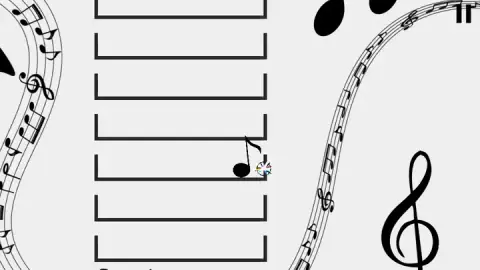
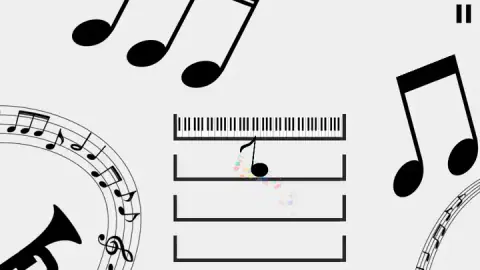
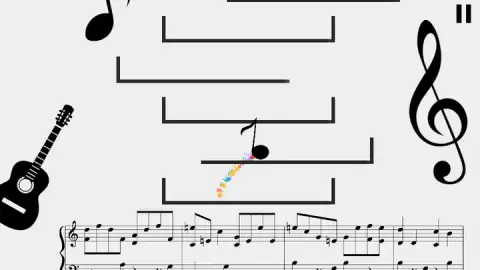
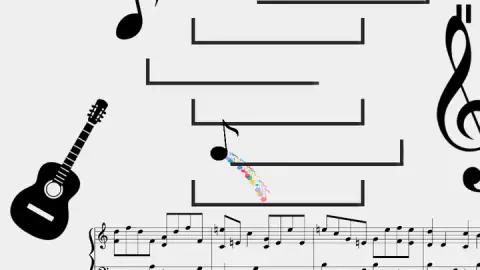
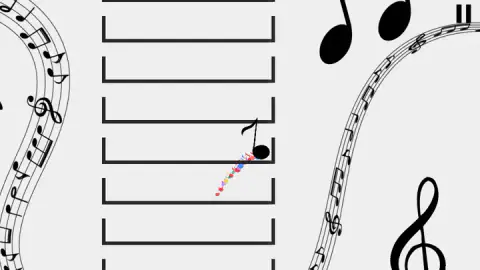
Taken by opening the game ourselves and letting it run — not supplied by the publisher, and not the same picture every other site shows.
How to play Music Note
- Press the play button on the title screen, then pick 1 on the Choose Level grid. Every other square starts locked.
- Watch the note. It is already moving along the bottom shelf, and it reverses each time it touches a wall.
- Press Space, or tap the screen, to jump. The note rises through the shelf above and lands on it.
- Repeat until the note is on the shelf with the piano keyboard. A rainbow screen and a Level Complete menu follow, and Next takes you on.
Tips from our run:
- Level 1 cannot hurt you. Every shelf has two walls, so the note just bounces back and forth until you jump. Use it to learn how long a jump takes, not to hurry.
- In level 2, look at the shelf above before you jump. What matters is where the note will land and which way it will be heading when it does.
- Check which side the wall is on. A ledge with a wall on the right is safe while the note travels right. Once it bounces and heads for the open end, you have until the edge to jump again.
- Jump early on the ledges. We lost all three of our level 2 attempts the same way, by letting the note ride a ledge to its open end.
- The pause icon is the only button on screen. It gives you Continue, Restart and Exit if a climb has gone wrong.
Controls
| Space, or a tap on the screen | Jumps the note up to the next shelf (the hint on screen names both; we played on the space bar) |
|---|---|
| Pause icon (top right) | Opens a menu with Continue, Restart and Exit |
| R | Restarts the level, according to the game's description |
Features
- One input only, a jump, because the note travels left and right by itself
- Level 1 is a straight ladder of eight walled shelves with a piano keyboard on the top one
- Level 2 swaps some shelves for ledges with a wall on one side only, so the note can slide off the open end
- A black-and-white world of staves, clefs and instruments, with a trail of small coloured notes after every jump
- Clearing a level opens the next square on the level grid, and losing sends you back to the bottom of the same level
- No score, timer or lives on screen while you play, only a pause icon
Game details
- Developer
- Qookie Games
- Release date
- October 2025
- Last updated
- August 26, 2026
- Added here
- August 2025
- Technology
- HTML5 (2D)
- Platforms
- Browser (desktop, keyboard or mouse), Browser (mobile & tablet, touch)
- Classification
- Arcade
- Saved progress
- Saving, when available, is managed by this game. Mava cannot confirm your level.
FAQ
How do you play the Music Note game?
The note moves sideways on its own along a shelf and turns around when it reaches a wall. Your only control is a jump, on the space bar or with a tap, which lifts it to the shelf above. Keep climbing until the note reaches the piano keyboard at the top of the level.
How do you win a level in Music Note?
You win by getting the note onto the top shelf, the one with the piano keyboard on it. The screen fills with a rainbow spiral, then a Level Complete menu offers Next, Restart and Exit. Clearing level 1 also opened level 2 on the level grid in our game.
How do you lose in Music Note?
In level 2 some ledges have a wall on one side only. If the note is still on a ledge when it reaches the open end, it drops off, breaks apart at the bottom of the screen and a Game Over menu appears. Restart puts you back at the bottom of the same level.
How many levels does Music Note have?
We cannot give a total. The Choose Level screen shows fifteen squares at once and scrolls further, and every square after the ones you have cleared is locked. We cleared level 1 and did not get past level 2.
Is Music Note a rhythm game?
Not in the levels we played. Nothing on screen asks you to press in time with a beat, and there is no score for accuracy. It is a timing platformer dressed in musical symbols, where the skill is choosing when to jump.
Who made Music Note?
Music Note is by Qookie Games. It was listed in October 2025, last updated in August 2026.
Can you play Music Note on a phone?
The game is offered for phones and tablets as well as computers, and its own hint says a tap on the screen does the same job as the space bar. It runs in the browser with no download.