



About King of pirate
Most pirate games give you a ship, a map and something to find. King of pirate gives you a strip of sand. The pirate stands in the middle of it, sabre in hand, and he never takes a step. Zombies walk in from the left and from the right, and your whole say in the matter is which way he swings.
That is the game: one screen, two halves, one decision repeated as fast as the zombies arrive. Tap the left half and he attacks left. Tap the right half and he attacks right. Every zombie you cut down is a point in the SCORE counter in the top left corner, and the round ends when one gets through.
We should say how our own run went before anything else. Over about ten minutes we played more than a dozen rounds, and our score never went past one. Most rounds ended at zero. We explain below what we think went wrong, because it is also the clearest lesson in how the game works.
King of pirate is made by Lazy GameDev. It came out in December 2025. It plays in English and Russian, in landscape.
Why our best round was a single zombie
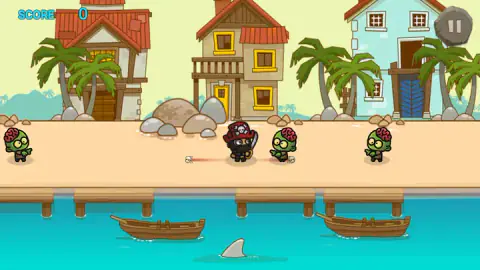
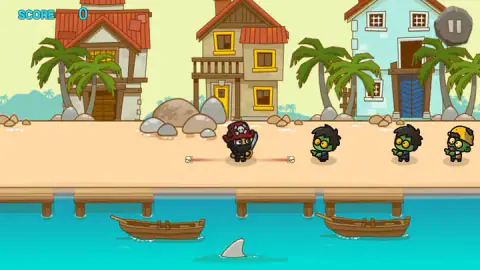
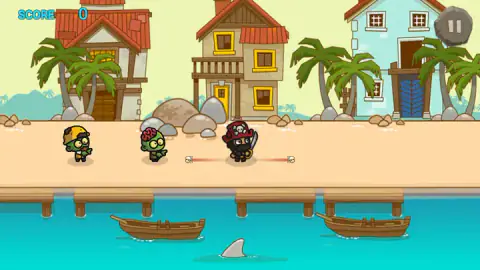
The captures from our rounds tell the story better than we can. In one of them the pirate stands in the middle with a zombie far off on the left, a second already standing on the end of his red line on the right, and a third further back on the right. Three zombies, two sides, three distances. The right tap at that moment is obvious: right, now, then right again.
What we were doing instead was alternating. A left tap at that moment swings at empty sand while the zombie on the right walks in. Most of our rounds lasted seconds, and the panel came up with a zero on top.
The rounds are short enough that this costs little. The tutorial line returns at the start of every round, the beach is the same each time, and the restart stone is one tap away. That is the arcade bargain: losing is quick, and so is trying again. Our record stayed at one for the whole session, and the panel showed it every time, which is its own kind of motivation.
What we cannot tell you is whether a swing at empty air leaves the pirate open for a moment, or whether the three kinds of zombie differ in speed. We never got far enough to see a pattern. If you do, the score in the top left corner will be the proof.
Two halves of a screen: an old idea in a small game
Splitting the screen into a left button and a right button, and sending enemies from both sides, is not new. The best-known version on PC is One Finger Death Punch by Silver Dollar Games, from 2014, where a stick-figure fighter stands in the middle and enemies run in from both flanks. One button hits left, one hits right, and only enemies inside your reach can be hit.
That design works because it strips the controls down so far that only the decision is left. You never aim and never move, so the game is entirely about reading which side is about to matter. The red line around the pirate plays the same role here as the range marker in that game: it tells you when a tap will land and when it will not.
King of pirate is a much smaller game than that one, with a single beach, but the skill it asks for is the same. Patience counts for more than speed. A player who taps only when a zombie crosses the line will beat one who taps twice as often.
What is on the beach
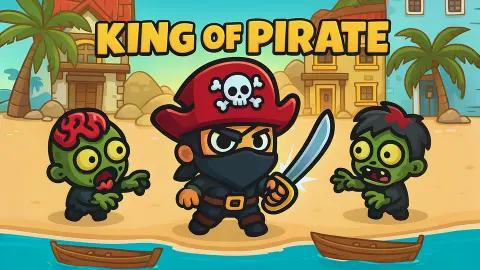
The setting never changes. Three houses with red and yellow roofs stand behind a row of palm trees, the sand runs across the middle of the screen, and below it is a wooden pier with two rowing boats tied up. A shark fin circles in the water under the pier. It looks like a threat, but it did nothing in any round we played; as far as we saw, it is scenery.
The zombies come in three looks: one with its pink brain showing, one with a mop of black hair, and one in a yellow hard hat. They shuffle in at the same height as the pirate, so there is nothing to dodge, only something to hit.
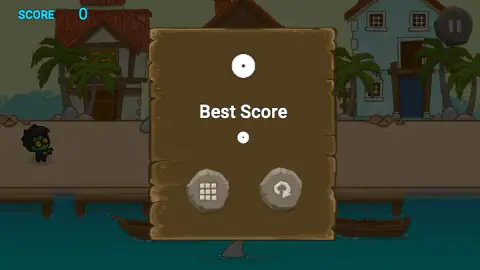
There are two panels. The end-of-round panel has the score, the Best Score, a grid stone and the restart stone. The Pause panel adds a mute stone and a green X to close it and carry on. A small note reading Click to keep playing appeared at the top a few times; one click on the game and it carried on.
Phone or computer
King of pirate is listed for PC, Android and iOS, in landscape, and its own instructions talk only about taps. The game is built for a thumb on each half of a phone held sideways, which suits it well.
We played on a computer, clicking the two halves with a mouse. That works, but you have to move the cursor across the whole screen to change sides. The arrow keys made no sound when we pressed them, so we could not use the keyboard.
More from Lazy GameDev, and more zombies
Lazy GameDev has very different games in our catalogue. Cube shooter is a 3D battle shooter where you loot weapons and try to be the last one standing, and Attack super hole puts you in charge of a hole in the ground that swallows soldiers against the clock. For zombies with more to do than walk in a straight line, try Zombie Raid, a side-on shooter with missions and an arena. If what you liked was the single blade, Sword Master: Slice Your Enemies! is built on very short levels of slicing. There are more quick, one-screen games in our arcade games.
Screenshots
Taken by opening the game ourselves and letting it run — not supplied by the publisher, and not the same picture every other site shows.
How to play King of pirate
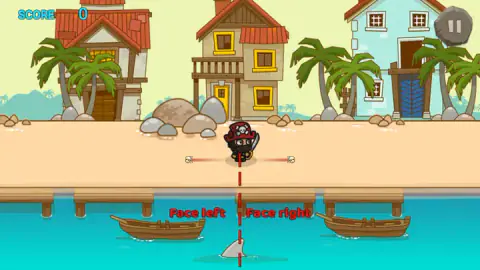
- Read the guide. Every round opens with a red dashed line down the middle of the screen and two labels, Face left and Face right. That line is the border between your two buttons.
- Watch both edges. Zombies walk in along the sand from both sides, often at the same time and at different distances.
- Tap the side of the nearest zombie. A tap or click on the left half turns the pirate left and swings. The right half does the same to the right.
- Go again. When a zombie reaches you, the pirate disappears from the beach and a wooden panel shows the score for the round on top and your Best Score below. The stone with the circular arrow starts a new round.
Tips from our run:
- Do not fall into a rhythm. We tapped left, right, left, right at a steady pace, and that is what the zombies punished. They do not alternate, so neither should you.
- Use the red line as your trigger. A thin red line with a small skull at the end runs out from the pirate on each side. We read it as the reach of his sabre. A zombie inside it is the one to hit.
- Mind the corner buttons. The stone Pause button sits in the top right, close to where your right thumb or cursor will be. We opened the Pause panel by accident more than once.
- Expect an ad break between most rounds. In our session one appeared after almost every round, before the beach came back.
Controls
| Tap or click the left half of the screen | The pirate faces left and attacks to the left |
|---|---|
| Tap or click the right half of the screen | The pirate faces right and attacks to the right |
| Pause button (stone, top right) | Opens the Pause panel with mute, a grid button, restart and a green X to close it |
| Circular arrow stone on the end panel | Starts a new round |
Features
- One screen and one gesture: the pirate never leaves the middle of the beach, and you only choose which way he swings
- Zombies walk in from both sides at once and at different distances, so every tap is a choice of side
- A thin red line with a small skull at each end runs out from the pirate on both sides, which we read as the reach of his sabre
- The Face left and Face right guide, split by a red dashed line, returns at the start of every round
- Three kinds of zombie on the beach: one with its brain showing, one with black hair and one in a yellow hard hat
- The end panel shows the round score on top and your Best Score below, with a restart stone to go again at once
Game details
- Developer
- Lazy GameDev
- Release date
- December 2025
- Last updated
- October 1, 2026
- Added here
- October 2025
- Technology
- HTML5 (2D)
- Platforms
- Browser (desktop, mouse), Browser (mobile & tablet, touch, landscape)
- Saved progress
- Saving, when available, is managed by this game. Mava cannot confirm your level.
FAQ
How do you play King of pirate?
Tap or click the left half of the screen to make the pirate face and attack left, and the right half to attack right. He stays in the middle of the beach while zombies walk in from both sides. Each zombie you cut down adds a point to the SCORE in the top left corner, and the round ends when one reaches you.
How do you get a high score in King of pirate?
Hit the side where the nearest zombie is, not the side you hit last. Zombies come from both directions at once and at different distances, so tapping left and right in a steady rhythm wastes swings. Our own best round was a single point, so we learned this the hard way.
What is the red line next to the pirate?
A thin red line with a small skull at each end runs out from the pirate on both sides. The game does not label it, but it sits where the sabre would land, so we read it as his reach: a zombie inside that line is one you can hit. The red dashed line down the middle of the screen at the start of a round is something else, the guide that splits the screen into the left and right halves.
Who made King of pirate?
King of pirate is by Lazy GameDev. It came out in December 2025 and was updated in October 2026.
Can you play King of pirate on a phone?
Yes. It is listed for PC, Android and iOS, in landscape, and the controls are taps on each half of the screen. We played it on a computer with a mouse, clicking the two halves, so we cannot say how the timing feels on a phone.
Can you use the keyboard in King of pirate?
Not that we found. The game only describes taps, and pressing the arrow keys made no sound in our session, so we played with the mouse. Clicking the left or right half of the game works the same as a tap.
Is King of pirate an adventure game?
Not in what we played. It is filed under Adventure, but it is a single beach seen from the side, with no map, no story and no moving around: you defend one spot for as long as you can. It plays like an arcade game, built around short rounds and a best score.