



About Tap tap Swing
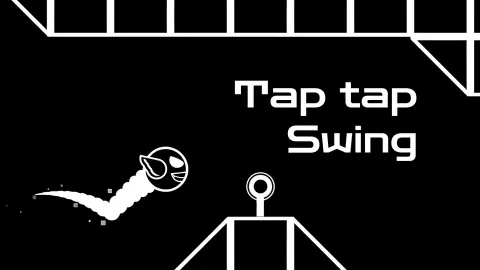
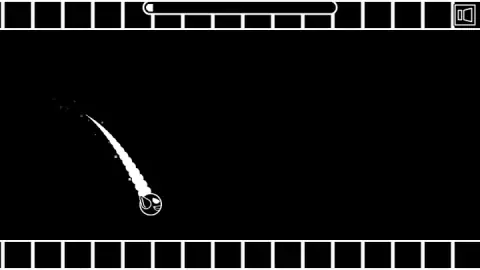
The game is called Tap tap Swing and, in a session of about ten minutes, we never once saw a swing. What we saw was a small white ball with one wing, a black corridor, and a number: 13%.
That number is the whole game. There is no score while you play, no coins, no timer. You click to lift the ball, you stop clicking and it drops, and the level scrolls past until the ball touches something it should not. Then a banner appears with the word PROGRESS and the percentage of the level you covered. If it is a new best, the banner says NEW PROGRESS! instead.
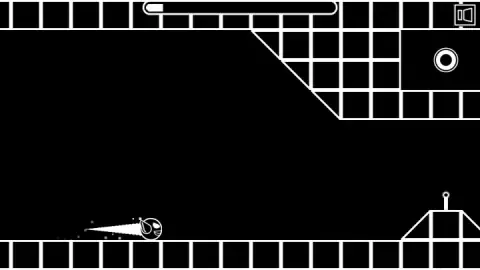
The look is a single idea carried all the way through. Floor and ceiling are rows of outlined black squares, the blocks are drawn as grids, and the ball leaves a scalloped white ribbon behind it in the air and a straight spike along the floor. The only colour we found anywhere was a yellow smiling face on the level cards.
The game is credited to artupdev. It was published in September 2025.
Where our run stopped, and why 13% is the number
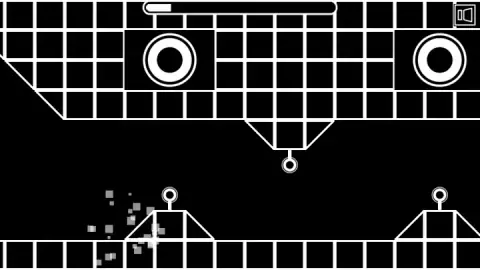
Our account of the first level ends at the same place every time. The ball starts at the left, the floor runs flat, and then a ramp rises with a small ring on a stalk at its peak. Two large circles sit in the grid blocks of the ceiling above it, with another ring hanging from a V-shaped block between them.
One of our captures catches the moment: the ball has just arrived and has become a shower of grey squares at the foot of the first ramp. The next capture is the banner, PROGRESS 13%. Every banner we saw on that level carried the same figure.
Two things follow from that. The first is practical: the first real test of the level is a ramp you have to be flying over, not rolling toward. The second is about the design. Because the game reports position rather than points, you always know exactly where you failed, and the next attempt starts with that knowledge. The restart is quick enough to use it, too. From banner to flying ball took us a few seconds each time.
We also noticed that NEW PROGRESS! appeared twice at 13%. Our reading is that the game keeps a finer figure than the whole number it prints, so a run that gets a few pixels further still counts as a record.
Three levels on cards, each with its own bar
The list button opens a screen we did not expect in a game this spare. A card sits in the middle with a title at the top, a yellow face below it and a progress bar across the bottom. Large white arrows on either side move you between cards. Clicking the card itself takes you to its TOUCH TO START screen.
We saw three cards: ROBOT HAPPY, BACKGROUND MELODY and FUTURISTIC ROBOTIC COPS. The first had a short white fill in its bar, which matched our 13%, and the other two were empty. We did not establish whether a fourth card exists past the third.
The titles read like the names of music tracks rather than places, and the provider's description says the music is matched to each level. We can only say what we saw: the circles in the ceiling and the rings on the stalks swelled and shrank between our captures, which fits scenery pulsing to a beat. We heard a single sound at the start and nothing we could call music after it, so treat the soundtrack as something to check with your own ears.
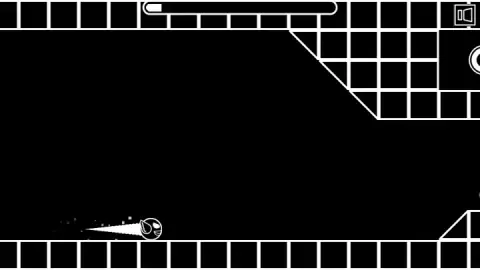
Choosing BACKGROUND MELODY gave us a different corridor, with a slanted ceiling block and a ramp with a ring at the left, and a different result. Our best there was 7%.
A bird, a tap and nothing else
The ball has a wing, and that is not an accident of style. The tag list for this game includes Flappy Bird, and the resemblance is in the hands rather than the picture. In Dong Nguyen's game, released for iPhone in May 2013, the bird sinks on its own and only rises when you tap. It became the most downloaded app on the App Store and, by the developer's own account to The Verge, was earning around 50,000 dollars a day from advertising before he withdrew it in February 2014.
Tap tap Swing uses the same grammar: one input, up on the tap, down when you stop. What it changes is the frame around it. Flappy Bird is endless and counts pipes. This game has built levels with a start and, presumably, an end, and tells you how far along you got. That turns a reflex test into something closer to learning a route, which is why our two numbers stayed fixed at 13% and 7%: each level had a specific obstacle we had not yet solved, not a random one.
The instructions add a hold-to-hover that Flappy Bird never had. We did not use it, so we cannot tell you how much it changes the feel. If it works as described, it should make the ramps far less of a wall than they were for us.
Who it suits, and what is close to it
It suits anyone who likes a game they can start in one click and fail at in ten seconds without minding, and a child can play it with no reading beyond TOUCH TO START. The quick restart and the percentage make it easy to try one more time. On the other side, we can vouch for the first 13% of one level and 7% of another, so we cannot tell you how long the levels are or how many there are.
If the percentage bar appeals, Gravity Speed Run, by the same studio, uses the same idea with a character who runs on his own and flips between floor and ceiling. Stickman Jump, also by artupdev, is a one-button runner in the same black and white, and Acox is their platformer with 30 short levels. For another one-input dodge through a cave, there is Geometry Arrow. More like these in our arcade games.
Screenshots
Taken by opening the game ourselves and letting it run — not supplied by the publisher, and not the same picture every other site shows.
How to play Tap tap Swing
- Click on TOUCH TO START. The ball waits at the left of the screen, and the bar at the top already shows a sliver of white. As far as we could tell, that sliver is your best run on this level.
- Click to fly. Each click lifts the ball. We used short clicks only, and the ball rose in a curve after each one. The instructions say holding the button makes it hover, which we did not try.
- Stop clicking to fall. The ball drops and, if it reaches the floor, rolls along it fast.
- Avoid everything drawn in white. Ramps on the floor, rings on stalks, grid blocks reaching down from the ceiling. One touch ends the run in a burst of grey squares.
- Read the banner. PROGRESS with a percentage, two buttons underneath. The round arrow returns you to TOUCH TO START; the list opens the level cards.
Tips from our run:
- Get airborne before the first ramp. On the first level the floor is clear for a stretch and then a ramp with a ring on top appears. We rolled into it, and our best stayed at 13% because of it.
- The floor is not safe for long. The ball rolls quickly once it lands, and the next obstacle arrives sooner than it looks.
- Change level when you are stuck. The cards let you swap at any time, and each keeps its own best. The second level we tried had a different layout and a different wall for us: 7%.
- Do not expect a death screen. The banner is all you get, and it comes within a second or two of the hit.
Controls
| Left click or tap | Lifts the ball into the air. Short clicks are all we used |
|---|---|
| Hold | Hovers, according to the instructions. We never held the button down, so we cannot confirm it |
| Release | Lets the ball fall, according to the instructions |
| List button | Opens the level cards. It sits under every PROGRESS banner and on the start screen |
| Round arrow button | Sends you back to the TOUCH TO START screen of the current level |
| Left and right arrows on the cards | Cycle through the levels. Clicking the card itself picks it |
Features
- Everything is white outlines on black, and the only colour on any screen we saw is the yellow face on the level cards
- There is no score during play: each run ends on a PROGRESS banner, and NEW PROGRESS! appears when you beat your best
- At least three named levels sit on cards, each with its own progress bar, and you can switch between them at any time
- One input moves the ball, and in ten minutes of short clicks we reached 13% of the first level and 7% of the second
- Restarting takes seconds: banner, TOUCH TO START, click, and the ball is flying again
- The circles in the ceiling and the rings on stalks swell and shrink while you play, so the scenery is never quite still
Game details
- Developer
- artupdev
- Release date
- September 2025
- Last updated
- October 1, 2026
- Added here
- August 2025
- Technology
- HTML5 (2D)
- Platforms
- Browser (desktop, mouse), Browser (mobile & tablet, touch)
- Saved progress
- Saving, when available, is managed by this game. Mava cannot confirm your level.
FAQ
How do you play Tap tap Swing?
You click or tap to lift a small winged ball and let it fall when you stop. The level scrolls from left to right, and the aim is to get as far along it as you can without touching the ramps, rings and blocks. When you hit something the run ends and a banner tells you what percentage of the level you reached. The instructions also say holding the button makes the ball hover, which we did not test.
What does the percentage in Tap tap Swing mean?
It is how far into the current level you got before the run ended. Each level has its own figure, and the game shows NEW PROGRESS! when you improve on it and plain PROGRESS when you do not. In our session the first level stopped at 13% every time and the second at 7%, so the number is the whole score of the game.
How many levels does Tap tap Swing have?
We saw three cards, named ROBOT HAPPY, BACKGROUND MELODY and FUTURISTIC ROBOTIC COPS, and did not find out whether the list continues past the third. Each card carries its own progress bar. We never finished a level, so we cannot say what happens when a bar fills.
How do you change level in Tap tap Swing?
Press the button with the list icon, which appears under the progress banner after each run and on the start screen. A card with the level name and a yellow face appears, with a large white arrow on each side to move between cards. Clicking the card itself takes you to that level's TOUCH TO START screen.
Why do I keep dying at the start of Tap tap Swing?
Probably at the same ramp that stopped us. On the first level, a little way in, a ramp with a ring on a stalk sits on the floor, and in our run the ball rolled straight into it and burst into grey squares. Every one of our attempts on that level ended at 13%, which is where the ramp is. You need to be in the air before you reach it.
Does Tap tap Swing have a score or leaderboard?
Not one you can see while playing. The game only shows percentages. The listing's page for it does list a daily leaderboard with scores in the tens of thousands, so a score is being kept somewhere, but we never saw it on screen and cannot say how it is calculated.
Can you play Tap tap Swing with the keyboard?
Not that we found. We pressed Space, the arrow keys and Escape and saw no response. The mouse is what works, and the instructions say a tap does the same on a phone or tablet. We only played on a computer.
Who made Tap tap Swing?
The game is credited to artupdev. It dates the game to September 2025 with an update in October 2026.