



About +1 Wings Keyboard Speed
Most +1 Speed games have one job: hold forward and watch a number climb. +1 Wings Keyboard Speed keeps that number and adds a second job. When the road runs out, the game's instructions say, you jump, flap and glide to reach the islands, so the wings matter as much as the running.
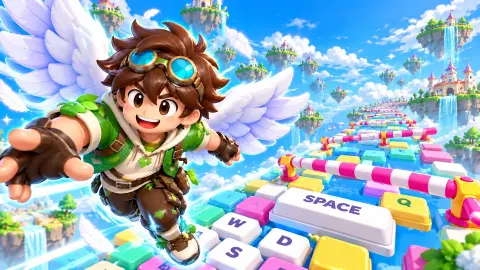
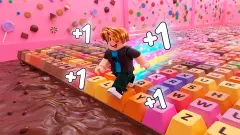
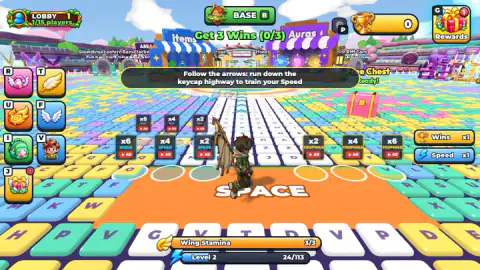
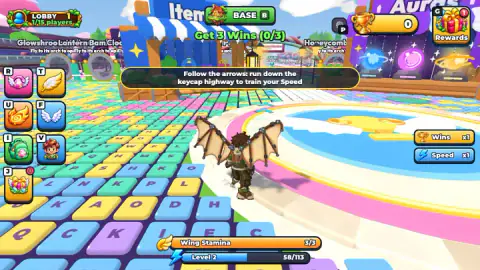
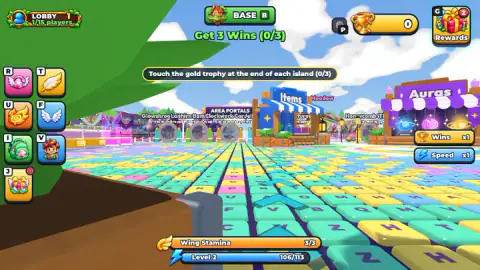
You start on a plaza paved with giant keyboard keys, pastel blue, yellow, green and pink, with a road of white keycaps and arrows pointing away from the spawn. The goal is on screen from the first second: Get 3 Wins, and a Win means touching the gold trophy at the end of an island. Around you sit an Items shop, an Auras shop, a Wing Shop, a Free Chest and a ring of island gates.
The developer is listed as splitch games and the release as November 2026. Several of the studio's other games are obby titles about eggs. When we checked, and we found no guides or reviews anywhere else.
Our session lasted just over ten minutes, keyboard and mouse, and took us from level 1 to level 3. We opened the Wing Shop and the Rebirth panel, and walked up to the Bubblegum Meadow arch. We never touched a trophy: the counter read 0/3 from the first screen to the last. What follows is what that session showed, and when something comes only from the game's own instructions, we say so.
Running pays even when you lose: level and Wing Stamina
The first thing the game rewards is not winning. In our session the Level bar kept filling while we held W on the highway, with the Wins counter stuck at zero. We reached level 2 after about two and a half minutes of running.
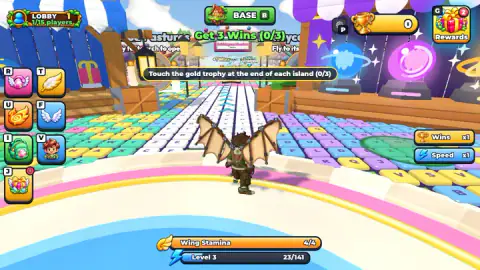
Every level raised the ceiling of Wing Stamina by one. The bar read 2/2 at the start, 3/3 one level up and 4/4 the level after. Going by its name, stamina is what your wings spend in the air, so a higher level should mean a longer flight. We could not measure that: we never made a clean flight.
The bar also gets longer each time. The first level asked for 90 points, the second for 113 and the third for 141, roughly a quarter more each step. Each level costs more running than the one before.
Wins are the currency: the Wing Shop
The Wing Shop does not take coins. It takes Wins, the same trophies that count toward your first goal.
You start with Glider Wings: one extra point of Speed per step and one of Stamina, with a plain glide. The next pair, Vine Wings, doubles both and glides slightly further. The banner at the top reads "Next: Vine Wings for 5 Wins".
That changes the order of things. The first goal asks for three trophies, but the first new wings need five, so you will finish the tutorial goal and still be two trophies short of an upgrade. Until then, the only stamina you can add for free comes from levels, so running the highway first looks like the cheapest way to give those early flights more reach.
Rebirth: what you trade, and when it opens
A pink Rebirth panel opened during our session at level 2. It is the usual idea of the genre, starting over for a permanent bonus, and it shows the deal plainly.
You give up your Speed and your Level; the panel says so in so many words. In return your Wins multiplier rises by half, to x1.5, and your Speed multiplier doubles, to x2.
You also get +3 Stamina, worth three levels of wing power at the rate we saw. When we opened the panel the Rebirth button was grey above a bar reading Level 2/10, so we could only press Later. It looks like it opens at level 10; we never got there to check.
The islands and their gates
Past the shops stands a row of arches, each one an island with its own name: Bubblegum Meadow, Cloud Pasture, Honeycomb and more. We walked up to the Bubblegum Meadow arch, a candy-striped gate over a road of mint and pink keys.
The sign above it offered "+1 Wins", or "+2 Wins" if you watch a video. That reads as the reward for the island's trophy, and the extra Win is another ad offer. The gate signs tell you to fly to the arch to open it. In our session we stood under it, but we never got the island open and never saw its trophy.
Who it is for, and what it is not
It is a game for people who like the +1 Speed loop of running, levelling and rebirthing, with a flight to reach each island. The world is bright, and in what we saw there was no fighting and nothing chasing you, which suits younger players.
It is not a typing game. The keys are the floor. You run over the letters with the movement keys; nothing asks you to type them.
It is also sold as online play, and the lobby has room for 15 players. In our session the counter read 1/15 the whole time, so we cannot tell you what racing other people is like.
More +1 games on Mava Games
If you like the keyboard floor, +1 Speed Keyboard Escape turns the same keyboard idea into an escape. +1 Wings Escape keeps the wings and swaps the highway for a sky-high obstacle course. +1 Speed per Step: Obby Mode is the plain version of the loop, and +1 SPEED: Escape School puts it inside a school. For more pick-up-and-play games, see the arcade games.
Screenshots
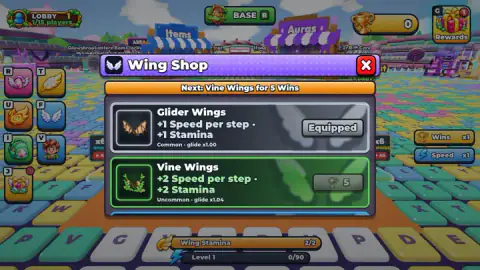
Taken by opening the game ourselves and letting it run — not supplied by the publisher, and not the same picture every other site shows.
How to play +1 Wings Keyboard Speed
- Hold W to run down the keycap highway, following the white arrows. The mouse turns the view, according to the game's instructions.
- Watch the Level bar at the bottom of the screen. It fills as you run, and each new level adds a point of Wing Stamina, the bar just above it.
- At the edge, jump with Space. The instructions say a second press in the air flaps your wings and holding it glides.
- Fly to an island's arch to open it, run to its end and touch the gold trophy. That is one Win; three complete the first goal.
- Spend Wins in the Wing Shop. B takes you back to base and E works the shops, per the instructions.
Tips from our session:
- Run before you try to fly. Your level and your stamina grow from running alone, so a few laps of the highway should mean more time in the air later, going by the bar's name.
- The glowing pads around the spawn marked x2, x4 and x6 are not part of the course. Every one has an AD label: they are video offers. Our whole session was played without them.
- A small "Click to keep playing" tag showed up at the top of the screen more than once. A click on the game brings it back.
- Twice in ten minutes a full-screen the ad covered the game. Expect it.
- Read the gate signs. Each one says "Fly to its arch to open", so the way in is through the air, not along the road.
Controls
| W | Run forward down the keycap highway; the key we held in our session |
|---|---|
| WASD / mouse | Move and look around, according to the game's instructions |
| Space | Jump; press again in the air to flap, hold to glide (game's instructions; we never confirmed a glide) |
| E | Use a shop when you stand at it, according to the game's instructions |
| B | Go back to base; the BASE button at the top shows the same letter |
| Mouse click | Close panels such as the Wing Shop and Rebirth, and resume after "Click to keep playing" |
Features
- A spawn area paved with giant keycaps: running down the highway fills your Level bar
- Wing Stamina that grows by one point with every level, from 2/2 at the start
- A first goal on screen from second one: Get 3 Wins by touching the gold trophy at the end of each island
- A Wing Shop priced in wins, not coins: the second pair of wings asks for 5
- A Rebirth panel that trades your Speed and Level for x1.5 Wins, x2 Speed and +3 Stamina
- Named island gates, such as Bubblegum Meadow, that open when you fly to their arch
- An online lobby for up to 15 players, though we were alone in it
Game details
- Developer
- splitch games
- Release date
- November 2026
- Added here
- November 2026
- Technology
- HTML5 (WebGL, 3D)
- Platforms
- Browser (desktop), Browser (mobile & tablet, touch)
- Saved progress
- Saving, when available, is managed by this game. Mava cannot confirm your level.
FAQ
How do you play +1 Wings Keyboard Speed?
You run down a highway made of giant keyboard keys to train your Speed, then cross to an island and touch the gold trophy at its end. Each trophy is a Win. The game's instructions say Space jumps, a second press flaps your wings in the air and holding it glides. Your first goal is three Wins.
Does running give you anything if you never win?
Yes. In our session the Level bar at the bottom filled while we ran, with no Win at all, and we went from level 1 to level 3. Each level added one point of Wing Stamina: 2/2, then 3/3, then 4/4.
How do you get new wings in +1 Wings Keyboard Speed?
With Wins. You start with Glider Wings, which give +1 Speed per step and +1 Stamina. The next pair, Vine Wings, gives +2 of each and glides a little further, and the Wing Shop asks for 5 Wins to unlock it.
What does Rebirth do in +1 Wings Keyboard Speed?
Rebirth resets your Speed and your Level. In exchange the Wins multiplier goes from x1 to x1.5, Speed from x1 to x2, and you get +3 Stamina. When we opened the panel at level 2 the Rebirth button was grey above a bar reading Level 2/10, so we could only press Later.
Are the x2, x4 and x6 pads near the start free boosts?
No. The glowing pads by the spawn marked x2, x4 or x6 TROPHIES, SPEED and FLY all carry an AD label: they are offers you pay for by watching a video. We did not use them, and everything in our session happened without them.
Is +1 Wings Keyboard Speed a typing game?
No. The keys are the floor, not a keyboard you type on. You run over them with ordinary movement keys, W in our session, and you never type the letters under your feet.
Can you play +1 Wings Keyboard Speed with other people?
The game puts you in an online lobby with room for 15 players, and the game's listing mentions racing others. In our ten-minute session the counter read 1/15 the whole time, so we never met another player.
Who made +1 Wings Keyboard Speed?
The developer is listed as splitch games and the release as November 2026. The same studio has a run of obby games about eggs. We found no other page about this game.