

About +1 Speed Keyboard Escape
For the last three minutes of our session, the bar at the bottom of +1 Speed Keyboard Escape read 598 out of 600. We were two points short of the next level, with a figure that walked wherever we sent it, and the number would not move. That is the most useful thing we can tell you about this game, so this page is built around it.
The game is a 3D walk-around with a counter attached. You steer a plain white figure, seen from behind, through a world made of sweets. The floor is the colour of caramel. Glazed donuts stand taller than the figure, slabs of chocolate hang on the walls, and bright red blocks and ramps break up the space. A number called speed climbs, a bar turns it into levels, and a second number, wins, is what things cost.
Our session was short: about four minutes at a desktop, keyboard in hand, all of it on one level. We did not finish a stage, did not earn a win and did not open the shop. What follows is what those minutes showed and where they stopped.
The game's listing credits the game to SoyDrioStudio. It was listed in August 2026.
The counter climbed on its own, then stopped two short
Here is the part that is not obvious. The first time we read the shoe counter it said 386. A minute later the bar said 597. In that minute we had hardly touched the keyboard.
Then it reached 598 and stayed. We walked forward, we walked right, we went past a donut, along a red ramp, across an open room with chocolate on the wall and into a green corner. Nearly three minutes of that changed nothing.
So speed in this game is not simply a reward for walking, and it is not simply a reward for waiting either. The listing says you gain it by pressing keys. Maybe it is paid only in certain places, or only for something we were not doing, or maybe the last points of a level come harder than the first. We do not know which, and the game put nothing on screen to explain it.
What we can say is practical. If your bar stalls just short of full, more of the same walking is unlikely to fix it. Look for what changed between the minute it rose and the minute it stopped.
Wins are the money, and we never had one
The trophy counter read 0 from start to finish. That matters, because the world is full of things priced in wins.
Over a dark round pad, a floating sign read "20 Speed" above "1500 Win", with a shoe and a trophy beside the words. In a lime-green corner, big pale letters offered "+100 WIN" for "1 AD". A third sign, beside a red block, was half hidden and showed the same two words, speed and win.
Read together, they describe a simple economy. Speed is what you need, wins are what you pay with, and watching an advert is one way to get wins. If the first sign is a price, as it appears to be, that pad costs fifteen of the green offers.
We used none of them. We cannot tell you how a win is earned by playing, although the name suggests finishing a stage. We also did not open the shop.
Why two points short is so hard to walk away from
A bar that is almost full pulls harder than one that is half empty. There is a name for this, the goal-gradient effect. In the 1930s the psychologist Clark Hull noticed that rats in a maze ran faster the closer they got to the food.
In 2006 three researchers, Ran Kivetz, Oleg Urminsky and Yuhuang Zheng, found the same thing in a coffee shop. Customers with a ten-stamp card came back sooner and sooner as the free coffee got near.
+1 Speed Keyboard Escape puts that bar at the bottom of the screen at all times, and it puts the pads that sell speed a few steps away. Sitting at 598 of 600, we felt the pull ourselves. It is worth knowing that the feeling is part of the design.
Who it is for
Someone who likes watching a number grow and does not mind working out the rules alone. Nothing rushed us, nothing ended the session, and the world is all sweets and plain shapes.
It is not for a player who wants the game to explain itself. Nothing told us why the counter stopped. Parents should also know that the game offers rewards for watching adverts inside the world itself.
More running games with a number to chase
Keyboard Escape: +1 Speed | Sweets is the closest thing we have, and a clearer one: a corridor paved with giant keys where each step adds one to your speed. Parkour Runner 3D is a three-lane sprint down a city street, and Knock and Run. 100 Doors Escape sends a stickman down a hotel corridor knocking on doors. The rest are under arcade games.
Screenshots
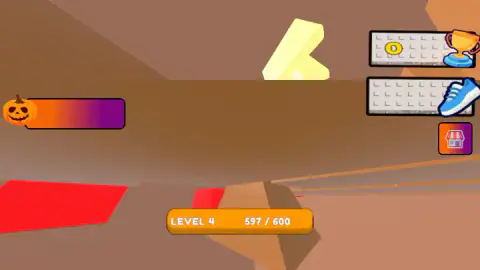
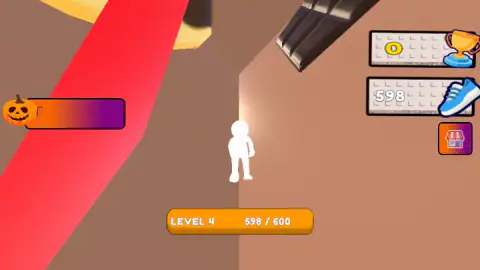
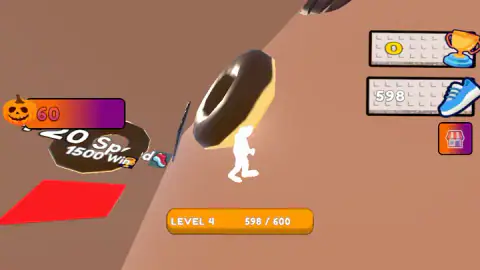
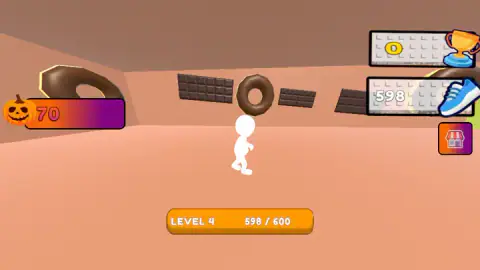
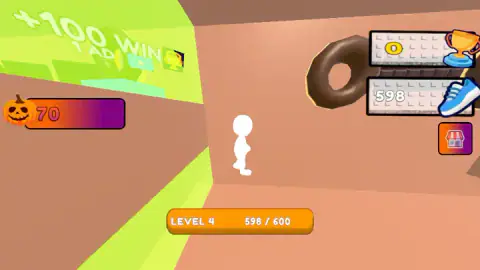
Taken by opening the game ourselves and letting it run — not supplied by the publisher, and not the same picture every other site shows.
How to play +1 Speed Keyboard Escape
- Hold W to walk forward and D to walk right. Those are the two keys we used. The listing adds A and S, and gives the mouse the job of looking around.
- Read the bar at the bottom. It names your level and shows your speed against the amount that level needs. Ours said LEVEL 4, and the target was 600.
- Check the two counters on the right. The trophy is your wins. The running shoe is your speed, the same number as the bar.
- Look at the signs that float over pads on the floor. They are prices and offers, written in speed and wins.
- The small stall button under the counters carries a shop icon. We left it alone.
What four minutes taught us:
- Walking did not move the counter. We held W and D for a second or more at a time, again and again, and the bar stayed where it was.
- The shoe and the bar are one number. Both read 598 for most of the session. You only need to watch one of them.
- The pumpkin is something else. A counter with a pumpkin sits on the left. It went up ten at a time, from 30 to 70, and it is not your speed.
- The camera wanders. At one point we were looking straight down on the figure's head, and twice the view was inside the scenery with no figure in sight. If you lose yourself, move the mouse before you move the figure.
- The name promises a keyboard. The only one we can vouch for is the pattern of grey keycaps behind the two counters. We did not see a path of giant keys in the part of the map we walked.
Controls
| W (hold) | Walks the figure forward |
|---|---|
| D (hold) | Walks the figure to the right |
| A / S | Left and back, according to the game's listing; we did not use them |
| Mouse | Looks around, according to the game's listing; the camera did change angle during our session |
| Stall button, right edge | Sits under the two counters and carries a shop icon; we did not open it |
Features
- A plain white figure seen from behind, steered with the keyboard
- A world made of sweets, with glazed donuts taller than the figure and chocolate bars mounted on the walls
- A bar at the bottom that shows your level and your speed against the amount the level needs
- Two counters on the right, a trophy for wins and a running shoe for speed
- Floor pads with floating price signs, such as "20 Speed" over "1500 Win"
- A green zone that offers "+100 WIN" for "1 AD"
- A pumpkin counter on the left that went up in tens while we played
Game details
- Developer
- SoyDrioStudio
- Release date
- August 2026
- Last updated
- October 9, 2026
- Added here
- July 2026
- Technology
- HTML5
- Platforms
- Browser (desktop)
- Classification
- Adventure , Arcade , Educational
- Saved progress
- Saving, when available, is managed by this game. Mava cannot confirm your level.
FAQ
What is +1 Speed Keyboard Escape?
It is a 3D browser game credited to SoyDrioStudio. You walk a plain white figure through a world of giant donuts and chocolate bars while a number called speed fills a bar at the bottom of the screen. A full bar means the next level, and a second number, wins, is what the offers in the world are priced in.
How do you play +1 Speed Keyboard Escape?
On a computer you hold W to walk forward and D to walk right, which are the two keys we used. The game's listing gives the full W, A, S, D set for moving and the mouse for looking around. Keep an eye on the bar at the bottom, which shows your level and how much speed that level needs.
How do you gain speed in +1 Speed Keyboard Escape?
We can only give you half an answer. Our speed rose from 386 to 597 in the first minute, at a moment when we were hardly touching the keys. Then it stopped at 598 and stayed there for nearly three minutes of walking. The listing says speed comes from pressing keys, and we could not confirm how.
What are wins for in +1 Speed Keyboard Escape?
Wins are the game's money. A sign over one floor pad read "20 Speed" above "1500 Win", and a green zone offered "+100 WIN" for "1 AD". Our trophy counter stayed at 0 for the whole session, so we never bought anything and cannot tell you how a win is earned in play.
How many levels does +1 Speed Keyboard Escape have?
We do not know. Every reading we took of the bar said LEVEL 4, with 600 speed needed to leave it, and we stopped two points short. We saw no level-up and no end to the game.
Can you lose in +1 Speed Keyboard Escape?
Nothing ended our session and nothing sent us back. In about four minutes we saw no timer, no lives and no losing screen. That is a short session in one part of the map, so it does not prove the rest of the game is as gentle.
Can you play +1 Speed Keyboard Escape on a phone?
It is listed for PC, Android and iOS, in landscape. We played on a desktop with a keyboard only, so the phone version is the listing's word and not something we tested.
Who made +1 Speed Keyboard Escape?
The game's listing credits SoyDrioStudio. It was listed in August 2026 and updated in October 2026 with a Halloween theme.