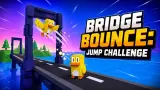
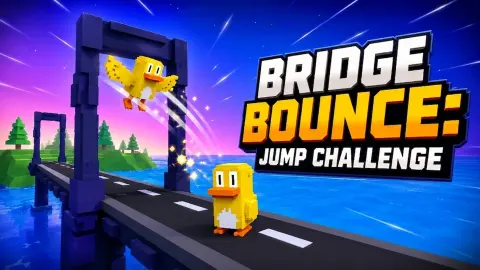


About Bridge Bounce: Jump Challenge
A jump button is usually one of five or six things you press in a platform game. In Bridge Bounce: Jump Challenge it is the whole controller. Your runner, a small blocky green-and-yellow figure, sets off along a road bridge over the sea and keeps going by itself. You never steer, never brake and never speed up. You decide one thing: when to leave the ground.
That sounds generous until the bridge stops being a bridge. Further along, the road splits into separate spans standing on stone pillars, with open water between them, and the first jump that really matters is not over an obstacle but over nothing at all. Jump early and you land short. Jump late and there is nowhere to land.
The game comes from GAD Games Studio and was published in September 2026. We played it for about four minutes with a mouse. That was enough to learn the first level well and not enough to beat it, and this page tells you both halves.
What the bar, the hearts and the coins tell you
Everything you need sits along the top of the screen. In the middle are three hearts, and under them a thin bar that runs from a "1" on the left to a "2" beside a chequered flag on the right. It fills in yellow as you advance, so a glance tells you how much bridge is left.
That bar is the detail most people miss. The game is tagged as an endless runner, but this one has a finish line. Each level is a fixed stretch of bridge, and the goal is to reach the flag, not to last as long as possible. The "2" on the right is the next level waiting.
The hearts are your margin for error. A hit costs one, not the whole attempt, which is why you can clip a barrier and keep running. When the attempt ends, a red banner reading LEVEL 1 DEFEAT appears across the screen with two buttons: an orange REVIVE with a film-strip icon and a blue RESTART.
Losing still pays: the coins you keep
The coin counter in the top right corner is the one number that never goes backwards. In our session it climbed from nothing on the first attempt to 23 halfway through and finished on 38 coins, while the level itself started from scratch every time.
So a defeat is not wasted. Every attempt feeds the same total, which makes the restart button feel less like a punishment. We did not find out what the coins buy, because we spent the whole session on the bridge and never went looking for a shop.
Same level, four different landscapes
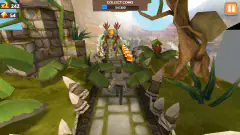
The bridge stayed the same each time we restarted Level 1, but the world around it did not. We crossed it between white icebergs, under a starry sky and again in daylight. We crossed it past pine-covered hills at dusk, past grey rock with ruined stone arches on the shore, and through sand dunes dotted with cactus.
It changes nothing about the timing, as far as we could tell, but it changes how a retry feels. A failed attempt in the ice and the next one in the desert do not look like the same failure twice, and in a game built on retries, that matters more than it sounds.
Our honest run: more than half a dozen starts at Level 1
We want to be clear about how far we got. In about four minutes we started Level 1 more than half a dozen times. The furthest the progress bar went in any of our screenshots was roughly a third of the way to the flag, and we never saw Level 2.
As far as we could tell, what stopped us most often was the same thing: the broken stretches, where the road ends at a pillar and the next span starts some distance further on. On the flat road, jumping a barrier is forgiving. Over the gaps, a tap a fraction early or late is the difference between landing and a defeat card.
We always pressed RESTART. REVIVE would have let us carry on from where we fell, and the film-strip icon on it is the usual sign of a video ad. If you do not want to watch one, RESTART costs nothing except the distance you had covered.
A one-button runner, in a long line of them
The idea of a runner that moves by itself while you only jump goes back at least to Canabalt, a 2009 browser game in which a man sprints across city rooftops and the single control is jump. It spread from there to countless phone games, because one button suits a thumb on a touchscreen as well as a mouse.
Bridge Bounce keeps that rule and adds two things to it: hearts, so a single clipped obstacle does not end your run, and a finish flag, so each level is a target rather than a high score. It is a smaller game than the ones it descends from, but it is built on the same honest premise. Everything that goes wrong is timing, and timing is yours.
Who it is for
It suits anyone who wants something to pick up for a minute, and it is easy for children to start: one button, a hand on screen showing where to tap, and nothing to read. The gaps make it harder than it first looks, so it also suits players who like to beat a level by repetition.
It is not a game of choices. There is no steering, no lanes to switch and no upgrades that we saw. It is listed for phones as well as computers, in both screen orientations, but we played with a mouse and did not test touch.
More games where you only jump
Geometry Vibes is the same one-input pressure with an arrow and walls of spikes. Fluffy Jump asks you to hop from platform to platform as the pace rises, Only Jump RPG builds hero upgrades on top of a single jump, and Parkour Run - 3D Runner adds slides and wall runs for when one button is not enough. The rest are in our arcade games.
Screenshots
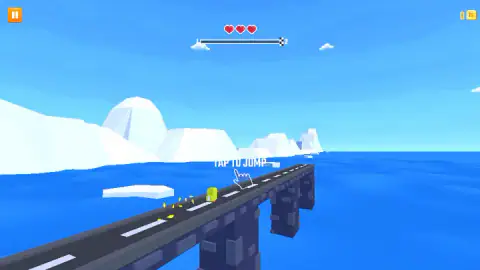
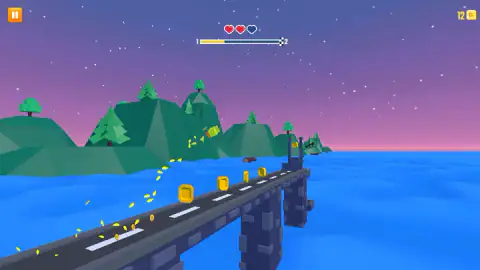
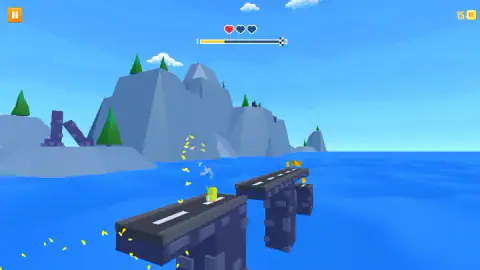
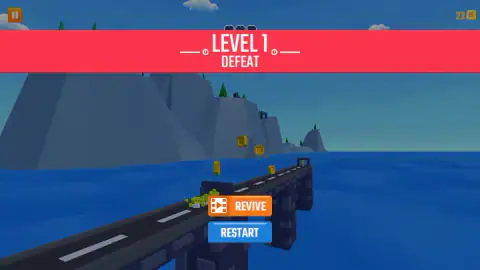
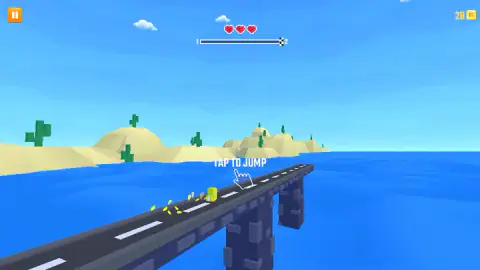
Taken by opening the game ourselves and letting it run — not supplied by the publisher, and not the same picture every other site shows.
How to play Bridge Bounce: Jump Challenge
- Start a run. The runner appears at the start of the bridge with "TAP TO JUMP" and a pointing hand over the road.
- Click or tap anywhere on the screen to jump. The runner moves forward on its own the whole time.
- Jump over the obstacles on the road and across the gaps between broken spans, and pick up the coins in your path.
- Keep an eye on the bar at the top. When the marker reaches the chequered flag, the level is done.
- If the attempt ends, choose RESTART to go again from the beginning.
Tips from our run
- Watch the bridge, not the runner. Your figure stays in the same place on screen, so the gap coming towards you is what tells you when to tap.
- Losing a heart is a warning, not the end. In our run the runner kept going on two hearts and then on one.
- Coins sit in lines along the road. Most of them come to you if you just stay on the bridge, so do not jump for a coin when there is a gap coming.
- Do not tap twice out of nerves. One clean jump, timed to the edge of the span, did more for us than a hurried pair of clicks.
Controls
| Click or tap anywhere | Jump. The runner moves forward on its own, so this is the only thing you do |
|---|---|
| Space, W or Up Arrow | Also listed as jump in the game's instructions; we played with the mouse |
| Orange button (top left) | Pauses the run |
| RESTART (after a defeat) | Starts the level again from the beginning |
| REVIVE (after a defeat) | Carries a film-strip icon, the usual sign of a video ad; we never pressed it |
Features
- One control: the runner keeps moving and you only decide when it jumps
- Three hearts per attempt, and a hit costs one heart rather than the whole run
- A progress bar with a chequered flag shows how far the end of the level is
- The bridge breaks into separate spans over open water, so some jumps are gaps, not hurdles
- Coins stay in your total after a defeat, so a failed attempt still pays
- The same level came back with a different landscape on different attempts, from icebergs to desert
- Made by GAD Games Studio and published in September 2026
Game details
- Developer
- GAD Games Studio
- Release date
- September 2026
- Added here
- September 2026
- Technology
- HTML5 (3D)
- Platforms
- Browser (desktop, mouse), Browser (mobile & tablet, touch)
- Saved progress
- Saving, when available, is managed by this game. Mava cannot confirm your level.
FAQ
How do you play Bridge Bounce Jump Challenge?
Your runner moves along a bridge over the sea by itself, and you click or tap to make it jump. You jump to clear obstacles on the road and the gaps between broken sections of the bridge, and you pick up coins on the way. Reach the chequered flag at the end of the progress bar to finish the level.
What do the hearts mean in Bridge Bounce Jump Challenge?
You start each attempt with three hearts. In our run a hit took away one heart and the runner kept going, down to a single heart. When an attempt is over, a red card reading LEVEL 1 DEFEAT appears with two buttons, REVIVE and RESTART.
Do you keep your coins when you lose in Bridge Bounce Jump Challenge?
Yes. We restarted Level 1 many times and the coin counter in the top right corner never went back to zero. It climbed from 0 to 38 across our attempts, so every try adds to the same total even when it ends in defeat.
Is Bridge Bounce Jump Challenge an endless runner?
Not in the way most endless runners work. The progress bar at the top runs from 1 to 2 and ends in a chequered flag, so each level has a finish line. We played Level 1 and did not reach that flag, so we cannot say how many levels there are.
Is Bridge Bounce Jump Challenge hard?
The first level is harder than its single button suggests. In about four minutes we started Level 1 more than half a dozen times and never got much past a third of the progress bar. Gaps in the bridge are the part that needs real timing.
What does the REVIVE button do in Bridge Bounce Jump Challenge?
REVIVE carries a film-strip icon, which in browser games usually means you watch a video ad to carry on from where you fell. We never used it and always pressed RESTART, which sends you back to the start of the level at no cost.
Can you play Bridge Bounce Jump Challenge with a keyboard?
The game's instructions list Space, W and the Up Arrow as jump keys, as well as a click or tap. We played the whole session with a mouse click, which works anywhere on the screen.
Who made Bridge Bounce Jump Challenge?
It was made by GAD Games Studio and published on 14 September 2026. It is listed for PC, Android and iOS in landscape and portrait, in English.