


About Stickman Jump
Most games give you a lot to manage and forgive you when you get some of it wrong. Stickman Jump gives you almost nothing to manage and forgives nothing. The stickman runs by himself. You do not steer him, slow him down or pick a path. You decide one thing, when he jumps, and if you decide it wrong he breaks apart and starts again.
The game keeps count, and it does not hide the number. Written in large white letters into the start of the level sits the word Attemp, followed by how many times you have tried. That is the game's spelling, without the final t. When we sat down with it for ten minutes the number read 53. When we got up it read 160.
We should be plain about what those ten minutes covered, because it is the most useful thing we can tell you about this game. More than a hundred runs, and not one of them got past the first obstacle. The bar across the top of the screen, the one that shows how far through the level you are, sat at its left-hand end in every picture we took. We cannot tell you what the rest of the level looks like, because we have not seen it.
Stickman Jump is credited to artupdev. It was published in November 2025 and updated again last August.
Three spikes, and we never got past them
This is the part other pages will not tell you, so here it is with the evidence. The first obstacle in the level is a group of three white triangles sitting on the floor. Every run we have a record of ended there. In the pictures the stickman is always on the ground: running, or a fraction of a second into the burst of grey squares that marks the end of a try.
That burst is the only animation in the game with any flourish. He does not fall over or fade. He comes apart into a scatter of small grey squares that keeps spreading until it is a rough circle far wider than he was, and then the floor snaps back to the start with the counter one higher.
The progress bar is the honest witness. It is a long rounded outline across the top with a marker inside it, and in every picture from both our sessions that marker is jammed against the left-hand end, under a twentieth of the way along. The bar is not broken; there is simply nothing to show. If you are wondering whether this game is hard, that is the answer: a hundred tries at the same jump, and the bar does not notice.
None of that is a complaint. A one-button runner is supposed to be a wall you learn to climb. It does mean you should arrive expecting to spend your first session on a single jump, and judge the game on whether that appeals to you.
The ad layers come round every few seconds
This shapes how the game feels, so it belongs here. Through our ten minutes a layer sat over the game more often than not: in more than four of every ten moments we looked at the screen, the run was behind one.
Two kinds turn up. The common one is a dark card with the distributor's mascot on it, a line that begins "We skipped the ad this time", and a purple Continue playing button. The rarer one is a plain card with the words the ad. The game dims behind both, and the run waits until you deal with the card.
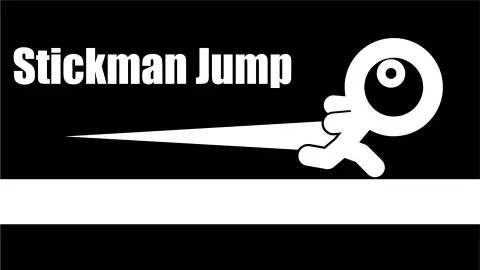
The bright mascots on those cards look like they belong to the game. They do not. The hearts and birds stamped with the distributor's wordmark are part of the ad, not prizes or skins you can win. Nothing in Stickman Jump itself is coloured: white on black, and that is all.
The effect is that your rhythm keeps getting broken, which is unkind in a game whose whole skill is rhythm. Expect to dismiss a card every few attempts.
The attempt counter is painted into the level
The counter is not a label pinned to the corner of the screen, which is the first thing you would assume. It is painted onto the start of the level, like a number chalked at the starting line, and it travels with the floor.
You can watch it happen. In one picture it reads a clean Attemp 72 near the left edge; a moment later, with the stickman further along, only the tail of it is left as the text slides off the side, and the spikes have moved by exactly the same distance. Further into the session the same thing happens again, a reading cut down to "emp 109" and then gone.
It is a small decision with a real effect. The number is in your face at the instant you are about to try again, which is exactly when it stings, and then it gets out of the way and leaves you a clean black screen to concentrate on.
Stickman Jump and Geometry Dash
If the shape of this feels familiar, that is because it is a well-known one. Geometry Dash, released by RobTop Games in 2013, made popular the runner where the character moves on its own, spikes end the run at a touch, a bar shows your progress, and an attempt counter greets you at the start of every try. Stickman Jump uses those same parts with a stickman in place of a cube, and strips the rest away: no music to lock onto, no colour, nothing on screen but the run.
The useful thing to take from the comparison is how to approach it. In games like this a level is learned, not reacted to. The obstacles never move, so every failed attempt tells you exactly where the jump has to begin. The players who get through are the ones who treat each death as a measurement.
What we still cannot tell you, and who it is for
We have not seen a second level, a finish line, or whatever the list button at the top left opens, and we do not know what the diamond button does. We only played on a computer, so the touch control the listing describes for phones is still something we take on trust.
It suits players who enjoy short, repeated tries at the same stretch of ground until it finally goes right. There is nothing violent beyond a stick figure coming apart into squares, and nothing to read, so younger players are fine with it. If losing the same jump a hundred times sounds like a bad afternoon rather than a good one, this is not your game.
More one-button games
Geometry Rash is the closest in spirit, a one-button runner with levels that switch between a jumping cube and a flying ship. Geometry Vibes also comes down to one button, but you hold it to climb and let go to dive instead of jumping. Jumper Jam turns the jumping upward, through towers instead of along a floor. For more quick-reflex games, browse the arcade games.
Screenshots
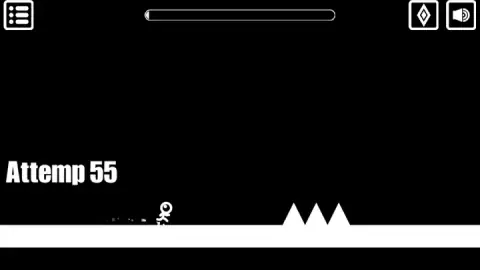
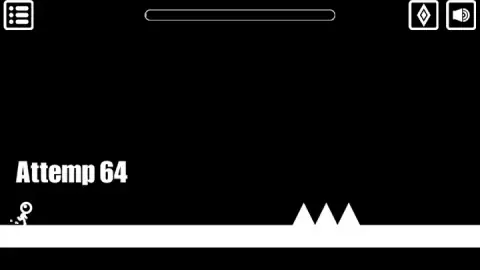
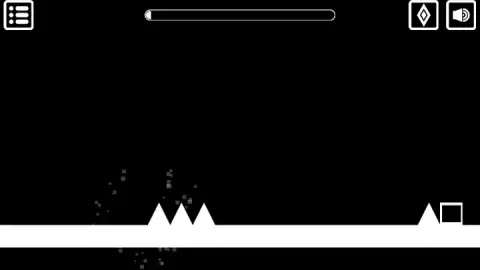
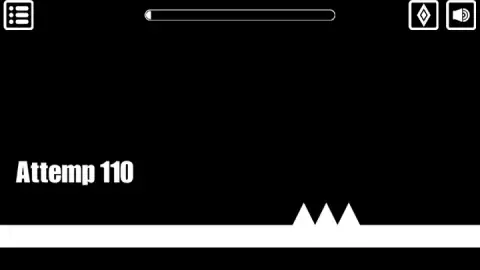
Taken by opening the game ourselves and letting it run — not supplied by the publisher, and not the same picture every other site shows.
How to play Stickman Jump
- Start the game. The stickman appears at the left of a white floor and sets off to the right on his own.
- Give the game a click before you try anything else. A dark strip reading "Click to keep playing" kept dropping over the top of our screen, and nothing moves while it is there.
- Jump to clear what is in front of him. The game's listing gives Space as the jump key on a computer and a tap on phones and tablets.
- Do not touch the spikes. One touch bursts him into small grey squares and the level starts over.
- Watch the bar at the top. It is the only thing on screen that tells you how far you have got.
What our sessions taught us:
- The first obstacle is three spikes, not one. A jump that would clear a single spike is not long enough for a row of three, so the moment you leave the ground matters more than it looks like it should.
- Do not chase the counter. Restarts are so quick that it is easy to jump on reflex, a little earlier or later each time, and learn nothing. Pick one landmark on screen, jump at it every time, and move the moment on purpose.
- Look past the first group while you are dying on it. The next obstacle is already visible about half a screen further on: a single spike with a hollow square block right behind it. Clearing the three spikes buys you very little time before the next decision.
- We still cannot tell you which input jumps. Across both our sessions we tried clicks, Enter and Space, and we do not have a single picture of the stickman off the ground. Follow the listing: Space on a computer, a tap on a phone.
Controls
| Space | Jump, according to the game's listing for computers |
|---|---|
| Tap the screen | Jump, according to the game's listing for phones and tablets |
| Speaker button, top right | Sound on or off |
Features
- A stickman who runs to the right on his own, so the only decision you make is when to jump
- A black screen with a single white floor and white obstacles, nothing else to read or collect
- A group of three spikes in a row as the first obstacle, with a single spike and a hollow square block about half a screen behind it
- An attempt counter written in large letters into the start of the level, rising by one every time you fail
- A death that bursts the stickman into small grey squares and restarts the level with no menu in between
- A progress bar at the top that is the only measure of progress on screen
- Frequent the ad layers that stop the run until you press a button to carry on
Game details
- Developer
- artupdev
- Release date
- November 2025
- Last updated
- August 10, 2026
- Added here
- September 2025
- Technology
- HTML5 (2D)
- Platforms
- Browser (desktop), Browser (mobile & tablet, touch)
- Classification
- Arcade
- Saved progress
- Saving, when available, is managed by this game. Mava cannot confirm your level.
FAQ
How do you play Stickman Jump?
The stickman runs to the right by himself across a white floor, and you make him jump over white spikes and blocks. The game's listing gives Space as the jump key on a computer and a tap on phones and tablets. Touch a spike and he breaks apart, and the run starts again from the beginning of the level.
Is Stickman Jump hard?
Yes, and we can put a number on it. In ten minutes our attempt counter went from 53 to 160, which is more than a hundred runs, and every one of them ended at the first group of three spikes. The progress bar at the top never left its starting point in any picture we took.
What does "Attemp" mean in Stickman Jump?
It is the attempt counter, spelled "Attemp" without the final t on screen. It is written in large white letters into the start of the level and goes up by one each time you crash, so it scrolls off the left edge once you start running.
What happens when you hit a spike in Stickman Jump?
The stickman bursts into small grey squares that spread out into a circle, and the level restarts from the beginning with the counter one higher. There is no game-over screen and no restart button in between, so the next try starts almost at once.
Does Stickman Jump have a lot of ads?
In our ten-minute session an ad layer covered the game in more than four of every ten moments we looked at the screen, and it came back every few seconds. Most times it was a card saying the ad had been skipped, with a button to carry on; a few times it was a plain the ad card. The run waits behind it either way.
Is Stickman Jump like Geometry Dash?
It belongs to the same kind of game. Geometry Dash, by RobTop Games, made popular the runner that moves on its own, with spikes, a progress bar and an attempt counter, and Stickman Jump uses those same elements with a stickman instead of a cube. They are separate games by different developers.
How many levels does Stickman Jump have?
We cannot tell you. The game's listing says the levels get harder as you go, and there is a button with a list icon at the top left that we never opened. Nothing on the screen while you are running shows a level number.
Who made Stickman Jump?
The game is credited to the developer artupdev. The game was published in November 2025, updated in August 2026.