


About Stickboy Epic Swordsman
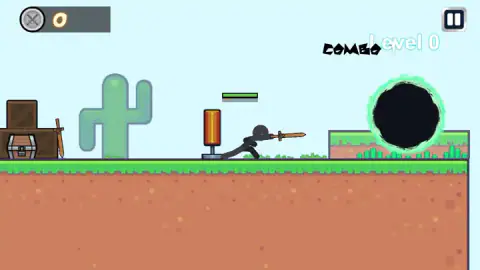
Most browser sword games open with a wave of enemies and let you find the attack button under pressure. Stickboy Epic Swordsman opens with a punching bag. Nothing in the first screen can hurt you, and the first thing worth doing is to hit the bag and watch what your sword does.
That calm start hides a small moveset. There is an attack key that chains into three different strokes, an attack in the air, and a dash on a separate key that spends energy. The game teaches all of it in one short stage, by writing the keys on the sky and letting ghost figures act them out.
The game is credited to SoloGame. It was published in March 2025.
We played about four minutes on a desktop. In that time we stayed in the start area and the training stage, used the attack key and nothing else from the moveset, and met no enemy. This page covers what we saw and says where it stops.
The training stage writes the controls on the sky
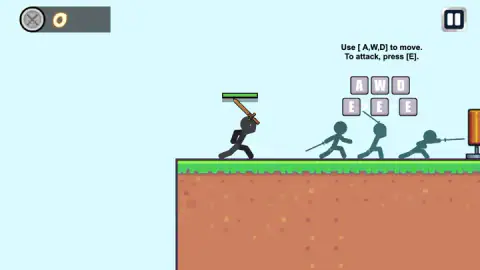
Level 0 is not a level in the usual sense. It is a flat stretch of ground with a second punching bag and two blocks of text hanging in the air.
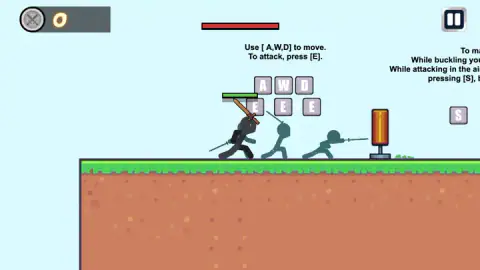
The first block reads, word for word: "Use [ A,W,D] to move. To attack, press [E]." Under it sit the three movement keys, and under those the attack key drawn three times with small arrows between them. Three teal ghost figures stand below, each frozen in a different stroke: a low thrust, a raised cut and a long flat lunge. The message is that one key does three things if you keep pressing it.
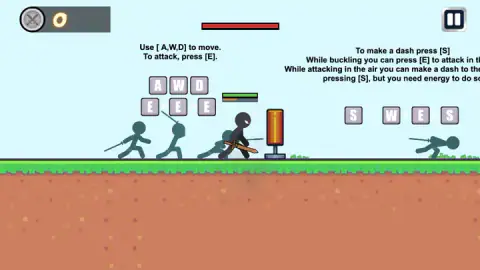
The second block is about the dash. "To make a dash press [S]", it starts. Then come two longer lines, which the edge of our screen cut short: "While buckling you can press [E] to attack in th…" and "While attacking in the air you can make a dash to the…". The last line was whole: "pressing [S], but you need energy to do so".
The diagram beneath shows S on its own, and then W, E and S in a row. A teal ghost next to it is stretched out flat, sword first. So the showpiece move is jump, strike, then dash out of the strike.
We read "buckling" as ducking. We did not test it, and the sentence it belongs to was cut off before its end.
Three bars, and only one of them explained itself
Your fighter carries a green bar over the head. It was full every time we looked, which fits a session in which nothing attacked us.
Directly under it runs a much thinner orange bar. It was nearly empty in the start area and close to half full at one point in the training stage. The dash panel says the dash needs energy, and this is the only gauge on screen that moves, so we take it for the energy bar. The game does not label it.
In the training stage a wide red bar also appears at the top centre of the screen. We could not tie it to anything. It may belong to the bag; we did not see it change.
What the pause panel tells you
Pausing brings up a portrait of your fighter and two numbers: a 5 beside a plus sign and a 1 beside a burst mark. There are no words on the panel.
One thing we saw fits them. When our sword landed on the bag near the portal, a pale 1 floated up from it and the combo counter beside the level name went to 1. That makes the second number look like the damage of a single stroke, and the plus sign usually stands for health. Both are our readings; the game states neither.
Whether those numbers ever change is something we did not see. The counter at the top left, next to a badge of crossed swords, read 0 from start to finish. A chest and a spare wooden sword sit by the crates in the start area, and we left both untouched, so we cannot say whether they open or can be taken.
Where our session stopped
We went through the portal, read the training stage, paused, and pressed the house. That put us back at the crates. We then attacked our way to the portal a second time, and the session ended there.
So we cannot tell you what the first real fight looks like, how many levels follow Level 0, what an enemy does when it reaches you, or what losing costs. We also never jumped or dashed. Everything above about those two moves comes from the game's own panels, quoted as they appear.
Who it is for
Players who like a fighter with a short list of moves that combine. Attack three times, attack in the air, dash out of it: that is a small vocabulary, and the game gives you a quiet place to practise it before it asks for anything.
It is a keyboard game first, as far as we saw. The left hand does everything, with movement on three keys and attack and dash right beside them. If you want a mouse-only game, or a second player on the same keyboard, this is not it.
More sword and stickman games
Stickman Ghost Online is the closest match here, a side-scrolling hack-and-slash with a three-hit sword combo of its own and eight stages to clear. Stick Duel: Medieval Wars drops the attack button altogether and puts two stickmen with polearms on carts, for one or two players. Epic Sword Battle moves the sword fight into 3D with ragdoll mannequins, and Sworded io turns it into a six-fighter arena where you only steer. The rest are in the action games category.
Screenshots
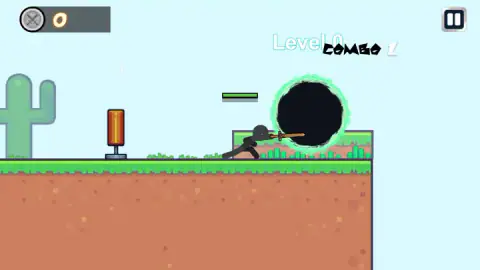
Taken by opening the game ourselves and letting it run — not supplied by the publisher, and not the same picture every other site shows.
How to play Stickboy Epic Swordsman
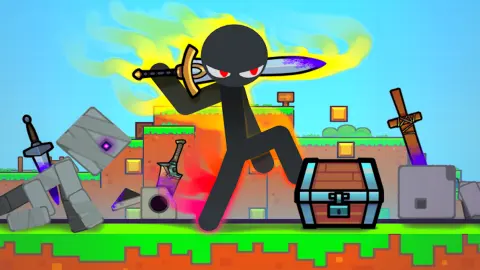
- You begin on a strip of grass with crates and a chest on your left and an orange punching bag on your right. Your fighter already holds a wooden sword.
- Press E to attack. Each stroke also steps the fighter forward, so a few presses carry you into the bag and past it.
- Keep going right to the black portal with the green rim. The label over it reads Level 0.
- Inside, read the two instruction panels as you pass them. The first gives movement and attack, the second the dash.
- Use the pause button at the top right when you want out. The house icon on its panel takes you back to the start area.
Tips from our session:
- The attack moves you. We crossed the whole start area, bag to portal, on the attack key alone. It is worth knowing before you swing next to a ledge.
- Three presses, not one hold. The game draws the attack key three times with arrows between, one stroke for each press. We tried holding it as well and saw nothing that a tap did not do.
- The pause panel has no words. A red house, a pink triangle and a purple speaker. The triangle resumes. The house does not ask before it sends you back to the start.
- Do not wait for the bag to break. We hit it and it stayed. It is there for practice.
Controls
| E | Attack with the sword; each stroke also carries the fighter a step forward. The only key we used ourselves |
|---|---|
| A / D | Move left and right, as the game's first instruction panel shows them |
| W | The third movement key on that panel; it opens the air-attack sequence on the second one, so we take it for the jump |
| S | Dash, according to the second panel; it needs energy |
| W, then E, then S | The sequence drawn on the second panel, an attack in the air followed by a dash |
| Pause button (top right) | Opens a panel with Home, Play and a sound switch |
Features
- A start area with a punching bag to hit before anything can hit back
- A portal marked Level 0 that leads to a training stage with the controls written on the sky
- Ghost figures that act out each move under the keys that produce it
- An attack key that is drawn three times in a row, one stroke per press
- A dash on its own key, with an energy cost the game warns you about
- A combo counter that read 1 after our first clean hit on the bag
Game details
- Developer
- SoloGame
- Release date
- March 2025
- Last updated
- August 10, 2026
- Added here
- April 2025
- Technology
- HTML5 (GDevelop, 2D)
- Platforms
- Browser (desktop, keyboard), Browser (mobile & tablet)
- Classification
- Action
- Saved progress
- Saving, when available, is managed by this game. Mava cannot confirm your level.
FAQ
How do you play Stickboy Epic Swordsman?
You control a black stick figure with a wooden sword in a side-on world of grass and red earth. The game's own instructions give A, W and D to move and E to attack. You start beside a punching bag and a portal marked Level 0, and going through the portal takes you to a training stage that shows every move on screen.
What are the controls in Stickboy Epic Swordsman?
On a keyboard the game shows A, W and D for movement, E to attack and S to dash. E is drawn three times in a row, one sword stroke for each press. In our session we used E, and each stroke also moved the fighter a step forward. We did not press the movement keys or the dash ourselves.
How do you dash in Stickboy Epic Swordsman?
The training stage says the dash is on S, and it adds that you can dash while attacking in the air, but you need energy to do so. The diagram for that is W, then E, then S. We did not perform a dash in our session, so we cannot say how far it travels or how fast the energy comes back.
What do the 5 and the 1 on the pause screen mean?
The pause panel shows your fighter with two numbers beside it, a 5 next to a plus sign and a 1 next to a burst mark. The game does not label them. When we hit the punching bag a small 1 floated up from it, which fits the second number being the damage of one stroke, but that is our reading and not something the game states.
Are there enemies and bosses in Stickboy Epic Swordsman?
We did not meet any. Our four minutes were spent in the start area and the training stage, where the only thing to hit is a punching bag and the only other figures are ghosts demonstrating the moves. We cannot describe the fights that come after from our own play.
Can you play Stickboy Epic Swordsman on a phone?
It is listed for PC, Android and iOS, in landscape. We played on a desktop with a keyboard, and the instructions we saw were all written as keyboard keys. We did not try it on a phone ourselves.
Who made Stickboy Epic Swordsman?
The game is credited to SoloGame. It was published in March 2025 and last updated in August 2026.