

About Stick Fight Arena
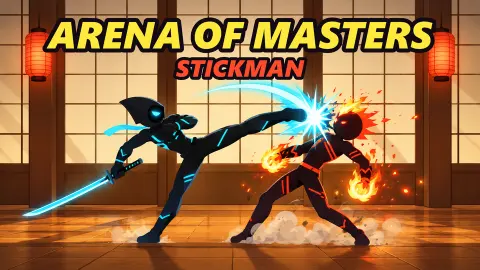
Most stickman fighting games look the same from the first screenshot: two black silhouettes, a flash, a body flying across the stage. Stick Fight Arena looks like that too. What sets it apart are three small things on screen that tell you how to fight, and we only understood them after losing.
It plays like a classic one-on-one fighter, not a physics free-for-all. Each fighter has a health bar and a number, the clock starts at 99, and you need two rounds to take the fight. You play as Shade, a hooded fighter with a blade and cyan markings, against a CPU rival. When a hit lands, a comic-book word bursts out of it: WHAM, BOOM, CRACK, POW.
The game is credited to Negoda Ivan and was published on 2 November 2026. We played it on a computer and lost every fight we played, each one 0 : 2. None of our rivals lost a single point of health. That is not a boast. It is the reason the tips below are about reading the screen, because that is where we went wrong.
The special key changes sides with you
The key panel in the bottom-left corner is not just a fixed list of keys. It reads W above A S D, then J under ATTACK, then K and a second special under SPECIALS. That second one is the part that moves.
At the start of a round against Monk, with Monk on our right, it read A+K. A second later Monk jumped over Shade and landed on the left, and the panel switched to D+K. It switched back each time the fighters crossed. The pattern held in every fight: the second special is K plus the direction pointing away from your rival.
So the keys for that special change every time someone jumps over. When the rival crosses over you, look at the corner before you press. It takes a second, and it keeps you from pressing the old direction.
Rematch is not a retry
We expected Rematch to mean the same fight again. It didn't, once. Our session went through four rivals on four stages, the last three each arriving through the Rematch button:
- Viper, on a red volcano stage
- Monk, in a misty bamboo forest
- Lumi, who fights with a star-tipped staff, at a pink sunset among torii gates
- Blaze, red-crested, in a graveyard under a full moon
They are not equal on paper. Shade starts with 360 health. Viper had the smallest pool we saw at 280 and Monk the largest at 380, with Lumi and Blaze in between.
That changes how you practise. You cannot use Rematch to drill one matchup until you beat it, because the next fight will be someone else. Each rival also takes a different amount of damage to put down. The game's listing says there are 12 fighters in all; we met these five.
The CPU does not wait for you
The clock gives you 99 seconds a round. You will rarely need them.
Against Monk, our first round ended on a K.O. with 69 seconds still on the clock, and the second with 66. Against Blaze, one round ended with 56 left. Rounds lasted roughly half a minute.
The reason is the combos. When the rival strings hits together, a HITS counter pops up on the right, under the rival's health bar. It stayed there even when the rival was standing on the left of the arena. Monk reached HITS 8! on us once, and four- and five-hit runs were common.
Two habits follow. If that counter starts climbing on the rival's side, you are inside a combo, and standing there costs you most of a bar. The game's listing says pressing K while being comboed breaks out of it; we did not manage to confirm it. And do not plan on a timeout win. You need to land hits, and fast.
The banner that explains a lost round
Several times a grey banner reading Click to keep playing sat at the top of the screen. While it was there, the round went on. Monk kept hitting Shade, the health bar kept dropping, and our keys did nothing we could see.
The banner means the game has stopped listening to the keyboard, and it asks for one click inside the game. Aim for the arena itself, not the top centre: the pause button sits right above the clock. Our clicks there opened the menu more than once instead.
The pause menu is worth one look
The pause menu has Resume, Restart and Exit, a fullscreen button, and sliders for music and sound. Three settings are easy to miss: a Zoom slider that starts at 0.80, and two switches, Battle effects and Hints, both on by default. We left all three as they were, so we cannot tell you what each one changes.
The result screen is simple. It shows DEFEAT or the win, the round score, and the coins earned: five for each of our losses. A green button offers to double the coins with an ad. Rematch and Menu sit below it, and neither needs an ad.
What we played, and what we did not
We played one session of about fifteen minutes on a computer: four single fights against the CPU as Shade. We lost all four 0 : 2 without denting a rival's health bar. We never won a round, never saw the clock run out and never reached a menu where you pick a fighter.
The game's description mentions 12 fighters, a ladder of 12 towers, a Mod Fight mode with random effects, 2 vs 2 tag battles and two players on one keyboard. We did not see any of those. We also did not find out what coins buy, and we did not play on a phone.
Who it is for
It suits players who like old-school one-on-one fighters: health bars, rounds, a clock, special moves with a direction. The art is clean and the fights are short, so it works in a short break. The impact words keep it light rather than gory.
It is not a physics party game. If you came for floppy stickmen pushing each other off ledges, that is a different kind of game.
More fighting games like it
Shadow Stick - Lightning Ninja is another side-view stick fighter with skills to time. Stickboy Epic Swordsman keeps it to a blade and a dash. For two players on one keyboard, Stick Duel: Medieval Wars and Drunken Boxing are both quick to learn.
More in our action games.
Screenshots
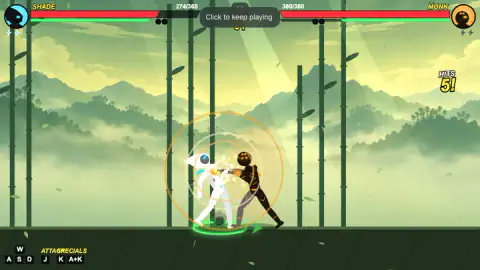
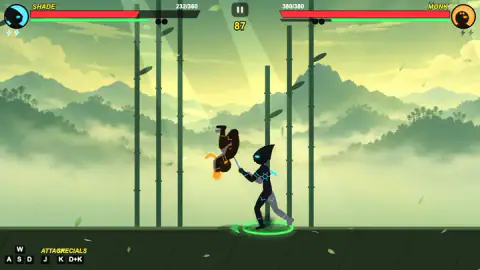
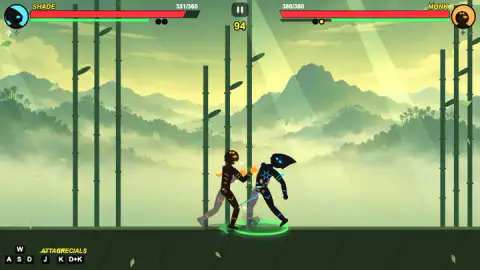
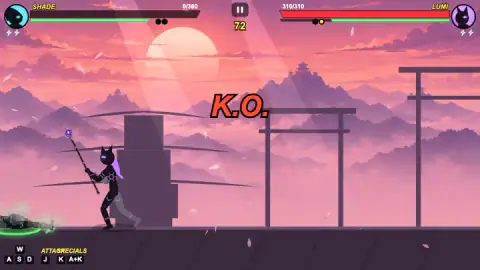
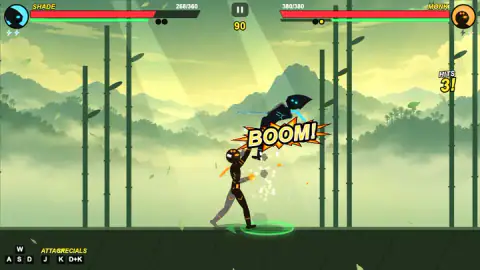
Taken by opening the game ourselves and letting it run — not supplied by the publisher, and not the same picture every other site shows.
How to play Stick Fight Arena
- Start a fight. The stage shows ROUND 1 and both health bars full.
- Move with A and D, jump with W. A green ring under your feet marks your fighter, and its arrow points at the rival.
- Attack with J. The two specials sit under the SPECIALS label: K, and K with the direction away from your rival.
- Empty the rival's bar before the clock runs down. Each round you take fills one of the two dots under your bar.
- After the result screen, press Rematch for the next fight or Menu to leave.
Tips from our run:
- Keep an eye on the key panel in the bottom-left corner. It changes while you fight.
- If Click to keep playing appears at the top, click inside the game once before pressing anything.
- If a HITS counter starts climbing on the right, under the rival's bar, you are inside a combo.
- Don't wait for the clock. Every round we saw end was a knockout with more than half a minute left.
- Ignore the "x2 for ad" button unless you want to watch an ad. The five coins are yours anyway.
Controls
| A / D | Move left and right (shown on the on-screen key panel) |
|---|---|
| W | Jump (shown on the key panel) |
| S | Shown on the key panel; the game's listing says holding it blocks |
| J | Attack, labelled ATTACK on the key panel |
| K, and away-from-the-rival + K | The two specials, labelled SPECIALS; the panel shows A+K while the rival is on your right and D+K while it is on your left |
| Pause button (top centre, above the clock) | Opens the pause menu with Resume, Restart, Exit, sound, zoom and hint settings |
Features
- Fights are best of three rounds on a 99-second clock; two dots under each health bar count the rounds won
- Every rematch in our run brought a new rival and a new stage: Viper, Monk, Lumi, then Blaze
- Fighters do not share one health pool: the rivals we met ran from Viper's 280 to Monk's 380, against our 360
- The special-move hint flips from A+K to D+K when the rival jumps to your other side
- A HITS counter climbs under the rival's health bar while the CPU combos you; Monk strung together eight hits on us
- A lost fight still pays five coins, with an optional ad to double them
- The pause menu has a zoom slider plus battle-effects and hints switches
Game details
- Developer
- Partner studio
- Release date
- November 2026
- Last updated
- November 4, 2026
- Added here
- November 2026
- Technology
- HTML5 (2D)
- Platforms
- Browser (desktop), Browser (mobile & tablet, touch)
- Classification
- Action , Multiplayer
- Saved progress
- Saving, when available, is managed by this game. Mava cannot confirm your level.
FAQ
How do you win a fight in Stick Fight Arena?
Win two rounds. Each round runs on a 99-second clock and ends when one fighter's health bar is empty. Two small dots under each bar fill in yellow as that fighter takes rounds, and the result screen shows the score, for example 0 : 2. The game's listing adds that if the clock runs out, the fighter with more health takes the round; in our fights it never got that far.
What is the special move key in Stick Fight Arena?
K is a special, and the second special is K together with the direction pointing away from your rival. The key panel in the bottom-left corner spells it out and updates as you move: it reads A+K while the rival stands to your right and D+K once the rival is on your left. Check it after every jump or throw that swaps sides.
Does rematch give you the same opponent in Stick Fight Arena?
Not in our run. We pressed Rematch three times and got a new rival and a new stage each time: Viper on a volcano, Monk in a bamboo forest, Lumi at a pink sunset with torii gates, and Blaze in a moonlit graveyard. Rematch is a new fight, not a retry of the last one.
Who are the fighters in Stick Fight Arena?
We played as Shade, who has 360 health. The rivals we met were Viper, Lumi, Blaze and Monk, with health running from Viper's 280 up to Monk's 380, so some take less damage to beat than others. The game's listing says there are twelve fighters in total, each with a weapon and two specials; we only saw these five.
Do you get coins if you lose in Stick Fight Arena?
Yes. Each of our lost fights paid five coins on the result screen. A green button offers to double them by watching an ad; you can ignore it and press Rematch or Menu. We did not find out what coins buy.
Why do my keys stop working in Stick Fight Arena?
If a grey banner saying Click to keep playing sits at the top of the screen, the game is not taking your keys. Click once inside the game, away from the pause button above the clock. In our run the fight carried on while that banner was showing, and our fighter kept taking hits.
Is Stick Fight Arena the same as Stick Fight: The Game?
No. Stick Fight: The Game is a paid physics brawler sold on Steam and consoles. Stick Fight Arena is a free browser fighting game with health bars, rounds and a clock, closer to a classic one-on-one fighter. The game's listing credits it to Negoda Ivan, and it was published on 2 November 2026.