

About Shadow Stick - Lightning Ninja
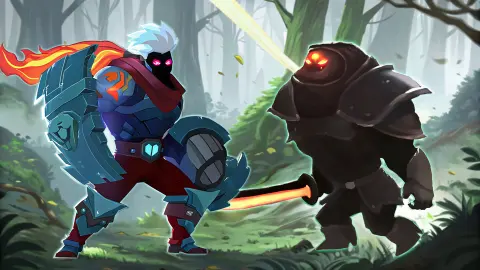
The name promises a stickman. There is none. The hero of Shadow Stick - Lightning Ninja is a white-haired fighter in a mask and a red scarf, wearing armour that glows blue, and the things he fights are bulky black knights with orange eyes and red curved blades. Nobody on screen is drawn with a line for a body.
What the name gets right is the second half. This is a side-view fighting game where you walk left and right along the floor of a dark green forest and hit whatever walks in. Around that sits a role-playing layer: a map of locked levels, three difficulty settings, and a list of gear and materials each level can hand out.
The game's listing credits a developer called Ermac Alex. It has been available since December 2024.
Now the honest part. We played one session of four minutes on a computer. Half of it went on the menus and the tutorial. The other half was the first fight, level 1-1, which we did not finish: we stopped with over a minute left on the clock and two enemies on screen. Read this page as a guide to the opening and to what the screens tell you, not as a verdict on the levels behind it.
Three minutes a level, and the clock is the opponent you notice first
Every fight carries a countdown in the top right corner. It starts at 3:00.
That number shaped our run more than the enemies did. They were not dangerous on the first level: our health bar read 99% the first time we looked at it in combat and still read 99% a minute and a half later. What ran down was the time. With 1:11 left there were two knights walking in from the left, the same kind as the first, and no sign of the level ending.
So the opening lesson is about pace, not survival. Standing in one spot and trading single hits is safe and slow. If the clock is a limit and not just a record of your time, a careful player loses to it. We did not reach zero, so we cannot tell you which of the two it is.
One more thing the first level shows: do not assume the enemies are ahead of you. Ours walked in from the left edge, behind the ninja, every time we caught them arriving.
One attack, three skills, and two buttons we did not use
The big button, V, is the normal attack. A banner on the left counts your chain, and ours read "3 Hit!" every time we looked. We never saw it go higher.
The three smaller buttons, Z, X and C, are skills. We fired X once. A white beam ran from the ninja straight through the knight in front of him, a blue-white burst filled the edge of the screen, and the X on the button was replaced by a countdown reading 14.4. So a skill is out of your hands for about a quarter of a minute after each use. Against a clock this short that is only a handful of uses per level, which makes each one worth saving for a moment when two enemies are lined up.
B is a different kind of button. The tutorial describes it as a special skill that raises attack and defence by 30% for 15 seconds. A second bar under your health sat at 0% for our whole fight and may be what feeds it; we did not find out.
The last button wears a padlock. One tutorial card reads "You can summon the dragon to support", and the game's key list gives F for the dragon, so the padlock is probably that. We never saw it unlock.
What the map and the drop list tell you before you fight
The first page of the map has ten nodes in two rows, joined by lines, with an arrow to further pages. Nine are locked. Two of those nine show a horned skull in place of the padlock, the third node along the top and the last one on the bottom row. The game does not label them. A skull at the end of a row usually means a boss, and the provider's description mentions bosses, but we did not get near one.
Under the map sit three buttons: Easy, Normal and Hard. Easy was the one lit in orange when we arrived, and we left it there.
Click a node and you get its drop list before you commit. For 1-1 it was two rows of five. The top row, "Drop scroll", is gear: Armor, Shoe, Amulet, Pants and Glover, which is the game's own spelling. The bottom row, "Drop material", is Fabric, Herb, Feathers, Leather and Wood. That is the role-playing half of the game in one panel: levels are places you go back to for parts.
What we did not see
The end of level 1-1, won or lost. The clock at zero. A drop landing, or anything built from one. The jump. The boost in use. The dragon. A second kind of enemy. A boss. Normal or Hard. The gear and skill screens the provider's description talks about. Any sound we could tie to a hit.
Who it is for
Players who like a brawler with something to collect between fights, and who do not mind that the first level is gentle. The on-screen buttons and the short levels point at a phone as the natural home for it. If you want a fighting game with an opponent who blocks and reads you, this is not that: on the evidence of the first level it is about clearing a stage against the clock.
More sword games
Stickboy Epic Swordsman is the closest relative we have, a side-scrolling sword game with a three-stroke chain, and its hero really is a stick figure. Stickman Ghost Online is another hack-and-slash with fighters to buy. For a ninja who avoids the fight altogether, try Ninja: Bamboo Assassin, and for a duel against a friend on the same keyboard, Stick Duel: Medieval Wars. The rest are under action games.
Screenshots
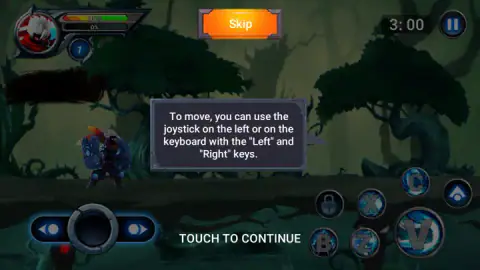
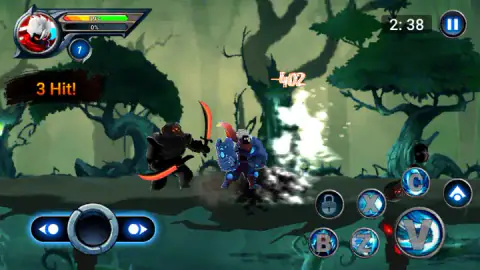
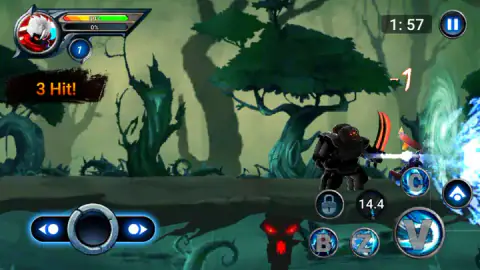
Taken by opening the game ourselves and letting it run — not supplied by the publisher, and not the same picture every other site shows.
How to play Shadow Stick - Lightning Ninja
- On the map, click the node marked 1-1. It is the only one without a padlock.
- A panel shows what the level can drop. Press the red Fight! button in its corner.
- The first time, a run of tutorial cards explains the buttons. Click through them, or press the orange Skip at the top.
- Answer "Are you ready?" with OK. The clock starts.
- Walk toward the enemies with the arrow keys, hit with V, and spend Z, X and C when they are lit.
What one short run taught us:
- The buttons on screen work with a mouse. The stick and the round buttons are drawn on a computer too. Each one carries the letter of its key, so clicking the big V does the job of the V key if you forget which letter is which.
- The right edge is a bad place to stand. We walked the ninja all the way to the right, where a green swirl hangs in the air, and he ended up underneath the skill buttons. You can barely see him or the enemy there. Fight in the middle of the screen.
- A skill you have used shows a number, not a letter. Wait for the letter to come back before clicking it again.
- The tutorial eats no time. The clock sat at 3:00 through every card and only moved after we pressed OK.
Controls
| Left / Right arrow keys | Walk the ninja along the ground; the tutorial names them and the right arrow carried ours across the stage |
|---|---|
| Up arrow | Jump, according to the game's key list; we did not jump |
| V | Normal attack; it is also the biggest round button on screen, which is how we used it |
| Z, X, C | Three skills, each with its own round button; a used skill turns into a countdown before it can be fired again |
| B | A temporary boost; the tutorial gives it as 30% more attack and defence for 15 seconds. Not used in our run |
| F | Summons a dragon, according to the key list; a button with a padlock sat among the skills and we never saw it open |
| On-screen stick and buttons | A sliding stick in the bottom left and round buttons in the bottom right, shown on a computer as well and clickable with the mouse |
Features
- Side-view fights on flat ground against armoured swordsmen who walk in from the edges of the screen
- A clock on every level that starts at three minutes and counts down
- One normal attack plus three skills that go on a cooldown of about fifteen seconds after use
- A level map of round nodes joined by lines, one open at the start and the rest behind padlocks
- Three difficulty buttons under the map, Easy, Normal and Hard
- A panel before each fight that lists what the level can drop, five pieces of gear and five materials
- A tutorial of short cards on the first fight, with a Skip button
Game details
- Developer
- Ermac Alex
- Release date
- December 2024
- Last updated
- August 10, 2026
- Added here
- April 2025
- Technology
- HTML5 (Unity, 2D)
- Platforms
- Browser (desktop, keyboard & mouse), Browser (mobile & tablet)
- Saved progress
- Saving, when available, is managed by this game. Mava cannot confirm your level.
FAQ
How do you play Shadow Stick - Lightning Ninja?
You pick a level on a map, press Fight and land in a side-view forest with a three-minute clock. Walk with the left and right arrow keys, hit with V, and use Z, X and C for stronger skills that need a few seconds to recharge after each use. Enemies walk in from the sides. The same controls are drawn on screen as a stick and round buttons.
What are the keyboard controls in Shadow Stick - Lightning Ninja?
Left and right arrows move and the up arrow jumps. V is the normal attack, Z, X and C are skills, B is a short boost to attack and defence, and F is listed as the key that summons a dragon. We moved with the arrows and attacked by clicking the on-screen buttons, so the letter keys are given here as the game lists them.
Is there a time limit in Shadow Stick - Lightning Ninja?
Yes. A clock in the top right starts at 3:00 when the fight begins and counts down. In our run it was at 1:11 with two enemies still walking toward us, and we stopped there, so we cannot say what the game does when it reaches zero.
How many levels does Shadow Stick - Lightning Ninja have?
The provider says more than 120. What we saw is the first page of the map, which holds ten nodes, with an arrow leading to more pages. Only the first node, 1-1, was open. Two of the locked ones carry a horned skull where the others carry a padlock.
What do you get for finishing a level in Shadow Stick - Lightning Ninja?
Before a fight the game shows what that level can drop. For 1-1 it listed five gear scrolls, Armor, Shoe, Amulet, Pants and Glover, and five materials, Fabric, Herb, Feathers, Leather and Wood. We did not finish the level, so we never saw a drop arrive or what the materials are used for.
Can you play Shadow Stick - Lightning Ninja on a phone?
It is listed for PC, Android and iOS in landscape, and the game draws a movement stick and attack buttons on screen at all times. We played only on a computer, with the keyboard and by clicking those buttons, so we have not judged how it handles on a touch screen.
Who made Shadow Stick - Lightning Ninja?
The game's listing names Ermac Alex as the developer. The game was published in December 2024 and last updated in August 2026.