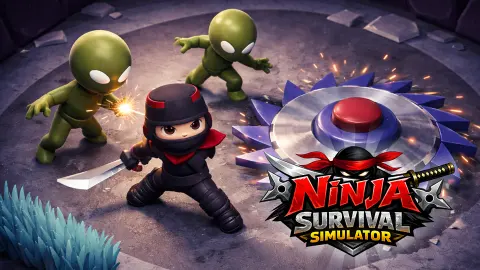




About Ninja Survival Simulator
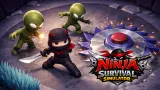
The story card is the loudest thing in Ninja Survival Simulator. You are a Shadow Clan master, your home is in ruins, a Cursed Outcast has unleashed a Red Army of zombie ninjas, and you are to reclaim the Dojo. Then you press Start Adventure and the first level hands you an empty arena, a ninja with 250 health, and two words painted on the floor beyond the far wall: Destroy crates.
We spent thirteen minutes in that arena. No zombie turned up. Health never moved. What the level is really about, at least before the hordes, is a shop you pass on the way in, a spawn point with a fire pit in front of it, and lilac boxes that nothing we did could break. This page is about those three things, because nobody else has written them down.
The game comes from Mirra Games and was published on 8 April 2026. We played it in November on a computer with a keyboard, one long session, the first level only. We never destroyed a crate, and we say so now so the rest reads as what it is: a first-level report, not a walkthrough.
The shop comes before the fight, and 50 gems buys exactly one katana
The left green button on the Tap to Start screen opens a panel with two tabs. The first holds five ninjas: the black one is marked Selected, and the red, blue, yellow and green ones carry a purple gem and a price. The second tab holds three katanas, the first marked Selected and the other two priced in gems as well.
The numbers are the useful part.
| Tab | Item | Price |
|---|---|---|
| Ninjas | Black | Selected, yours from the start |
| Ninjas | Red, blue, yellow, green | 75, 80, 85 and 90 gems, printed in red |
| Katanas | First | Selected, free |
| Katanas | Second, third | 25 and 30 gems, printed in white |
The colours read like an affordability code: red for what you cannot pay, white for what you can. You start with 50 gems, so either extra katana is within reach, never both, and no ninja skin at all. Every price carries the gem icon and none the coin, so your 100 coins buy nothing here; whatever they are for, it is somewhere we did not reach.
We left our gems alone, which means we cannot tell you what the second blade changes. What we can tell you is that the decision happens before the level, not during it, and that the back arrow returns you to Tap to Start without spending anything.
The only order in level 1 is about crates, not a horde
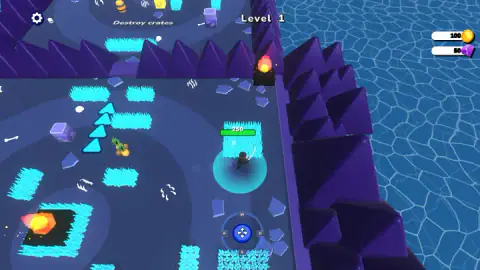
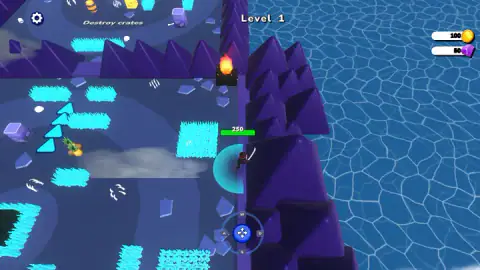
The arena is an isometric square of dark blue floor with rings painted on it, fenced by purple spikes with blue water outside. Around the ninja sit tufts of cyan grass, bones, watermelons, pineapples, white claw marks on the ground, fire pits burning on black slabs and the lilac crates. Near one crate, a stack of three blue arrows points up along the floor; we never found out what they do.
The words Destroy crates are the only instruction the level gives, and it gives them oddly: they are painted on the floor of a second patch of arena beyond the top spike wall, next to a crate, a barrel and a yellow block, and you only see them once you walk up to that wall. We never found a way across the spikes, so we cannot say whether the order is for your crates or for theirs. Nothing attacked us while we read it. No enemy entered the arena in our session, the health bar over the ninja read 250 from the first second to the last, and the coin and gem counters never changed either. The Red Army from the story card was not in this level, at least not before the crates go.
What we could not do was break one. Walking into a crate leaves it standing, the katana never swung, and the two big buttons with a sword and a shield that sat under the ninja on the Tap to Start screen are gone once the level begins. So the one order we found depends on an attack that is not explained and that we did not trigger. If you work it out in the first minute, you are ahead of us.
What the spawn point hides
Ninja Survival Simulator puts you down in the centre ring of the arena with a fire pit, on its own patch of cyan grass, directly above you. That one detail cost us most of our session. We held W, got nothing, held W again, got nothing, and were ready to write that the keyboard did not work.
It does. The right arrow moved the ninja a clear step to the right, and then A walked him back to the spawn in the same amount of time. S took him down past the grass. Later, A pulled him away from the spike wall and D pushed him back against it. The on-screen pad agrees: hold W and the blue knob slides to the top of the pad, hold S and it drops to the bottom, which means the game is reading the key even when the ninja has nowhere to go.
So the rule is simple. From the spawn, go sideways or down first. Once you are clear of the fire pit, every direction we tried worked, including up, and the camera follows you to the edges, where the wall stops you without hurting you.
Who it is for, and what we did not see
This is a slow start for an action game. If you like arenas you can read at a glance, a shop with prices that tell you the truth about your purse, and a first task that is about exploring rather than fighting, the opening is pleasant and nothing in it punishes you. If you came for the zombie hordes on the story card, they are not in the first few minutes of level 1.
We saw one level, on a keyboard, without finding the attack. The publisher promises traps, puzzles, bosses, more weapons and skins across many levels, and a swipe control on phones. None of that reached our session, and we did not press the shield button, light a second circle on the Tap to Start row, or step into a fire pit.
More ninja and survival games
Fake Ninjas sends you after impostors in your master's name, and Samurai Survivor is the horde fight this one holds back for later. Shadow Ninja RPG: Enemy Legends adds levels and hero upgrades, and Noobik Arena - 99 nights is another 3D arena where coins and upgrades carry you through the waves. More like them in our action games section.
Screenshots
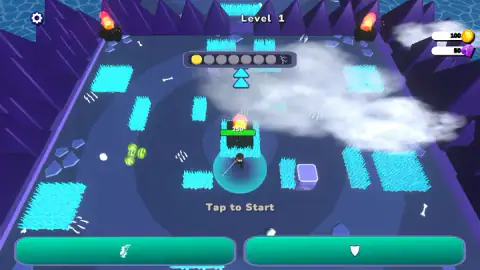
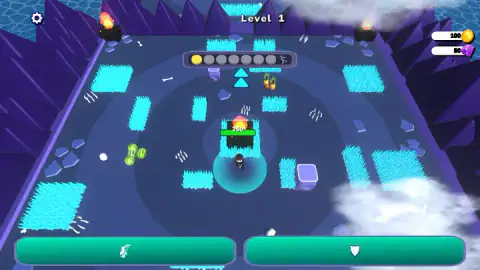
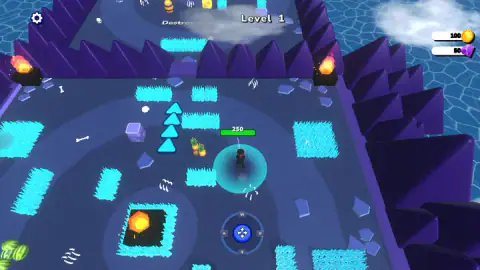
Taken by opening the game ourselves and letting it run — not supplied by the publisher, and not the same picture every other site shows.
How to play Ninja Survival Simulator
- Press the green Start Adventure button on the purple story card. The card hangs over the level 1 arena, with Level 1, your coins and your gems already on screen.
- You land on the Tap to Start screen: the ninja on a blue circle, a row of circles above him and two green buttons below. The left one, with a ninja and a sword, is the shop; the right one shows a shield. The white arrow at the top left of the shop brings you back here.
- Tap to Start. The buttons and the row disappear, and a round pad marked W, A, S, D appears at the bottom centre.
- Move with the arrow keys or W, A, S and D. The ninja stays in the middle of the screen and the arena slides under him, so the purple spike wall and the water beyond it come into view as you walk.
- Walk up to the top spike wall and the words Destroy crates come into view, painted on the floor of a second zone beyond it. The lilac boxes are the crates.
Tips from our run
- If nothing happens when you press W, you are not stuck: a fire pit sits right above the spawn. Press A, D or an arrow first.
- The purple spikes around the arena are a wall, not a trap. We stood pressed against them with full health.
- Bumping into a crate does not break it. There is an attack we did not find; the sword and shield buttons are gone once the level starts.
- The crate order is not on your screen. It is written on the floor past the top wall, so you only read it once you walk up there; the right side of the arena shows it best.
Controls
| Arrow keys | Move the ninja (we crossed the arena to the spike wall with them) |
|---|---|
| W, A, S, D | Move too; the on-screen pad's knob follows them. From the spawn, W did nothing for us because a fire pit sits right above it |
| Mouse or tap | Start Adventure, Tap to Start, the shop buttons and the back arrow |
| Swipe | Movement on touch screens, per the publisher (not tested) |
| Attack | Not found in our run; the katana never swung and walking into a crate did not break it |
Features
- A story card before the first level: a Shadow Clan master, a Cursed Outcast and a Red Army of zombie ninjas
- Five ninjas in the shop: the black one is yours, the red, blue, yellow and green ones cost 75 to 90 gems
- Three katanas: the first is free, the other two cost 25 and 30 gems
- A starting purse of 100 coins and 50 gems, and 250 health shown over the ninja's head
- An isometric arena walled with purple spikes, with fire pits, cyan grass, bones and lilac crates
- A row of seven circles ending in a running figure on the Tap to Start screen
- An on-screen W, A, S, D pad whose knob mirrors the keyboard
Game details
- Developer
- Mirra Games
- Release date
- April 2026
- Last updated
- November 6, 2026
- Added here
- February 2026
- Technology
- HTML5 (3D)
- Platforms
- Browser (desktop, keyboard and mouse), Browser (mobile & tablet, touch)
- Saved progress
- Saving, when available, is managed by this game. Mava cannot confirm your level.
FAQ
How do you play Ninja Survival Simulator?
Press Start Adventure on the story card, then Tap to Start in the arena. The two green buttons under the ninja are the shop (left) and a shield we did not press (right). Once the level starts, move the ninja with the arrow keys or W, A, S and D; the camera follows him. The only instruction we found, the words Destroy crates, is painted on the floor of a second zone beyond the top spike wall and comes into view when you walk up to that wall; the crates are the lilac boxes.
Why does the ninja not move with W in Ninja Survival Simulator?
A fire pit on its patch of grass sits directly above the spawn point, and we never got past it. In our run W did nothing from the start, while the right arrow, A, S and D all moved him and the on-screen pad's knob followed every key. Step sideways first and the keyboard works as expected.
What is the objective of level 1 in Ninja Survival Simulator?
The only order we saw is Destroy crates, two words painted on the floor of a second zone beyond the top spike wall, which you only read once you walk up to that wall. Whether it means the pale lilac boxes in your arena or the ones over there, we cannot say. Walking into a crate does not break it; we never found the attack, and no zombie or enemy appeared during our thirteen minutes in the arena.
How much do the ninjas and katanas cost in Ninja Survival Simulator?
The shop prices everything in gems, and the black ninja and the first katana are yours from the start. The second katana costs 25 gems and the third 30, while the cheapest locked ninja, the red one, costs 75 and the green one at the end of the row is the dearest. Your coins are not used on either tab.
Can you buy anything at the start of Ninja Survival Simulator?
One katana. You start with 50 gems, the two extra katanas cost 25 and 30, so you can afford either but not both, and every ninja skin is out of reach. We did not spend ours, so we cannot say what the better blade changes.
Are there zombies in Ninja Survival Simulator?
The story card promises a Red Army of zombie ninjas, and the publisher mentions zombies and bosses. In the first level, none appeared in our run: thirteen minutes in the arena, health at 250 the whole time, and a task that was about crates, not enemies. Expect the fighting to come later.
Who made Ninja Survival Simulator?
The game is credited to Mirra Games and was published on 8 April 2026. On that page, and it is offered for PC, Android and iOS in English and Russian. We found no other page about the game.
Does Ninja Survival Simulator work on a phone?
The publisher lists Android and iOS and says you move by swiping, and the game draws a round W, A, S, D pad at the bottom of the screen during the level. We only played on a computer with a keyboard, so we cannot vouch for the swipe.