











About Cheat and Don't Get Caught
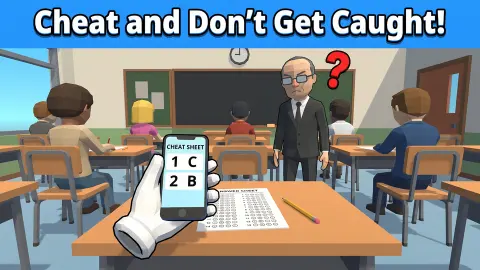
Most stealth games ask you to hide yourself. Cheat and Don't Get Caught asks you to hide a phone, at a school desk, from a man with a moustache and a green tie who will not stay at the blackboard.
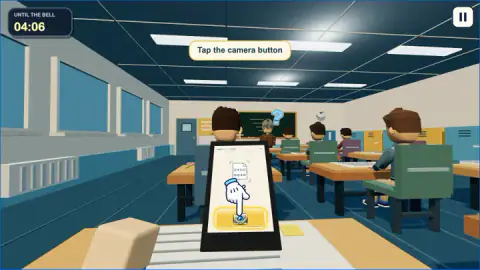
You see the classroom through your own eyes, from a desk at the back. A clock in the corner, labelled UNTIL THE BELL, counts down. Three buttons along the bottom are the whole toolkit: a pencil, an answer sheet and a phone. The phone photographs the answers, the sheet is where you copy them, and the pencil is what you hold when the teacher is too close for either.
The game is credited to PIXEL STAR. It was published in September 2026.
Here is the honest size of our visit: about four minutes, mouse in hand, at a desktop screen. Half of that was the guided tutorial. Then we were caught twenty seconds into our first real attempt, lost that attempt soon after with zero days survived, and were a few seconds into a second one when we stopped. We never heard the bell, so the upgrades that the game's own description promises between days are something we cannot describe.
Each photo covers two questions
This is the detail that sets the pace, and the game never states it outright. The phone does not hand you the whole exam. Its screen names a pair, and the photo you take is only good for that pair.
In the tutorial we photographed, copied two answers, went back to the phone, photographed again and copied two more. When the real attempt began, the phone was offering "5–6". After we failed and started over, it offered "1–2". The sheet we saw had six questions, which makes three photos for one sheet.
Three photos means three separate stretches with a phone in your hand and a wait on the loading bar. That wait is the exposed part. You have pressed the button, nothing useful is on the screen yet, and putting the phone down means the trip was wasted.
Our reading, from a small sample, is that the phone always offers the next pair you have not filled in. That would explain both labels. We did not play long enough to see it break.
One more thing on the sheet itself: a tag in its top corner reads VERSION A. We only ever saw A, and cannot say whether another version exists.
What the teacher sees, and what a warning costs
Our first catch came twenty seconds into the day. We had the phone up and reached for the pencil too late. The screen filled with the teacher's face and a red card: "GOTCHA!", then "The teacher came close and saw the open phone." Underneath, in yellow: "PHONE ON THE DESK. WARNING!"
The wording matters. He did not glance over from the board. He came close. In this classroom the danger is distance, and the teacher covers it on foot.
The card also read 1/2 WARNINGS, and play carried on afterwards. So the first catch is a telling-off, not the end.
A little later a second signal showed up. With the phone raised again, a half-circle dial appeared at the top of the screen, shaded from yellow through orange to red, with the teacher's portrait in the middle and a white needle lying at the yellow end. At the same moment our desk and the floor around it took on a pink tint. We pressed the camera button anyway. Seconds later the attempt was over, with a card that read ATTEMPT COMPLETE and 0 DAYS SURVIVED, and an offer to try again.
We cannot tell you exactly what moves that needle. The game's own description talks about keeping suspicion low, and a dial with the teacher's face on it is the obvious place to read it. What we can say is that the dial was not on screen the first time we were caught, so do not wait for it as your only alarm.
Whenever we held the pencil, the phone was out of sight.
The corner of the screen we could not explain
Two small counters sit under the pause button, and nothing in our tutorial explained either.
The first is a gift box with its own countdown. It read 4:01 in our first look at it and 2:51 in our last. The curious part: when our attempt failed and the bell clock jumped back up, the gift box kept counting down. It runs on your time at the desk, not on the school day. We did not see it open.
The second is a small desk icon with 0/10 beside it. It never moved, not even after the tutorial's four answers went in. We do not know what it counts.
The pause panel is headed DAY 1 and lists Settings, Collection and Calendar. We opened none of them.
Why the answer sheet is all bubbles
The sheet in the game is a real object with a real history. Wikipedia's article on optical mark recognition explains that the first test-scoring machine did not look at the marks at all. It felt for them, by sensing the electrical conductivity of pencil graphite. That is why this kind of exam and the pencil have been tied together ever since.
The same article explains the fat round bubble. It is a leftover from early optical readers, which were so insensitive that only a large mark was reliable. The game keeps both habits: big bubbles, and a pencil as the tool of an honest pupil.
The cheating is drawn from life too. Wikipedia's article on academic dishonesty lists phones among the devices pupils store answers on. It also cites a study which found that seating students further apart has little effect. The game agrees with that study. Nobody here copies from a neighbour, and the classmates around you play no part. The only thing that can sink you is the object in your own hand.
Who it is for
It suits players who like a game of nerve with almost no controls. There are three buttons, one clock and one adult to watch, and a failed attempt costs a few minutes at most.
It suits less anyone hoping for a free-roaming school to explore. You never leave the desk. And the long game, the run of days and the upgrades between them, is something we can only pass on from the game's description, not from our own play.
It is listed for PC, Android and iOS. We played with a mouse.
More games to try next
For stealth with a child in the lead and adults to avoid, there is Schoolboy Escape: Runaway, where the watchers are parents and the building is a house. Escape School Duel and +1 SPEED: Escape School swap the desk for the corridors and turn the teacher into something to outrun. Bob The Robber is the older, side-on take on waiting for a guard to look away. The rest are under adventure games.
Screenshots
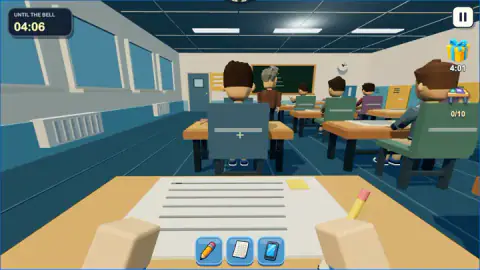
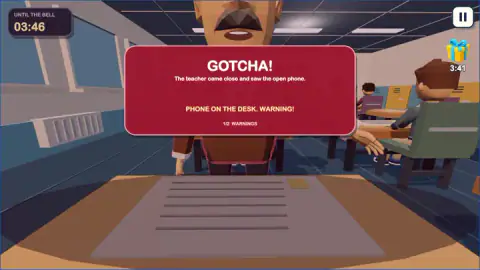
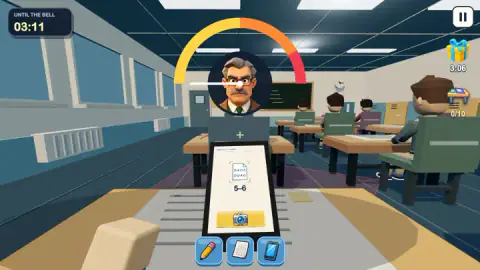
Taken by opening the game ourselves and letting it run — not supplied by the publisher, and not the same picture every other site shows.
How to play Cheat and Don't Get Caught
- Raise the phone. Click the phone button, the right-hand one of the three. The phone comes up in front of you with a yellow camera button on its screen.
- Take the photo and wait. Click the camera button. A loading bar appears and the tutorial says "Wait for the photo".
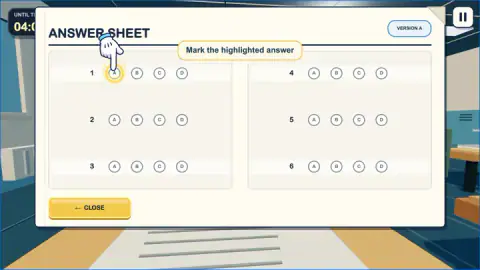
- Open the answer sheet. The middle button brings up a panel titled ANSWER SHEET, with numbered questions and four bubbles each, A to D.
- Mark the bubbles. A marked answer turns green with a tick and the rest of its row greys out. CLOSE takes you back to the desk.
- Switch to the pencil when the teacher moves. The left-hand button puts the phone away and a pencil in your hand.
- Repeat until the sheet is done, before the clock reaches zero.
What two short attempts taught us:
- The tutorial is free time. The bell clock sat at 04:06 from the first tutorial prompt to the last. It only started falling once the guiding hand let go.
- The answer sheet blinds you. It covers almost the entire screen. While it is open you cannot see where the teacher is, so open it knowing where he was a second ago.
- The teacher walks. We first saw him at the board with his back to the class. Later he was standing by the door on the left, facing the room.
- You get one mistake. The warning counter read 1/2 after our first catch.
- Everything is a button. There is nothing to steer and no camera to turn. The game is about when you click, not where you look.
Controls
| Click the phone button (bottom right of the three) | Raises the phone, which shows the pair of questions it is about to photograph |
|---|---|
| Click the yellow camera button on the phone | Takes the photo of the answers; they load after a short wait |
| Click the sheet button (middle of the three) | Opens the ANSWER SHEET over the whole screen |
| Click a bubble, A to D | Marks that answer; it turns green and the rest of the row greys out |
| Click CLOSE | Shuts the answer sheet and gives you the classroom back |
| Click the pencil button (bottom left of the three) | Puts a pencil in your hand in place of the phone |
| Click the pause button (top right) | Pauses the day |
Features
- A whole school day seen from one desk at the back of the room, in first person
- Three tools and nothing else: a pencil, a bubble answer sheet and a phone with a camera
- A bell clock that starts just above four minutes and stood still for the whole tutorial
- Photos that cover two questions at a time, so one sheet means several trips to the phone
- A teacher who patrols the room, a warning counter that reads 1/2 and a risk dial with his face on it
- Made by PIXEL STAR
Game details
- Developer
- PIXEL STAR
- Release date
- September 2026
- Last updated
- September 21, 2026
- Added here
- September 2026
- Technology
- HTML5 (3D)
- Platforms
- Browser (desktop, mouse), Browser (mobile & tablet, touch)
- Classification
- 3D , Adventure , Arcade , Simulation
- Saved progress
- Saving, when available, is managed by this game. Mava cannot confirm your level.
FAQ
How do you play Cheat and Don't Get Caught?
You sit an exam at the back of a classroom and copy the answers from your phone. Raise the phone, press its camera button, wait for the photo, then open the answer sheet and mark the bubbles. The whole thing has to be done while the teacher is somewhere else, and before the clock marked UNTIL THE BELL runs out.
How long is a day in Cheat and Don't Get Caught?
The bell clock read 04:06 at the start of ours and counted down in real seconds. It did not move during the guided tutorial, which took us about two minutes, so the tutorial costs you nothing. We did not reach the bell in either of our attempts.
What happens when the teacher catches you in Cheat and Don't Get Caught?
A red card fills the screen with the word GOTCHA and the reason. Ours said the teacher came close and saw the open phone. It counted as a warning, shown as 1/2, and play went on. Our attempt ended not long afterwards with zero days survived, so treat the second warning as the last.
How many answers does one photo give you?
Two. The phone names the pair it is about to photograph, such as 1–2 or 5–6, and after the photo loads you copy those two onto the sheet. The answer sheet we saw had six questions, so filling it means going back to the phone three times.
Are there upgrades in Cheat and Don't Get Caught?
The game's own description says you choose an upgrade after each completed day and carry it into the next. We cannot confirm what they are: we did not finish a day. The end screen of our failed attempt counted days survived, which fits a game built as a run of days.
Can you play Cheat and Don't Get Caught on a phone?
It is listed for PC, Android and iOS, in landscape and portrait, and the game's instructions say mouse and touch are both supported. Everything is done with on-screen buttons. We played it on a desktop computer with a mouse and did not test a touchscreen.
Who made Cheat and Don't Get Caught?
It is credited to a developer listed as PIXEL STAR. It was published in September 2026. The listing gives English and Russian as its languages.