




About Escape School Duel
Most escape games start you in a locked room with a puzzle. Escape School Duel starts you at a desk in the middle of a lesson, with the clock already running and the teacher looking straight at you. There is nothing to solve. There is a door somewhere, a stopwatch at the top of the screen, and a large man in a bow tie whose eyes throw red beams across the room.
That is the whole idea, and it is the reason the game has "Duel" in its name. The timer does not count down to a fail. It counts up from zero, and the title screen keeps your best time. Played alone, you are racing yourself. Played with a friend, you are racing each other on the same keyboard.
It comes from gameVgames, a small studio in Denizli, Turkey, whose name is written on the title screen and on the classroom chalkboard. The earliest listing we found dates its arrival in browsers to February 2026.
Players are split on it. One big games site shows 4.9 stars from 735 votes, while another says 63% of its players like it.
The first room is a classroom, and the teacher is the obstacle
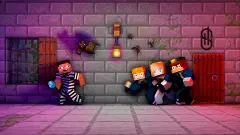
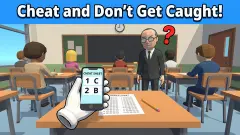
Before any jump or corridor, the game is a stealth test. You begin seated, a few rows from the chalkboard, with other pupils around you. The teacher is much bigger than everyone else, and his eyes throw thin red lines across the desks.
That changes how you should start. A platform game rewards moving at once; this room rewards watching first. The beams move, the teacher moves, and the gap you need is the moment both point elsewhere.
We will be direct about how far we got. Our pupil never left the desk. The camera turned around the room, the beams swept past, the clock ran on, and the character stayed seated. We cannot tell you from our own play what happens when a beam catches you, or what the rest of the school looks like.
The portals that host the game fill in some of it. One mentions a canteen, vents to crawl through and keys to find. Another mentions leaking sewer pipes. The studio's own notes speak of a coach who blocks the gym and of mini-games in the yard once you are out. Treat all of that as their description, not our report.
The clock is the score, and Skip costs you time
There are no lives on screen and no points. There is a timer at the top centre, a tickets counter and a money counter at the top right, and a green Skip button in the bottom right corner.
That button is the most interesting thing on the screen. It answers to the N key, and its label carries a red "+30s" and a small video icon. Read together, it looks like a way to jump past a section in exchange for thirty seconds on your clock, and probably an ad. In a game scored on time, that is a real choice: skipping a room that keeps catching you can still be faster than failing it five more times.
We cannot confirm the trade. The button did nothing we could see during our session, even after many presses.
Two players, one keyboard
The 2P mode puts both players on the same keyboard: one on the left hand side, one on the arrows. Some game sites describe it as split screen, so each of you gets your own view of the school. The fact that both of you run the same rooms is what makes it a duel. You can watch your friend get caught, then take the route they did not.
One practical warning. Many keyboards can only read a handful of keys held down at the same time, a limit called key rollover. Two players each holding a direction, run and jump can go past it. If a jump suddenly stops working when you both press at once, the keyboard dropped the key, not the game.
Tickets, money and a wardrobe that costs a lot
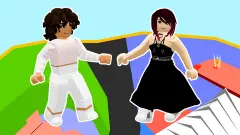
The two currencies do one job: they dress you up. The Customize screen has a clothes panel, a boy or girl model and six sections down the side. The icons show clothes, a pair of wings, a bag, a cap, glasses and a cat, which matches the outfits, wings, backpacks, hats, glasses and mascots that another games site lists.
The prices tell you how long this is meant to last. You start with 100 money and no tickets. The cheapest outfit we could buy costs 980, and the most expensive one in the first panel costs 16.5K. None of it changes how fast you run, according to one portal's description, so it is a reason to keep coming back rather than a way to get better.
What we saw, and what we did not
We played Escape School Duel for about four minutes in a desktop browser, in 1P mode. We saw the title screen, the Customize screen, the controls card and the first classroom, with the timer running from zero past a minute and a half. We did not get the pupil out of the desk, so we did not see a corridor, a trap, the principal, the gym, the yard or the two-player split screen. Everything past the first room on this page comes from the portals that host the game, and we name them where we use them.
More games by gameVgames
The same studio makes Rolling Balls Sea Race, a ball race over piers and open sea that also has a mode for two players, Geometry Vibes, a reaction game about keeping an arrow on its route, and Snow Rush 3D, a sled run on ice. If sneaking past adults is the part you like, Schoolboy Escape: Runaway is a stealth escape from a house instead of a school. Everything built for two players on one screen is in our multiplayer category.
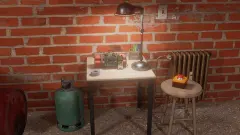
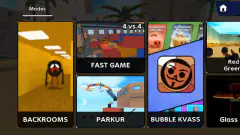
Screenshots
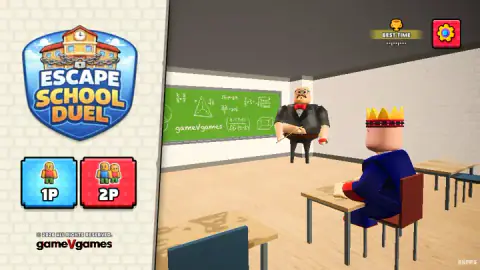
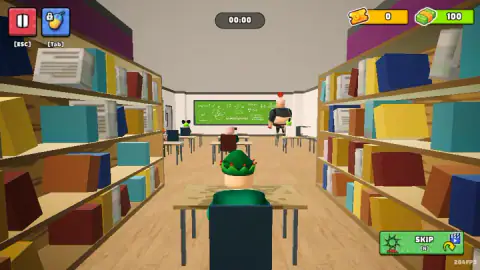
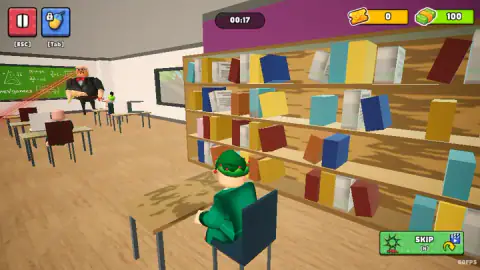
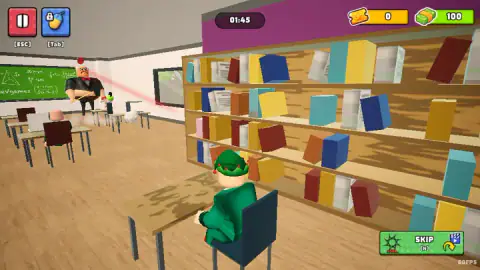
Taken by opening the game ourselves and letting it run — not supplied by the publisher, and not the same picture every other site shows.
How to play Escape School Duel
- Pick a mode. On the title screen, the blue 1P button is a solo run against the clock and the red 2P button is a race against a second player.
- Dress up and press Start. The Customize screen comes first. You can change clothes or leave the default outfit and go.
- Learn your keys. Player 1 moves with W, A, S and D, jumps with Space and runs with Left Shift. Player 2 uses the arrow keys, L to jump and K to run. Press jump twice for a double jump.
- Get out of the classroom without being caught. The run begins at your desk. The teacher patrols the front of the room and sweeps it with his beams.
- Reach the exit as fast as you can. The clock never stops, so every hesitation shows up in your time.
Tips from our session
- Watch the teacher before you move. In our captures he walked between the front desks and his beams swept from one side of the room to the other. The quiet moments are the ones where the beams point away from you.
- The bookshelves are cover. The first room has a long row of shelves down one side, tall enough to block the view from the front. It is the obvious route away from the teacher.
- Do not wait for the timer. Sitting still does not pause it. Ours went past a minute and a half while our pupil was still in its seat.
- Esc pauses, Tab is the mouse key. The Tab button shows a mouse with a padlock, which points to locking and freeing the pointer. If the camera stops following your mouse, that is the key to press.
Controls
| W A S D | Player 1 moves |
|---|---|
| Space (press twice) | Player 1 jumps, and double jumps on the second press |
| Left Shift | Player 1 runs |
| Arrow keys | Player 2 moves |
| L (press twice) | Player 2 jumps, and double jumps on the second press |
| K | Player 2 runs |
| N | Skip button, marked with a 30-second penalty and a video icon |
| Esc | Pause |
| Tab | The button shows a mouse with a padlock, which points to locking or freeing the mouse pointer |
Features
- A school escape run timed from the first second, with your best time shown on the title screen
- A solo mode against the clock and a two-player race on one keyboard, split into two views
- A first classroom guarded by a big teacher whose eyes sweep the room with red beams
- Double jump and a separate run key for each player
- A Skip button that carries a 30-second penalty on its label
- Two currencies, tickets and money, spent in a wardrobe with six sections, a boy or girl model and outfits priced up to 16.5K
Game details
- Developer
- gameVgames
- Release date
- February 2026
- Added here
- December 2025
- Technology
- HTML5 (WebGL, 3D)
- Platforms
- Browser (desktop, keyboard)
- Classification
- Adventure , Arcade , Fighting , Multiplayer , 2 Player
- Saved progress
- Saving, when available, is managed by this game. Mava cannot confirm your level.
FAQ
What is Escape School Duel?
Escape School Duel is a free 3D browser game by gameVgames, a studio from Denizli, Turkey. You play a pupil who decides to break out of school in the middle of a lesson, and the clock starts the moment the run begins. You can race the clock alone or race a friend on the same keyboard.
How do you play Escape School Duel with two players?
Pick 2P on the title screen. Player 1 moves with W, A, S and D, jumps with Space and runs with Left Shift. Player 2 moves with the arrow keys, jumps with L and runs with K. Both players can double jump by pressing their jump key twice, and some game sites describe the two-player race as split screen.
How do you win Escape School Duel?
The goal is to get out of the school as fast as you can. A timer counts up from zero during the run and the title screen keeps your best time, so a win is a faster escape, or beating the other player in 2P. There is no life counter on screen; the clock is the score.
What does the Skip button do in Escape School Duel?
The green Skip button sits in the bottom right corner during a run and answers to the N key. Its label shows a 30-second penalty and a video icon, so it appears to let you jump a section in exchange for time on your clock and an ad. In our session, pressing it did not move us on.
What are tickets and money for in Escape School Duel?
They buy cosmetics in the Customize screen. You start with 0 tickets and 100 money, and the outfits in the first clothes panel cost 980, 2.9K, 6.4K and 16.5K. The wardrobe has six sections, including hats, glasses and a pet, and one games portal notes that the looks do not change how you play.
Who made Escape School Duel?
gameVgames, a studio based in Denizli, Turkey. Its name is on the title screen and on the classroom chalkboard, and the game's listings on other sites credit it too. The same studio makes Rolling Balls Sea Race and Geometry Vibes.
Can you play Escape School Duel on a phone?
It is built around a keyboard, with two sets of keys for two players, and another big games site lists it as desktop only. We played it in a desktop browser. On a phone or tablet you would miss the second player and the run key.
How long does it take to escape the school?
We cannot give a finishing time. In our session the clock passed a minute and a half and we were still in the first classroom, so that room is the first thing to learn. The description on another games site mentions a canteen, vents and keys further on, which we did not reach.