








About The Escape Series
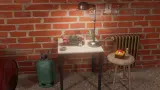
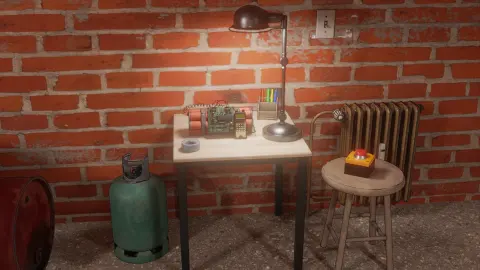
Most browser escape games are drawn flat: a cartoon room, a key under the rug, a door. The Escape Series looks like a photograph of somebody's storeroom. Brick walls, a ceiling lamp that burns out the middle of the picture, cardboard boxes with a removal company's name printed on them, a mop leaning beside a pair of rubber boots. Nothing glows, nothing blinks, and nothing tells you where to start.
That is the game. You stand in the middle of the room and turn. Two white arrows at the bottom of the screen swing you from one wall to the next, and a click on the right object moves you in close. The puzzle is deciding which of all those ordinary things matters.
The first thing that clearly matters is a metal panel bolted to a strapped crate, with six red buttons, two switches and a slot. We clicked it, tried its switches, pressed its buttons. The game answered with two words at the top of the screen: "No power".
The Escape Series is by isotronic games. It was published in August 2024.
Our session lasted about four minutes and stayed in that first room without solving it. Further down we say exactly what we saw and what we did not.
One storeroom, three views, and a lot of red buttons
We reached three views of the first room, and they are worth describing because each one hides the same kind of object in a different place.
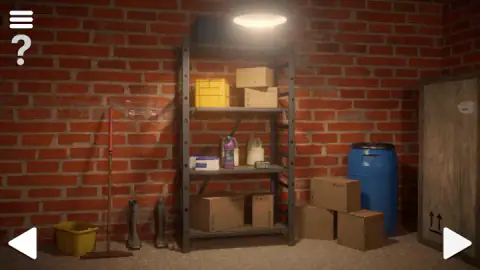
The first is the tidy one. A metal shelf stands under the lamp, loaded with cardboard boxes, a yellow plastic crate and bottles of detergent. A mop, a yellow bucket and two rubber boots stand to its left. To the right is a blue barrel and, at the edge of the picture, a tall wooden crate with two "this way up" arrows.
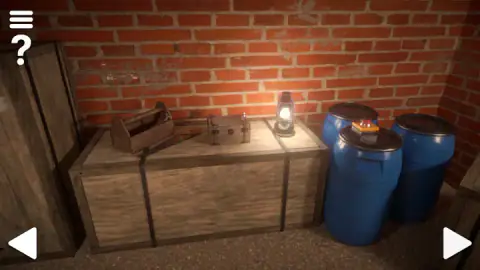
The second view is lower and warmer. A long strapped crate serves as a table for a wooden toolbox, a small chest with metal bands and a lit lantern. Three blue barrels stand beside it, and on the lid of one sits a red button on a yellow base, the kind used as an emergency stop on a machine.
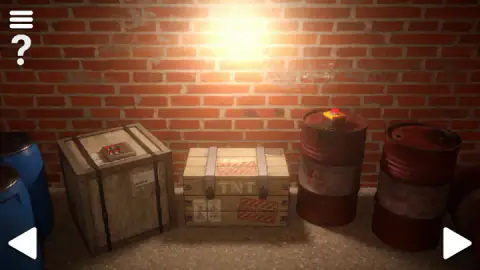
The third view has the panel. It rests on top of a strapped crate at the left. In the middle is a crate stencilled TNT, wrapped in CAUTION tape. On the right are two red barrels with a flammable warning diamond, and on one of them sits a second red button on a yellow base.
Count them and you get a pattern. Six red buttons on the panel, one on a blue barrel, one on a red barrel. A room with that many things to press and one message about missing power is setting up an order of operations. We can describe the pieces; we did not find the order.
What the panel shows up close
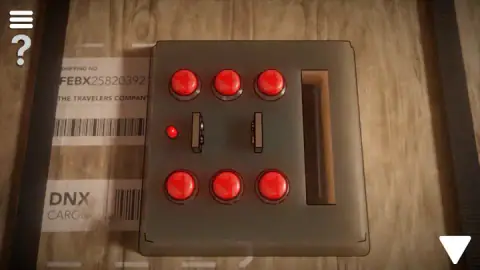
The close-up is the most detailed screen we saw. The panel is a grey metal plate with three red buttons along the top and three along the bottom. Between the rows are two slide switches, and to their left a small red lamp. On the right edge is a tall, narrow slot, dark inside.
One detail is easy to miss. The small red lamp was lit every time we looked at the panel, including the moment the game told us there was no power. Whether that lamp means "off", "locked" or "waiting" we cannot say, but it is the one part of the panel that is visibly alive, and we would watch it after doing anything else in the room.
Beside the panel, stuck to the crate, is a shipping label. It reads SHIPPING NO followed by a code of four letters and nine digits, then THE TRAVELERS COMPANY, and below that DNX CARGO with a barcode. Escape games rarely print that much text for decoration. We did not get far enough to learn whether the number is used, so treat it as something to write down, not as a solution.
What we saw of the first room, and what stayed locked
Our visit was short, and this is everything in it. We turned through the three views. We clicked the panel and went into its close-up. We clicked the switches and several buttons and got "No power". We opened the menu, saw the two sliders, and came back with PLAY. We stepped out with the down arrow, tried dragging the red button on the barrel, which did nothing we could see, and went back to the panel.
We never picked up an object, so we cannot tell you where collected items are kept or how you use one on another. We did not open the toolbox, the small chest, the TNT crate or anything on the shelf. We did not see a door, a keypad or an exit, and we did not finish the room. We also never pressed QUIT or the question mark.
Two things we can say with confidence. Nothing on screen measured time or counted clicks, so there was no pressure to hurry. And the game never corrected us: no pointer, no highlighted object, no tutorial box. The only sentence it spoke in four minutes was the one above the panel.
The rooms you can book were copied from games like this
It is natural to assume that escape games on a screen imitate the real rooms you can book for a birthday. It happened the other way round. Point-and-click games about getting out of a locked room circulated in web browsers first. In 2007 Takao Kato, who worked for the Kyoto publishing company SCRAP, turned the idea into a live event called Real Escape Game, with real people shut in a real room. The format reached San Francisco in 2012 and spread from there.
The Escape Series sits at the end of that loop. Its storeroom is modelled with the sort of realism a physical room has, with props that look bought, not drawn, and yet it plays by the oldest rule of the browser genre: you cannot walk, you can only turn and look closer. The fixed views are not a limitation of the technology. They are the format, and they are why every object in frame deserves suspicion.
Who it suits
Players who enjoy being left alone with a problem. There is no score to beat and no clock, so it works well with a notebook beside the keyboard, and for two people sharing a screen and arguing about barrels. It is a poor fit if you want steady rewards: our first four minutes produced one message and no progress. Younger children can handle the controls easily but may find the silence frustrating.
More escape and mystery games
For a faster version of the same idea, 100 Doors Puzzle Box splits the escape into many short levels, one door at a time. If searching a detailed scene is the part you like, Mystery of the Old House: Hidden Objects and Blackriver Mystery. Hidden Objects give you lists of things to find instead of locks to open. Dig out of Prison is an escape of a different kind, done with a spoon and patience. The rest are under puzzle games.
Screenshots
Taken by opening the game ourselves and letting it run — not supplied by the publisher, and not the same picture every other site shows.
How to play The Escape Series
- Use the white arrows in the bottom corners to turn. Each click shows a different part of the same room.
- Click an object that looks as if it could be opened, pressed or read. If it has a close-up, the view moves in and the side arrows give way to a single down arrow.
- Read everything in the close-up before touching it. Labels, numbers and warning signs are drawn sharply enough to read.
- Click the down arrow in the bottom right corner to step back, then turn and look for the next thing.
- The game's instructions say the rest is collecting objects, cracking codes and using logic to find the way out of the room.
Things worth knowing before the first click:
- The menu looks like a pause, and it is one. The three-line button in the top left lays MUSIC, AUDIO, PLAY and QUIT over whatever you were looking at. PLAY puts you back exactly where you were. It does not restart anything.
- A dead panel is information. When the buttons answered "No power", pressing more of them changed nothing. The message is telling you to leave and come back later.
- The down arrow is the only way out of a close-up. We saw no other back button on that screen.
- Leave the keyboard alone. We tried a key and heard no response. Everything we did was a mouse click.
- There is a question mark under the menu button. It never leaves the screen. We did not press it.
Controls
| Click or tap the white arrows (bottom left and bottom right) | Turns you to the next view of the room |
|---|---|
| Click or tap an object | Moves in for a close-up, where there is one; the button panel on the strapped crate opened this way |
| White down arrow (bottom right, in a close-up) | Steps back to the wider view |
| Three-line button (top left) | Opens the menu with MUSIC and AUDIO sliders, PLAY to go back to the room and QUIT |
| Question mark (top left) | Stays on screen at all times; we did not press it |
Features
- A storeroom drawn in realistic 3D, seen from fixed views that you turn between with two arrows
- Close-ups of single objects, such as a metal panel with six red buttons, two switches and a slot
- Feedback in plain words at the top of the screen; our panel answered with "No power"
- Printed labels, stencils and warning signs on the crates and barrels that can be read in close-up
- No timer, score or move counter on screen in the part we played
- Separate MUSIC and AUDIO sliders in the menu
- Made by isotronic games
Game details
- Developer
- isotronic games
- Release date
- August 2024
- Last updated
- August 10, 2026
- Added here
- March 2025
- Technology
- HTML5 (Unity WebGL)
- Platforms
- Browser (desktop, mouse), Browser (mobile & tablet)
- Saved progress
- Saving, when available, is managed by this game. Mava cannot confirm your level.
FAQ
How do you play The Escape Series?
You look around a locked room with the two white arrows at the bottom of the screen and click on anything that seems worth a closer look. Some objects open in close-up, and a down arrow takes you back. The game's instructions say you collect objects, crack codes and solve puzzles until you find the way out.
What does No power mean in The Escape Series?
It is the message that appeared above the six-button panel in the first room when we clicked its switches and buttons. The panel does nothing in that state, so the puzzle starts somewhere else in the room: something has to feed it before the buttons count. We did not find what, so we cannot give the solution.
How do you go back from a close-up in The Escape Series?
Click the white down arrow in the bottom right corner. In a close-up the two side arrows disappear and that single arrow takes their place. It returned us from the button panel to the view with the crates and the red barrels.
Is there a hint button in The Escape Series?
There is a question mark in the top left corner, under the menu button, and it stays there in every view and even while the menu is open. That is where escape games usually keep their hints. We never pressed it, so we cannot say what it shows or whether it costs anything.
How many rooms does The Escape Series have?
We do not know. The game's description talks about each room having its own puzzles, so there is more than one, but no number is given on the game or on its listing. Our session stayed inside the first room and did not finish it.
Who made The Escape Series?
The Escape Series is by isotronic games. It was published in August 2024 and updated in August 2026.
Can you play The Escape Series on a phone?
It is listed for PC, Android and iOS, in both landscape and portrait. Everything we did was a single click on an arrow, an object or a button, which translates directly to taps. We played on a computer with the mouse and did not test a phone.
Is The Escape Series free?
Yes. It runs in the browser with nothing to download and no account. We saw no shop, coins or locked content in the first room.