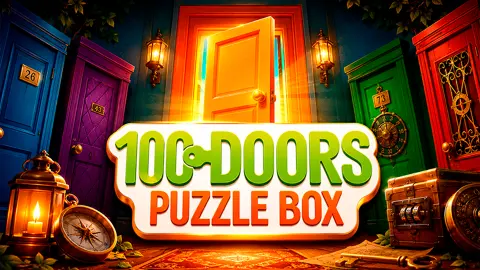








About 100 Doors Puzzle Box
Most escape games hand you a room and let you guess what the room wants. 100 Doors Puzzle Box keeps the guessing small. Each level is one room, one door and a handful of things you can touch, and the whole game is the question of which touch, in which order, gets you through.
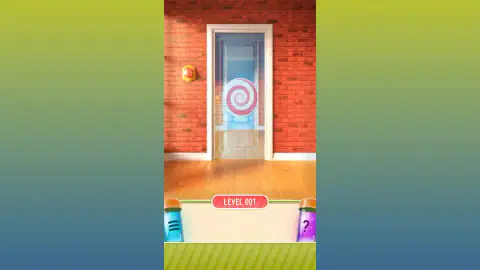
The screen is tall and narrow, shaped like the phone it was made for. The room fills the top. At the bottom sits a strip with the level number, LEVEL 001 on the first screen, flanked by two glass vials: a blue one with three lines and a purple one with a question mark. The strip between them is your pocket. Anything you pick up waits there until you use it.
The game comes from Protey, a mobile studio that put it on the iPhone in June 2016. On Google Play it has since passed 5 million downloads. The browser version is published by other companies, which is why portals disagree on the name to credit; we explain that further down.
The scientist, and what the second room teaches you
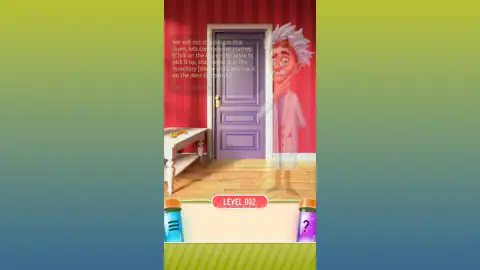
The second room is where the game explains itself. Behind the lilac door and the little white table stands a scientist with wild white hair, goggles pushed up on his forehead and a lab coat. In our capture he is see-through, like a ghost, while his lines are on screen.
What he says is the whole tutorial in one sentence. We will not stay long in this room, he tells you, and then, in brackets, the instructions: click the key on the table to pick it up, select it in the inventory with a single click, and use it on the door to open it. Tap to continue, and he is gone.
That order, pick up, select, use, is the core of every level that follows. According to the portals that carry the game, the scientist is looking for his lost invention, called BRAAM, and you go through the doors with him. His name for it did not come up in the two rooms we played.
Hints cost an ad, and the skip button sits in the pause menu
Tap the purple vial and a panel called Help opens. Its message is plain: help will be available after watching a short ads video. Below it is an orange button to load the video, and a cross to close the panel. There is no free hint, and no hint counter to save up.
The blue vial opens the pause panel. It has two switches, one for sound effects and one for music, and four buttons: Continue, Skip, Restart and Menu. Another games site's instructions describe the blue vial as the way to skip a level you are stuck on. We did not use it, so we cannot tell you whether a skip also asks you to watch an ad first.
Escape-the-room games came before the real rooms
The title puts two old ideas together. Puzzle boxes, boxes that open only if you find the right sequence of hidden moves, became popular souvenirs in the 19th century, in Victorian England, in Switzerland and in the Hakone region of Japan. Some needed a single move to open; others needed a series of discoveries. That is a fair description of the first two levels here: one tap for the first door, three steps for the second.
The other idea is the escape room, and here the browser got there first. Escape-the-room games began as Flash games for web browsers, a single room full of clues and objects, before they moved to phones. One of the first real-life versions, Real Escape Game, was created in Kyoto in 2007 by Takao Kato of the publishing company SCRAP. So when you tap your way out of a room in 100 Doors Puzzle Box, you are playing the format that inspired the rooms people now book with friends, back in the medium it started in.
Who made it: one game, several names
Search for 100 Doors Puzzle Box and you will find it credited to several names. The game was made by Protey; its Google Play package still carries the studio's name, although the listing now shows Pixel Tale Games as the developer. The browser version is distributed by others: the game's listing gives DarkPlay, dated July 2026.
It is the same game in every case: the same title, the same scientist and the same pair of vials that a popular games portal describes in its instructions, where it holds a 4.1-star rating from more than 10,000 votes. Protey also made other games in the 100 Doors series, and many unrelated studios use the same two words, so check the full title if you are looking for a walkthrough.
What we saw, and what we did not
We played 100 Doors Puzzle Box for about four minutes. That covers the first room, the Help panel, the pause panel and the second room up to the point where the key is in your hand. It is the very start of a long game.
We did not see the third room, the elevator the store listings mention, the other locations or the time-travel puzzles they promise. We also never saw a hint play out, because a hint needs an ad. If your question is about a later door, we cannot answer it from our own game yet, and we will not guess.
More room-escape games
For another escape game built from separate rooms, try The Escape Series. Room 45 is darker, a single locked room with no tutorial at all. If you prefer searching a scene for objects, Mike Lost in Desert is a hidden-object story, and Detective Max Mystery: The Disappearance of Mr. Winters turns the same skills into a detective case. Every game about logic, clues and a little patience is in our puzzle category.
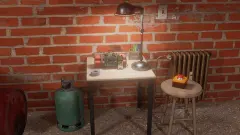
Screenshots
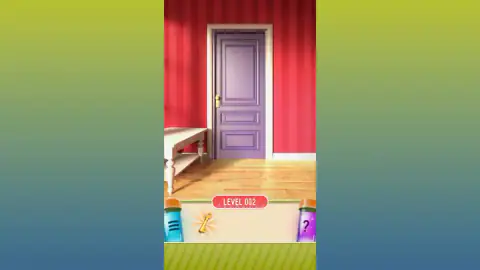
Taken by opening the game ourselves and letting it run — not supplied by the publisher, and not the same picture every other site shows.
How to play 100 Doors Puzzle Box
- Look before you tap. Each room has one exit and only a few objects that do anything. Scan the walls, the floor and any furniture first.
- Tap what looks movable. Buttons, drawers and objects on tables react to a click or a tap. Some do something at once; others go into the bar at the bottom.
- Use objects from the bar. Tap an object in the bar once to select it, then tap the place in the room where it belongs. This is the step people miss.
- Go through the door. When the way out is open, tap it. The level number at the bottom goes up by one.
Tips from our session:
- In level 1, the spiral is the way out. The first room already has an open doorway, with a red-and-white spiral hanging in it and a blue door further down the corridor. Our test player pressed the red button on the wall about ten times and nothing on screen changed. The tap that took it to level 2 was on the spiral itself.
- In level 2, the key does not use itself. Picking it up is only half the job. Our test player took the key from the table, then clicked it in the bar again and again for over a minute without touching the door, and never left the room. Select the key, then tap the door.
- Blue is pause, purple is help. It is easy to mix up the two vials. The blue one opens the pause panel; the purple one asks for a hint.
- The keyboard does nothing. Arrow keys, A and D gave no response. Everything is a click or a tap.
Controls
| Click or tap an object in the room | Press it, open it or pick it up; picked-up objects go to the bar at the bottom |
|---|---|
| Click or tap an object in the bottom bar | Select it, then tap the spot in the room where it should be used |
| Purple vial with a question mark (bottom right) | Ask for a hint; the game offers it after a short ad video |
| Blue vial with three lines (bottom left) | Open the pause panel - sound, music, continue, skip, restart, menu |
Features
- One room and one way out per level, numbered from LEVEL 001 in a label at the foot of the screen
- A bar of found objects between two vials; a picked-up key glows there until you use it
- A tutorial in the second room, spoken by a white-haired scientist in a lab coat
- Hints on the purple vial, unlocked by watching a short ad
- A pause panel with separate switches for sounds and music, plus skip and restart
- A tall, phone-shaped screen that is played with clicks or taps only
Game details
- Developer
- Protey Apps
- Release date
- June 2016
- Added here
- May 2026
- Technology
- HTML5
- Platforms
- Browser (desktop, mouse), Browser (mobile & tablet, touch)
- Saved progress
- Saving, when available, is managed by this game. Mava cannot confirm your level.
FAQ
What is 100 Doors Puzzle Box?
100 Doors Puzzle Box is a point-and-click escape game first released for iPhone by Protey in 2016 and now also playable free in the browser. Each level is a room with one way out; you search it, pick up objects and use them until the door opens. A scientist looking for his lost invention keeps you company.
How do you beat level 1 of 100 Doors Puzzle Box?
The first room has an open doorway with a red-and-white spiral hanging in it, and a round red button on the wall. In our game, pressing the button over and over changed nothing we could see; tapping the spiral took us to level 2. One games site's instructions call that kind of object the portal to the next room.
How do you beat level 2 of 100 Doors Puzzle Box?
The game tells you itself. Click the key on the table to pick it up, click it once in the bar at the bottom of the screen to select it, then click the door. Our test player picked up the key and then kept clicking it in the bar without ever touching the door, which is why it stayed on level 2.
How do hints work in 100 Doors Puzzle Box?
Tap the purple vial with the question mark in the bottom-right corner. In the browser version it opens a Help panel saying help will be available after watching a short ad video, with a button to load it. There is no hint without the ad.
Can you skip a level in 100 Doors Puzzle Box?
The pause panel, opened from the blue vial in the bottom-left corner, has a Skip button next to Continue, Restart and Menu. A popular games portal describes the blue vial as the way to skip hard levels. We did not press it, so we cannot say whether it also asks for an ad.
How many levels does 100 Doors Puzzle Box have?
The name gives it away: the store listings promise 100 doors, spread over nine locations, and the level label counts in three digits from 001. The iPhone version reached door 100 in an update in September 2018. We played the first two levels; the rest we have not seen.
Who made 100 Doors Puzzle Box?
The game comes from Protey, a mobile studio whose 100 Doors Puzzle Box has more than 5 million downloads on Google Play. The browser version is published by different companies on different portals: the game's listing gives DarkPlay, while another big games site credits Mirra Games.
Do the A and D keys do anything in 100 Doors Puzzle Box?
Not that we could tell. The arrow keys, A and D gave no response in our game, and we saw no character to walk around. The game is played entirely with clicks or taps.