





About Fillblox
Most block puzzles let you make a mess and clear it. You drop pieces, a row fills, the row disappears, and a bad placement is forgotten three moves later. Fillblox has no rows to clear. A piece goes down and stays down, and one that sits a single cell away from where it belongs can end the level without the game saying a word.
The idea fits in a sentence. There is a square board, there is a tray of green block pieces to its right, and the board has to be covered completely. Nothing falls, nothing is random, and you can see every piece from the first second.
We played two levels on a desktop with a mouse, for about four minutes. Level 1 was done in two moves. Level 2 has three pieces and nine cells, and we did not finish it: we placed two pieces, both legally, and left the third with nowhere to go. This page is mostly about that mistake, because it is the one the game is built to make you commit.
The game's listing credits Flagwin Studio and dates the game there to March 2026.
Level 2 is three pieces, and the first one decides it
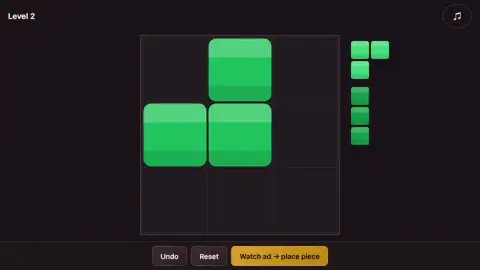
Level 2 gave us a 3 by 3 board and three pieces. One is an upright bar of three blocks. The other two are corner pieces, three blocks each, like a 2 by 2 square with one block bitten off. On the first the missing block is the bottom-right one. On the second it is the top-left one.
We started with the second corner piece and dropped it against the top of the board, in the left and middle columns. It looked harmless. It covered three cells and left six, and there were six blocks still in the tray.
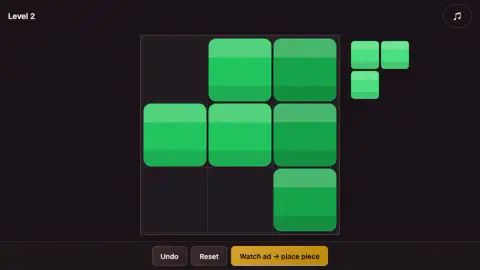
But look at where the gap in that piece ended up: the top-left cell of the board, shut in by the piece on two sides and by the frame on the other two. That is one empty cell on its own, and our tray held no single block.
We did not notice. The bar went into the right column next, which is a perfectly good place for it, and the board showed six cells covered out of nine. The three left over were the top-left corner and two cells side by side on the bottom row. The last piece needs three cells that touch. That is where our session ended.
Here is what the shapes say should work, with the caution that we did not see the card come up for it. Keep the bar in the right column. Put the first corner piece, the one with two blocks on top, into the top-left corner. The second corner piece then drops in below it, one row lower than where we put it, and its bitten-off corner is filled by the piece above. The same pair also fits if the bar takes the left column instead and the two corner pieces move one column to the right.
So we had the right pieces and the right columns, and we were wrong by a single row.
You cannot turn a piece, and that is the puzzle
The two corner pieces are the same shape turned half a circle. If you could rotate them, they would be interchangeable and Level 2 would hardly be a puzzle. We found no button or gesture that turns a piece, and the listing says outright that shapes cannot be rotated or flipped. The bar that stood upright in the tray stood upright on the board.
That means the tray is exact. A corner piece missing its bottom-right block will only ever fill a spot whose bottom-right is already taken, or is outside the piece's reach. Read the missing block, not the three that are there.
One small thing about the tray: with three pieces waiting they are drawn quite small, and when only one was left it was drawn larger. Judge a piece by its number of blocks, since its size on screen changes.
The win card measures you with a clock you never saw
While you play, the screen shows the level number in the top-left corner and a round music button in the top-right. There is no timer and no move count.
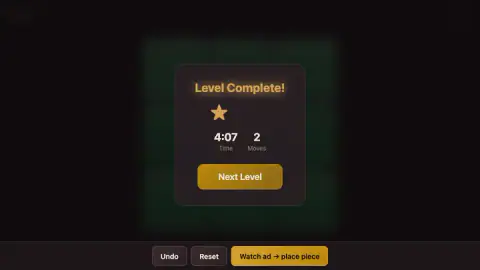
Both turn up afterwards. Our card for Level 1 read 4:07 for two moves, under a single gold star. Two moves do not take four minutes. The clock had been counting from the moment the level opened, through all the time we spent looking at it.
The star sits to the left of centre on the card, as if there were room for more beside it. We only ever saw that one card, so we cannot tell you what earns a second star, or whether there is one.
The gold button under the board is a video
Three buttons sit under the board on every screen we saw. Undo and Reset are plain and dark. The third is gold and reads "Watch ad → place piece". It is the game's hint: a video in exchange for one piece put down for you.
We did not use it, so we cannot say which piece it picks or how long the video is. We did not press Undo or Reset either, which is how we ended up stuck on a board that Reset was there to fix.
These shapes have a name, and there are only two of them
Shapes made of equal squares joined edge to edge are called polyominoes. The mathematician Solomon Golomb gave them the name in 1953, and whole books have been written about which boards they can and cannot cover.
A piece made of three squares is a tromino, and there are only two kinds: the straight one and the bent one. Level 2 of Fillblox uses both, one bar and two bends. The first question in the whole subject is the one from our tips: do the squares in the pieces add up to the squares on the board? On Level 2 they do, exactly, and that is why no placement can be wasted.
What four minutes did not show us
A finished Level 2, and anything after it. We saw two levels, both on a 3 by 3 board. The listing says boards grow and pieces multiply as you go, and that the difficulty adjusts to how fast you play; we cannot confirm either.
We heard no sound, did not press the music button and did not try a phone. The one keyboard key we tried did nothing. Everything we did was done with the mouse.
Who it is for
Anyone who likes a puzzle with nothing hidden and no hurry on screen. There is almost nothing to read, the pieces are plain green blocks, and a child who can drag with a mouse can play the first levels.
If you want rows that clear and a score that climbs, this is the wrong game: here a level is either covered or it is not. And know that the hint costs a video, though nothing requires you to press it.
More boards to fill
Hexa Block Puzzle asks the same question on a honeycomb board, also with pieces that do not rotate. Cats Block Puzzle swaps the blocks for cats that have to fit inside a box. For the kind that clears rows, QBlock Puzzle and Block Puzzle: Jewel Block both hand you a tray of three pieces at a time. The rest are under puzzle games.
Screenshots
Taken by opening the game ourselves and letting it run — not supplied by the publisher, and not the same picture every other site shows.
How to play Fillblox
- Look at the board and the tray on the right. Each piece is a group of square blocks in its own shade of green.
- Hold the left mouse button on a piece, drag it over the board and let go with all of its blocks over empty cells.
- Keep going until no cell is empty. A card reading "Level Complete!" appears. Press Next Level.
- If a piece is in the wrong place, the Undo and Reset buttons are under the board.
What our two levels taught us:
- Count before you drag. On Level 2 the three pieces had three blocks each and the board had nine cells. Nothing was spare. Every piece has to go down, and none may overlap.
- Watch for the lonely cell. If a placement leaves one empty cell with no empty neighbour, and no piece in the tray is a single block, the level is already lost. It happened to us on the first drag.
- The game will not tell you. No message appeared when our board became impossible. The last piece simply stayed in the tray.
- A drag that misses changes nothing. When we let go of a piece off the board or over a taken cell, the board stayed as it was and the piece was still in the tray.
- The clock is hidden, and it is running. You only see it on the win card.
Controls
| Left mouse button, drag | Picks a piece up from the tray on the right and drops it on the board |
|---|---|
| Next Level on the "Level Complete!" card | Opens the following level |
| Undo and Reset under the board | Two plain buttons for taking a placement back or starting the level over; we pressed neither |
| Gold button "Watch ad → place piece" | Offers to put one piece on the board for you in exchange for a video; we did not use it |
Features
- A fill-the-board puzzle where every piece in the tray has to end up on the board and no cell may stay empty
- Pieces made of square blocks, each in its own shade of green
- A 3 by 3 board on the first two levels
- A "Level Complete!" card that shows your time and your number of moves, neither of which is on screen while you play
- Undo and Reset buttons under the board on every level
- An optional video button that offers to place one piece for you
Game details
- Developer
- Flagwin Studio
- Release date
- March 2026
- Added here
- December 2025
- Technology
- HTML5
- Platforms
- Browser (desktop)
- Classification
- Puzzle
- Saved progress
- Saving, when available, is managed by this game. Mava cannot confirm your level.
FAQ
What is Fillblox?
Fillblox is a logic puzzle credited to Flagwin Studio. Each level gives you a square board and a tray of block pieces, and you drag the pieces onto the board until no cell is empty. Every piece is needed, so the puzzle is finding the one spot where each of them goes.
How do you play Fillblox?
Hold the left mouse button on a piece in the tray on the right, drag it over the board and let go. All of its blocks have to land on empty cells. When the last cell is covered, a "Level Complete!" card appears with a Next Level button.
Can you rotate the pieces in Fillblox?
We found no way to turn a piece, and the game's listing says the shapes cannot be rotated or flipped. The upright bar in our tray went onto the board upright. Read each piece exactly as the tray shows it.
How do you solve Level 2 of Fillblox?
We did not finish it, so this is worked out from the shapes and not something we watched happen. In our game Level 2 had an upright bar of three blocks and two corner pieces. Put the bar in the right column, the corner piece with two blocks on top in the top-left corner, and the other corner piece under it against the bottom edge.
Is there a timer in Fillblox?
Yes, but you do not see it while you play. The level screen shows only the level number and a music button. The time and the number of moves appear on the "Level Complete!" card, and our clock had been running since the level opened, before we moved anything.
Do you have to watch ads to get a hint in Fillblox?
The help on offer is a gold button under the board that reads "Watch ad → place piece", so it asks for a video. Undo and Reset sit beside it as plain buttons with no video marking. We did not use the gold button and cannot say which piece it places.
Who made Fillblox?
The game's listing credits Flagwin Studio and gives March 2026 as the release date there. That listing is our only source for the name; the screens we saw carry no credits.
Can you play Fillblox on a phone?
It is listed for PC, Android and iOS. We played on a desktop with a mouse only, so the phone is the listing's word and not ours.