











About Fill The Lines
Most line puzzles hand you two dots and ask you to join them. Fill The Lines only gives you one end. Each coloured square on the grid is where a line begins, and where it stops is up to you. The level is done when every grey cell has been claimed by some colour.
That single change turns the job around. You are not looking for a route from A to B. You are deciding how to share a board out between two or more lines, and the shape of each line follows from the share you pick.
The game is by Drivix Games and has been available since September 2025. The screen keeps almost nothing on it: a level number, a house button, a restart arrow and a skip button. There is no clock and no score.
Our time with it was a single ten-minute sitting, mouse in hand. We cleared level 1, spent most of the time on level 2 and did not finish it. Below is what we saw, and how level 2 splits once you look at it the right way.
What the first two levels hold
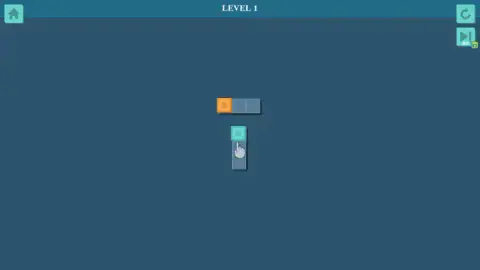
Level 1 is a lesson rather than a puzzle. There are two separate strips of three cells, one lying flat with its coloured square on the left and one standing upright with its coloured square on top. A hand icon points at the upright one. Drag each square along its strip and the level clears.
The colours are not fixed. Across our attempts, the same two strips came up orange and cyan, then blue and green, then pink and blue, then red and blue. Restarting the level, or coming back to it, deals a new pair. The layout never changed.
Level 2 is where it starts asking questions. The board is seven cells wide and three tall. Two cells in the middle row are holes, the second and the fourth from the left, and the coloured squares sit directly above and below the fourth. That leaves seventeen grey cells for two lines.
Level 2: the split that works
We did not clear level 2 in our session. Our lines kept heading toward the same side of the board. Looking at the layout afterwards, the answer is in the hole between the two coloured squares.
That hole cuts the board into a left part of eight cells and a right part of nine. Because it sits directly between the two coloured squares, each line can only leave its square sideways, left or right. Both parts need filling, so one line must take each side.
The right-hand line runs along its row to the edge, steps into the middle row, runs back toward the hole, then turns into the far row and runs out to the edge again. The left-hand line goes to the left edge, passes through the open cell at the end of the middle row, comes back along the far row, and finishes on the cell boxed in between the two holes. Either colour can take either side.
One end fixed, one end free
Joining coloured pairs on a grid without crossing is an old pencil puzzle. Sam Loyd printed a version in the Brooklyn Daily Eagle in 1897, and it reached phones in 2012 as Flow Free, where both ends of every line are drawn in for you.
Fill The Lines drops the second dot. That makes it gentler, since there is no target square to reach, but it also removes your best clue. With two dots, the route between them narrows itself down. With one, the only guide is the space left over, which is why the useful habit here is to count cells and look for walls, not to trace paths.
If you prefer one long line to several short ones, Drivix Games made The Fill, where a single line has to pass through every square once. Connect Line, by the same studio, asks you to turn fixed pieces of line until they join up, and Snake Out has you drag coloured snakes into holes of their own colour.
How far we got, honestly
We saw two levels and finished one. We never reached level 3, so we cannot say how large the boards get or how many lines a later level hands you. The only extra button we found was the AD skip, and when we pressed it there was no advert to show, so the level stayed put. We did not see a hint button or any count of moves.
One thing we can confirm: progress stays. The page reloaded partway through our session, and the game reopened on level 2 rather than at the beginning.
Who it is for
It suits anyone who likes a quiet board with no clock, from children learning to plan a route to adults who want a few minutes of counting and fitting. The early levels are short enough to clear in under a minute once you see the split. If you want a puzzle that pushes back hard from the start, the opening levels here will feel like a warm-up.
More grid and logic games are in our puzzle games.
Screenshots

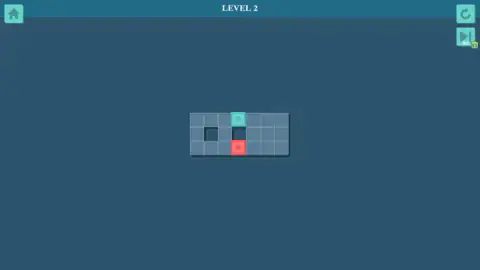
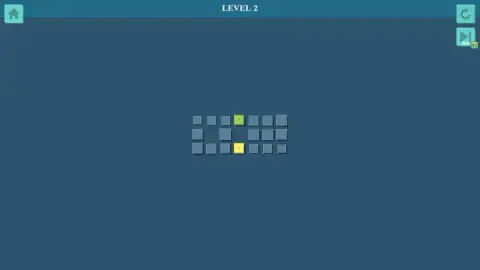
Taken by opening the game ourselves and letting it run — not supplied by the publisher, and not the same picture every other site shows.
How to play Fill The Lines
- Find the coloured squares. Each has a small ring in its centre, which marks it as a line's starting point.
- Press on one and drag. Its colour flows into the next grey cell and follows you, turning corners when you change direction.
- Drag back along a line to shorten it. You do not need to restart to fix a wrong turn.
- Cover every grey cell. The board then dims and a panel reading "LEVEL CLEAR!" appears with a double-arrow button to the next level.
- The circular arrow at the top right resets the level. The button under it, marked AD, offers a skip in exchange for an advert.
Tips from our session:
- Read the holes before you drag. A hole is a wall. On level 2 one hole sits straight between the two coloured squares, and that tells you neither line can reach the other side by the short way.
- Count each side. If a hole or a wall cuts the board into areas, each area needs a line of its own. Count the cells in each part and match them to a starting square before you draw anything.
- Cells boxed in on two sides are the end of the road. A grey cell with only two open neighbours, like the one between the two holes on level 2, is easiest to fill as the last cell of a line.
- Use the pull-back. We stretched a green line four cells along the top row, then dragged it back and bent it down. That costs nothing, so try a shape, look at what it leaves grey, and adjust.
Controls
| Click and drag from a coloured square | Stretches that colour's line across the grey cells, turning corners wherever you drag |
|---|---|
| Drag back along a line | Shortens it again, so a wrong turn can be undone without restarting |
| Circular arrow (top right) | Restarts the level with a fresh pair of colours |
| Skip button marked AD (under the arrow) | Offers to skip the level in exchange for an advert |
| House (top left) | Back to the title screen |
Features
- Every line has a fixed start, the coloured square with a ring in it, and a free end that goes wherever you drag it
- Lines bend around corners and can be pulled back, so a level is solved by adjusting, not by drawing it right first time
- Holes in the grid act as walls and split the board into areas each line has to claim
- A first level of two short strips that teaches the drag, then a second board of seven columns and two holes
- New colours on every restart while the layout stays the same
- Progress survives a page reload: the game reopened on the level we had reached
- No timer, no score and no move counter on screen
Game details
- Developer
- Drivix Games
- Release date
- September 2025
- Last updated
- August 10, 2026
- Added here
- July 2025
- Technology
- HTML5 (2D)
- Platforms
- Browser (desktop, mouse), Browser (mobile & tablet, touch)
- Classification
- Puzzle
- Saved progress
- Saving, when available, is managed by this game. Mava cannot confirm your level.
FAQ
What is Fill The Lines?
Fill The Lines is a free browser puzzle by Drivix Games. Each level is a small grid of grey cells with a few coloured squares on it, and every coloured square is the start of a line. You drag those lines across the grid until every grey cell is covered. It has been available since September 2025.
How do you play Fill The Lines?
Press on a coloured square and drag. Its line follows your pointer cell by cell and can turn corners. Drag back along a line to shorten it. When every grey cell belongs to one of the lines, a Level Clear panel appears and a double-arrow button takes you on.
How do you beat level 2 of Fill The Lines?
Level 2 is a board seven cells wide and three tall, with two holes in the middle row and a coloured square above and below the right-hand hole. That hole splits the board in two, so give one colour the left side and the other the right. Each line runs along its own side and snakes back through the middle row to finish.
Can lines cross or share a cell in Fill The Lines?
No. A cell can belong to only one line, and a line stops when it meets another colour or a hole. That is why the order matters less than the split: once you know which part of the board each colour must cover, drawing the lines is quick.
Is there a time limit in Fill The Lines?
Not in the levels we played. There was no timer, no score and no move counter on screen, and a level only ends when the board is full. A bad attempt costs you nothing but a restart.
What does the AD button do in Fill The Lines?
The button marked AD under the restart arrow offers to skip the current level in exchange for an advert. When we pressed it, no advert was available and the level stayed where it was, so do not count on it as a way past a hard board.
Does Fill The Lines save your progress?
Yes, in our session it did. After the page reloaded partway through, the game reopened on level 2, the level we had reached, rather than sending us back to the first one. That was on the same browser; we did not test another device.
Who made Fill The Lines?
Fill The Lines is by Drivix Games. It came out in September 2025 and was last updated in August 2026. It is listed for PC, Android and iOS, in English, for a phone held upright.