







About Connect Line
Most pipe puzzles bury you in grid: a full board of tiles, each one touching its neighbours, a tangle you take in at a glance and then spend ten minutes unpicking. Connect Line opens with two pieces on a blank page and nothing else, not even a line to show where the squares would be.
The pieces cannot be moved, dragged or swapped. Tap one and it turns a quarter turn, and that is the whole of what you are allowed to do.
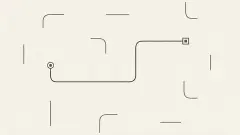
The part that makes it stranger than it sounds is that the pieces never touch. A visible gap sits between them on every board we played, and no amount of turning closes it. What you line up is not contact but direction. The only joined line we ever saw was the one the game draws on the panel that appears when a board is finished.
Connect Line is by Drivix Games. Our last session ran ten minutes on a desktop with a mouse, and we got through exactly one board. The reason is further down, and it is worth reading before you start.
What a Connect Line board holds
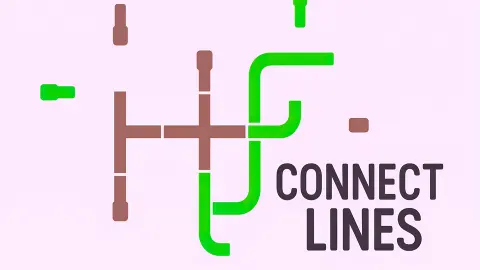
There are two kinds of piece. A capped one is a slim bar with a fat squared block at one end: the block is where the line stops, so capped pieces are always the two ends. An elbow is a quarter-circle bend of even width, open at both ends, and it only ever belongs in the middle.
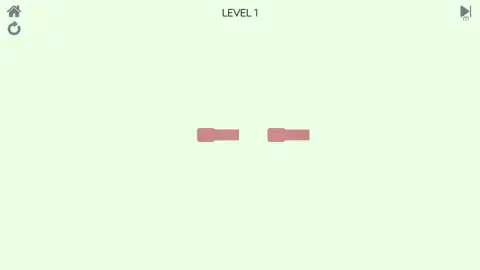
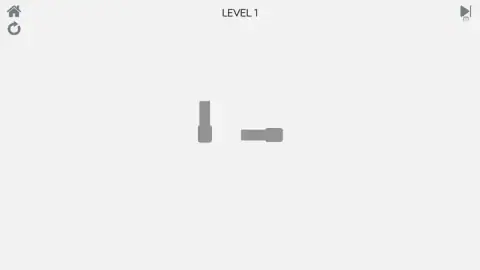
Level 1 is two capped straights side by side on an empty page. Turn one of them round so the slim ends face each other instead of both pointing the same way, and the board is done. It takes seconds, and it exists to teach the one rule.
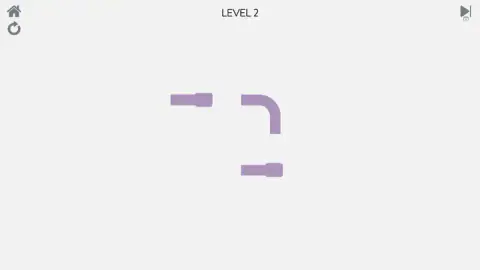
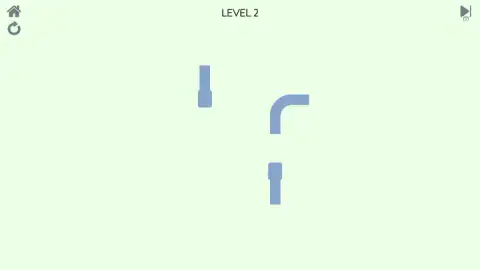
Level 2 is the first real board: two capped straights and an elbow between them. The elbow is what makes it a puzzle rather than a demonstration, because turning it moves two ends at once. An earlier, shorter session of ours reached level 3, which jumps to six pieces, and did not solve that either. That is the whole of what we can tell you about how far the game goes.
One oddity to square away. The title screen says Connect Lines, in the plural, under a round play button with a small music button below it. The catalogue and this page call it Connect Line. Same game, two names.
The colours change, the board does not
Load level 1 twice and you may get salmon pink pieces on a pale green page, or grey on light grey. Level 2 came up mauve one time and blue the next. Across two sessions and after every restart the layout stayed identical, down to the position of each piece, and only the palette moved.
That has one practical consequence. If you give up on a board and come back to it, it will look like a new one and play exactly like the old one, so the plan you worked out still applies. The restart arrow is a repaint, not a reshuffle.
An old puzzle with the grid thrown away
Turning pipe segments until they join is one of the oldest ideas in computer puzzles. Pipe Mania, from 1989, had you lay pipe ahead of a liquid that started flowing a few seconds in, and the pressure was the whole game. Later puzzles kept the pipes and dropped the hurry: in Net, part of Simon Tatham's free puzzle collection, the pieces are fixed in place and rotation is the only move, which is exactly the rule here.
Connect Line goes a step further and removes the grid as well. No neighbouring squares, no board edges to rule directions out, rarely more than three pieces at a time — the smallest possible version of a puzzle type older than most of the people playing it.
Ten minutes, one board: what happened
We should be straightforward about our session, because it says something useful about the game. We solved level 1, reached level 2, then spent five minutes tapping without the board changing once. The pieces were not stuck. We were missing them, landing on the empty page beside a piece, which produces no response of any kind. A game with this little on screen gives you nothing to tell a missed tap from an ignored one.
The frame interrupted twice, dimming the board behind a dark panel: once during level 1 to say no ad was available, once on reaching level 2 to say the ad had been skipped. Both cleared with a purple Continue playing button. That is the portal, not the game, but you will meet it.
What we still cannot tell you is how many boards there are, whether a level map exists, whether the puzzles get genuinely hard past level 3, and what the skip arrow in the top right costs. It carries a small screen badge, which usually means an ad in exchange for the skip, and we never pressed it.
Who it is for
Connect Line suits anyone who wants a puzzle with one rule, no reading and nothing counting down. A young player can solve the first board unaided, because a line pointing the wrong way is easy to see. There is no story, no score and no reward beyond the next board. It suits less anyone who wants to be pushed: on the evidence we have the game grows slowly, and the hardest part of our ten minutes was the interface rather than the puzzle.
More line puzzles to try
Turnline: Relaxing Puzzle is the grid version of this idea: tap tiles to turn them until a whole network joins. For the drawing kind, Brain Line Connect has you trace one continuous line through every dot. Drivix Games made two more of this minimal stripe worth a look: Connect Puzzle Image, a picture puzzle, and Color Dots Challenge, where coloured dots slide along rails into matching rings. The rest of our logic and turning puzzles sit in the puzzle category.
Screenshots
Taken by opening the game ourselves and letting it run — not supplied by the publisher, and not the same picture every other site shows.
How to play Connect Line
- Find the two pieces with the squared block on one end. Those are the ends of the line; everything else goes between them.
- Click or tap a piece — on the piece, not beside it — and it turns a quarter turn clockwise.
- Turn each piece until its open end points at the piece it has to reach: caps inwards, elbows carrying the line round a corner.
- When everything points correctly the board clears, and a grey panel appears with the finished line drawn on it. Press NEXT.
- To start over, use the circular arrow in the top left corner. The house above it goes back to the title screen.
Tips from our game:
- Hit the piece. This is the one that cost us. A tap on the background does nothing — no sound, no flicker, no refusal. A board that seems frozen is usually a board you keep missing by a few pixels.
- Count your turns. Every tap goes the same way round, so a piece one step short of where you want it takes three taps, not one. Four taps always bring it home.
- Straights are cheap, elbows are not. A straight piece has two positions that matter, so one tap settles it. An elbow has four, which makes it the piece to think about first.
- Set the caps first. A capped piece has one open end, and it must point at a neighbour. Fix both and the pieces between them have far fewer options left.
- Leave the keyboard alone. Enter and Escape changed nothing in either of our sessions.
Controls
| Click or tap a piece | Turn it a quarter turn clockwise |
|---|---|
| Click or tap the background | Nothing at all, which is the mistake that cost us most of our session |
| Circular arrow (top left) | Restart the board, which brings it back in a new colour |
| House (top left) | Back to the title screen |
| NEXT | Go on to the next board once the level is solved |
| Skip arrow (top right) | Offers to skip the board; a small screen badge sits under it and we never pressed it |
Features
- Boards of two or three pieces on an otherwise empty page, with no grid, no scenery and nothing to read
- Pieces that never move from their spot, so the whole puzzle is which way each one faces
- A tap that only counts when it lands on the piece itself, with the empty background swallowing every near miss
- End pieces marked by a fat squared block, and elbows that are open at both ends and belong in the middle
- Two straight pieces on level 1, three pieces and the first elbow on level 2
- The same board in a new colour every time it loads, from salmon on pale green to grey on grey, mauve and blue
- No clock, no move counter and no score anywhere on screen, so a wrong tap costs you a second
Game details
- Developer
- Drivix Games
- Release date
- September 2025
- Last updated
- August 10, 2026
- Added here
- August 2025
- Technology
- HTML5 (2D)
- Platforms
- Browser (desktop, mouse), Browser (mobile & tablet, touch)
- Saved progress
- Saving, when available, is managed by this game. Mava cannot confirm your level.
FAQ
What is Connect Line?
Connect Line is a free browser puzzle game by Drivix Games. Two or three pieces of line sit on an empty page, some straight and some bent into a quarter turn, and two of them carry a fat squared block that marks where the line ends. You tap the pieces to turn them until every one points the right way, and the board is done.
How do you play Connect Line?
Click or tap a piece and it turns a quarter turn clockwise. Nothing slides and nothing can be dragged, so the only question on each board is which way each piece faces. When they all face correctly the level-complete panel appears, with a drawing of the finished line and a NEXT button under it.
How do you rotate pieces in Connect Line?
Tap or click the piece itself. The tap has to land on the shape, not near it, because the empty background around a piece does nothing at all when you hit it. Each tap is a quarter turn in the same direction, so four taps bring a piece back to where it started.
Is the game called Connect Line or Connect Lines?
Both, depending on where you look. The game's own title screen reads Connect Lines, in the plural, over a round play button with a small music button under it. The catalogue name, and the name on this page, is Connect Line in the singular. It is the same game either way.
How many levels does Connect Line have?
We cannot give you a number, and neither the game nor its listing states one. In our longest session we solved level 1 and spent the rest of ten minutes on level 2 without finishing it. An earlier, shorter game got as far as a six-piece level 3, so the boards do grow, but we have never seen an end.
Why does Connect Line say Level Complate?
It is a spelling mistake in the game. The grey panel that appears when you finish a board reads LEVEL COMPLATE instead of LEVEL COMPLETE, with the line you just made drawn in black beneath it. Nothing else is affected and the NEXT button under it works normally.
Is there a timer or a score in Connect Line?
No. In ten minutes of play nothing on screen counted anything: no clock, no move counter, no points and no stars. The only text on the board is the level number at the top. That means a wrong tap costs you nothing, which is the main reason the game feels calm.
Who made Connect Line, and does it work on a phone?
Connect Line is by Drivix Games. It was published in September 2025 and last updated in August 2026. It is listed for PC, Android and iOS; the only control is a tap on a piece, so a finger does the same job as a mouse, though we played it on a desktop.