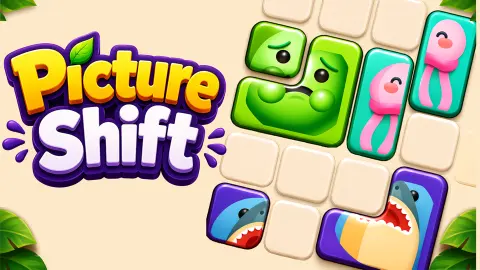









About Picture Shift
Most picture puzzles you can slide around are cousins of the old 15 puzzle: equal square tiles, one gap, and every tile has exactly one home. Picture Shift breaks both rules. Its blocks come in different shapes, a picture is printed across several of them, and the picture does not have to end up anywhere in particular. It only has to come back together.
That shifts the whole puzzle. You are not asking where a piece goes. You are asking what has to move first so that two pieces can meet, because a block can only travel through empty squares, and the other blocks are always in the way.
Picture Shift is credited to John Hany, and it was published in August 2026. We played the first three levels: the first two to the end and the third until we stopped with the clock still running. What follows is what we saw, plus what the game's own description says about the levels we did not reach.
The first three pictures in Picture Shift
The board on the early levels is a four-by-four square, and every level starts with a banner or a target at the top so you are never guessing what to build.
Level 1, the ladybug. Two yellow blocks: the L with most of the ladybug on it and a single square with the missing piece. A hand points at the small block and a banner reads "Slide the block to complete an image". The clock starts at two minutes.
Level 2, the sailboat. One target again, a small boat. This one went much faster for us: the clock still read 1:43 when the board emptied and the blocks broke apart in a shower of green chunks. That burst is how the game tells you a picture is done.
Level 3, the cupcake and the strawberry. Two thumbnails now, and five blocks in two colours, yellow and teal. The pieces of the two pictures sit close to each other, and one strawberry leaf is in each top corner of the board. This is where Picture Shift stopped being a demonstration for us. At 1:04 both pictures were still in pieces, and we stopped before finishing it.
Between levels, the LEVEL COMPLETED screen pays 25 coins with the green CONTINUE button. The purple x2 COINS button, marked with a video icon, raises that to 50.
Our coin counter read 0 on the first completion screen and 25 on the second, so the coins arrive when you leave the screen, not before.
The four locked buttons: Level 5, 6, 9 and 13
Under the board, from the very first level, sit four buttons with padlocks on them, labelled LEVEL 5, LEVEL 6, LEVEL 9 and LEVEL 13. They stayed locked through all three levels we played, and they stay on screen the whole time, which suggests they are meant for use during a puzzle, not between puzzles.
We did not reach level 5, so we cannot say what any of them does. The game's description lists four boosters that you spend coins on: Freeze Timer, which stops the clock for a moment; Hammer, which knocks a small chunk off a block; Merge, which completes a picture at once; and Free Movement, which lets a block slide through everything. Four buttons and four boosters is the obvious match. Treat that as our reading, not as something we saw.
If the match is right, the coins from the first levels are not decoration. They are what you will pay for help later, which is a reason to collect them while the puzzles are still easy.
From the 15 puzzle to Picture Shift
The best-known sliding puzzle, the 15 puzzle, is a square box holding fifteen numbered tiles and one gap. It is usually credited to Noyes Palmer Chapman, a postmaster in Canastota, New York, in the 1870s, and in 1880 it became a craze across the United States and Europe.
The puzzle maker Sam Loyd later claimed it as his own and spread a version with the 14 and 15 swapped, with a cash prize for whoever could put them right. Nobody could, because it cannot be done. Two mathematicians, William Johnson and William Story, had already shown in 1879 that exactly half of all the ways to fill the box can never be solved.
Picture Shift starts on the same four-by-four board and then changes the two things that made the 15 puzzle what it was. Its blocks are not equal squares, so a long block cannot squeeze through a one-square gap. And a picture has no fixed home, so there is no single correct answer to march towards. That puts it closer to the family of sliding-block puzzles where you clear a path, like freeing a car from a jammed car park. The question is never "where does this go" but "what has to move out of the way first".
What we did not reach
The game's description promises a lot that starts after the first three levels: ice that freezes a block until you clear other pictures, chains that need a key, pinned blocks that never move, blocks that only slide in one direction, and bombs with their own countdown. It also describes lives, a revive when you run out of time, 100 levels and an endless mode that shuffles them once you are done.
We saw none of that. Our three levels had plain blocks, one clock and no obstacles, and we never lost a level, so we never saw what losing costs. If you want to know whether the bombs are fair, you will be ahead of us by level 4.
Who Picture Shift is for
It suits anyone who likes a puzzle that can be solved in a minute or two and still asks you to think before you move. The first levels are gentle enough for a child, with a pointing hand and pictures anyone can recognise, and the controls are a single gesture, so it works on a phone as well as on a computer.
It is not a jigsaw. The pieces are fixed to their blocks and you cannot rotate them. It is not a relaxing puzzle either, at least not entirely: the clock is always running, and on the third level it was the clock that we noticed.
More sliding-block puzzles
If you want the original, Sliding Puzzle is a take on the 15 puzzle with numbered tiles. Bus Parking Out asks the same "what moves first" question with buses in a crowded car park. Slide And Divide is a number puzzle on a small board, for days when dividing appeals more than sliding, and Wood Block Journey is the calmer, no-clock option with blocks on a grid. The rest are in the puzzle category.
Screenshots
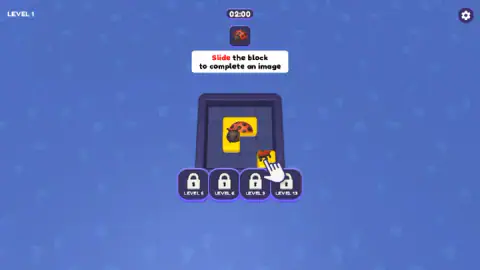

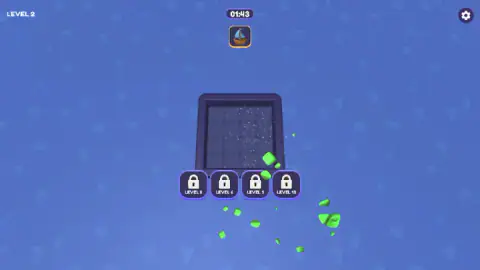
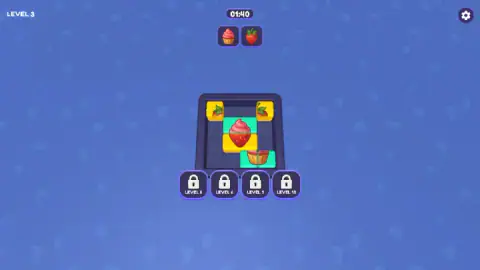
Taken by opening the game ourselves and letting it run — not supplied by the publisher, and not the same picture every other site shows.
How to play Picture Shift
- Look at the thumbnails above the board. Those are the pictures you have to rebuild, one on the first two levels and two on the third.
- Find the pieces. Each picture is split across blocks on the board, and the parts are drawn on the blocks themselves.
- Drag a block to slide it. It travels through empty squares only, so a block in its path or the edge of the board stops it.
- Put the pieces of a picture next to each other in the right arrangement. The picture completes, its blocks burst off the board and the space they leave is yours.
- Clear every picture before the clock at the top reaches zero, then take your coins on the LEVEL COMPLETED screen.
Tips from our run:
- Read the shapes before you move. On the first level the ladybug sits on a yellow block shaped like an L, with a one-square gap in its corner. The only other block on the board is exactly one square. The shapes tell you the answer before the picture does.
- Drag, do not press keys. The arrow keys did not move anything for us. Everything is done by dragging, with the mouse or a finger.
- Think about the last move first. The game's own tip is to work backwards: decide which block should move last, and clear the way for it.
- The first level is slower than it looks. With two blocks and a hand pointing at the right one, we were still working on it at 1:16, with more than a third of the clock gone.
- Finish one picture at a time. On the third level, clearing a picture takes its blocks off a small, crowded board. Fewer blocks means more room for the rest.
Controls
| Drag a block (mouse or finger) | Moves it through empty squares; it cannot pass through another block or the wall |
|---|---|
| Gear icon (top right) | Opens the settings |
| CONTINUE | On the LEVEL COMPLETED screen, banks the coins and takes you to the next level |
| x2 COINS | The purple button with a video icon on the same screen, which doubles the reward |
Features
- A small square board where each block carries part of a picture, and the goal is to make the parts meet
- The target pictures sit as thumbnails above the board, so you always know what you are building
- A countdown clock on every level, starting at two minutes on the first one
- Completed pictures burst off the board, which frees space for the blocks that are left
- Coins for every cleared level, with a button that doubles them after a video
- Four locked buttons under the board that open at levels 5, 6, 9 and 13
- Drag controls only, so it plays the same with a mouse or a finger
Game details
- Developer
- John Hany
- Release date
- August 2026
- Last updated
- August 26, 2026
- Added here
- August 2026
- Technology
- HTML5
- Platforms
- Browser (desktop, mouse), Browser (mobile & tablet, touch)
- Classification
- Puzzle
- Saved progress
- Saving, when available, is managed by this game. Mava cannot confirm your level.
FAQ
How do you play Picture Shift?
Each level shows one or more small pictures above the board, and those pictures have been cut up and printed across the blocks below. You drag a block and it moves through empty squares, never through another block. When the pieces of a picture sit next to each other the right way round, the picture completes and its blocks leave the board.
Do the pictures in Picture Shift have to go in a particular place?
No. The game's instructions say a picture only needs its pieces in the right formation relative to each other, anywhere on the board. That is why the order of your moves matters more than where things end up.
What happens when the timer runs out in Picture Shift?
The first level gives you two minutes, shown at the top of the screen. The game's instructions say running out of time, or letting a bomb reach zero, costs a life, and that you can revive on the spot. We cleared our first two levels before the clock ran out, so we did not see the revive screen ourselves.
What are the locked LEVEL 5, 6, 9 and 13 buttons in Picture Shift?
They are four padlocked buttons under the board, there from the first level. We did not play far enough to open one. The game's description lists four boosters (Freeze Timer, Hammer, Merge and Free Movement), and four buttons is the obvious match, but that is our guess, not something we saw.
How many levels does Picture Shift have?
The game's description promises 100 handcrafted levels followed by an endless mode that shuffles them. We played the first three, so we cannot confirm the count.
Can you play Picture Shift with the keyboard?
Not in our experience. The arrow keys did nothing on the board when we tried them, and the game's instructions describe dragging as the only control. It works with a mouse on a computer and with a finger on a phone or tablet.
Are there ads in Picture Shift?
At the end of a level the game offers a purple x2 COINS button with a video icon, which doubles your reward from 25 to 50 coins. The green CONTINUE button takes the 25 coins and moves on without it.
Who made Picture Shift?
Picture Shift is credited to John Hany, and it was published in August 2026. The game itself does not show a developer name on any screen we saw.