






About Oddly Sorted: Color Sort
Most colour-sorting games hand you a row of tubes and ask you to tidy them. Oddly Sorted: Color Sort hands you a finished picture and asks you to take it apart. The picture is a pixel-art face made of small blocks, and each box you send up takes away one colour of it.
The catch is that a box cannot take what it cannot reach. The face sits inside an outline, the outline sits inside a background, and a box for the colour in the middle has nothing to collect until the layers around it have gone. The game is choosing the order.
We should say how far we got. Our session lasted about four minutes and stayed inside Level 1. A counter under the board showed 227 of 400 blocks removed when we stopped, a little over half the portrait. Everything below comes from that stretch.
The game is credited to DAHMANI LIMITED, and it was published on 9 September 2026.
A box takes what it can reach, and waits for the rest
The whole game hangs on one rule, and Level 1 teaches it within the first few moves.
Our first box was light blue, and it filled at once and left. The second was orange and asked for 30 blocks. It went up to a slot and sat there still showing 30. We played another light blue box, which also filled and left, and the orange box had not moved. Only when a dark box ate through the outline did the orange one wake up. The next time we looked it read 11, and soon after it was gone.
So a slot is a parking space. A box you send too early does no harm by itself, but it holds a space until the picture opens up for it. With five slots you can afford a couple of early boxes. The game's instructions put the limit plainly: clear the portrait without filling every slot.
The board moves as you play. Blocks leave from the bottom, the columns above drop into the gap, and empty space opens at the top. By the middle of our level the face had sunk to the floor of the board and the background stood in uneven towers on each side. The counter below climbed in steps that matched the boxes exactly: 45, then 90, then on past 200.
One box showed the cost of the rule. A dark box collected most of its blocks, stopped with 4 still to find, and held its slot for the rest of our session. The last dark blocks were shut inside the face, behind colours we had not cleared yet.
What is on screen in Level 1
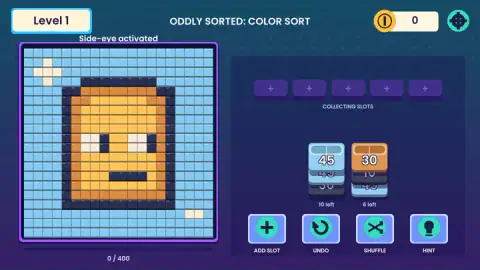
The portrait is an orange face with a dark outline, two white eyes looking to one side and a flat mouth, on a light blue background with a small white sparkle in one corner. Above the board the game prints a caption: "Side-eye activated". The board is 20 blocks wide and 20 tall.
Under the queues there are four round buttons: ADD SLOT, UNDO, SHUFFLE and HINT. The game's description says all four are free, and none of them shows a price. A coin counter in the top right corner read 0 from start to finish, so we cannot tell you what coins are for.
Pressing Escape opened a Settings panel that covers the board. It has a sound switch, a Choose a level button, a Restart level button and a green Resume. Along the bottom it lists the keyboard shortcuts for desktop: the queue number to select a box, Z to undo, R to restart.
What we did not reach
We did not finish Level 1, so we never saw the end of a level, a second portrait or the fail screen. The game's description says there are 49 portraits, which it calls reactions. We saw one.
We did not open the level picker, so we do not know whether later levels are locked. We did not try the game on a phone. We also heard no sound during the session, although the sound switch was on.
Who it is for
This is a game for people who like to plan three moves ahead and do not want a timer. Nothing on screen counted down, and nothing happened while we waited. The game's description recommends it for ages 13 and up.
It is not a tube-pouring sorter, and it is not a colouring game, despite the pixel art. You never place a block. You only decide which colour leaves next.
More games like Oddly Sorted: Color Sort
If you want the classic version of the genre, Liquid Sort Puzzle is coloured water in glasses, and Sand Sorting Challenge does the same with sand in bottles. Marble Color Sort is closer to this one, with marbles dropping from trays into matching containers. To build a pixel picture instead of dismantling one, try Pixel Art - Color by Numbers. There is more of this kind in the puzzle games category.
Screenshots
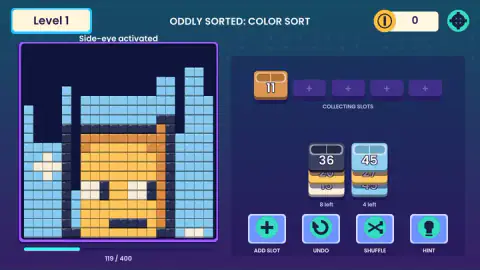
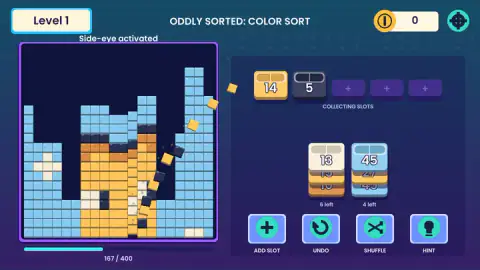
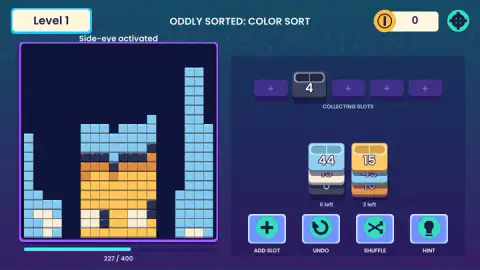
Taken by opening the game ourselves and letting it run — not supplied by the publisher, and not the same picture every other site shows.
How to play Oddly Sorted: Color Sort
- Start the game. After two clicks ours was on Level 1 with the board ready and no menu in between.
- Look at the two queues of boxes on the right. Each front box has a colour and a number.
- Click or tap a front box. It moves up to one of the five collecting slots and starts pulling in blocks of its colour.
- Watch the number on the box fall. At zero the box leaves and the slot is free again.
- Keep going until the board is empty.
Tips from our session:
- Read the number before you send a box. A light blue box marked 45 wants forty-five light blue blocks. If that many are exposed, it fills at once and never really costs you a slot.
- Start with the background. In Level 1 the orange box we sent early found nothing to take, because the orange was sealed behind a dark outline. The light blue boxes we played before and after it filled straight away.
- A waiting box is not a wasted box. It fills by itself as soon as its colour is uncovered. You do not have to tap it again.
- The small label under a queue is a countdown. It says how many boxes that queue still holds, front box included. Level 1 began with "10 left" and "6 left".
- Shuffle changes the queues, not the board. We pressed it once. The message "Queued colors shuffled" appeared and the front box of the first queue changed from a cream one to a light blue one, while the box already waiting in a slot stayed where it was.
Controls
| Click or tap the front box of a queue | Sends that box to a free collecting slot, where it pulls in the blocks of its colour that it can reach |
|---|---|
| ADD SLOT / UNDO / SHUFFLE / HINT buttons | The four helpers under the queues |
| Queue number (desktop) | Selects a queue, as listed in the game's Settings panel |
| Z (desktop) | Undo, as listed in the Settings panel |
| R (desktop) | Restart the level, as listed in the Settings panel |
| Escape | Opens Settings, which pauses the level |
Features
- A portrait built from 400 small blocks on a 20 by 20 board, taken apart colour by colour
- Numbered boxes that say exactly how many blocks of their colour they still need
- Five collecting slots, and a box that keeps its slot until it is full
- Two queues of boxes where only the front one can be played
- Four helpers on screen at all times, add a slot, undo, shuffle and hint
- A counter under the board that shows how many blocks you have removed
- A Settings panel with a sound switch, a level picker and a restart button
Game details
- Developer
- DAHMANI LIMITED
- Release date
- September 2026
- Last updated
- September 10, 2026
- Added here
- August 2026
- Technology
- HTML5 (2D)
- Platforms
- Browser (desktop, mouse and keyboard), Browser (mobile & tablet, touch)
- Classification
- Puzzle
- Saved progress
- Saving, when available, is managed by this game. Mava cannot confirm your level.
FAQ
How do you play Oddly Sorted: Color Sort?
You click or tap the front box of one of the two queues. The box moves up to a collecting slot and pulls in blocks of its own colour from the pixel-art portrait on the left. The number on the box is how many blocks it still needs, and when it reaches zero the box leaves and frees the slot.
How do you win a level in Oddly Sorted: Color Sort?
You win by removing every block of the portrait. A counter under the board shows your progress, and Level 1 has 400 blocks. In our session we removed 227 of them and did not finish, so we cannot describe what the game shows at the end of a level.
How do you lose in Oddly Sorted: Color Sort?
The game's instructions say you must clear the portrait without filling every slot. There are five collecting slots, and a box that cannot find its colour stays in its slot and waits. We never had more than two slots taken at once, so we did not see the fail screen ourselves.
Why is a box stuck in a slot in Oddly Sorted: Color Sort?
A box only takes the blocks it can reach, and colours buried inside the picture are out of reach until the blocks around them are gone. The box waits in its slot and fills by itself once its colour is uncovered. Our first orange box sat untouched while another box filled and left, and only started to fill once a dark box had removed the outline around it.
How many levels does Oddly Sorted: Color Sort have?
The game's description says there are 49 pixel-art portraits to uncover. We only played Level 1, so we cannot confirm the number. The Settings panel has a Choose a level button, which we did not open.
Do the hints and extra slots cost anything in Oddly Sorted: Color Sort?
The game's description says undo, shuffle, hints and extra slots are free. The four buttons show no price, and the coin counter in the corner read 0 for our whole session, including after we used the shuffle.
Who made Oddly Sorted: Color Sort?
The game is credited to DAHMANI LIMITED. It was published on 9 September 2026.