










About Stack Sort
Most colour-sorting puzzles work like a pile of plates. You lift the top piece off one tube and drop it on top of another, and the whole game is about what is sitting on top. Stack Sort ignores the top of the pile. Every move happens at the bottom of a column, and the piece you move is always the one in your hand.
That one change turns sorting into a relay. There are four columns of four blocks in a wooden box, and one more block waiting in a slot underneath. Tap a column and the block in the slot takes that column's bottom place, while the block it replaced drops down into the slot. You never pick anything up. You swap, and the swap always hands you something new to place.
Stack Sort is published by HyperJoy Games, dated July 2026. It is a small, calm game with a move limit rather than a clock.
The first level is a chain of four taps
Here is the part that is not obvious at first. In level 1 the top three blocks of every column are already right. Only the bottom row is wrong, and the wrong blocks form a chain. Your yellow block belongs where a brown one sits. That brown block belongs where a cyan one sits, the cyan one belongs under the green column, and the green block that comes out sits where the rainbow block is.
So the level can be solved in four taps: yellow column, brown column, cyan column, green column. Each tap finishes one column and hands you the block for the next. You get 30 moves for a puzzle that needs four, which makes the first level a lesson in the rule rather than a test.
Our test player did not see the chain. It tried the rainbow block in the green column, swapped the same pieces back and forth and used the undo button once. It ended the session with three columns ticked and the green block in its hand, a single tap from the finish. We never saw the win screen, so we cannot tell you what it looks like or what it pays.
The chain is also the reason the game counts moves. Every swap puts at most one block in its right place, so no level can take fewer moves than it has blocks out of place. The fastest route follows the chain, each tap feeding the next, and the counter keeps score of every detour.
What the rainbow block does, and does not do
There are four colours of four blocks each, plus the rainbow block: seventeen pieces for sixteen places. One piece is always in your hand, and when the puzzle is done that piece should be the rainbow one.
It is tempting to read the rainbow block as a joker that matches anything. In our game it was not. For most of the session the left column held three green blocks on top of the rainbow block, and it never got its tick. The three other columns got theirs as soon as they were one colour.
What we saw on level 1, and what we did not
We played Stack Sort for about four minutes, all of it on level 1. That covers the tutorial, the swap, the ticks, the move counter and the undo button. It is the very start of the game.
Next to the undo button there are two padlocked buttons marked LV.5 and LV.10. They are clearly extras that open at those levels, but they stayed locked for us, and we will not guess what they do. We did not see level 2, a column deeper than four blocks, a fifth colour or a lost level. The game's description promises that the puzzles get harder as you go; we can only confirm how the first one works.
Other sorting puzzles to try
If you want the classic top-of-the-pile version of the idea, Ball Sort Puzzle has you move balls between flasks, and Magic Block Sort does the same with blocks and tubes. Vials: ASMR Sand Sort Puzzle pours coloured sand with no clock at all, and Nuts Puzzle: Sort By Color threads nuts onto bolts. Every game about order, logic and a little planning ahead is in our puzzle category.
Screenshots
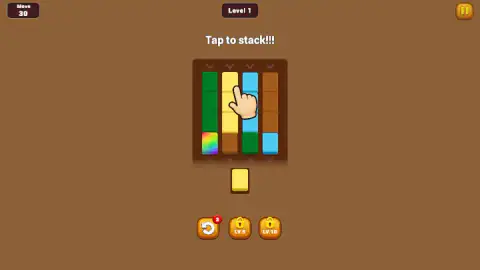
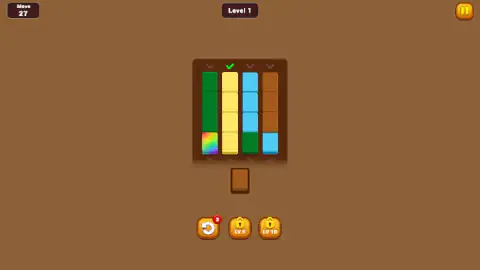
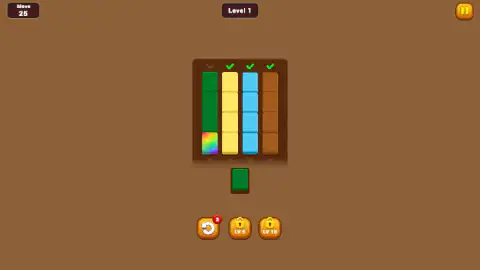
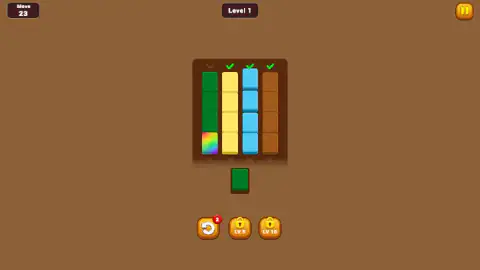
Taken by opening the game ourselves and letting it run — not supplied by the publisher, and not the same picture every other site shows.
How to play Stack Sort
- Read the slot. The block under the box is the one you are holding. At the start of the first level it is yellow, and a tutorial hand points at the yellow column with the words "Tap to stack!!!".
- Tap the column where that colour belongs. You can tap anywhere on the column, not just its bottom block. The two blocks trade places.
- Follow the block you are given. The piece that dropped into the slot tells you your next move. Tap the column that needs that colour.
- Watch for the ticks. A green tick appears over a column the moment it holds four blocks of one colour. The aim is a tick over all four.
- Mind the counter. The number in the top-left corner is your moves left. It starts at 30 on the first level and falls by one with every swap.
Tips from our session:
- Do not tap the spare block. Clicking the block in the slot did nothing, however often our test player tried it. The move is always a tap on a column.
- Use undo for mistakes, not for thinking. The circular-arrow button in the bottom-left corner undoes your last swap and gives the move back. Its red badge counted down from 3 to 2 when we used it, so it looks like a small ration per level.
- Leave the rainbow block for last. It belongs to no column, so it is the piece you want sitting in the slot when everything else is sorted.
Controls
| Click or tap a column | Swap the block in the slot under the box with that column's bottom block |
|---|---|
| Circular-arrow button (bottom left) | Undo the last swap and get the move back; a red badge shows how many undos are left |
| Pause button (top right) | Pause the level |
Features
- Four columns of four coloured blocks in a wooden box, and one spare block waiting in a slot underneath
- One move only - a tap swaps the spare block with the bottom block of the column you choose
- A green tick over every column that ends up a single colour
- A move counter that starts at 30 on the first level and counts down with every swap
- An undo button that also gives the move back, with a badge showing the uses left (3 at the start of level 1)
- A rainbow block that does not count as any colour and has to be worked out of the columns
- Two padlocked buttons marked LV.5 and LV.10, still locked on the first level
Game details
- Developer
- HyperJoy Games
- Release date
- July 2026
- Added here
- May 2026
- Technology
- HTML5
- Platforms
- Browser (desktop, mouse), Browser (mobile & tablet, touch)
- Saved progress
- Saving, when available, is managed by this game. Mava cannot confirm your level.
FAQ
What is Stack Sort?
Stack Sort is a free colour-sorting puzzle by HyperJoy Games that you play in the browser. Coloured blocks sit mixed up in four columns, and you tap a column to swap its bottom block with the spare block in your hand. The level is done when every column holds one colour.
How do you play Stack Sort?
Look at the block waiting in the slot under the box and tap the column where that colour belongs. The block goes in at the bottom of the column, and the block that was there drops into the slot. Repeat with the new block until every column has a green tick. Each tap costs one move.
What does the number in the top-left corner of Stack Sort mean?
It is the move counter, and it counts down. On the first level it starts at 30, drops by one with every swap and goes back up by one when you use undo. We did not run it down to zero, so we cannot tell you what happens then.
What is the rainbow block in Stack Sort?
It is the one piece with no colour of its own. In our game a column of three green blocks sitting on the rainbow block never got its tick, so the rainbow block does not stand in for a missing colour. There is one more piece than there are places in the box, and the aim is to swap the rainbow block out.
Is Stack Sort the same game as the Stack Sort app?
Not as far as we can tell. Several mobile puzzles use the name Stack Sort, including a card-stacking app and a colour-cube app, and "sort a stack" is also a well-known programming exercise. This Stack Sort is the browser game published by HyperJoy Games, and we found no source linking it to any of those apps.
Can you undo a move in Stack Sort?
Yes. The circular-arrow button in the bottom-left corner undoes your last swap and returns the move to the counter. A red badge on it shows how many undos are left; it read 3 at the start of our first level and 2 after we used one.
Can you play Stack Sort on a phone?
Yes. It is listed for PC, Android and iOS browsers, and the only control is a tap on a column. We played it in a desktop browser with a mouse; the arrow keys and the space bar did nothing we could hear.