




About Magic Block Sort
Block-sorting puzzles are sold as the calm end of the shelf: no clock, nothing to lose, and a take-back whenever you want one. Magic Block Sort keeps the first two promises and puts a number on the third. The back arrow under its board wears a small orange 3, and the button beside it wears a 2. Only the one that throws your whole position away and starts the level again is free.
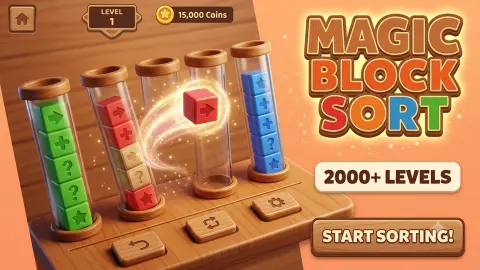
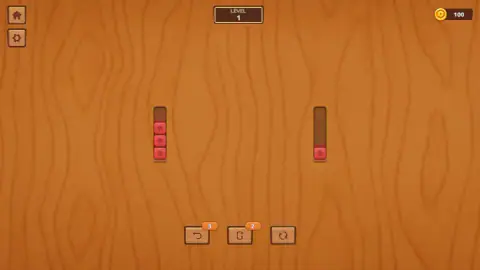
The board is a table of light orange-brown wood. Standing on it are upright wooden posts, each cut with four notches, and the coloured blocks are threaded onto them like beads on a peg. Four notches means four blocks and no more, so a full post is closed to you until something leaves it. Only the block at the top can travel, which is the whole difficulty: everything you want is underneath something else.
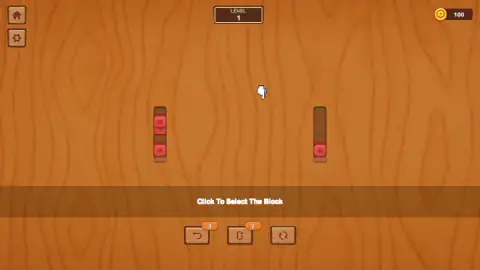
The game spells the move out on a band across the middle of the screen. The first sign reads "Click To Select The Block". Once you have something in hand it changes to "Click To Drop The Block". That is the entire control scheme, and it is literal: we tried dragging a block to the next post and nothing moved. Our first selection came with a useful surprise: the top two reds rose off the post together, as one piece, leaving a gap where the lower of them had been. A matching run travels as a unit, not a block at a time.
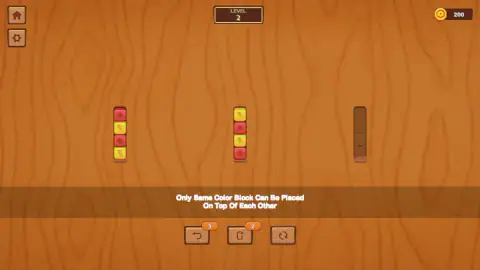
Level 2 prints the rule the opening level never needed, in capitals right across the table: "Only Same Color Block Can Be Placed On Top Of Each Other". The single exception is an empty post, which takes anything.
The game is credited to HyperJoy Games, a studio with a long row of sorting puzzles to its name. How much game is behind that we cannot tell you: the panel in front of it advertises more than 2,000 levels, which is its own advertising rather than a figure we counted. In ten minutes we cleared one.
The three buttons under the table, and what their badges admit
Three small wooden buttons sit below the board. The left one is an arrow curling backwards, with an orange badge reading 3. The middle one shows a post with a plus sign against it, badged 2. The right one is two arrows chasing each other in a circle, and it wears no badge at all.
Read the asymmetry and you have the design in a glance. The two helpers that would rescue a position you are halfway through are counted out and will run dry; the one that throws it in the bin and deals again is unlimited. In a puzzle whose failure state is a board that quietly stops accepting clicks, that decides whether being wrong costs you a move or the level.
What we cannot tell you is what each one spends. We pressed the unbadged restart in the middle of a stuck position on level 2 and could not see the board change, and we never watched a badge tick down, so whether the counts refill with each new level is an open question.
Four notches, eight blocks, one spare post
Level 1 is two posts and one colour: three reds on the left with a notch free above them, one red at the foot of the right-hand post. With a single colour there is no wrong place to put anything, so the level exists purely to teach the two clicks, and it is over in a handful of them.
Level 2 is the real game, and it fits on one screen. Three posts. The left one is full, four high, red and yellow alternating. The middle one is full too, the same four blocks in the opposite order. The third is empty.
Count that position and the squeeze is already visible. Both loaded posts are full, so nothing can land on either until something leaves. Their top blocks are different colours, so neither will accept the other. The only legal move on the whole board is onto the empty post, and there is exactly one of those.
Anyone who has dug a box out of the middle of a stack in a garage knows the shape of this. To reach what you want you first have to put the things above it somewhere, and that somewhere has to be a place they are allowed to sit: their own colour, or the one free post. An empty post is a single parking space.
That is why a board this small can lock itself without saying so. Put a yellow in the free post when a red was the block you needed to release, and your only free space is now a yellow space. If no other post shows yellow on top, nothing can move at all. A deadlocked sort is not a position you can play out of; it is one you have to unwind, which is why this family of puzzle always ships with a take-back — and why the number on that back arrow is worth reading before you start.
The blocks help more than they look as though they will. Each has a mark pressed into its face, a pentagon on the reds and a bolt on the yellows, so two kinds of block differ in shape as well as in shade. You can read this board without relying on colour at all.
Our own sitting is the evidence. We cleared the one-colour level quickly, reached level 2 and never cleared it: the rest of the ten minutes went on that one position, trying moves the board turned down and starting over.
What a cleared level pays
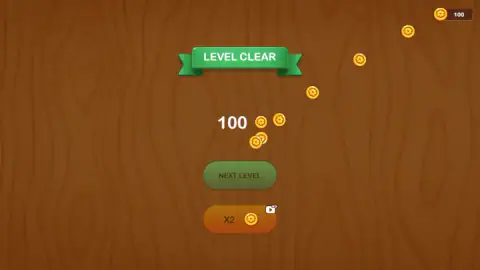
The coin counter in the top right corner read 100 before we had moved anything, and it still read 100 on the clear screen while a large 100 fell past it in coins. It stood at 200 when level 2 opened, so the payout lands when you take it, not when you earn it. A cleared level is worth a flat hundred, at least at the start.
What that hundred buys we never found out: no shop and no price appeared in two levels. The only other place we saw coins was the orange X2 on the clear screen, which carries a small video tag and doubles the payout. We took the plain green button instead.
Who it is for
Anyone who wants a logic puzzle with no clock and no way to lose, and who is content for the difficulty to arrive as a position that has quietly closed rather than as time running out. The rule fits in one sentence, the game prints it for you, and the first level teaches itself.
How it develops we cannot tell you. Two levels, two colours and three posts are all we saw, and the second of those beat us. Go in knowing that the rescue buttons here are numbered, that the free one wipes your progress on the level, and that nothing on screen warns you when you have run out of legal moves.
More block-sorting puzzles
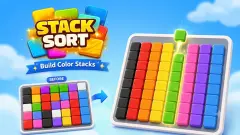
Stack Sort is by the same studio and inverts the idea: you swap the block at the bottom of a column rather than lifting the one on top, against a move limit. Block Sort Puzzle is the closest neighbour, the same two-click move played for speed instead of calm. Block Sort Pirate Treasure wraps the rule in a treasure hunt, and Nuts Puzzle: Sort By Color runs it with nuts threaded on bolts. The rest are under puzzle games.
Screenshots
How to play Magic Block Sort
- Press the button on the panel that loads first, then the green Play on the title screen. Level 1 opens on the wooden table.
- Click the post you want to take from. Its top block lifts, and any matching blocks under it come up with it.
- Click a different post to put them down: on their own colour, or on a post with nothing on it.
- Keep going until every post holds one colour and nothing else. A green LEVEL CLEAR ribbon drops down with your coins underneath.
- Press the green NEXT LEVEL. The orange X2 beside it is the video offer, and you never need it.
What ten minutes taught us:
- One click is half a move. Our first instinct was to click the same post again and again and wait for something to happen. Nothing did. The block only travels when the second click lands somewhere else.
- Count the notches before you commit. Every post takes four blocks. A post standing at four is shut however well the colours would have matched, and only taking its top block off reopens it.
- Dragging is not a move. We pulled a block across to the next post and the board did not change. The two signs mean exactly what they say.
- Spend the empty post last. Once the loaded posts are full, the empty one is the only legal destination on the board. Fill it with the wrong colour and you have no workspace left.
- Nothing tells you that you are stuck. A refused move looks like a click that missed. If two or three attempts in a row change nothing, the position is the problem, not your aim.
- Leave the keyboard alone. Enter and the arrow keys did nothing we could see.
Controls
| Left click on a post | Lifts the block at the top. If the blocks under it match, they come up with it as one piece |
|---|---|
| Left click on a different post | Drops what you are holding there; clicking the same post again moved nothing for us |
| Dragging a block across | Nothing moved. The move is two separate clicks |
| The back arrow under the table, badged 3 | A take-back with a number on it. We could not confirm what pressing it spends |
| The post-and-plus button beside it, badged 2 | Shows a post with a plus sign and a count of two. We never saw what it adds |
| The two-arrow button on the right, unbadged | The restart. It is the only one of the three that carries no number |
| Keyboard | Enter and the arrow keys did nothing we could see |
Features
- Upright wooden posts cut with four notches each, so a post holds four blocks and not a fifth
- A move made of two clicks, with the game's own signs telling you which half you are on
- A matching run of blocks that lifts off a post together rather than one at a time
- The sorting rule printed across the board the moment a second colour arrives
- Blocks marked as well as coloured, a pentagon on the reds and a bolt on the yellows
- A take-back badged three and a second helper badged two, against a restart that carries no number at all
- A flat 100 coins for clearing a level, an optional video that doubles it, and no clock anywhere on screen
Game details
- Developer
- HyperJoy Games
- Release date
- June 2026
- Added here
- May 2026
- Technology
- HTML5
- Platforms
- Browser (desktop)
- Saved progress
- Saving, when available, is managed by this game. Mava cannot confirm your level.
FAQ
How do you play Magic Block Sort?
Click a post to lift the block at its top, then click a different post to drop it there. Blocks land on blocks of their own colour, and an empty post accepts anything. A level is over when every post holds a single colour, and a green LEVEL CLEAR ribbon says so.
What is the rule in Magic Block Sort?
The game prints it across the board as soon as a second colour turns up: "Only Same Color Block Can Be Placed On Top Of Each Other". The one exception is an empty post, which takes any colour. Each post is cut with four notches, so four blocks fill it and nothing else can be added until something leaves.
How many levels does Magic Block Sort have?
The panel in front of the game advertises more than 2,000 levels, which is the game's own claim and not a count of ours. We cleared level 1 and spent the rest of our sitting on level 2 without finishing it, so the first two are what we can describe.
What are the three buttons under the board in Magic Block Sort?
A back arrow with an orange 3 on it, a button showing a post with a plus sign and an orange 2, and a restart drawn as two arrows chasing each other in a circle, which carries no number. The two numbered ones look like helpers you have a limited supply of. We pressed the unnumbered restart while stuck and could not see the board change, so what each one actually spends is something we cannot confirm.
What are the coins for in Magic Block Sort?
The counter in the top right corner stood at 100 before we had moved anything, clearing level 1 paid another 100, and the counter read 200 when level 2 opened. The clear screen also offers an orange X2 button with a small video tag that doubles the reward. We found nothing to spend coins on in two levels.
Is there a timer or a move limit in Magic Block Sort?
No. Nothing on screen counted time or moves on the two levels we played. The only figures in view are the level number across the top, the coin counter in the corner, and the badges on two of the three buttons under the table.
What happens when you get stuck in Magic Block Sort?
Nothing happens, and that is the problem. The board refuses a move it does not allow without printing any message, so a refused move looks exactly like a click that missed. We reached a position on level 2 where everything we tried was turned down, and only starting the level over got us moving again.
Can you play Magic Block Sort on a phone?
The game's listing offers it for PC, Android and iOS, in both landscape and portrait. We played on a desktop with a mouse, so the phone version is the listing's word rather than something we tested. The move is a tap on one post and a tap on another, which transfers to touch without changes.
Who made Magic Block Sort?
The game's listing credits HyperJoy Games. Magic Block Sort was published on 29 June 2026.