





About Jewel Coloring: Crystal Sorting
Most colour-sorting puzzles hand you tubes, bolts or stacks, and the only rule is that a piece can land on its own colour. Jewel Coloring: Crystal Sorting gives every colour its own slots instead, and then fills those slots with the wrong crystals. Nothing moves until you have found somewhere to put whatever is in the way.
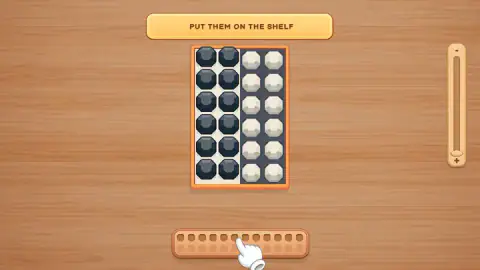
That somewhere is the shelf, a wooden tray that sits under the board. It is drawn as two rows of twelve holes, which looks generous until you play: only the top row ever took a crystal for us. Twelve places to put things down. That is your whole margin for error.
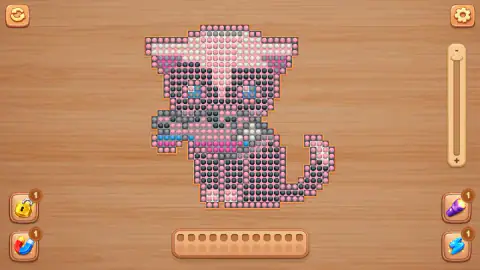
And the tray does not grow. The tutorial board is twenty-four cells, and the finished picture we opened is several hundred crystals, and the same twelve holes sit underneath both of them. The puzzle is not really the colours. It is the order you move them in, with twelve hands free.
Prime Web Publish, a small studio, made it. The game was published in late August 2026.
The signs come in pairs, and that is the lesson
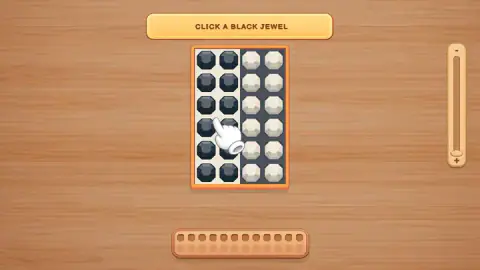
The tutorial looks too simple to need teaching. The board is a frame of twenty-four cells, split down the middle: cream slots on the left holding black jewels, dark slots on the right holding white ones. Every crystal is in the other colour's place.
What makes it a lesson is the way the sign talks. It never asks for a whole move at once. It asks for half of one, and then for the other half:
- CLICK A BLACK JEWEL — pick the colour up.
- PUT THEM ON THE SHELF — the black jewels leave the board and fill the tray, and the cream slots are empty.
- PUT THEM IN WHITE SLOTS — the white crystals cross over to the cream side.
- CLICK BLACK JEWELS ON THE SHELF — the hand points back down at the tray, where the blacks have been waiting.
- PUT THEM IN BLACK SLOTS — they come home into the dark slots the whites have just left.
Two signs per move, one to take and one to give. It is a small thing, but it teaches the only rule the game has: you are never holding the board, you are holding one colour, and it has to go somewhere before you can pick up another.
The puzzle underneath is older than the game. If you have a glass of milk and a glass of juice and want to swap them, you need a third glass, because neither drink can move while the other is still in the way. Programmers hit the same wall swapping two values and solve it the same way, by keeping one aside for a moment. The shelf is the third glass, and the tutorial is a swap with the steps written out.
A picture made of crystals
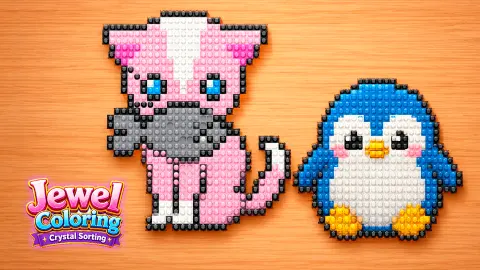
The name points at a real craft. In diamond painting, you press tiny resin gems onto a sticky canvas printed with a colour code until a picture appears, a mix of paint-by-numbers and cross-stitch. Jewel Coloring takes that onto a screen: every cell of the drawing waits for a crystal of one colour, and the picture is finished when they are all in place.
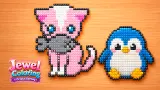
The one we opened shows how much work that is. It is a pink animal with wide ears, a grey muzzle, blue eyes and a long curled tail, built out of several hundred round crystals in pink, white, grey, black, magenta and blue. Whether it is a cat or a dog we genuinely could not agree.
Around it sit the tools for a long job. A circular arrow at the top left restarts, a gear at the top right opens settings, and a slider runs down the right edge with a minus at the top and a plus at the bottom. In each bottom corner there is a helper: a gold padlock and a red-and-blue magnet on the left, a purple torch and a blue lightning bolt on the right. Each carries a small badge reading one, and none of the four had a video symbol on it, so none of them was asking us to watch an advert to use it.
Before the picture, a middle screen showed the next drawing as an empty wooden outline with a green LEVEL 2 button under it. You get the shape first and the colours only as you earn them.
What we did not reach
We walked the tutorial forward through its signs and we opened a finished picture, and that is the honest limit of it. We did not place a single crystal on that picture, so we cannot tell you how long a real drawing takes, how many colours a board juggles at once, or what happens the moment the shelf fills up.
We never pressed any of the four helpers, so their jobs are unknown to us. We did not open the GALLERY, the settings or the slider, and we never saw the rest of the catalogue of pictures, so we are not going to guess how many there are. We saw no losing screen, and no advert broke into either run.
Who it is for
Jewel Coloring suits players who like slow, tidy puzzles and want something to show for the effort at the end. Nothing in what we played hurried us, and every action is one click or one tap.
It is not a match-three game, despite the jewels in the name: nothing pops, falls or chains. And it is not a free colouring book either. Each cell has exactly one right colour, and the only thing you decide is the order.
More sorting and picture puzzles
From the same studio, Farm: Clear the Jam is another ordering puzzle, about getting farm animals out of a crowded pen without blocking each other. If the sorting half is what appeals, Nuts Puzzle: Sort By Color has you stack coloured nuts on bolts, and Stack Sort swaps blocks between columns against a move limit. For the picture half, Pixel Art - Color by Numbers fills pixel drawings square by square. Every other slow, thinking kind of game we carry is in the puzzle category.
Screenshots
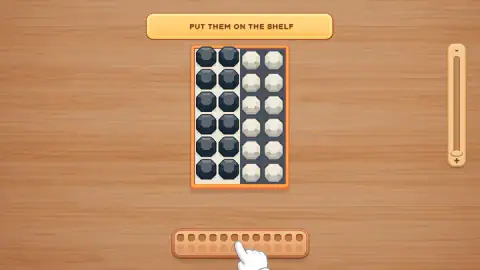
Taken by opening the game ourselves and letting it run — not supplied by the publisher, and not the same picture every other site shows.
How to play Jewel Coloring: Crystal Sorting
- The game opens on the tutorial board. There is no menu and no level select: the first thing you see is the puzzle, with a yellow sign above it and a white pointing hand showing where to press.
- Click or tap a crystal to pick up its colour, then click the slots of that colour to set it down.
- When the slots you want are still occupied, click the shelf under the board to park what you are holding.
- Bring it back from the shelf once those slots are free. The level is done when every crystal sits in a slot of its own colour.
- After the tutorial, a green LEVEL button opens the next picture, and a book marked GALLERY sits in the corner of that screen.
Tips from our runs:
- Read the sign before you click. It changes after every move, and only the move it is asking for does anything. We lost most of a run clicking crystals the game was not asking about yet.
- Think in colours, not in gems. One click picks up a whole colour. The sign asks you to click a black jewel and the next one asks you to put them on the shelf, in the plural, and that is exactly what happens.
- Move the blocked colour out first. Whatever is sitting in the wrong slots has to reach the shelf before anything else can come home.
- Count the shelf before you commit. Twelve crystals fill the row exactly. On a real picture, that is what stands between a tidy board and a stuck one.
- Nothing is timed. No clock, no move counter, no score. You can leave a board half-sorted and think about it.
Controls
| Left click or tap on a crystal | Picks up crystals of that colour, from the board or from the shelf |
|---|---|
| Left click or tap on slots or on the shelf | Puts the crystals you are holding down there |
| The wooden tray under the board | Spare space, twelve holes deep in the row that takes crystals |
| Four buttons in the corners of a picture | Padlock, magnet, torch and lightning helpers, each showing a counter of one |
| Circular arrow (top left) and gear (top right) | Restart and settings |
| Slider on the right edge | Marked minus at the top and plus at the bottom; we never moved it |
Features
- The board is a frame of twenty-four cells split down the middle, and every crystal starts in the other colour's slots
- The shelf below it is a tray of two rows of twelve, and only the top row took crystals in anything we played
- The same twelve-hole tray sits under a finished picture of several hundred crystals, so your spare space never grows
- The signs come in pairs, one telling you what to click and the next telling you where to put it
- One click picks up a whole colour rather than a single gem, which is why the signs say click a jewel and then put them
- Four helpers in the corners of a picture, a padlock, a magnet, a torch and a lightning bolt, each with a counter of one
- No timer, no move counter and no score on any screen we reached, and no ad interrupted either of our runs
Game details
- Developer
- Prime Web Publish
- Release date
- August 2026
- Last updated
- August 25, 2026
- Added here
- July 2026
- Technology
- HTML5
- Platforms
- Browser (desktop, mouse), Browser (mobile & tablet, touch)
- Saved progress
- Saving, when available, is managed by this game. Mava cannot confirm your level.
FAQ
How do you play Jewel Coloring Crystal Sorting?
You click or tap a crystal to pick up its colour, then click the slots of that same colour to put it there. When the right slots are still taken by other crystals, you park yours on the wooden shelf under the board and bring them back later. A level ends when every crystal sits in a slot of its own colour.
What is the shelf for in Jewel Coloring Crystal Sorting?
It is spare space, and it is small on purpose. In the tutorial, twelve black jewels sit in the white slots and twelve white crystals sit in the black ones, so neither colour can move until one of them steps aside. The shelf is where it waits. The tray shows two rows of twelve holes, but only the top row took crystals in everything we played.
How do you finish the tutorial in Jewel Coloring Crystal Sorting?
Follow the sign at the top of the screen, which changes after every move. It asks you to click a black jewel, put them on the shelf, put the white crystals in the white slots, then click the black jewels on the shelf again and put them in the black slots. A message reading "GREAT!" and a green CONTINUE button tell you it is done.
What do the four helper buttons do in Jewel Coloring Crystal Sorting?
On the picture screen there is a padlock, a magnet, a torch and a lightning bolt, one in each bottom corner, and each carries a small badge with a one on it. We never pressed any of them, so we cannot tell you what each one does. None of the four showed a video symbol, so none of them asked us to watch an ad to use it.
Who made Jewel Coloring Crystal Sorting?
It is made by Prime Web Publish. It was published on 24 August 2026.
Can you play Jewel Coloring Crystal Sorting on a phone?
Yes. Every action is a tap on a crystal, a slot or the shelf, so it plays the same with a finger as with a mouse. It runs in the browser on phones, tablets and computers with nothing to install.
Is there a timer in Jewel Coloring Crystal Sorting?
We saw no timer, no move counter and no score on the tutorial board or on the picture screen. The limit the game sets you is space rather than time, because the shelf holds twelve crystals and no more, however large the drawing is.