







About Time Puzzle
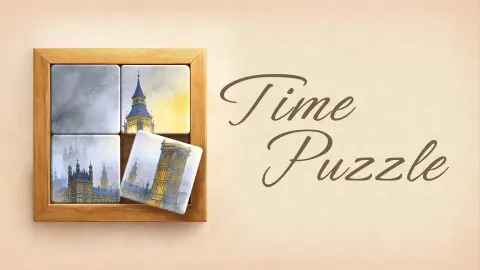
Time Puzzle is a free browser puzzle by DaxiFun. The opening picture is an orange cat split down the middle, with its halves on opposite sides. One swap puts the face back together and opens the next board. The trickier pictures reward a different habit. Find a line you can trace through two pieces before trying to place the subject itself.
What changes across the first four boards
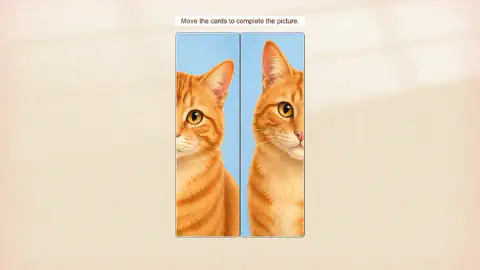
Level 1 · The cat teaches the swap
The two halves of the face point towards the outside edges. Bring the eyes and muzzle together along the centre seam. This first board lets you see what happens to both pieces in a single move. The drop target goes back to the slot you dragged from.
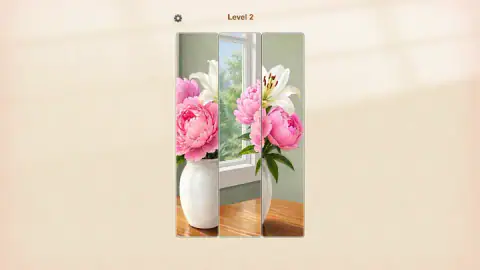
Level 2 · Use the window frame to place the flowers
The vase scene has three vertical strips. Pink petals appear on both outer strips, so colour alone gives you two plausible places to put them. Use the white window frame to orient the middle, then check the edge of the wooden tabletop. If the flowers look close but the table seems to jump at the seam, check the order of the strips again.
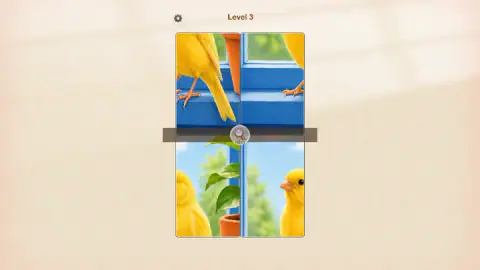
Level 3 · The blue sill gives you a second direction to check
The canary picture is a two-by-two grid. A piece can now sit in the right column and still be in the wrong row. Start by joining the blue windowsill across a vertical seam. Then look where the window frame continues across the horizontal seam. The blue sill gives you an easier starting point than the patches of yellow feathers. A magnifying glass marked Hint appears at this level.
Level 4 · Start with the book and window
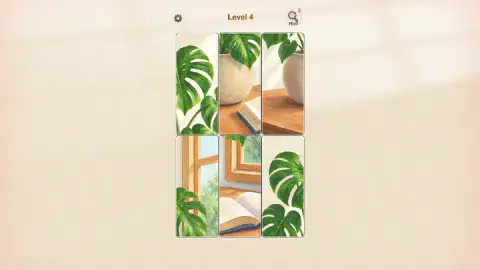
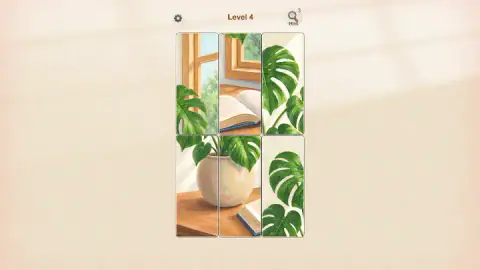
The monstera board has six pieces in two rows. Two tiles show large green leaves against a pale wall and can look convincing next to each other. The wooden frame and open book give you clearer edges to work with. Start with those landmarks, then use the curve of the pot to check the pieces around them. The desktop test completed the first three boards and reached this one. It ended with the fourth board still unfinished.
The two Level 4 screenshots show what a useful match looks like before the whole picture comes together. In one, the pot fragments sit across the top row and its outline breaks at the seam. In the other, the curve of the pot and the edge of the tabletop continue across the bottom-left join. That pair gives you a reference for the next swap while the window and book still need work.
Plan for the piece you displace
The board stays full, so each move changes two positions. Before dropping a piece, look at what occupies its destination and where that piece will end up. If the destination already forms a clean seam, check a different match first. This matters more once pieces have neighbours above and below as well as to the side. Keeping one reliable join in place gives you a reference for the rest of the picture.
When two pieces both seem to fit beside the same leaf, compare their other edges before making the swap. One may also need to connect to the book or the window. Use that second join to settle the choice. If neither piece fits along both edges, check the position of the leaf you started from. A convincing match in one direction can still leave the picture broken in the other.
New pictures, rewards and the gallery
The early boards introduce one change at a time. The flowers ask you to order a single row. The canary adds a second row, and the monstera asks you to make several joins around the same object. In the first four boards, there was no visible clock or move counter. You can pause to compare the edges of two pieces before choosing where to drop one.
The game's official description mentions more scenes as you progress, including green towels and white flowers beside a blue kitchen appliance. It also describes rewards and items you can use to decorate a personal gallery. The first four boards are covered in the desktop test above. The gallery and its unlocks come from that description. It gives no level number for the first unlock, so the guide leaves that milestone open.
More picture puzzles
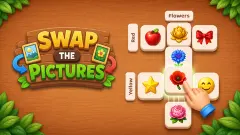
In Swap The Pictures, you swap picture tiles to match the categories along each row and column. Browse our puzzle games for more.
Screenshots
How to play Time Puzzle
- With a mouse, hold the left button on the piece you want to move. Drag it over another piece and release. Each piece takes the other's place.
- On a touchscreen, the game's instructions describe the same gesture. Touch a piece, drag it over the piece you want to exchange it with and lift your finger. The gameplay test for this guide was on desktop with a mouse.
- Check the seams after the swap. When two edges line up, keep that pair in place and use it to position the next piece. The next board opens once the picture is complete.
Controls
| Mouse | Hold the left mouse button on a piece, drag it over a second piece and release. The two exchange positions. |
|---|---|
| Touch | The game's mobile instructions say to touch and drag a piece onto another to swap them. |
| Hint | The magnifying glass first appears in Level 3. The top-right Hint button showed three in the desktop test. |
| Settings | The gear is in the top left from Level 2. |
Features
- Painted scenes on a portrait board
- Two pieces in the first level and six by the fourth
- A Hint button appears in Level 3
Game details
- Developer
- DaxiFun
- Release date
- September 2026
- Last updated
- September 4, 2026
- Added here
- August 2026
- Technology
- HTML5 (2D)
- Platforms
- Browser (desktop, mouse), Browser (mobile & tablet, touch)
- Saved progress
- Saving, when available, is managed by this game. Mava cannot confirm your level.
FAQ
Is there a timer in Time Puzzle?
The first four levels showed no countdown or move counter during a desktop test. Time Puzzle is a picture puzzle about rearranging pieces.
Can you play Time Puzzle on a phone?
The game's listing gives touch and drag on mobile. The gameplay test used a mouse on desktop.
When does the Hint button appear?
It appeared in Level 3. The counter showed three in both Levels 3 and 4. The test left the hints unused.
What do you unlock in Time Puzzle?
The game's description mentions rewards as you progress, including items for decorating your personal gallery. It does not specify when the gallery first opens.
Can I resume on another device?
The game's page on another site offers a sign-in to save progress across devices. Progress transfer from the Mava Games player has not been verified.