




About Jigsaw Puzzles
A cardboard jigsaw has a picture on the lid. You glance at it, then back at the table. Jigsaw Puzzles keeps its lid behind a button with an eye on it. Press it, and the whole picture lies over the board, at the same size. Press it again, and it is gone.
That button changes how you play. The board is a plain grey square, with no outline and no ghost picture. Without the eye, you have only the pieces. With it, you can see that the yellow splash goes top left, or that the sky fills the top row.
Jigsaw Puzzles is an online jigsaw by Drivix Games, played in the browser. It was published in September 2025. We played it in four sittings and tried five pictures: Madonna Lily, Boat, Pizza, Color Art and Spring. We did not finish one. Below is what we could check, and what we could not.
Two buttons do the work of the box lid
Most jigsaw tips say the same two things. Look at the picture, and do the edges first. This game has a button for each.
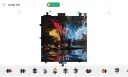
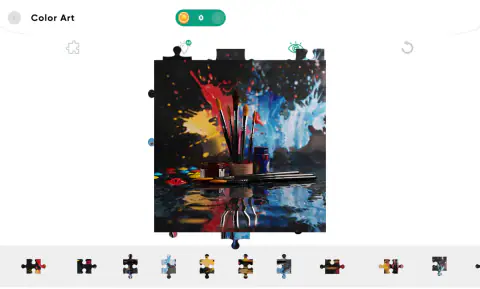
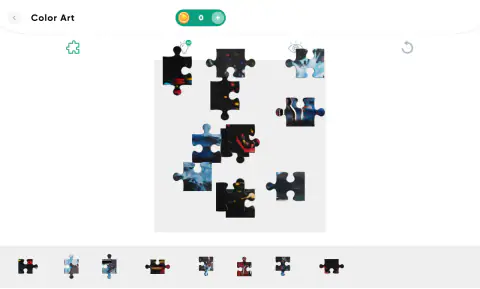
The eye is the picture. In Color Art we pressed it with a messy board. The picture of paint brushes covered the grey square from edge to edge. It was the same size as the square, so it worked like a map. We pressed it again, and our pieces came back into view.
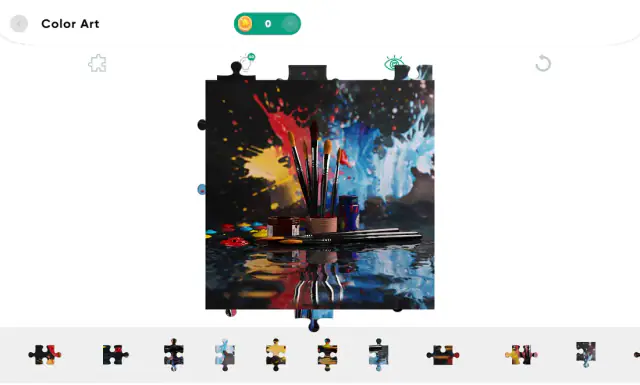
The puzzle piece button sorts the edges. We pressed it, and it turned green. Pieces with no straight side left the board and the tray. Only pieces with a straight side were left, and the tray went from eleven pieces in view to eight. With the button still on, we had the whole tray on the board a minute later.
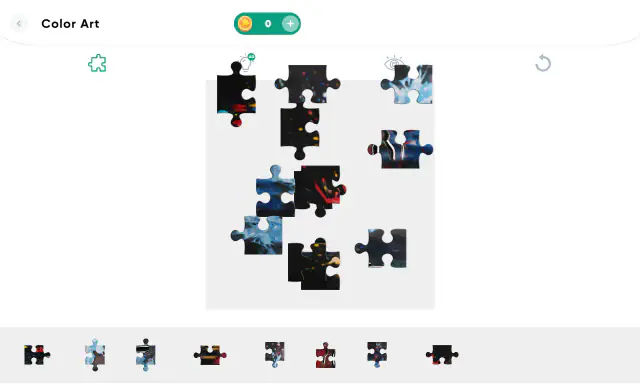
So here is a good start. Press the piece button and build the frame. Peek with the eye to see which edge each piece belongs to. We did not turn the piece button off again, so we cannot tell you how the inside pieces come back.
The grey square is the only table
On a real table you can spread pieces anywhere. Here you cannot. In Spring we tried for over two minutes to park pieces on the white strip beside the board. Not one stayed there, and the board looked exactly the same after each try.
The grey square is also small. Each piece is about a sixth as wide as it, so we think our pictures had about 36 pieces. The game shows no count. If you pull out every piece at once, they pile up. Our Color Art board turned into a heap where no edge could be seen.
What works better is a few pieces at a time. Put each one in the part of the square where the eye showed its colour. Keep a little gap around it.
Padlocks, coins and the AD bulb
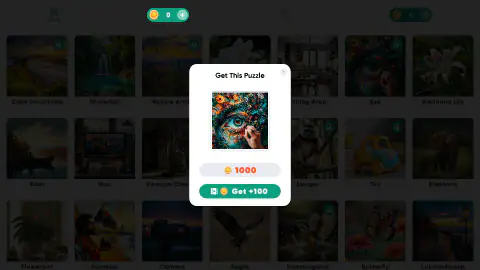
About a third of the pictures we saw had a green padlock. We clicked one called Eye. A panel came up, called Get This Puzzle. It asked 1,000 coins, and a green Get +100 button had a small video icon. We did not press it.
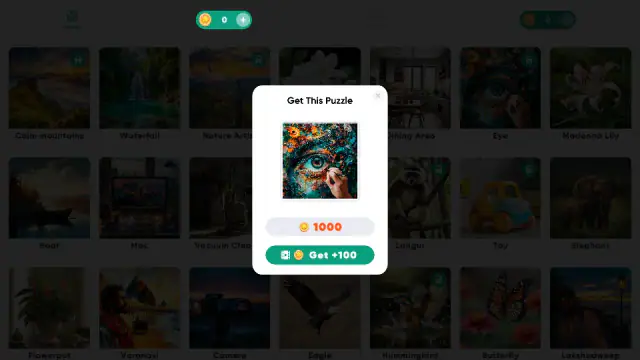
Our coin count read 0 in every sitting, from start to end. So the pictures without a padlock are the ones to play. The grid also changed between two of our sittings, with new pictures in it, so look around before you pick.
The game's listing also talks about modes, a choice of piece count and turning pieces. We did not see any of that. Our pieces always came out the right way up, and no picture asked how many pieces we wanted.
Are the picture names real?
Yes, many are. Kefalonia is a Greek island. Varanasi is an old city in India on the river Ganges. Lakshadweep is a group of small coral islands in the Arabian Sea. Madonna Lily is a white lily that people have grown for at least 3,000 years.
The pictures are a mix of photos and paintings. The lily in the grid is pink and white, though the real flower is white. So take the names as titles.
A picture with many colours is easier to start. Boat had a dark hull, an orange sky and blue water. The dark hull pieces were the first we could place by eye. A picture in one main colour, like the lily, gives you far fewer clues.
More jigsaws on Mava Games
Cozy Jigsaw Puzzles is a photo jigsaw that starts with a kitten. Time Puzzle cuts pictures into pieces you swap. Jigmerge Puzzles and Favorite Puzzles are two more picture puzzles. For more, see our jigsaws and puzzles collection or all puzzle games.
Screenshots
How to play Jigsaw Puzzles
- Wait for the load. A black screen with a small cat icon came first. On our computer it took close to a minute.
- Pick a picture. You see a grid of pictures, each with a name. Click one without a green padlock. The board opens at once.
- Peek with the eye. Press the eye button above the board. Look at where each colour sits. Press the eye again to hide the picture.
- Drag pieces up. Hold a piece in the tray at the bottom. Drop it inside the grey square, near where its colour was.
- Check with the eye. When you are not sure, press the eye again. The picture lines up with the grey square.
Tips from our sittings
- Turn the eye off after each look. While it is on, it covers your pieces.
- Drop pieces inside the grey square only. On the white strip at the sides, they did not stay.
- Do not drop pieces in one heap in the middle. They land on top of each other and hide their edges.
- Space your pieces out by colour. In Spring we kept the sky pieces on one side and the grass pieces on the other.
- Leave the light bulb alone if you do not want an ad. It carries a green AD badge.
Controls
| Drag a piece up from the tray | Put it on the grey board. Let go inside the grey square, or it will not stay. |
|---|---|
| Drag a piece on the board | Move it to a new spot inside the grey square. |
| Eye button | Show the whole picture on top of the board. Press it again to hide it. |
| Puzzle piece button (top left) | Hide the inside pieces, so only pieces with a straight side are left. |
| Light bulb with AD | Marked as an ad. We did not press it. |
| Circular arrow and back arrow | We did not try them, so we cannot say what they do. |
Features
- Click a picture without a padlock and the board opens at once.
- The board is a plain grey square, with no outline and no faded picture.
- An eye button lays the whole picture over the board, at the same size.
- A puzzle piece button leaves only the edge pieces, for a frame-first start.
- Pieces come out the right way up. None of our puzzles asked us to turn one.
- Pictures with a green padlock cost 1,000 coins. Our coin count stayed at 0.
- No timer, no piece count and no move counter while you play.
Game details
- Developer
- Drivix Games
- Release date
- September 2025
- Last updated
- August 10, 2026
- Added here
- July 2025
- Technology
- HTML5 (2D)
- Platforms
- Browser (desktop, mouse)
- Classification
- Puzzle
- Saved progress
- Saving, when available, is managed by this game. Mava cannot confirm your level.
FAQ
How do you play Jigsaw Puzzles?
Click a picture without a padlock. Drag pieces up from the tray at the bottom and drop them inside the grey square. Press the eye to see the whole picture, then press it again to hide it. Put each piece where its colour sits in that picture.
How do you see the picture in Jigsaw Puzzles?
Press the eye button above the board. The full picture appears on top of the board, at the same size as the grey square. It hides your pieces while it is on, so press the eye again before you go back to work.
How do you get only the edge pieces in Jigsaw Puzzles?
Press the puzzle piece button at the top left. It turns green, and the inside pieces leave the board and the tray. Only pieces with a straight side are left, so the tray is much shorter and you can build the frame first.
Why won't a piece stay where I drop it in Jigsaw Puzzles?
You probably let go outside the grey square. In our tests, pieces dropped on the white strip at the sides did not stay there, and the board did not change. Drop every piece inside the grey square.
What do the padlocks mean in Jigsaw Puzzles?
A green padlock means the picture is locked. Clicking one opens a panel called Get This Puzzle that asks 1,000 coins. It also has a Get +100 button with a small video icon. Our coin count stayed at 0, so we played pictures without a padlock.
How many pieces does Jigsaw Puzzles have?
The game does not show a number. In our puzzles, each piece was about a sixth as wide as the board. So we think our pictures had about 36 pieces. The game's listing says you can change the number of pieces. We were not asked when we opened a picture.
Do pieces snap together in Jigsaw Puzzles?
We could not confirm it. We pushed pieces side by side many times. They touched or sat on top of each other, but we never saw two move as one. So use the eye to learn where each colour goes, and place pieces by colour.
Can you play Jigsaw Puzzles on a phone?
The game is listed for phones and tablets. We only played on a computer with a mouse, so we cannot tell you how small the pieces feel under a finger.