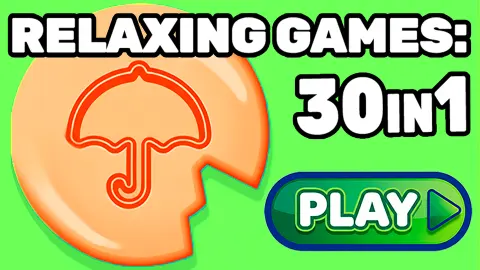






About Relaxing Games: 30 in 1
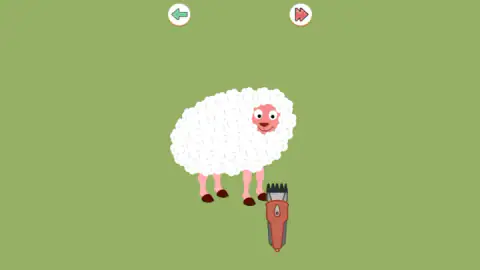
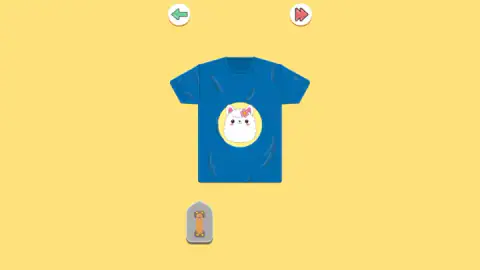
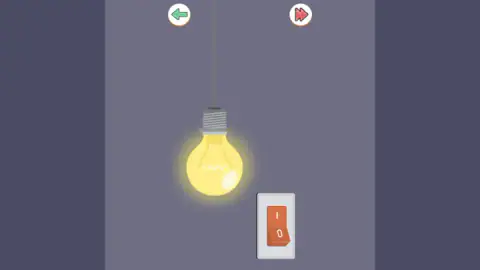
Four scenes from this game sat in front of us, and between them there was not a single number. A sheep with a thick white fleece on flat olive green, an electric clipper lying by its hooves. A blue t-shirt on yellow. The neck of an amber bottle on lilac, with a cork pushed into it. A lit bulb hanging in a grey room beside a wall switch. One object each, a flat colour behind it, and nothing else.
Nothing else except two buttons. Those two buttons are the game.
They sit at the top, in the same two places every time, the same size as each other. Top left, a green arrow pointing back. Top right, a red double arrow — the fast-forward mark — and it skips whatever you are looking at. No start button. No pause, no menu, no home, no counter telling you how many are left. Back, and skip. That is the entire interface of Relaxing Games: 30 in 1, and it says what the thing wants from you before you touch anything.
The skip button is the one worth noticing. Most browser collections hide the exit: a level has to be beaten, or failed, or at least sat through. Here the permission to walk away is furniture. It is as large as the way back, it is on screen in every scene, and pressing it costs nothing and records nothing. You are not meant to finish all thirty. You are meant to stop at the ones you like.
The game is credited to MaxDev.app. It was published in February 2026, for everyone. The studio's own address does not answer and no other portal we checked names an author, so treat that credit as one source rather than three.
And now the part we would rather say early. We spent about four minutes here, on a desktop, with a mouse. Thirteen different scenes passed under our pointer out of the thirty the title offers. We got exactly one of them to respond. What follows includes the parts where the game beat us.
Two buttons and no scoreboard is a decision, not an omission
It is tempting to read a game this bare as unfinished. Look at what has been removed and the opposite case is stronger.
A score turns an action into a performance. A clock turns it into a test. A level number tells you where you are in a queue, which is another way of saying you are not finished. A fail state gives the game the right to say no. All four are missing here, and what is left is the action itself: a clipper and a fleece, a blade and a block, a cork and a bottle.
The skip button is the proof this was on purpose. In almost every other collection, leaving early is an admission — you back out through a menu, or you lose. Here the way out is drawn in the same ink as the way back, in the corner of every screen, and the game never comments on it.
What is actually behind the grid
Short, varied, and mostly domestic. The scenes we reached included that sheep and its clipper, a blue t-shirt flecked with dark bobbles and a grey handheld tool waiting underneath it, a popcorn box with kernels hanging above it, a leaning tower on a strip of grass, a fizzy-drink bottle beside a pile of pastilles, a corked bottle of spirits, a cucumber slice under a blade, a watermelon slice, a tissue box, a retro television full of static, and a purple block halfway through being cut in two.
There is a pattern in that list. Almost every scene is a small physical job a person would do with their hands and would find oddly pleasant: shearing, shaving, slicing, uncorking, de-fuzzing. None is a puzzle with a solution to work out. They are chores with the tedium taken out.
The one we definitely completed was the bulb. It hung dark over a white plate with an orange rocker on it, we pressed the rocker, and the bulb lit — the room went from grey to warm in a single frame. We did it twice, because it was the only thing all session that answered us, and because it was genuinely nice both times.
The rest did not move. We pressed the clipper, the sheep, the tool under the shirt, and the pictures stayed exactly as they were. The game's own blurb says the rules are simple enough to need no training. For us that was not true, and it is this page's one real complaint: a collection built on the pleasure of doing the thing should make it obvious how to do the thing.
The genre this belongs to, and why no scoreboard fits it
In 2015 two researchers at Swansea University, Emma Barratt and Nick Davis, published the first peer-reviewed study of what people online had taken to calling ASMR — the tingling, drowsy calm some people get from certain sounds and certain kinds of careful, unhurried attention. They surveyed 475 people about what set it off and what they used it for.
The triggers came back ranked. Whispering led, named by 75% of them, followed by personal attention at 69% and crisp sounds at 64%. Slow, deliberate movements came next, named by more than half.
Take whispering out of that list, because a browser game cannot whisper, and read what is left: crisp sounds, slow movements, and watching someone carry out a small repetitive task. That is not a description of a research finding any more. It is a description of this game's contents — clippers moving through wool, a blade travelling through a block, a cork leaving a bottle.
The same survey asked what people did with it. Almost all said they used it to relax, and most said they used it to get to sleep. Whatever you make of the phenomenon, that is what the audience for this kind of material says it is there for — and it explains the missing scoreboard better than any design document could. Put a score on a calming task and you have made an exam of it. The two buttons are what is left when you remove everything that would make a quiet thing competitive.
What we did not see
The whole session produced one sound, the one the game plays when it opens. Nothing we did made a noise after that — no crisp snip, no pop, no chime. For a game that lives on texture that is a strange absence, and we would rather report it than explain it away; sounds may well arrive with the actions we never managed to trigger.
We also never saw a finished scene announce itself, never saw a count of how many remain, and never played it on a phone. Thirty is what the title offers. Thirteen is what we opened, and one is what we solved.
More puzzles that take their time
Save The Girl Epic is the sharp-edged version of the same shape: one scene, one choice, one tap — except there you can be wrong, and it has no hints and no undo. Nuts Puzzle: Sort By Color is the sorting kind of calm, moving coloured nuts between bolts until each bolt holds one colour. Mahjong Lines is quieter still, pairing identical tiles that can be joined by a short path. And Hidden Objects: Island Secrets rewards slow looking rather than quick hands. The rest are in puzzle games.
Screenshots

How to play Relaxing Games: 30 in 1
- Pick a picture. The collection opens on a grid of small icons, one per scene — a switch, a sheep, a slice of fruit, a shirt. Choose one and it fills the screen.
- Do the obvious thing to the obvious object. There are no written instructions in a scene, because there is only ever one thing in it. A bulb hangs next to a wall switch, so you press the switch. That is the whole lesson, and it is taught without a word.
- Press the red double arrow when you are finished, or bored. Top right. It moves you on, and that is all it does.
- Press the green arrow to go back. Top left, same size, and the only other control the game gives you.
What the run taught us:
- A single click is often not enough. Pressing the clipper lying beside the sheep did nothing for us, several times over. The wall switch worked on the first press. Our guess is that some of these scenes want a press held and dragged — the way you would actually run clippers through a fleece, or pull a cork — rather than a tap. We did not get far enough to prove it, so take it as a guess.
- The keyboard is not part of this. Arrow keys and the space bar produced nothing we could see or hear.
- Nothing you do is wrong. No lives, no fail screen, no undo. The worst outcome of any press is that nothing happens, which is a strange and quite restful thing in a game.
- Some scenes are built upright. The bulb and its switch sit in a narrow central column with grey bands either side on a wide monitor. On a phone held vertically they would fill it.
Controls
| Tap or click an icon on the opening grid | Opens that minigame full screen. This is the only menu the game has |
|---|---|
| Click the object in the scene | The one interaction that worked for us was pressing the wall switch, which lit the bulb. Several other scenes ignored a plain click |
| Red double arrow, top right | Skips the scene you are in and moves to the next one. No penalty, nothing recorded |
| Green arrow, top left | Goes back. Same size, same prominence as skip |
| Keyboard | Nothing. Arrow keys and the space bar did nothing we could see or hear; this is a pointer game |
Features
- Thirty small scenes behind one grid of icons: pick a picture, do the thing in it, move on
- Two round buttons are the entire interface — a green arrow back and a red double arrow that skips — and they sit in the same two places in every scene
- No score, no timer, no lives and no level number appeared in any scene we opened
- One object on one flat colour: a sheep and a clipper on olive green, a corked bottle on lilac, a lit bulb in a grey room
- Skipping is part of the furniture rather than a way out of it, the same size and weight as the button that goes back
- Some scenes are laid out upright and sit in a narrow column on a wide monitor, which is what the phone version is shaped for
- Made by MaxDev.app
Game details
- Developer
- MaxDev.app
- Release date
- February 2026
- Last updated
- August 10, 2026
- Added here
- December 2025
- Technology
- HTML5 (2D)
- Platforms
- Browser (desktop, mouse), Browser (mobile & tablet, touch)
- Classification
- Puzzle
- Saved progress
- Saving, when available, is managed by this game. Mava cannot confirm your level.
FAQ
What is Relaxing Games: 30 in 1?
It is a collection of thirty very small scenes, each one object on a flat colour: a sheep with an electric clipper beside it, a bottle with a cork in it, a bulb hanging next to a wall switch. You pick one from a grid of icons, do the thing it suggests, and move on. There is no score, no clock and no way to lose.
How do you play Relaxing Games: 30 in 1?
Tap an icon on the opening grid and that scene fills the screen. There are no written instructions, because there is only ever one object and one obvious thing to do to it. When you have had enough, press the red double arrow at the top right and the next scene appears.
Is there a score or a timer in Relaxing Games: 30 in 1?
Not that we ever saw. Across every scene we opened there was no score, no clock, no lives, no level number and no progress bar, and the game made no reward or failure sound. The only things on screen besides the object were the two navigation buttons at the top.
What do the two buttons at the top do?
The green arrow at the top left takes you back. The red double arrow at the top right, the fast-forward mark, skips the scene you are in. They are the same size and sit in the same two places in every minigame, and they are the only controls the game ever shows you.
Can you skip a minigame you do not like?
Yes, and the game clearly expects you to. The skip button is always visible, costs nothing and records nothing, and there is no requirement to finish a scene before leaving it. Nobody is meant to complete all thirty in a row; the point is to stop at the ones that suit you.
Is Relaxing Games: 30 in 1 suitable for children?
It is rated E, for everyone, and there is nothing to win, lose or buy in it. One thing for parents to know: among the scenes is a corked spirits bottle, drawn as flat cartoon shapes with no brand on it and nothing to drink. If you would rather it were not on screen, one press of the skip button moves past it.
Does Relaxing Games: 30 in 1 work on a phone?
It is listed for PC, Android and iOS, in both landscape and portrait, and some of the scenes are clearly laid out upright — on a wide monitor they sit in a narrow column with the background either side. We only played it on a desktop with a mouse, so we cannot say how the scenes respond to a finger.
Who made Relaxing Games: 30 in 1?
The game is credited to MaxDev.app and lists eight games under that name, among them Merge Watermelon, Break the eggs, Solve the maze and Escaping Arrows. That is the only source we could find: the studio's own address does not answer and no other portal we checked names an author. The game was published in February 2026.