



About Jigmerge Puzzles
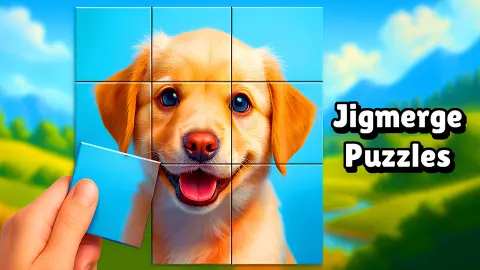
A jigsaw normally starts with a pile. You tip the box out, hunt for edges, and the picture grows from nothing. Jigmerge Puzzles skips the pile. Every piece is on the board from the first second, edge to edge, and the photo is all there. It is just in the wrong order.
That changes the job. There is no tray to search and no empty space to fill. You pick up one rectangle, drop it on another, and the two trade places. The merge in the name is what happens when you get a pair right: the thin line between the two tiles goes, and they show as one bigger piece.
The game is credited to VeturGames and was published on 18 December 2025.
Now for the limits of what follows. We played twice, a few minutes each time, with a mouse. On the second visit we worked on the first level of the Dogs theme for about four minutes and did not complete it. So this page describes the board, the swapping, the joining and the menu. It does not describe a finished level, the reward for one, or anything from level 2 onwards.
A swap puzzle more than a jigsaw
The pieces are plain rectangles. That matters more than it sounds. In a cut jigsaw the shape does half the work: a piece either fits or it does not. Here every tile fits everywhere, so the picture is the only judge, and a patch of leaves can sit happily in the wrong corner for a long time.
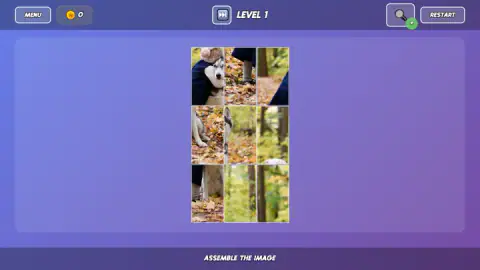
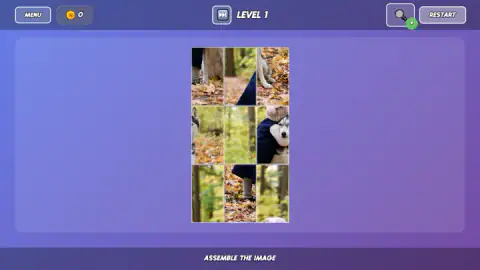
The join is what replaces the click of a real piece. We saw it twice on the husky. First the tile with the dog's haunches and the tile with its front paws ended up side by side on the bottom row, and the line between them went. Later the ear tile landed above the paws tile and those two became one tall piece.
Neither pair lasted, and only one of those is easy to explain. The second went when we pressed RESTART. The first was apart again a few swaps later, and we could not tell which of our moves did it. Treat a joined pair as a good sign and not as something locked in place.
There is no pressure around the board. We saw no clock, no move count and no lives.
The menu, the coins and the skip button
The top bar has a coin counter, the level number and four buttons. MENU opens the themes. Across our two visits the list showed Food, Cats, New Year, Dogs, Cars, Cakes, Mountains, Ships and Winter, and at least two themes with a padlock, Flowers and Coffee. Coffee carried a price of 1,000 coins. At the side were two buttons offering 50 and 200 coins, the larger one marked as an advert.
The small fast-forward button beside the level number opens a card titled «SKIP LEVEL», with two ways to pay: 800 coins, or «SKIP FOR AD». We closed it.
Next to RESTART there is a magnifying glass with a green plus on it. We did not press it, so we will not guess at what it shows.
Our counter read 0 from start to finish. How many coins a completed picture pays is one of the things we did not get to see.
The first time we opened it, there was no picture
Our first visit started badly. Level 1 came up as an empty purple panel, with a line in Russian at the bottom saying the images had not loaded. The buttons around it were in English and all present. RESTART, pressed several times, changed nothing.
What fixed it was leaving the level. We opened MENU, chose Cars, and a nine-tile photo of a car appeared. On the second visit, a day later, the Dogs photo loaded at once. If you get the empty panel, go straight to the menu and pick a theme.
Who it suits
It suits anyone who likes a picture puzzle but not the sorting that comes before one. A nine-tile board is a couple of minutes for an adult and a fair task for a child, with nothing to read beyond three words. Nobody is hurried.
It suits less the player who wants the feel of a real jigsaw, with odd-shaped pieces and a hundred of them on the table. And with photos as soft as a forest in autumn, some tiles are hard to tell apart on a small screen.
More picture puzzles
For pieces with proper tabs and a tray to pull them from, try Cozy Jigsaw Puzzles, which opens on a 35-piece kitten, or Jigsaw Puzzles, where the board gives you no outline to follow. Art Master Puzzle has you drop coloured cut-outs onto a pencil sketch. Turnline: Relaxing Puzzle keeps every tile in its place and asks you to turn them. The rest are in puzzle games.
Screenshots
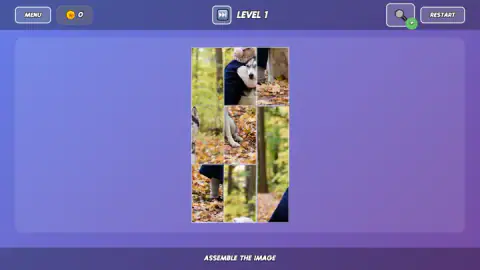
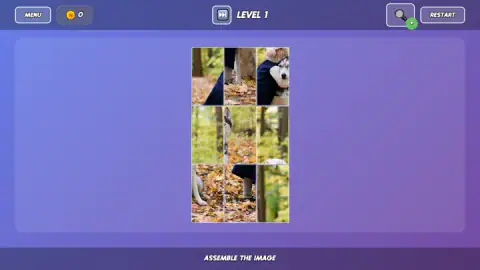
Taken by opening the game ourselves and letting it run — not supplied by the publisher, and not the same picture every other site shows.
How to play Jigmerge Puzzles
- Open MENU and pick a theme. The list is a column of photo categories. We chose Dogs.
- Read the board before you touch it. The first board is nine tall tiles and no tray. Ours showed a husky in a wood, a navy coat, a pink woolly hat and a floor of orange leaves.
- Drag a tile onto another tile. They swap. Nothing else on the board moves.
- Watch the lines. When two neighbours belong together, the line between them vanishes.
- Carry on until the photo is whole. The bottom bar keeps the instruction on screen: «ASSEMBLE THE IMAGE».
What we picked up while playing:
- Start with the tiles that have something on them. Three of the nine on our board were almost pure forest: trunks and blurred green. They look alike and tell you little. The husky's face, its ear and its front paws each sit on a different tile, and those are the ones that give you a join.
- Edges of things are the clue. With no tabs to match, the only evidence is what gets cut off. One tile had the dog's ear and half a head right against its left edge, so the rest of the face had to be the tile on its left.
- Drag from the middle of one tile to the middle of the other. A very short drag did nothing for us.
- Leave RESTART alone unless you mean it. We pressed it once. All nine tiles came back in a new order, and the pair we had joined was gone.
Controls
| Drag a tile onto another tile | The two swap places; the board never has a gap |
|---|---|
| MENU (top left) | Opens the list of photo themes |
| RESTART (top right) | Shuffles the same photo again and undoes any joined tiles |
| Fast-forward button beside the level number | Offers to skip the level for coins or for an advert |
Features
- A photo cut into plain rectangles, with no tabs, no tray and no outline to follow
- Level 1 is a board of nine tall tiles, three across and three down
- Dragging a tile onto another swaps the two, so the board is always full
- Tiles that belong side by side lose the line between them and become one piece
- A menu of photo themes: we saw dogs, cats, food, cars, cakes, ships and mountains, among others
- No clock, no move counter and no lives on the screen
Game details
- Developer
- VeturGames
- Release date
- December 2025
- Last updated
- August 10, 2026
- Added here
- October 2025
- Technology
- HTML5 (2D)
- Platforms
- Browser (desktop, mouse), Browser (mobile & tablet, touch)
- Saved progress
- Saving, when available, is managed by this game. Mava cannot confirm your level.
FAQ
How do you play Jigmerge Puzzles?
A photo is cut into rectangular tiles and shuffled on the board. Drag one tile onto another and the two swap places. Keep swapping until the picture is whole; the bar at the bottom of the screen says it in three words, ASSEMBLE THE IMAGE.
What does merge mean in Jigmerge Puzzles?
When two tiles that belong next to each other end up side by side, or one above the other, the thin line between them disappears and they show as a single larger piece. We saw it happen twice on the first level, once across and once down. It is the game's way of telling you a pair is right.
How many pieces does level 1 of Jigmerge Puzzles have?
Nine. The first board is three tiles across and three down, and the tiles are taller than they are wide because the photo is a portrait. We did not finish level 1, so we cannot say how large the later boards get.
Is there a timer or a move limit in Jigmerge Puzzles?
We saw neither. The top bar shows a coin counter, the level number and four buttons, and nothing on it counted down or counted our moves in about four minutes of play. You can take as long as you like over a board.
What do the coins do in Jigmerge Puzzles?
Two uses showed up while we played. A card opened by the fast-forward button offers to skip the level for 800 coins or for an advert, and one locked theme in the menu carried a price of 1,000 coins. Our counter stayed at 0 throughout, so we did not see how many coins a finished level pays.
Jigmerge Puzzles shows an empty board. What can I do?
It happened to us once. The first time we opened the game, level 1 came up with no picture and a notice in Russian saying the images had not loaded, and RESTART did not help. Going to MENU and picking a theme from the list did: the tiles appeared. On our second visit the photo loaded normally.
Who made Jigmerge Puzzles?
The game is credited to VeturGames and added it to its catalogue on 18 December 2025. It lists the game for PC, Android and iOS, in landscape, in English and Russian.