










About Fruit Merge Mania
Most merge games named after fruit start with a cherry and end with a watermelon. Fruit Merge Mania puts fruit in its title and then fills the jar with vegetables. The first piece you meet is a little green pea, and the chain climbs through corn, a potato, a bulb of garlic and a carrot before the first real fruit turns up: a tomato. Every one of them has a face, and the game says the last one is a pumpkin.
The rule is the one made famous by the drop-and-merge craze of the last few years. A piece hangs above a wooden jar, you choose where it falls, and when two identical pieces touch they become one bigger piece. Bigger pieces take more room, so the jar keeps getting more crowded even as you clear it.
What Fruit Merge Mania adds is a layer of player progress on top. Every merge feeds a score, a trophy counter and an XP bar, and four paid boosters sit under the jar for when the pile goes wrong.
It is by Taprush. It was published on 27 October 2026, so it is brand new.
Fruit or vegetable: the name is half right
The title says fruit, the provider's own description says vegetables, and botany says both. A fruit, to a botanist, is the part of a plant that holds the seeds. By that rule the tomato, the corn kernel and the pumpkin are fruits, and so is the pod a pea grows in. The potato, the garlic and the carrot are not: one is a swollen stem, one is a bulb and one is a root.
So the jar holds roughly half and half. For a child playing it, that is a nice question to ask out loud the first time the tomato appears: why is this one a fruit and the carrot is not? The game will not tell you, but now you can.
The strip under the jar is your map
Below the jar runs a dark strip with eleven slots, one for every piece in the chain. The ones you have made show their faces. The rest are dark silhouettes. When we started, five faces were lit; the sixth, the tomato, lit up about a minute in, the first new piece we made.
The five dark slots that remain each carry a small coin figure, from 5 coins at the first to 20 at the last. That is the game telling you two things at once: how far the chain still goes, and that each new piece you discover pays. It is also the only way we found to earn coins, since the purse did not grow from ordinary merges during our ten minutes.
If you have played other drop-and-merge games, the strip answers the question everyone asks early: what does this turn into? Here you never have to guess what comes next, only how to make it.
Score, trophies and the XP bar
There are three numbers at the top of the screen, and two of them are the same. The figure under the XP bar is your score for the jar, and the trophy counter on the left always matched it in our session. It went from 84 to 168 in about nine minutes of play.
The XP bar is different. It belongs to you, not to the jar. Merges fill it, and at 200 XP a Level Up screen appears with a single OK button. We saw it once, for level 2, right at the start. It did not clear the pile or change the rules: the same jar was waiting behind it. After that, filling the bar from zero to halfway took us most of the session, so level 3 is a long-term goal rather than something you reach in one sitting.
The four boosters, and what happens when the coins run out
Shake is the one we used most. Press it and the interface hides for a moment while the whole jar rattles, throwing the pieces into the air so they settle in new places. Sometimes that puts two twins side by side; sometimes it only rearranges the problem. Bomb, Hammer and Undo sit beside it at the same price. Their names suggest removing a piece, smashing one or taking back your last drop, but we did not try them with coins in hand, so we cannot say exactly how each behaves.
When the purse reaches zero, the boosters do not disappear. Tapping one opens a plain message from the game, such as "Watch an ad for ShakeContainer booster?", with a Watch ad button and a Cancel button. Cancel closes it every time, and the game carries on as before. That is worth knowing if a child is playing: the ad offer will come up again each time they press a booster.
The pause button in the top-right corner opens a Setting panel with sound and music toggles, a home button, a restart button and a large Continue.
What we did not see
We played for ten minutes on a computer, with the mouse. In that time our pile never came near the white line, so we never saw the jar overflow or a game-over screen. We did not make anything past the tomato, never saw the pumpkin, and never reached level 3. The arrow keys did nothing for us; this is a mouse-and-touch game.
Who it is for
It suits young players and anyone who wants a calm puzzle with no clock. The rules fit in one sentence, the faces are friendly, and progress shows up on the strip as each new vegetable lights up. Players who already know the genre will find it slower and more forgiving than most, at least in the early pile we saw.
For the same drop-and-merge idea with a different jar, Poofruits: Merge the Fruit has eleven fruits with faces that blink and doze, and Watermelon Merge: Fruit Drop adds a golden seed that upgrades any fruit it touches. Purr Magic: Merge Balls swaps the vegetables for a cat's magic balls, and Drop & Merge 2048 does it with numbered cubes. There are more in our puzzle games.
Screenshots

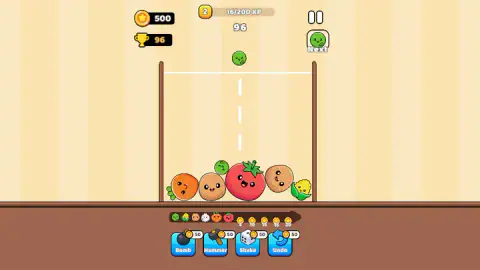



Taken by opening the game ourselves and letting it run — not supplied by the publisher, and not the same picture every other site shows.
How to play Fruit Merge Mania
- Aim with the mouse. The next piece hangs above the jar and slides left and right with your pointer. A dotted line runs straight down from it to show where it will land.
- Click to drop. On a phone or tablet the game says you tap instead.
- Merge identical pieces. Two peas make a corn, two corns make a potato, and so on along the strip under the jar.
- Keep the pile below the white line. The line near the top of the jar is the limit; the instructions warn you not to let the box overflow.
- Use boosters when you are stuck. Bomb, Hammer, Shake and Undo cost 50 coins each, from a starting purse of 500.
Tips from our session. Look at the Next box in the top-right corner before every drop. It shows the piece after the current one, so you can save a gap for it. Line the dotted guide up with a twin already in the jar rather than dropping in the middle out of habit; the pieces sit side by side along the floor of the jar early on, so there is room to choose. And do not spend your coins the way we did. We pressed Shake again and again in the first five minutes, and the 500 coins were gone well before the pile was in any danger.
Controls
| Mouse (move left and right) | Slides the hanging piece along the top of the jar; a dotted line shows where it will land |
|---|---|
| Left click or tap | Drops the piece |
| Bomb, Hammer, Shake, Undo buttons | Boosters at 50 coins each; Shake rattles the whole jar so the pieces resettle |
| Pause button (top right) | Opens the settings panel with sound, music, home, restart and Continue |
Features
- Smiling vegetables drop into a wooden jar, and two identical pieces touching merge into the next one up
- A strip under the jar shows the whole chain: six pieces we unlocked, from a little green pea to a tomato, and five still hidden
- Each hidden slot on the strip carries a coin reward, from 5 to 20 coins
- Every merge adds to your score and to an XP bar; at 200 XP you go up a player level
- You start with 500 coins and four boosters at 50 coins each: Bomb, Hammer, Shake and Undo
- Once the coins run out, a booster costs an optional video ad instead, and Cancel always gets you back to the jar
- A Next box in the top-right corner shows the piece that comes after the current one
Game details
- Developer
- Taprush
- Release date
- October 2026
- Last updated
- October 28, 2026
- Added here
- October 2026
- Technology
- HTML5 (2D physics)
- Platforms
- Browser (desktop, mouse), Browser (mobile & tablet, touch)
- Saved progress
- Saving, when available, is managed by this game. Mava cannot confirm your level.
FAQ
How do you play Fruit Merge Mania?
A vegetable with a face hangs above a wooden jar. Move the mouse left or right to aim it, using the dotted line as a guide, and click to drop it. When two identical pieces touch, they merge into the next, bigger piece in the chain.
What is the biggest fruit in Fruit Merge Mania?
The game's description says the chain ends with a pumpkin. The strip under the jar has eleven slots: in our session we unlocked six, from a small green pea to a tomato, and the last five stayed dark, so we have not seen the pumpkin ourselves.
How do you lose in Fruit Merge Mania?
There is a white line near the top of the jar, and the game's instructions say you must not let the box overflow. In ten minutes of play our pile never got close to that line, so we did not see what the game-over screen looks like.
What do the Bomb, Hammer, Shake and Undo buttons do in Fruit Merge Mania?
They are boosters that cost 50 coins each. Shake, the one we used most, rattles the whole jar and throws the pieces about so they settle in new places, sometimes next to a twin. Bomb, Hammer and Undo work on the pile too; going by their names, they blow up, smash or take back a piece, but we did not test them.
How do you get more coins in Fruit Merge Mania?
You start with 500. The strip of the evolution chain shows coin rewards of 5 to 20 on the pieces you have not made yet, so discovering new vegetables pays. When we ran out, tapping a booster offered a video ad in exchange for it; Cancel closes that offer and you keep playing.
What does the XP bar and level mean in Fruit Merge Mania?
It is a player level, not a stage. Merges fill the XP bar, and at 200 XP a Level Up screen appears. It does not empty the jar: you carry on with the same pile.
Is Fruit Merge Mania good for kids?
Yes. It needs only a mouse or a finger, there is no timer, and the jar fills slowly. The one thing to explain to a young child is the Watch ad button that appears on boosters once the coins are gone.
Who made Fruit Merge Mania?
It is by Taprush. It was published on 27 October 2026, in English, for computers, Android and iOS, in landscape and portrait.